
mysql安装方法
MySQL是一个关系型数据库管理系统,由瑞典MySQL AB 公司开发,目前属于 Oracle 旗下公司。MySQL 最流行的关系型数据库管理系统,在 WEB 应用方面MySQL是最好的 RDBMS (Relational Database Management System,关系数据库管理系统) 应用软件之一。
一、Window版本
1、下载
 MySQL Community Server 5.7.16

 http://dev.mysql.com/downloads/mysql/
2、解压
如果想要让MySQL安装在指定目录,那么就将解压后的文件夹移动到指定目录,如:C:\mysql-5.7.16-winx64
3、初始化
MySQL解压后的 bin 目录下有一大堆的可执行文件,执行如下命令初始化数据:
 cd c:\mysql-5.7.16-winx64\bin

 mysqld --initialize-insecure
4、启动MySQL服务
执行命令从而启动MySQL服务
 # 进入可执行文件目录

 cd c:\mysql-5.7.16-winx64\bin

 # 启动MySQL服务

 mysqld
5、启动MySQL客户端并连接MySQL服务
由于初始化时使用的【mysqld --initialize-insecure】命令,其默认未给root账户设置密码
 # 进入可执行文件目录

 cd c:\mysql-5.7.16-winx64\bin

 # 连接MySQL服务器

 mysql -u root -p

 # 提示请输入密码,直接回车
输入回车,见下图表示安装成功:
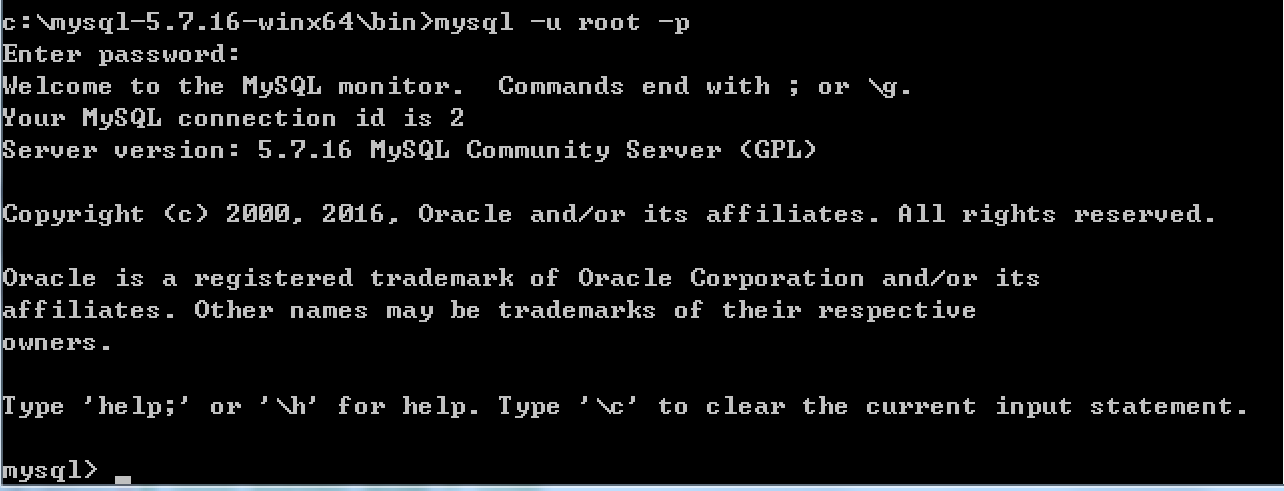
到此为止,MySQL服务端已经安装成功并且客户端已经可以连接上,以后再操作MySQL时,只需要重复上述4、5步骤即可。但是,在4、5步骤中重复的进入可执行文件目录比较繁琐,如想日后操作简便,可以做如下操作。
a. 添加环境变量
将MySQL可执行文件添加到环境变量中,从而执行执行命令即可
【右键计算机】--》【属性】--》【高级系统设置】--》【高级】--》【环境变量】--》【在第二个内容框中找到 变量名为Path 的一行,双击】 --> 【将MySQL的bin目录路径追加到变值值中,用 ; 分割】

如:

C:\Program Files (x86)\Parallels\Parallels Tools\Applications;%SystemRoot%\system32;%SystemRoot%;%SystemRoot%\System32\Wbem;%SYSTEMROOT%\System32\WindowsPowerShell\v1.0\;C:\Python27;C:\Python35;C:\mysql-5.7.16-winx64\bin
如此一来,以后再启动服务并连接时,仅需:
 # 启动MySQL服务,在终端输入

 mysqld

 # 连接MySQL服务,在终端输入:

 mysql -u root -p
b. 将MySQL服务制作成windows服务
上一步解决了一些问题,但不够彻底,因为在执行【mysqd】启动MySQL服务器时,当前终端会被hang住,那么做一下设置即可解决此问题:
 # 制作MySQL的Windows服务,在终端执行此命令:

 "c:\mysql-5.7.16-winx64\bin\mysqld" --install

 # 移除MySQL的Windows服务,在终端执行此命令:

 "c:\mysql-5.7.16-winx64\bin\mysqld" --remove
注册成服务之后,以后再启动和关闭MySQL服务时,仅需执行如下命令:
 # 启动MySQL服务

 net start mysql

 # 关闭MySQL服务

 net stop mysql
二、Linux版本
1、采用二进制包安装mysql
二进制软件包名称
mysql-5.5.49-linux2.6-x8.6_64.tar.gz
添加用户和组
groupadd mysql

useradd -s /sbin/nologin -g mysql -M mysql

tail -1 /etc/passwd

id mysql
开始安装MySQL
 [root@template ]# mkdir -p /home/oldboy/tools

 [root@template ]# cd /home/oldboy/tools

 [root@template tools]# wget http://dev.mysql.com/get/Downloads/MySQL-5.5/mysql-5.5.49-linux2.6-x86_64.tar.gz

 [root@template tools]# tar xf mysql-5.5.49-linux2.6-x86_64.tar.gz

 [root@template tools]# mkdir -p /application/

 [root@template tools]# mv mysql-5.5.49-linux2.6-x86_64 /application/mysql-5.5.49

 [root@template tools]# ln -s /application/mysql-5.5.49/ /application/mysql

 [root@template tools]# ls -l /application/mysql

 lrwxrwxrwx 1 root root 26 10月 27 10:28 /application/mysql -> /application/mysql-5.5.49/

 [root@template tools]# cd /application/mysql/

 [root@template mysql]# ls -l support-files/*.cnf

 -rw-r--r-- 1 7161 wheel  4691 3月   1 2016 support-files/my-huge.cnf

 -rw-r--r-- 1 7161 wheel 19759 3月   1 2016 support-files/my-innodb-heavy-4G.cnf

 -rw-r--r-- 1 7161 wheel  4665 3月   1 2016 support-files/my-large.cnf

 -rw-r--r-- 1 7161 wheel  4676 3月   1 2016 support-files/my-medium.cnf

 -rw-r--r-- 1 7161 wheel  2840 3月   1 2016 support-files/my-small.cnf

 #复制my.cnf 配置文件

 [root@template mysql]# /bin/cp support-files/my-small.cnf /etc/my.cnf

 [root@template mysql]# mkdir -p /application/mysql/data

 [root@template mysql]# chown -R mysql.mysql /application/mysql/
初始化数据库
 [root@template mysql]# /application/mysql/scripts/mysql_install_db --basedir=/application/mysql --datadir=/application/mysql/data --user=mysql

 Installing MySQL system tables...

 161027 10:30:22 [Note] /application/mysql/bin/mysqld (mysqld 5.5.49) starting as process 1958 ...

 OK

 Filling help tables...

 161027 10:30:23 [Note] /application/mysql/bin/mysqld (mysqld 5.5.49) starting as process 1965 ...

 OK

 To start mysqld at boot time you have to copy

 support-files/mysql.server to the right place for your system

 PLEASE REMEMBER TO SET A PASSWORD FOR THE MySQL root USER !

 To do so, start the server, then issue the following commands:

 /application/mysql/bin/mysqladmin -u root password 'new-password'

 /application/mysql/bin/mysqladmin -u root -h template.com password 'new-password'

 Alternatively you can run:

 /application/mysql/bin/mysql_secure_installation

 which will also give you the option of removing the test

 databases and anonymous user created by default.  This is

 strongly recommended for production servers.

 See the manual for more instructions.

 You can start the MySQL daemon with:

 cd /application/mysql ; /application/mysql/bin/mysqld_safe &

 You can test the MySQL daemon with mysql-test-run.pl

 cd /application/mysql/mysql-test ; perl mysql-test-run.pl

 Please report any problems at http://bugs.mysql.com/
添加数据库文件
 [root@template mysql]# cp support-files/mysql.server  /etc/init.d/mysqld

 [root@template mysql]# chmod +x /etc/init.d/mysqld

 [root@template mysql]# ll /etc/init.d/mysqld

 -rwxr-xr-x 1 root root 10880 Oct 27 10:31 /etc/init.d/mysqld
二进制默认路径为/usr/local/mysql 启动脚本里面的路径要更改
[root@template mysql]# sed -i 's#/usr/local/mysql#/application/mysql#g' /application/mysql/bin/mysqld_safe /etc/init.d/mysqld
启动mysql数据库
 [root@template mysql]# /etc/init.d/mysqld start

 Starting MySQL.. SUCCESS!
检查mysql数据库是否启动
 [root@template mysql]# netstat -lntup|grep mysql

 tcp        0      0 0.0.0.0:3306                0.0.0.0:*                   LISTEN      2224/mysqld
设置mysql 开机自启动
 [root@template mysql]# chkconfig --add mysqld

 [root@template mysql]# chkconfig mysqld on

 [root@template mysql]# chkconfig --list mysqld

 mysqld          0:off   1:off   2:on    3:on    4:on    5:on    6:off
配置开机自启动
 echo "#mysql start by huzhihua at 2016-10-27" >>/etc/rc.local

 echo "/etc/init.d/mysqld start" >>/etc/rc.local

 [root@template mysql]# tail -2 /etc/rc.local

 #mysql start by huzhihua at 2016-10-27

 /etc/init.d/mysqld start
配置mysql命令的全局使用路径
 [root@template mysql]# echo 'export PATH=/application/mysql/bin:$PATH' >>/etc/profile

 [root@template mysql]# tail -1 /etc/profile

 export PATH=/application/mysql/bin:$PATH

 [root@template mysql]# source /etc/profile

 [root@template mysql]# echo $PATH

 /application/mysql/bin:/usr/local/sbin:/usr/local/bin:/sbin:/bin:/usr/sbin:/usr/bin:/root/bin
登录mysql
别外三种登录方法:
 mysql -uroot -p,

 mysql -uroot

 mysql -uroot -p 'oldboy123'

 [root@template mysql]# mysql

 Welcome to the MySQL monitor.  Commands end with ; or \g.

 Your MySQL connection id is 1

 Server version: 5.5.49 MySQL Community Server (GPL)

 Copyright (c) 2000, 2016, Oracle and/or its affiliates. All rights reserved.

 Oracle is a registered trademark of Oracle Corporation and/or its

 affiliates. Other names may be trademarks of their respective

 owners.

 Type 'help;' or '\h' for help. Type '\c' to clear the current input statement.

 mysql> exit   #退出
请退出mysql,再设置密码
mysqladmin -u root password ''
2、采用yum的方式安装mysql
安装:
|
1
|
yum install mysql-server |
服务端启动
|
1
|
mysql.server start |
mysql安装方法的更多相关文章
- Mysql安装方法介绍
MySQL的yum安装方法 centos7默认不再使用mysql而是用mariadb来代替mysql [root@yxh6 ~]# yum install mysql-server 已加载插件:fas ...
- Linux的MySQL安装方法
第一种: APT方式安装 在ubuntu系统的apt软件仓库中,默认存在MySQL数据库 在用户模式下使用命令: apt/apt-get install mysql-server mysql-cli ...
- MySQL 安装方法
所有平台的Mysql下载地址为: MySQL 下载. 挑选你需要的 MySQL Community Server 版本及对应的平台. Linux/UNIX上安装Mysql Linux平台上推荐使用RP ...
- MySql安装方法和配置、解决中文乱码
MySql Server安装步骤 1安装MySql Server 2 安装MySqlServer管理工具 解压中文语言包,将文件复制到安装目录下覆盖 文件覆盖后,打开软件设置语言为中文(CN) 3 M ...
- 模拟生成环境的MySQL安装方法-通用二进制方式安装
模拟生成环境的MySQL安装方法-通用二进制方式安装 作者:尹正杰 版权声明:原创作品,谢绝转载!否则将追究法律责任. 一.并发响应用户请求的网络IO模型 1>.单进程 特点:一个进程响应一个请 ...
- linux系统下yum 安装mysql的方法
菜鸟一个,记录下yum 安装mysql的方法,给需要的朋友也做个参考吧. 弄了个新vps,想安装最新版的mysql,网上查了相关资料,记录如下: 1.安装查看有没有安装过: yum ...
- mysql 安装失败解决方法
在安装mysql的过程中,出现的最麻烦的问题和解决方法 安装后,启动不成功,就卡了,程序就没有响应. 如何解决: 找到mysql安装目录下的 #Path to the database root da ...
- MySQL的热备percona-xtrabackup、innobackupex的安装方法
http://blog.csdn.net/dbanote/article/details/13295727 http://blog.csdn.net/yangzhawen/article/detail ...
- 【Vegas原创】Mysql绿色版安装方法
所谓的绿色版,就是没有installer的MySQL,完全需要靠人工来操作,好处是,重装系统后,只要再做一次本次配置,即可使用. 具体操作方法: 1,设置系统环境变量, 在Path中添加 D:\mys ...
随机推荐
- https协议了解,以及相关协议的解析
HTTPS简介 HTTPS(全称:Hyper Text Transfer Protocol over Secure Socket Layer),是以安全为目标的HTTP通道,简单讲是HTTP的安全版. ...
- CentOS最大文件描述符限制更改
系统级的限制:/proc/sys/fs/file-max中设定了系统最大能打开的文件数. 查看该值可以用如下方式: [root@#panda ~]# cat /proc/sys/fs/file-max ...
- TCP三次握手,数据传输,四次挥手
TCP包结构 一个TCP包结构如下: 一个TCP包主要由TCP包头和数据部分组成,包头固定部分为20字节,选项和数据部分根据实际情况设置为4N(N可以为0)字节. 1.16bit源端口和目的端口号,它 ...
- USB hacker Collection
This blog contains some ideas and tricks about USB hacking.
- POJ3013 Big Christmas Tree[转换 最短路]
Big Christmas Tree Time Limit: 3000MS Memory Limit: 131072K Total Submissions: 23387 Accepted: 5 ...
- 转: VMware 安装mac osx 10.11 安装步骤(一)(from伟东)
http://blog.csdn.net/soachenshui/article/details/49251513
- python反弹tty shell
linux环境下进行内外渗透需要反弹shell连接内网ssh,Telnet等,就需要tty层的shell了.python代码转过来的,备用. #!/usr/bin/python import sys ...
- javascript特效——烟花燃放的效果[xyytit]
春节临近,要做活动促销专题页面,百度了下,找到一些烟花燃放的特效,整理并添加了修改烟花各种参数的注释,便于大家修改使用,版权归原作者所有. 1. 示例效果:点击这里 下载源码:点击这里 2. Ht ...
- h5中websocket
ajax的数据传输是单向的,客户端和服务端没有连接-----客户端建立连接发送请求----服务器端沿着建立的连接返回相应----断开连接 websocket则是可以在客户端和服务器端进行双向的数据接收 ...
- SpringMVC的Controller中使用线程安全的初始化
因为SpringMVC的Controller默认是单例, 在这种情况下, Controller中使用的私有变量必须也是单例, 例如各种service, 否则会有多线程访问数据互相修改的问题. 对于需要 ...