
如何在Win8.1和Win2012上运用PowerShell快速生成、安装、导出自签名证书 (Self-Signed Certificate)
自签名证书用途很广,测试,开发,本地或者云端网站(比如Microsoft Azure Web Site)都会使用到。本文会介绍一种在Win8.1和Win2012 R2上使用PowerShell快速生成自签名证书,自动导出私钥并在LocalMachine\My和LocalMachine\Root下自动安装的方法。非常易用。[这里是完整的脚本下载链接 CodePlex 或者 GitHub]
目前来说,我们已有的创建Self-Signed证书方法包括用MakeCert和CertMgr的,用SelfSSL或SelfSSL7的,用IIS 7/8自带功能的,或者用比较复杂的PowerShell脚本. 这些方法会要求记住多个命令行复杂的参数,或者手工UI操作,或者对证书生成的细节逻辑有比较深的认识。这里的脚本方法是使用新系统下自带的Powershell PKI Cmdlet, 只需要告诉最基本的证书Subject, 私钥保护密码,和导出私钥的路径即可:
GenerateSelfSignedCert www.mytest.com MyTestPassword c:\temp\mytest.pfx
使用的函数定义如下
<#

.DESCRIPTION

SelfSignedCertificate AutoScript

.NOTES

Author: Freist Li

Last Updated: 10/30/2014

#>

#Cert Genearation Related Functions

#********************************************************************************************************************

#Create Cert, install Cert to My, install Cert to Root, Export Cert as pfx

Function GenerateSelfSignedCert{

Param (

$certcn,

$password,

$certfilepath

)

#Check if the certificate name was used before

$thumbprintA=(dir cert:\localmachine\My -recurse | where {$_.Subject -match "CN=" + $certcn} | Select-Object -Last 1).thumbprint

if ($thumbprintA.Length -gt 0)

{

Write-Host "Duplicated Cert Name used" -ForegroundColor Cyan

return

}

else

{

$thumbprintA=New-SelfSignedCertificate -DnsName $certcn -CertStoreLocation cert:\LocalMachine\My |ForEach-Object{ $_.Thumbprint}

}

#If generated successfully

if ($thumbprintA.Length -gt 0)

{

#query the new installed cerificate again

$thumbprintB=(dir cert:\localmachine\My -recurse | where {$_.Subject -match "CN=" + $certcn} | Select-Object -Last 1).thumbprint

#If new cert installed sucessfully with the same thumbprint

if($thumbprintA -eq $thumbprintB )

{

$message = $certcn + " installed into LocalMachine\My successfully with thumprint "+$thumbprintA

Write-Host $message -ForegroundColor Cyan

$mypwd = ConvertTo-SecureString -String $password -Force –AsPlainText

Write-Host "Exporting Certificate as .pfx file" -ForegroundColor Cyan

Export-PfxCertificate -FilePath $certfilepath -Cert cert:\localmachine\My\$thumbprintA -Password $mypwd

Write-Host "Importing Certificate to LocalMachine\Root" -ForegroundColor Cyan

Import-PfxCertificate -FilePath $certfilepath -Password $mypwd -CertStoreLocation cert:\LocalMachine\Root

}

else

{

Write-Host "Thumbprint is not the same between new cert and installed cert." -ForegroundColor Cyan

}

}

else

{

$message = $certcn + " is not created"

Write-Host $message -ForegroundColor Cyan

}

}
证书产生和安装成功后,PowerShell输出为:
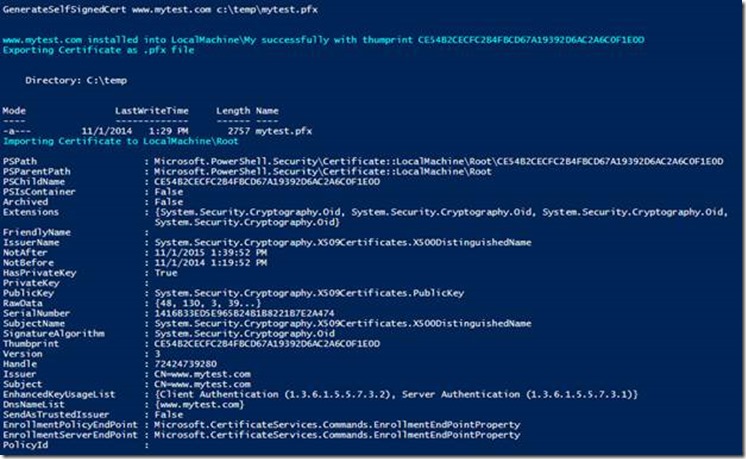
可以在Certificate Manager Console 里面看到:
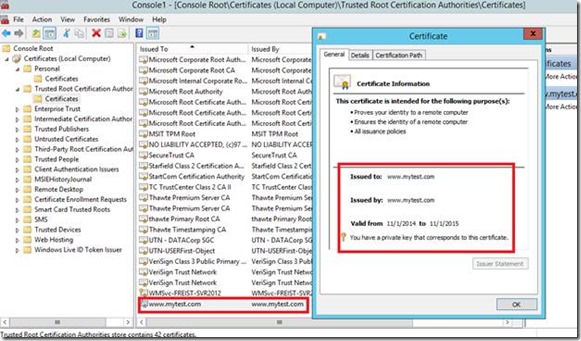
对于产生的.pfx文件,可以很容易放到Web服务器或者Microsoft AZure云端使用:
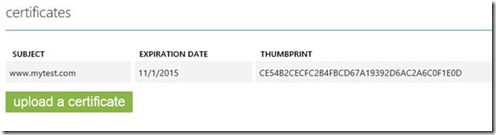
更新:
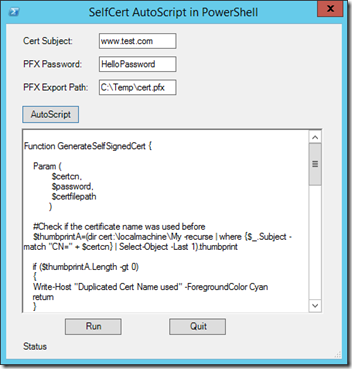
我进一步根据上面的GenerateSelfSignedCert的函数,直接用PowerShell完善了UI部分和自动生成脚本部分。这样使用的时候会弹出友善的Form窗口,生成你想要的Code, 可以立刻运行Code或者Copy Code到别的机器执行 (因为要安装证书,需要PowerShell或者PowerShell ISE以管理员身份权限打开):
这里是完整的脚本下载链接 CodePlex 或者 GitHub
如何在Win8.1和Win2012上运用PowerShell快速生成、安装、导出自签名证书 (Self-Signed Certificate)的更多相关文章
- 如何在SecureCRT中给linux上传和下载文件 安装redis
首先建立文件 /download sz和rz命令无法用.则用以下1.和2.3步骤 需要上传或者下载,需要使用rz和sz命令.如果linux上没有这两个命令工具,则需要先安装.可以使用yum安装.运 ...
- 教你如何在Drcom下使用路由器上校园网(以广东工业大学、极路由1S HC5661A为例)
免责声明: 在根据本教程进行实际操作时,如因您操作失误导致出现的一切意外,包括但不限于路由器变砖.故障.数据丢失等情况,概不负责: 该技术仅供学习交流,请勿将此技术应用于任何商业行为,所产生的法律责任 ...
- 如何在Linux中使用sFTP上传或下载文件与文件夹
如何在Linux中使用sFTP上传或下载文件与文件夹 sFTP(安全文件传输程序)是一种安全的交互式文件传输程序,其工作方式与 FTP(文件传输协议)类似. 然而,sFTP 比 FTP 更安全;它通过 ...
- 【转】如何在Ubuntu 14.04 LTS上设置Nginx虚拟主机
介绍 转自http://www.pandacademy.com/%E5%A6%82%E4%BD%95%E5%9C%A8ubuntu-14-04-lts%E4%B8%8A%E8%AE%BE%E7%BD% ...
- 如何在Windows Server 2012 R2上安装SharePoint 2013
笔者原以为是个挺容易个事儿, 毕竟是微软自家的产品安装在自家的操作系统上, 没想到还是让我费了半天劲. 写在这里吧, 方便其他的朋友. 具体步骤 ======================= ...
- 如何使用Mojave将APFS卷上的MacOS Catalina Beta安装到双引导
如果你想与macOS Mojave或macOS High Sierra一起运行MacOS Catalina Beta,你可以通过向Mac添加一个新的APFS卷来实现这一点,如果该Macs硬盘被格式化为 ...
- 如何在iOS设备中配置S/MIME邮件签名证书
本篇将介绍如何在iOS设备(如iPhone或iPad)上导入.配置并使用S/MIME邮件证书. 前置条件: iOS设备上已完成邮箱账号配置: 您的S/MIME邮件证书PFX/P12文件已导出备用. 步 ...
- 基于MVC4+EasyUI的Web开发框架经验总结(10)--在Web界面上实现数据的导入和导出
数据的导入导出,在很多系统里面都比较常见,这个导入导出的操作,在Winform里面比较容易实现,我曾经在之前的一篇文章<Winform开发框架之通用数据导入导出操作>介绍了在Winform ...
- 【转】 iOS开发之打包上传到App Store——(一)各种证书的理解
OK,有日子没写iOS开发的相关文章啦,主要是最近的精力都没在这上面,不过既然产品已经快要出来了,就有必要了解一下各种证书啥的(众所周知iOS的一堆证书可是很让人头大呀),最近确实被这个搞得头大,然后 ...
随机推荐
- eclipse中j2ee(struts2)部署及相关问题释疑
1.eclipse中进行web项目开发时.部署的时候和利用myeclipse部署时有非常大不同,由于在myeclipse的工具栏中有一个部署button.而且在myeclipse的preference ...
- java中的ShortBuffer
一.概述 java.lang.Object java.nio.Buffer java.nio.ShortBuffer public abstract class ShortBuffer extends ...
- BestCoder Round #56 /hdu5464 dp
Clarke and problem 问题描述 克拉克是一名人格分裂患者.某一天,克拉克分裂成了一个学生,在做题. 突然一道难题难到了克拉克,这道题是这样的: 给你nn个数,要求选一些数(可以不选), ...
- Copy Selected Text from any window
https://social.msdn.microsoft.com/Forums/windows/en-US/1dc356e6-9441-44de-9eda-247003fa6ef5/copy-sel ...
- 恶意IP监控
http://www.icarei.cn/fastdatav/MyDebug/readlog/error/ip191.96.249.136
- b-is-in- (1267, "Illegal mix of collations (utf8mb4_unicode_ci,IMPLICIT) and (utf8_general_ci,COERCIBLE) for operation '='") SELECT id FROM qqzoneshuoshuo WHERE words=
db-is-in- (1267, "Illegal mix of collations (utf8mb4_unicode_ci,IMPLICIT) and (utf8_general_ci, ...
- Codeforces Round #228 (Div. 2) C. Fox and Box Accumulation
C. Fox and Box Accumulation time limit per test 1 second memory limit per test 256 megabytes input s ...
- 【T^T 1871】获取敌情
获取敌情 在公元4484年,人类展开了对外界星球的征途和探索,但也不可避免的展开了和外星人之间的战争.偶然的机遇之下,美国联邦调查局截获了一串来自外星球的信息.但不知道有什么特殊的意义.所以就委托你, ...
- hdoj--5526--欧拉回路(欧拉回路)
欧拉回路 Time Limit: 2000/1000 MS (Java/Others) Memory Limit: 32768/32768 K (Java/Others) Total Su ...
- POJ1385 Lifting the Stone 多边形重心
POJ1385 给定n个顶点 顺序连成多边形 求重心 n<=1e+6 比较裸的重心问题 没有特别数据 由于答案保留两位小数四舍五入 需要+0.0005消除误差 #include<iostr ...