
Android-------------fragment的学习
一、fragment的静态使用
1.使用步骤:
a.继承fragment 重写onCreatevVew()的回调方法
b.设置Fragment的布局
c.在Activity中声明Fragment 使用方式与控件相同
2.代码展示:
 a.继承fragment   重写onCreatevVew()的回调方法
public class TileFragment extends Fragment {
    @Nullable
    @Override
    public View onCreateView(@NonNull LayoutInflater inflater, @Nullable ViewGroup container, @Nullable Bundle savedInstanceState) {
        return inflater.inflate(R.layout.tilefragment, null);
    }
}
b.设置Fragment的布局<LinearLayout xmlns:android="http://schemas.android.com/apk/res/android"
    android:layout_width="match_parent"
    android:layout_height="50dp"
    android:orientation="horizontal">      //忘记写会有控件覆盖,会报错的

    <ImageView
        android:id="@+id/iv_bck"
        android:layout_width="35dp"
        android:layout_height="35dp"
        android:src="@mipmap/ic_launcher" />

    <TextView
        android:gravity="center"
        android:layout_marginLeft="10dp"
        android:layout_width="match_parent"
        android:layout_height="match_parent"
        android:text="我是标题"
        />
</LinearLayout>

c.在Activity中声明Fragment  使用方式与控件相同
<LinearLayout xmlns:android="http://schemas.android.com/apk/res/android"
    xmlns:app="http://schemas.android.com/apk/res-auto"
    xmlns:tools="http://schemas.android.com/tools"
    android:layout_width="match_parent"
    android:layout_height="match_parent"
    android:orientation="vertical"        //这个忘写会报错误,很难找出来的
    tools:context=".MainActivity">

    <fragment
        android:name="com.example.zhang.myapplication.TileFragment" ----------->引用标签来静态加载fragment的数据
        android:layout_width="match_parent"
        android:layout_height="50dp"></fragment>
</LinearLayout>

二、fragment的动态使用
  a.创建Fragment的管理器对象
  b.获取Fragment的事物对象并开启
  c.调用事物的动态方法:动态的添加、动态的删除、动态的替换
  d.提交事物

  在xml文件中的代码,在布局文件中写好布局并设置ID,通过FragmentTransation.add去动态添加
  <LinearLayout
    android:orientation="vertical"
    android:layout_width="match_parent"
    android:layout_height="50dp"
    android:id="@+id/fragment_tile"
    />
  <LinearLayout
    android:orientation="vertical"
    android:layout_width="match_parent"
    android:layout_height="match_parent"
    android:id="@+id/frag_content"
    />
  //获得FragmentManager的对象
  FragmentManager manager = getSupportFragmentManager();
  //获取Fragment的事物对象并开始
  FragmentTransaction transaction = manager.beginTransaction();
  //动态添加fragment (add remove replace)
  transaction.add(R.id.fragment_tile, new TileFragment());
  transaction.add(R.id.frag_content, new ContentFragment());
  //提交获得的事物
  transaction.commit();

三、Fragment的生命周期
  1.第一次启动app的时候
    onAttach:activity与fragment的产生关联时候进行回调
    onCreateView : 用户第一次绘制界面
    onActivityCreate : fragment与activity创建成功进行回调

2.切换其他fragment的时候

3.返回第一次启动的fragment的时候

4.按home键的时候

5.home键之后再重新返回当前界面

6.按back键的时候

7.fragment和activity的生命周期
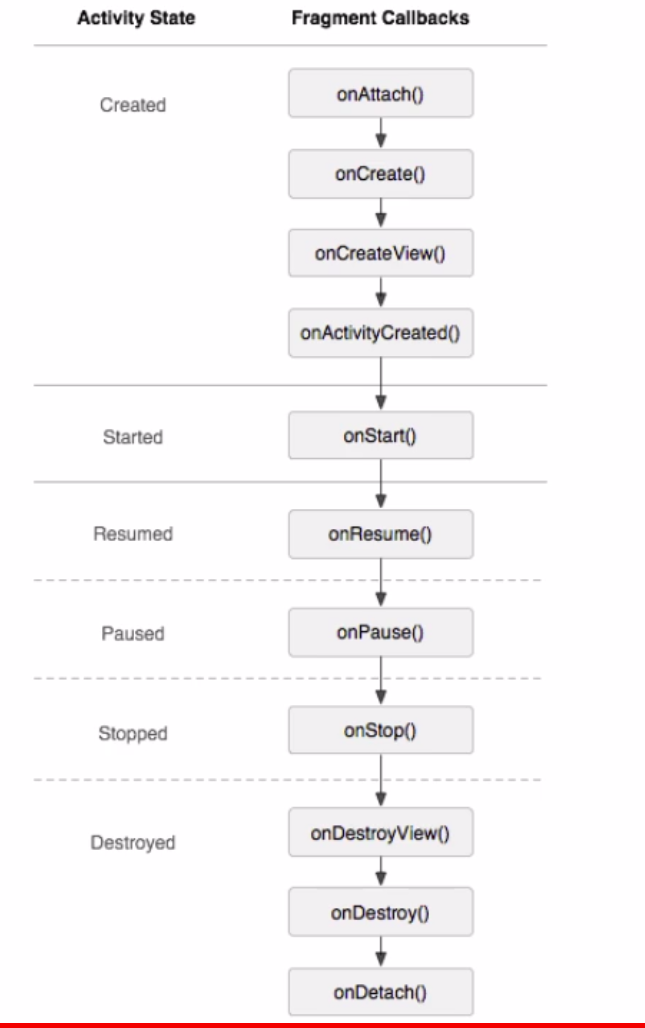
Android-------------fragment的学习的更多相关文章
- android fragment 博客 学习记录
转载请标明出处:http://blog.csdn.net/lmj623565791/article/details/37992017 上篇博客中已经介绍了Fragment产生原因,以及一些基本的用法和 ...
- Android Fragment应用实战
现在Fragment的应用真的是越来越广泛了,之前Android在3.0版本加入Fragment的时候,主要是为了解决Android Pad屏幕比较大,空间不能充分利用的问题,但现在即使只是在手机上, ...
- Android Fragment应用实战,使用碎片向ActivityGroup说再见
转载请注明出处:http://blog.csdn.net/guolin_blog/article/details/13171191 现在Fragment的应用真的是越来越广泛了,之前Android在3 ...
- 【转】基于Android Fragment功能的例子
原文网址:http://blog.csdn.net/eyu8874521/article/details/8252216 通过最近空闲时候对Fragment的学习,尝试着写了一个小Demo,将在开发的 ...
- 基于Android Fragment功能的样例
通过近期空暇时候对Fragment的学习,尝试着写了一个小Demo,将在开发的时候能经常使用到的Fragment知识放在一起,写过了这个Demo对Android Fragment的了解更加深入了,以后 ...
- Android编程权威指南笔记3:Android Fragment讲解与Android Studio中的依赖关系,如何添加依赖关系
Android Fragment 当我在学习时,了解了Fragment词汇 Fragment是一种控制器对象,我就把所了解的简单说一下.activity可以派fragment完成一些任务,就是管理用户 ...
- 【Android自学日记】【转】Android Fragment 真正的完全解析(下)
上篇博客中已经介绍了Fragment产生原因,以及一些基本的用法和各种API,如果你还不了解,请看:Android Fragment 真正的完全解析(上). 本篇将介绍上篇博客提到的:如何管理Frag ...
- Android Fragment使用(四) Toolbar使用及Fragment中的Toolbar处理
Toolbar作为ActionBar使用介绍 本文介绍了在Android中将Toolbar作为ActionBar使用的方法. 并且介绍了在Fragment和嵌套Fragment中使用Toolbar作为 ...
- Android Fragment使用(三) Activity, Fragment, WebView的状态保存和恢复
Android中的状态保存和恢复 Android中的状态保存和恢复, 包括Activity和Fragment以及其中View的状态处理. Activity的状态除了其中的View和Fragment的状 ...
- Android Fragment使用(二) 嵌套Fragments (Nested Fragments) 的使用及常见错误
嵌套Fragment的使用及常见错误 嵌套Fragments (Nested Fragments), 是在Fragment内部又添加Fragment. 使用时, 主要要依靠宿主Fragment的 ge ...
随机推荐
- CURL_SAFE_UPLOAD
1.版本差异 PHP5.4:支持通过在数组数据中,使用“@+文件全路径”的语法附加文件 curl_setopt(ch, CURLOPT_POSTFIELDS, array( 'file' => ...
- Vue2.0 keep-alive 组件的最佳实践
1.基本用法 vue2.0提供了一个keep-alive组件用来缓存组件,避免多次加载相应的组件,减少性能消耗 <keep-alive> <component> <!-- ...
- Sketch小妙招:在线分享设计
Sketch是很多产品经理.UI.UX设计师常使用的一款的设计工具,但是我在使用Sketch的过程中发现了一个让我困扰的事儿,或者说它缺少了一个我非常需要的服务:在线分享设计.可能很多使用Sketch ...
- JavaScript 的数据类型及其检测
JavaScript 有几种类型的值? Javascript 有两种数据类型,分别是基本数据类型和引用数据类型.其中基本数据类型包括 Undefined.Null.Boolean.Number.Str ...
- vue的过滤器
Vue.Js 提供了强大的过滤器API,能够对数据进行各种过滤处理,返回需要的结果 vue的过滤器一般在JavaScript 表达式的尾部,由“|”符号指示: 过滤器可以让我们的代码更加优美,一般可以 ...
- 测试这个才可以打包 我的PYQt matplotlib numpy 等程序
from distutils.core import setup import py2exe import matplotlib import sys import FileDialog import ...
- Oracle sql的基本优化写法和思路。
首先简单介绍下常规的sql优化的方式: 1.肯定有人说建索引啊. 2.数据量实在太大,建分区啊. 3.其实基于目前公司的业务还有一种办法那就是向上聚集表.根据查询业务,专门抽取上来一张表,直接做到se ...
- Devexpress VCL Build v2013 vol 14.1.3 发布
我修,我修,修修修. New Major Features in 14.1 What's New in VCL Products 14.1 Breaking Changes To learn abou ...
- Linux命令:ps
Linux中的ps命令是Process Status的缩写.ps命令用来列出系统中当前运行的那些进程.ps命令列出的是当前那些进程的快照,就是执行ps命令的那个时刻的那些进程,如果想要动态的显示进程信 ...
- Notification的功能和用法 加薪通知
实现通知栏消息的生成和消除 MainActivity.java public class MainActivity extends Activity { static f ...