
android TextView 例子代码(文字图片、文字省略、文字滚动)
<?xml version="1.0" encoding="utf-8"?>
<LinearLayout xmlns:android="http://schemas.android.com/apk/res/android"
    xmlns:app="http://schemas.android.com/apk/res-auto"
    xmlns:tools="http://schemas.android.com/tools"
    android:layout_width="match_parent"
    android:layout_height="match_parent"
    tools:context="com.example.prize.mydemo1.Main4Activity">
    <LinearLayout
        android:layout_width="match_parent"
        android:layout_height="match_parent"
        android:orientation="vertical">
        <!--TextView 放入图片例子-->
        <!--android:drawableTop="@drawable/icon1"  在文字上面放入图片-->
        <!--android:drawablePadding="20dp"  设置图片与文字之间的间隔-->
        <TextView
            android:layout_width="wrap_content"
            android:layout_height="wrap_content"
            android:text="努力学习"
            android:textColor="#0000ff"
            android:textSize="50sp"
            android:drawableTop="@drawable/icon1"
            android:drawablePadding="20dp"
            />
        <!--文字太长显示省略。。。例子-->
        <!--android:maxLines="1"  设置TextView行数-->
        <!--android:ellipsize="end"  设置文本结尾显示。。。-->
        <!--android:layout_marginBottom="5dp" 设置布局间隔-->
        <TextView
            android:layout_width="200dp"
            android:layout_height="wrap_content"
            android:text="@string/main4Text1"
            android:maxLines="1"
            android:ellipsize="end"
            android:layout_marginBottom="5dp"/>
        <!--android:ellipsize="end"  设置文本中间显示省略。。。-->
        <TextView
            android:layout_width="200dp"
            android:layout_height="wrap_content"
            android:text="@string/main4Text1"
            android:maxLines="1"
            android:ellipsize="middle"/>
        <!--设置有滚动播放效果的文字显示-->
        <!--android:singleLine="true"  设置单行-->
        <!--android:marqueeRepeatLimit="marquee_forever"  设置滚动次数,这里为永久滚动-->
        <!--android:ellipsize="marquee"  ellipsize意思省略位置,marquee的意思是滚动模式-->
        <!--android:focusable="true"  意思可聚焦,被选中。只有聚焦的文字才会滚动-->
        <!--android:focusableInTouchMode="true"   可调焦的触摸模式-->
        <!--注意此方法设置文字滚动,一个页面只有一段文字可以被预设聚焦并且滚动-->
        <TextView
            android:layout_width="wrap_content"
            android:layout_height="wrap_content"
            android:text="@string/main4Text1"
            android:layout_marginTop="30dp"
            android:singleLine="true"
            android:ellipsize="marquee"
            android:marqueeRepeatLimit="marquee_forever"
            android:focusable="true"
            android:focusableInTouchMode="true"/>

    </LinearLayout>

</LinearLayout>
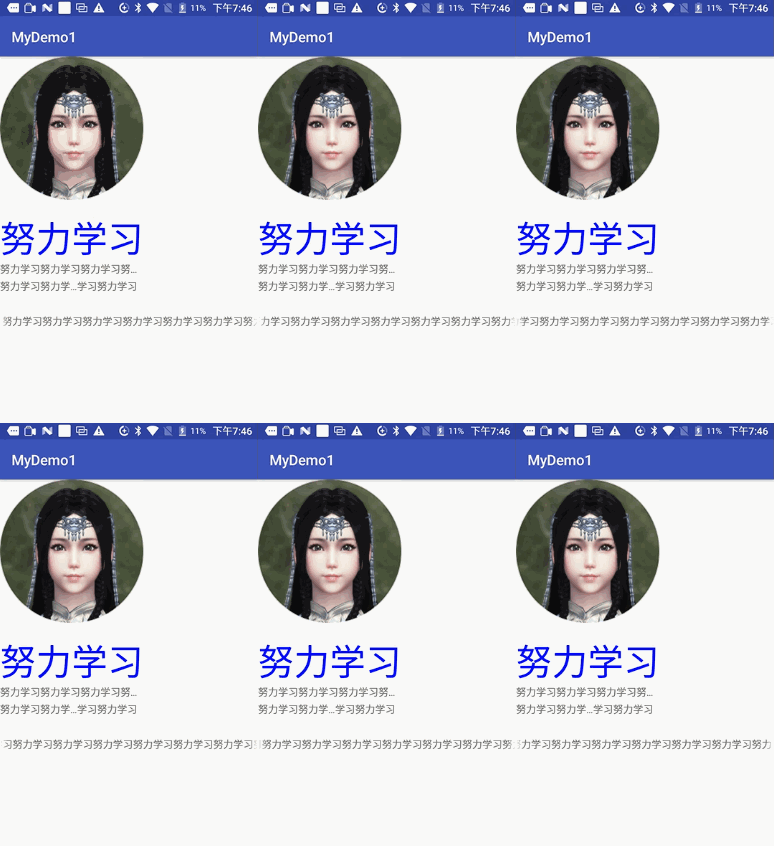
运行效果:
android TextView 例子代码(文字图片、文字省略、文字滚动)的更多相关文章
- android TextView 例子代码(文字中划线、文字下划线)
XML: <?xml version="1.0" encoding="utf-8"?> <LinearLayout xmlns:android ...
- Android TextView 显示HTML加图片
TextView显示网络图片,我用android2.3的系统,可以显示图片出来,并且如果图片比较大,应用会卡的现象,肯定是因为使用主线程去获取网络图片造成的,但如果我用android4.0以上的系统运 ...
- Android TextView里直接显示图片的三种方法
方法一:重写TextView的onDraw方法,也挺直观就是不太好控制显示完图片后再显示字体所占空间的位置关系.一般假设字体是在图片上重叠的推荐这样写.时间关系,这个不付源代码了. 方法二:利用Tex ...
- Android:Textview 通过代码设置 Drawable
解决方案 public void setCompoundDrawables (Drawable left, Drawable top, Drawable right, Drawable bottom) ...
- jquery文字上下滚动--单行 批量多行 文字图片上下翻滚 | 多行滚动
<!DOCTYPE html PUBLIC "-//W3C//DTD XHTML 1.0 Transitional//EN" "http://www.w3.org/ ...
- Android TextView 嵌套图片及其点击,TextView 部分文字点击,文字多颜色
1. TextView 中嵌套图片的方法 TextView textView... textView.setText("..."); textView.append(Html.fr ...
- Android TextView中有图片有文字混合排列
Android TextView中有图片有文字混合排列 1.使用html.fromHtml 2.新建ImageGetter 3.使用<img src>标签 demo: 1.设置文字 ((T ...
- android 文字图片合成
引用:http://blog.csdn.net/cq361106306/article/details/8142526 两种方法: 1.直接在图片上写文字 String str = "PIC ...
- 如何利用CSS代码使图片和文字在同一行显示且对齐
对于初学css的新手朋友来说,经常会遇到这样一个问题,当文字和图片出现在同一行或者同一个div里面的时候,在浏览器中运行出来的显示效果往往是在不同的行,那么,我们怎么才能利用CSS代码使图片和文字在同 ...
随机推荐
- asp.net:如何实现负载均衡方案讨论 (nginx+iis实现负载均衡)
5台阿里云服务器,ip地址分别为 ip地址 名字简称 操作系统 iis服务器 cpu 内存DDR3 机械硬盘 11 ...
- nginx基于目录的映射:
nginx基于目录的映射: location /wxchat/ { #proxy_redirect off; proxy_set_header Host $host; proxy_set_header ...
- [转]happybase1.0 报错:ThriftPy does not support generating module with path in protocol 'f'
happybase1.0 报错:ThriftPy does not support generating module with path in protocol 'f' 2016-10-12 14: ...
- web前端性能调优(一)
最近2个月一直在做手机端和电视端开发,开发的过程遇到过各种坑.弄到快元旦了,终于把上线了.2个月干下来满满的的辛苦,没有那么忙了自己准备把前端的性能调优总结以下,以方便以后自己再次使用到的时候得于得心 ...
- 解决 VUE 微信登录验证 【感谢原文:https://segmentfault.com/a/1190000009493199】
[感谢原文:https://segmentfault.com/a/1190000009493199] SPA单页应用中微信授权登录的一点思路 单页应用应该如何解决微信授权登录的尴尬跳转?后退无法返回? ...
- CI 数据库操作总结
最简单示例 $query = $this->db->query("YOUR QUERY"); foreach ($query->result() as $row) ...
- 安装node.msi 格式的文件失败
in10 安装node.msi格式的文件,出现2503 2502 错误码, win+x 打开 在命令提示符窗口中输入: msiexec /package "安装msi格式的文件的全路径&qu ...
- 【java】之equals和==区别
Java中数据类型可以分为两类 1.基本数据类型(byte,short,char,int,float,double,long,boolean) 2.复合数据类型(类,String等) Δ在基本数据 ...
- 【异常处理】Springboot对Controller层方法进行统一异常处理
Controller层方法,进行统一异常处理 提供两种不同的方案,如下: 方案1:使用 @@ControllerAdvice (或@RestControllerAdvice), @ExceptionH ...
- MFC如何在有界面的应用程序中开启控制台窗口
在有界面的应用程序中开启控制台窗口有时候非常有用,尤其是在调试多线程应用程序中,由于通过断点的方式调试程序时会导致线程挂起从而导致各种难于预料的结果.这时候就可以通过开启控制台窗口往窗口输出信息来查看 ...