
Vulkan SDK之 Swapchain
Swapchain是一系列最终会展示给用户的图像的集合。
/*
* Set up swapchain:
* - Get supported uses for all queues
* - Try to find a queue that supports both graphics and present
* - If no queue supports both, find a present queue and make sure we have a
* graphics queue
* - Get a list of supported formats and use the first one
* - Get surface properties and present modes and use them to create a swap
* chain
* - Create swap chain buffers
* - For each buffer, create a color attachment view and set its layout to
* color attachment
*/
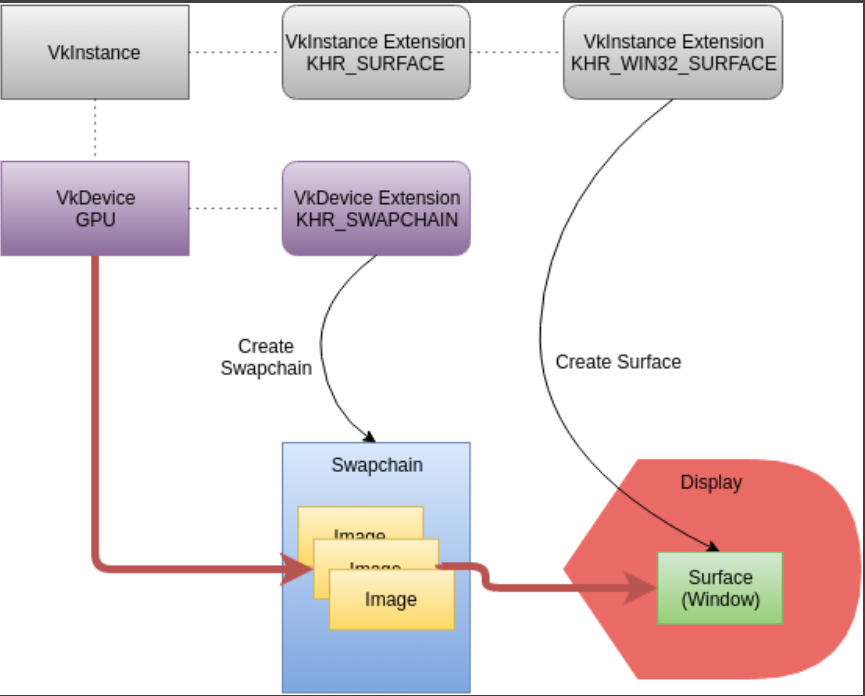
Vulkan and the Windowing System
1、跟其他图形API不同,vulkan 将window相关的操作和图形核心的API隔离;窗口使用对应的扩展,KHR 代表了这是一种Khronos Extension.
VK_USE_PLATFORM_ANDROID_KHR - Android

VK_USE_PLATFORM_WAYLAND_KHR - Wayland

VK_USE_PLATFORM_WIN32_KHR - Microsoft Windows

VK_USE_PLATFORM_XCB_KHR - X Window System, using the XCB library

VK_USE_PLATFORM_XLIB_KHR - X Window System, using the Xlib library
2、VkSurfaceKHR 是对原生平台设备表面或者窗口的一种抽象;
Revisiting Instance and Device Extensions
Instance Extensions
Device Extensions
1、swapchain只是一系列需要展示的图片,具体要将这些图片显示到显示器上,需要硬件进行操作,这个时候需要用到 VK_KHR_SWAPCHAIN_EXTENSION_NAME;
Queue Family and Present
1、vkQueuePresentKHR() 需要找到一个同时指出graphics和present的famaliy;
Device Surface Formats
1、 VkSurfaceFormatKHR 能获取当前显示设备指出的VkFormat;
Surface Capabilities
1、Swapchain的创建需要提供一些额外的信息,可以通过vkGetPhysicalDeviceSurfaceCapabilitiesKHR() 和 vkGetPhysicalDeviceSurfacePresentModesKHR()获取;
2、 minImageCount用来决定当前使用的是双缓冲还是三缓冲区。 双缓冲区一个render,一个present; 三缓冲区一个用来present,其他两个用来render;
Different Queue Families for Graphics and Present
1、如果graphics queue和 present queue family是不同的,需要做一些额外的工作可以让imagine在各个queue之间进行共享;
swapchain_ci.imageSharingMode = VK_SHARING_MODE_EXCLUSIVE;

swapchain_ci.queueFamilyIndexCount = ;

swapchain_ci.pQueueFamilyIndices = NULL;

uint32_t queueFamilyIndices[] = {

    (uint32_t)info.graphics_queue_family_index,

    (uint32_t)info.present_queue_family_index};

if (info.graphics_queue_family_index != info.present_queue_family_index) {

    // If the graphics and present queues are from different queue families,

    // we either have to explicitly transfer ownership of images between the

    // queues, or we have to create the swapchain with imageSharingMode

    // as VK_SHARING_MODE_CONCURRENT

    swapchain_ci.imageSharingMode = VK_SHARING_MODE_CONCURRENT;

    swapchain_ci.queueFamilyIndexCount = ;

    swapchain_ci.pQueueFamilyIndices = queueFamilyIndices;

}
Create Swapchain
1、vkCreateSwapchainKHR 创建了一系列的图像来组成swapchain,但在实际使用的过程中,我们需要告诉GPU当前使用的是哪个image,这个时候就用到如下的接口vkGetSwapchainImagesKHR;通过这个接口你可以获得
一系列images的handle;
Create Image Views
1、swapchain是一系列的images,但是当我们需要使用这些image的时候,我们就需要为image创建imagin view。 “view”用来告诉vulkan如何使用这些imagin。
2、VkImageViewCreateInfo 用来创建所需的imageview;
Vulkan SDK之 Swapchain的更多相关文章
- Vulkan SDK Demo 之一 熟悉
DiligentEngine的API是D3d11和D3D12风格的,vulkan也被封装成了这种风格的API. 在了解Diligent Engine是如何对vulkan进行封装之前,我准备先学习下Vu ...
- Vulkan SDK 之 Instance
上一篇 Vulkan SDK Demo 熟悉 粗略的了解了下,一个app是如何调用vulkan的api来展示一个立方体的,但是对其中的每一个api了解并不深刻,后面的系列会根据sample的tutor ...
- Vulkan SDK 之 Depth Buffer
深度缓冲是可选的,比如渲染一个3D的立方体的时候,就需要用到深度缓冲.Swapchain就算有多个images,此时深度缓冲区也只需要一个.vkCreateSwapchainKHR 会创建所有需要的i ...
- Vulkan SDK 之 DrawCube
Waiting for a Swapchain Buffer Beginning the Render Pass Bind the Pipeline Bind the Descriptor Sets ...
- Vulkan SDK之 FrameBuffer
The Vulkan Framebuffer Framebuffers represent a collection of memory attachments that are used by a ...
- Vulkan SDK 之 Shaders
Compiling GLSL Shaders into SPIR-V 1.SPIR-V 是vulkan的底层shader语言.GLSL可以通过相关接口转换为SPIR-V. Creating Vulka ...
- Vulkan SDK 之Render Pass
Create a Render Pass A render pass describes the scope of a rendering operation by specifying the co ...
- Vulkan SDK 之 Descriptor Set Layouts and Pipeline Layouts
当我们有了一个uniform buff之后,vulkan 还不知道这个信息,需要通过descriptor进行描述. Descriptors and Descriptor Sets A descript ...
- Vulkan SDK 之 Device
Enumerate Physical Devices Vulkan instance创建完成之后,vulkan loader是知道你有几个物理设备(显卡),但是程序不知道,需要通过 相关接口获取设备 ...
随机推荐
- 099、Java中String类之字符数组与字符串的转换
01.代码如下: package TIANPAN; /** * 此处为文档注释 * * @author 田攀 微信382477247 */ public class TestDemo { public ...
- IOS 3种内省方法
IOS提供了3种内省方法 isKindOfClass 检查当前实例是否为某类及其子类 UIView *b = [UIView new]; //... id a = b; if ([a isMember ...
- 吴裕雄--天生自然JAVA面向对象高级编程学习笔记:Object类
class Demo{ // 定义Demo类,实际上就是继承了Object类 }; public class ObjectDemo01{ public static void main(String ...
- Lua 完美打印数据 (例子)
例子1 : ableprint = function(data,cstring,deepIndex) --第二个参数可以为空,第三个参数不要手动添加,它是用来进行打印深度控制的. if data == ...
- POJ 3267:The Cow Lexicon 字符串匹配dp
The Cow Lexicon Time Limit: 2000MS Memory Limit: 65536K Total Submissions: 8905 Accepted: 4228 D ...
- JS - 判断字符串某个下标的值
<html><body> <script type="text/javascript"> var str="0123456789!&q ...
- windows清理命令
总是有一些设备需要清理,第三方的软件有不可以安装,那么,就需要这两条命令来做: cleanmgr /sageset:99 #设置要被清理的东西 cleanmgr /sagerun:99 #执行清理操作 ...
- Java笔记: 初始化块
Java语言提供了很多类初始化的方法,包括构造器.初始化器等.除了这两种方法之外,我们还可以用初始化块(initialization block)来实现初始化功能. 基本语法 初始化块是出现在类声明中 ...
- NIO 组件Buffer
重要属性 属性 描述 Capacity 容量, 即可以容纳的最大数据量; 在缓冲区创建时被设定并且不能改变 Limit 表示缓冲区的当前终点, 不能对缓冲区超过极限的位置进行读写操作, 且极限是可以修 ...
- 动手实验01-----vCenter 微软AD认证配置与用户授权
环境说明: AD域-> centaline.net 阅读目录: 1. 配置与AD认证源 2.权限角色 1. 配置与AD认证源 登陆vCenter后,在 系统管理 -> 配置 -> ...