
SpringBoot整合SpringSecurity实现JWT认证
前言
微服务架构,前后端分离目前已成为互联网项目开发的业界标准,其核心思想就是前端(APP、小程序、H5页面等)通过调用后端的API接口,提交及返回JSON数据进行交互。
在前后端分离项目中,首先要解决的就是登录及授权的问题。微服务架构下,传统的session认证限制了应用的扩展能力,无状态的JWT认证方法应运而生,该认证机制特别适用于分布式站点的单点登录(SSO)场景
目录
该文会通过创建SpringBoot项目整合SpringSecurity,实现完整的JWT认证机制,主要步骤如下:
- 创建SpringBoot工程
- 导入SpringSecurity与JWT的相关依赖
- 定义SpringSecurity需要的基础处理类
- 构建JWT token工具类
- 实现token验证的过滤器
- SpringSecurity的关键配置
- 编写Controller进行测试
1、创建SpringBoot工程
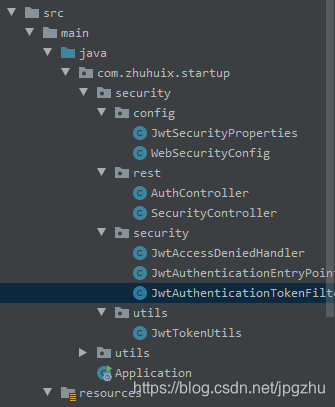
2、导入SpringSecurity与JWT的相关依赖
pom文件加入以下依赖
 		<!--Security框架-->

        <dependency>

            <groupId>org.springframework.boot</groupId>

            <artifactId>spring-boot-starter-security</artifactId>

        </dependency>

        ...

        <!-- jwt -->

        <dependency>

            <groupId>io.jsonwebtoken</groupId>

            <artifactId>jjwt-api</artifactId>

            <version>0.10.6</version>

        </dependency>

        <dependency>

            <groupId>io.jsonwebtoken</groupId>

            <artifactId>jjwt-impl</artifactId>

            <version>0.10.6</version>

        </dependency>

        <dependency>

            <groupId>io.jsonwebtoken</groupId>

            <artifactId>jjwt-jackson</artifactId>

            <version>0.10.6</version>

        </dependency>
3.定义SpringSecurity需要的基础处理类
application.yml配置中加入jwt配置信息:
#jwt

jwt:

  header: Authorization

  # 令牌前缀

  token-start-with: Bearer

  # 使用Base64对该令牌进行编码

  base64-secret: XXXXXXXXXXXXXXXX(制定您的密钥)

  # 令牌过期时间 此处单位/毫秒

  token-validity-in-seconds: 14400000
创建一个jwt的配置类,并注入Spring,便于程序中灵活调用
@Data

@Configuration

@ConfigurationProperties(prefix = "jwt")

public class JwtSecurityProperties {

    /** Request Headers : Authorization */

    private String header;

    /** 令牌前缀,最后留个空格 Bearer */

    private String tokenStartWith;

    /** Base64对该令牌进行编码 */

    private String base64Secret;

    /** 令牌过期时间 此处单位/毫秒 */

    private Long tokenValidityInSeconds;

    /**返回令牌前缀 */

    public String getTokenStartWith() {

        return tokenStartWith + " ";

    }

}
定义无权限访问类
@Component

public class JwtAccessDeniedHandler implements AccessDeniedHandler {

    @Override

    public void handle(HttpServletRequest request, HttpServletResponse response, AccessDeniedException accessDeniedException) throws IOException {

        response.sendError(HttpServletResponse.SC_FORBIDDEN, accessDeniedException.getMessage());

    }

}
定义认证失败处理类
@Component

public class JwtAuthenticationEntryPoint implements AuthenticationEntryPoint {

    @Override

    public void commence(HttpServletRequest request,

                         HttpServletResponse response,

                         AuthenticationException authException) throws IOException {

        response.sendError(HttpServletResponse.SC_UNAUTHORIZED, authException==null?"Unauthorized":authException.getMessage());

    }

}
4. 构建JWT token工具类
工具类实现创建token与校验token功能
@Slf4j

@Component

public class JwtTokenUtils implements InitializingBean {

    private final JwtSecurityProperties jwtSecurityProperties;

    private static final String AUTHORITIES_KEY = "auth";

    private Key key;

    public JwtTokenUtils(JwtSecurityProperties jwtSecurityProperties) {

        this.jwtSecurityProperties = jwtSecurityProperties;

    }

    @Override

    public void afterPropertiesSet() {

        byte[] keyBytes = Decoders.BASE64.decode(jwtSecurityProperties.getBase64Secret());

        this.key = Keys.hmacShaKeyFor(keyBytes);

    }

    public  String createToken (Map<String, Object> claims) {

        return Jwts.builder()

                .claim(AUTHORITIES_KEY, claims)

                .setId(UUID.randomUUID().toString())

                .setIssuedAt(new Date())

                .setExpiration(new Date((new Date()).getTime() + jwtSecurityProperties.getTokenValidityInSeconds()))

                .compressWith(CompressionCodecs.DEFLATE)

                .signWith(key,SignatureAlgorithm.HS512)

                .compact();

    }

    public Date getExpirationDateFromToken(String token) {

        Date expiration;

        try {

            final Claims claims = getClaimsFromToken(token);

            expiration = claims.getExpiration();

        } catch (Exception e) {

            expiration = null;

        }

        return expiration;

    }

    public Authentication getAuthentication(String token) {

        Claims claims = Jwts.parser()

                .setSigningKey(key)

                .parseClaimsJws(token)

                .getBody();

        Collection<? extends GrantedAuthority> authorities =

                Arrays.stream(claims.get(AUTHORITIES_KEY).toString().split(","))

                        .map(SimpleGrantedAuthority::new)

                        .collect(Collectors.toList());

        HashMap map =(HashMap) claims.get("auth");

        User principal = new User(map.get("user").toString(), map.get("password").toString(), authorities);

        return new UsernamePasswordAuthenticationToken(principal, token, authorities);

    }

    public boolean validateToken(String authToken) {

        try {

            Jwts.parser().setSigningKey(key).parseClaimsJws(authToken);

            return true;

        } catch (io.jsonwebtoken.security.SecurityException | MalformedJwtException e) {

            log.info("Invalid JWT signature.");

            e.printStackTrace();

        } catch (ExpiredJwtException e) {

            log.info("Expired JWT token.");

            e.printStackTrace();

        } catch (UnsupportedJwtException e) {

            log.info("Unsupported JWT token.");

            e.printStackTrace();

        } catch (IllegalArgumentException e) {

            log.info("JWT token compact of handler are invalid.");

            e.printStackTrace();

        }

        return false;

    }

    private Claims getClaimsFromToken(String token) {

        Claims claims;

        try {

            claims = Jwts.parser()

                    .setSigningKey(key)

                    .parseClaimsJws(token)

                    .getBody();

        } catch (Exception e) {

            claims = null;

        }

        return claims;

    }

}
5.实现token验证的过滤器
该类继承OncePerRequestFilter,顾名思义,它能够确保在一次请求中只通过一次filter
该类使用JwtTokenUtils工具类进行token校验
@Component

@Slf4j

public class JwtAuthenticationTokenFilter extends OncePerRequestFilter {

    private JwtTokenUtils jwtTokenUtils;

    public JwtAuthenticationTokenFilter(JwtTokenUtils jwtTokenUtils) {

        this.jwtTokenUtils = jwtTokenUtils;

    }

    @Override

    protected void doFilterInternal(HttpServletRequest httpServletRequest, HttpServletResponse httpServletResponse, FilterChain filterChain) throws ServletException, IOException {

        JwtSecurityProperties jwtSecurityProperties = SpringContextHolder.getBean(JwtSecurityProperties.class);

        String requestRri = httpServletRequest.getRequestURI();

        //获取request token

        String token = null;

        String bearerToken = httpServletRequest.getHeader(jwtSecurityProperties.getHeader());

        if (StringUtils.hasText(bearerToken) && bearerToken.startsWith(jwtSecurityProperties.getTokenStartWith())) {

            token = bearerToken.substring(jwtSecurityProperties.getTokenStartWith().length());

        }

        if (StringUtils.hasText(token) && jwtTokenUtils.validateToken(token)) {

            Authentication authentication = jwtTokenUtils.getAuthentication(token);

            SecurityContextHolder.getContext().setAuthentication(authentication);

            log.debug("set Authentication to security context for '{}', uri: {}", authentication.getName(), requestRri);

        } else {

            log.debug("no valid JWT token found, uri: {}", requestRri);

        }

        filterChain.doFilter(httpServletRequest, httpServletResponse);

    }

}
根据SpringBoot官方让重复执行的filter实现一次执行过程的解决方案,参见官网地址:https://docs.spring.io/spring-boot/docs/current/reference/htmlsingle/#howto-disable-registration-of-a-servlet-or-filter
在SpringBoot启动类中,加入以下代码:
    @Bean

    public FilterRegistrationBean registration(JwtAuthenticationTokenFilter filter) {

        FilterRegistrationBean registration = new FilterRegistrationBean(filter);

        registration.setEnabled(false);

        return registration;

    }
6. SpringSecurity的关键配置
SpringBoot推荐使用配置类来代替xml配置,该类中涉及了以上几个bean来供security使用
- JwtAccessDeniedHandler :无权限访问
- jwtAuthenticationEntryPoint :认证失败处理
- jwtAuthenticationTokenFilter :token验证的过滤器
package com.zhuhuix.startup.security.config;

import com.fasterxml.jackson.core.filter.TokenFilter;

import com.zhuhuix.startup.security.security.JwtAccessDeniedHandler;

import com.zhuhuix.startup.security.security.JwtAuthenticationEntryPoint;

import com.zhuhuix.startup.security.security.JwtAuthenticationTokenFilter;

import com.zhuhuix.startup.security.utils.JwtTokenUtils;

import org.springframework.context.annotation.Configuration;

import org.springframework.http.HttpMethod;

import org.springframework.security.config.annotation.SecurityConfigurerAdapter;

import org.springframework.security.config.annotation.method.configuration.EnableGlobalMethodSecurity;

import org.springframework.security.config.annotation.web.builders.HttpSecurity;

import org.springframework.security.config.annotation.web.configuration.EnableWebSecurity;

import org.springframework.security.config.annotation.web.configuration.WebSecurityConfigurerAdapter;

import org.springframework.security.web.DefaultSecurityFilterChain;

import org.springframework.security.web.authentication.UsernamePasswordAuthenticationFilter;

/**

 * Spring Security配置类

 *

 * @author zhuhuix

 * @date 2020-03-25

 */

@Configuration

@EnableWebSecurity

@EnableGlobalMethodSecurity(prePostEnabled = true, securedEnabled = true)

public class WebSecurityConfig extends WebSecurityConfigurerAdapter {

    private final JwtAccessDeniedHandler jwtAccessDeniedHandler;

    private final JwtAuthenticationEntryPoint jwtAuthenticationEntryPoint;

    private final JwtTokenUtils jwtTokenUtils;

    public WebSecurityConfig(JwtAccessDeniedHandler jwtAccessDeniedHandler, JwtAuthenticationEntryPoint jwtAuthenticationEntryPoint, JwtTokenUtils jwtTokenUtils) {

        this.jwtAccessDeniedHandler = jwtAccessDeniedHandler;

        this.jwtAuthenticationEntryPoint = jwtAuthenticationEntryPoint;

        this.jwtTokenUtils = jwtTokenUtils;

    }

    @Override

    protected void configure(HttpSecurity httpSecurity) throws Exception {

        httpSecurity

                // 禁用 CSRF

                .csrf().disable()

                // 授权异常

                .exceptionHandling()

                .authenticationEntryPoint(jwtAuthenticationEntryPoint)

                .accessDeniedHandler(jwtAccessDeniedHandler)

                // 防止iframe 造成跨域

                .and()

                .headers()

                .frameOptions()

                .disable()

				// 不创建会话

                .and()

                .sessionManagement()

                .sessionCreationPolicy(SessionCreationPolicy.STATELESS)

                .and()

                .authorizeRequests()

                // 放行静态资源

                .antMatchers(

                        HttpMethod.GET,

                        "/*.html",

                        "/**/*.html",

                        "/**/*.css",

                        "/**/*.js",

                        "/webSocket/**"

                ).permitAll()

                // 放行swagger

                .antMatchers("/swagger-ui.html").permitAll()

                .antMatchers("/swagger-resources/**").permitAll()

                .antMatchers("/webjars/**").permitAll()

                .antMatchers("/*/api-docs").permitAll()

                // 放行文件访问

                .antMatchers("/file/**").permitAll()

                // 放行druid

                .antMatchers("/druid/**").permitAll()

                // 放行OPTIONS请求

                .antMatchers(HttpMethod.OPTIONS, "/**").permitAll()

                //允许匿名及登录用户访问

                .antMatchers("/api/auth/**", "/error/**").permitAll()

                // 所有请求都需要认证

                .anyRequest().authenticated();

        // 禁用缓存

        httpSecurity.headers().cacheControl();

        // 添加JWT filter

        httpSecurity

                .apply(new TokenConfigurer(jwtTokenUtils));

    }

    public class TokenConfigurer extends SecurityConfigurerAdapter<DefaultSecurityFilterChain, HttpSecurity> {

        private final JwtTokenUtils jwtTokenUtils;

        public TokenConfigurer(JwtTokenUtils jwtTokenUtils){

            this.jwtTokenUtils = jwtTokenUtils;

        }

        @Override

        public void configure(HttpSecurity http) {

            JwtAuthenticationTokenFilter customFilter = new JwtAuthenticationTokenFilter(jwtTokenUtils);

            http.addFilterBefore(customFilter, UsernamePasswordAuthenticationFilter.class);

        }

    }

}
7. 编写Controller进行测试
登录逻辑:传递user与password参数,返回token
@Slf4j

@RestController

@RequestMapping("/api/auth")

@Api(tags = "系统授权接口")

public class AuthController {

    private final JwtTokenUtils jwtTokenUtils;

    public AuthController(JwtTokenUtils jwtTokenUtils) {

        this.jwtTokenUtils = jwtTokenUtils;

    }

    @ApiOperation("登录授权")

    @GetMapping(value = "/login")

    public String login(String user,String password){

        Map map = new HashMap();

        map.put("user",user);

        map.put("password",password);

        return jwtTokenUtils.createToken(map);

    }

}
使用IDEA Rest Client测试如下: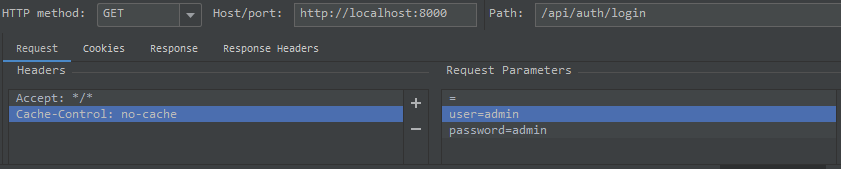

验证逻辑:传递token,验证成功后返回用户信息


token验证错误返回401:

SpringBoot整合SpringSecurity实现JWT认证的更多相关文章
- springBoot整合spring security+JWT实现单点登录与权限管理--筑基中期
写在前面 在前一篇文章当中,我们介绍了springBoot整合spring security单体应用版,在这篇文章当中,我将介绍springBoot整合spring secury+JWT实现单点登录与 ...
- SpringBoot整合SpringSecurity示例实现前后分离权限注解
SpringBoot 整合SpringSecurity示例实现前后分离权限注解+JWT登录认证 作者:Sans_ juejin.im/post/5da82f066fb9a04e2a73daec 一.说 ...
- SpringBoot整合SpringSecurity简单实现登入登出从零搭建
技术栈 : SpringBoot + SpringSecurity + jpa + freemark ,完整项目地址 : https://github.com/EalenXie/spring-secu ...
- 9、SpringBoot整合之SpringBoot整合SpringSecurity
SpringBoot整合SpringSecurity 一.创建项目,选择依赖 选择Spring Web.Thymeleaf即可 二.在pom文件中导入相关依赖 <!-- 导入SpringSecu ...
- boke练习: springboot整合springSecurity出现的问题,传递csrf
boke练习: springboot整合springSecurity出现的问题,传递csrf freemarker模板 在html页面中加入: <input name="_csrf&q ...
- boke练习: springboot整合springSecurity出现的问题,post,delete,put无法使用
springboot 与 SpringSecurity整合后,为了防御csrf攻击,只有GET|OPTIONS|HEAD|TRACE|CONNECTION可以通过. 其他方法请求时,需要有token ...
- springboot整合springsecurity遇到的问题
在整合springsecurity时遇到好几个问题,自动配置登录,下线,注销用户的操作,数据基于mybatis,模版引擎用的thymeleaf+bootstrap. 一.认证时密码的加密(passwo ...
- SpringBoot整合Shiro 四:认证+授权
搭建环境见: SpringBoot整合Shiro 一:搭建环境 shiro配置类见: SpringBoot整合Shiro 二:Shiro配置类 shiro整合Mybatis见:SpringBoot整合 ...
- SpringBoot 整合 SpringSecurity 梳理
文档 Spring Security Reference SpringBoot+SpringSecurity+jwt整合及初体验 JSON Web Token 入门教程 - 阮一峰 JWT 官网 Sp ...
随机推荐
- Java pdf转高清图片
为什么80%的码农都做不了架构师?>>> package com.hyb.kai.web.controller; import java.awt.image.BufferedIm ...
- Hadoop学习笔记(二)——插件安装和使用(Hadoop Eclipse)
1. Hadoop Eclipse @ 配置 需注意 在写Hadoop的根目录时,路径不能有空格 http://blog.sina.com.cn/s/blog_56d8111101014mlg.htm ...
- codeforce 1311 D. Three Integers
In one move, you can add +1 or −1 to any of these integers (i.e. increase or decrease any number by ...
- 数学--数论--HDU - 6124 Euler theorem (打表找规律)
HazelFan is given two positive integers a,b, and he wants to calculate amodb. But now he forgets the ...
- 搬东西 dp
搬东西 现有n个扁担以及一辆货车,扁担一次挑两个货物,货车可以装K个货物,货车只能运送一次货物. 现在qwb要把总共2n+k个货物搬到某个地方.现在qwb想选K个货物让货车先运走,然后剩下的2n个货物 ...
- spring的单元测试
如果spring 4.3.18这个版本的spring要使用junit,需要使用junit的junit-4.12之上的版本.使用这个版本junit的时 候需要引入hamcrest-all的jar包.之前 ...
- Mysql数据库分页查询
为什么使用分页查询: 数据量比较大时,如果全部查询,展示刚给用户,数据量太大,用户难以接受.并且数据量大,查询慢.如果此时将大量的数据读取到java内存中,可能会存储崩溃. 分页查询的方式: 1.全部 ...
- SpringCloudStream学习(一)RabbitMQ基础
应公司大佬要求,学习一下SpringCloudStream,作为技术储备.这几天也看了这方面的资料,现在写一篇笔记,以做总结.文章会从RabbitMQ基础讲起,到SpringCloudStream结束 ...
- 201771010113 李婷华 《面向对象程序设计(java)》第十五周总结
一.理论知识部分 JAR文件 Java程序的打包:程序编译完成后,程序员将.class文件压缩打包为.jar文件后,GUI界面程序就可以直接双击图标运行. .jar文件(Java归档)既可以包含类文件 ...
- Android 开发技术周报 Issue#279
新闻 丧心病狂or形势所迫?谈谈Android奇葩的"链式启动" 传闻称Android TV将更名为Google TV 谷歌官宣Android 11 Beta发布会:6月3日见 教 ...