
[iOS基础控件 - 6.9.3] QQ好友列表Demo TableView
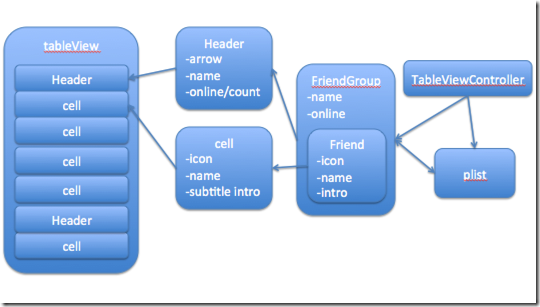
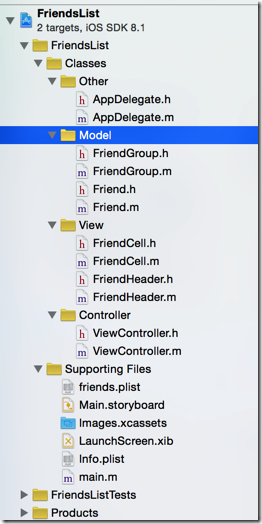
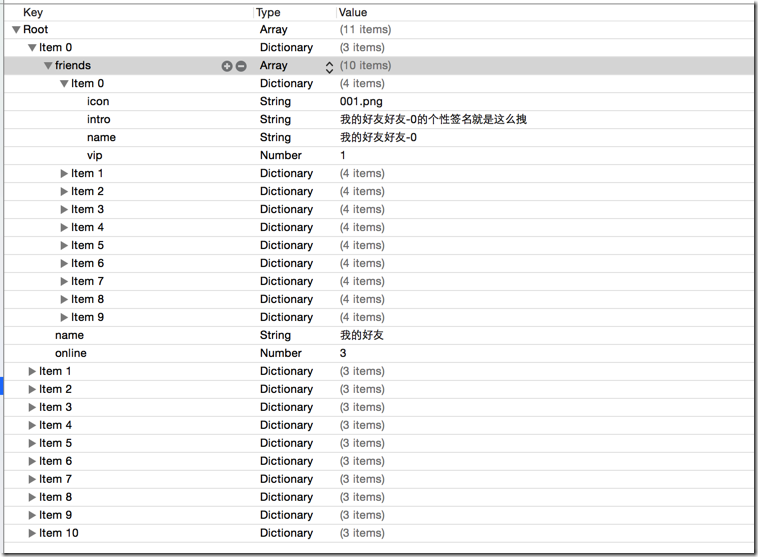
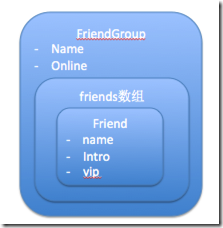
 //

 //  FriendGroup.h

 //  FriendsList

 //

 //  Created by hellovoidworld on 14/12/12.

 //  Copyright (c) 2014年 hellovoidworld. All rights reserved.

 //

 #import <Foundation/Foundation.h>

 @class Friend;

 @interface FriendGroup : NSObject

 /** 好友组 */

 @property(nonatomic, strong) NSArray *friends;

 /** 好友组名 */

 @property(nonatomic, copy) NSString *name;

 /** 在线人数 */

 @property(nonatomic, assign) int online;

 - (instancetype) initWithDictionary:(NSDictionary *) dictionary;

 + (instancetype) friendGroupWithDictionary:(NSDictionary *) dictionary;

 @end

 /** 加载数据  */

 - (void)setFriendGroup:(FriendGroup *)friendGroup
 /** 子控件布局方法

     在init的时候,只分配的内存,没有初始化控件的尺寸,在此处header已经有了位置尺寸了

 */

 - (void)layoutSubviews {

     // 必须先调用父类的方法

     [super layoutSubviews];

     // 1.背景

     self.headerButtonView.frame = self.bounds;

     // 2.在线人数/组内总人数

     CGFloat countWidth = ;

     CGFloat countHeight = self.frame.size.height;

     CGFloat countX = self.frame.size.width -  - countWidth;

     CGFloat countY = ;

     self.onlineCountView.frame = CGRectMake(countX, countY, countWidth, countHeight);

 }
 /** 自定义每个section的头部 */

 - (UIView *) tableView:(UITableView *)tableView viewForHeaderInSection:(NSInteger)section {

     FriendHeader *header = [FriendHeader friendHeaderWithTableView:self.tableView];

     header.friendGroup = self.friendGroups[section];

     return header;

 }
 /** 自定义构造方法 */

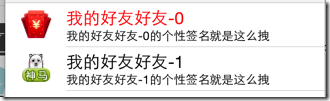
 + (instancetype) cellWithTableView:(UITableView *) tableView {

     static NSString *ID = @"friendCell";

     FriendCell *cell = [tableView dequeueReusableCellWithIdentifier:ID];

     if (nil == cell) {

         cell = [[self alloc] initWithStyle:UITableViewCellStyleSubtitle reuseIdentifier:ID];

     }

     return cell;

 }

 /** 加载数据 */

 - (void)setFriendData:(Friend *)friendData {

     _friendData = friendData;

     self.imageView.image = [UIImage imageNamed:friendData.icon];

     self.textLabel.text = friendData.name;

     self.textLabel.textColor = friendData.isVip?[UIColor redColor]:[UIColor blackColor];

     self.detailTextLabel.text = friendData.intro;

 }
 /** 是否伸展显示好友 */

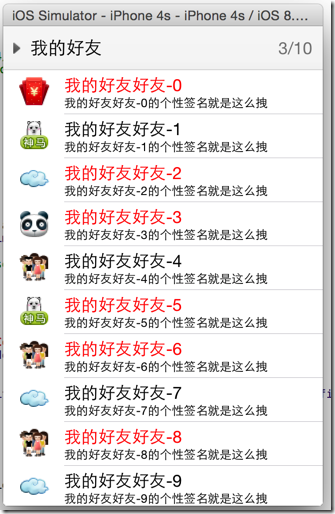
 @property(nonatomic, assign, getter=isOpened) BOOL opened;
         // 1.4点击事件

         [headerButtonView addTarget:self action:@selector(headerClicked) forControlEvents:UIControlEventTouchUpInside];
 /** 点击事件 */

 - (void) headerClicked {

     // 1.伸展、隐藏组内好友

     self.friendGroup.opened = !self.friendGroup.isOpened;

     // 2.刷新tableView

     if ([self.delegate respondsToSelector:@selector(friendHeaderDidClickedHeader:)]) {

         [self.delegate friendHeaderDidClickedHeader:self];

     }

 }
 @protocol FriendHeaderDelegate <NSObject>

 /** header被点击的代理方法 */

 @optional

 - (void) friendHeaderDidClickedHeader:(FriendHeader *) header;

 @end
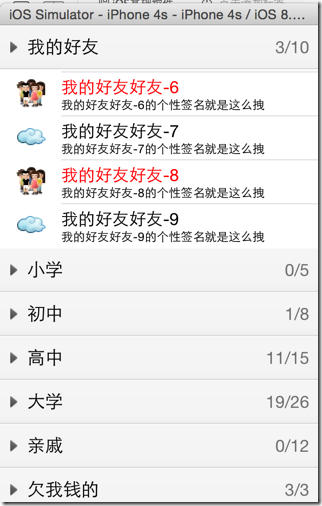
 - (NSInteger)tableView:(UITableView *)tableView numberOfRowsInSection:(NSInteger)section {

     FriendGroup *group = self.friendGroups[section];

     // 先检查模型数据内的伸展标识

     return group.isOpened? group.friends.count : ;

 }
 #pragma mark - FriendHeaderDelegate方法

 - (void)friendHeaderDidClickedHeader:(FriendHeader *)header {

     // 刷新数据

     [self.tableView reloadData];

 }
 /**

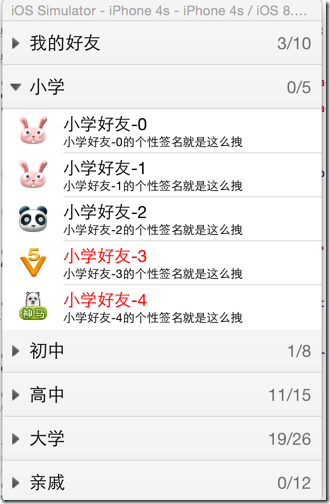
     被加到父控件之前

     由于tableView刷新数据后,所有header会被重新创建,所以要在这里对箭头朝向做出修改

 */

 - (void)didMoveToSuperview {

     // 改变箭头朝向,顺时针旋转90度

     CGFloat rotation = self.friendGroup.isOpened? M_PI_2 : ;

     self.headerButtonView.imageView.transform = CGAffineTransformMakeRotation(rotation);

 }
         // 改变箭头填充方式为居中

         [headerButtonView.imageView setContentMode:UIViewContentModeCenter];

         // 不需要裁剪箭头图片的边界

         [headerButtonView.imageView setClipsToBounds:NO];
[iOS基础控件 - 6.9.3] QQ好友列表Demo TableView的更多相关文章
- [iOS基础控件 - 6.12.1] QQ菜单管理 UITabBarController 控制器管理
A.需求 1.类似QQ.微信顶部或者底部的窗口转换导航条 2.给每个页面添加相应内容 B.UITabBarController 1.基本概念: (1)内容高度 iOS7之前内容高度为:屏幕高度 - ...
- [iOS基础控件 - 4.4] 进一步封装"APP列表”,初见MVC模式
A.从ViewController分离View 之前的代码中,View的数据加载逻辑放在了总的ViewController中,增加了耦合性,应该对控制器ViewController隐藏数据加载到Vie ...
- [iOS基础控件 - 6.10.1] PickerView 餐点搭配Demo
A.需求 1.使用PickerView做出有3列餐点(水果.主菜.饮料)的搭配Demo 2.选择的餐点实时显示在“显示区” 3.提供“随机”按钮,随机选择菜品搭配 B.实现步骤 1.拖入一个Pic ...
- [iOS基础控件 - 5.5] 代理设计模式 (基于”APP列表"练习)
A.概述 在"[iOS基础控件 - 4.4] APP列表 进一步封装,初见MVC模式”上进一步改进,给“下载”按钮加上效果.功能 1.按钮点击后,显示为“已下载”,并且不 ...
- [iOS基础控件 - 3.1] QQ登陆界面
A.storyboard 控件版 1.label 2.textfield a.Keyboard Type 账号:Number Pad 密码:Num ...
- iOS 基础控件(下)
上篇介绍了UIButton.UILabel.UIImageView和UITextField,这篇就简短一点介绍UIScrollView和UIAlertView. UIScrollView 顾名思义也知 ...
- [iOS基础控件 - 6.9] 聊天界面Demo
A.需求 做出一个类似于QQ.微信的聊天界面 1.每个cell包含发送时间.发送人(头像).发送信息 2.使用对方头像放在左边,我方头像在右边 3.对方信息使用白色背景对话框,我方信息使用蓝色背景对话 ...
- [iOS基础控件 - 7.0] UIWebView
A.基本使用 1.概念 iOS内置的浏览器控件 Safari浏览器就是通过UIWebView实现的 2.用途:制作简易浏览器 (1)基本请求 创建请求 加载请求 (2)代理监听webView加载, ...
- [iOS基础控件 - 6.11.3] 私人通讯录Demo 控制器的数据传递、存储
A.需求 1.搭建一个"私人通讯录"Demo 2.模拟登陆界面 账号 密码 记住密码开关 自动登陆开关 登陆按钮 3.退出注销 4.增删改查 5.恢复数据(取消修改) 这个代码 ...
随机推荐
- ACM - ICPC World Finals 2013 B Hey, Better Bettor
原题下载:http://icpc.baylor.edu/download/worldfinals/problems/icpc2013.pdf 这题真心的麻烦……程序不长但是推导过程比较复杂,不太好想 ...
- UVa 699 The Falling Leaves
题意:给出按先序输入的一颗二叉树,分别求出从左到右的相同横坐标上的节点的权值之和 递归建树,然后用sum数组分别统计每一个横坐标上的权值之和 感觉建树都在递归递归递归= =慢慢理解吧 #include ...
- django - 好的 获取 参数值 方法
第一步: # 参数列表 parameters = ('user_id', 'day_time', 'normal_data', 'hourly_data', 'product_id') # 需要传入的 ...
- Ecshop ajax 局部刷新购物车功能
1.比如我们category.dwt 里有 <a href='flow.php'><SPAN id='cart_count_all'>{insert name='cart_in ...
- linux 标准 GPIO 操作
Linux 提供了GPIO 操作的 API,具体初始化及注册函数在 driver/gpio/lib_gpio.c 中实现. #include int gpio_request(unsigne ...
- rpm 命令参数使用详解
RPM是RedHat Package Manager(RedHat软件包管理工具)类似Windows里面的“添加/删除程序” rpm 执行安装包 二进制包(Binary)以及源代码包(Source)两 ...
- spoj 694(后缀数组)
题意:求一个字符串的不重复子串的个数. 分析:对于下标为i的位置,能够产生的前缀子串个数为len-i(下标从0开始),对于与它字典序相邻的后缀产生的子串是重复的(就是他们的最长公共前缀),所以我们要减 ...
- 11g 重建EM 报ORA-20001: SYSMAN already exists
今天在安装11g(11.1.0.7.0)数据库之后,通过emca -config dbcontrol db -repos create 命令手工创建em的时候报错,查看日志后发现有以下错误 CONFI ...
- 转载:ofstream和ifstream详细用法
ofstream是从内存到硬盘,ifstream是从硬盘到内存,其实所谓的流缓冲就是内存空间; 在C++中,有一个stream这个类,所有的I/O都以这个“流”类为基础的,包括我们要认识的文件I/O, ...
- linux命令——磁盘管理cd
Linux cd 命令可以说是Linux中最基本的命令语句,其他的命令语句要进行操作,都是建立在使用 cd 命令上的. cd指令可让用户在不同的目录间切换,但该用户必须拥有足够的权限进入目的目录. 1 ...