
WinForm实现Rabbitmq官网6个案例-Hello World
先上代码
namespace RabbitMQDemo

{

    public partial class HelloWorld : Form

    {

        string queueName1 = "hello_queue1";//消费者1

        string queueName2 = "hello_queue2";//消费者2

        Action<string> SetText;

        /// <summary>

        /// 单线程实例

        /// </summary>

        private static readonly HelloWorld _helloWorld;

        static HelloWorld()

        {

            _helloWorld = new HelloWorld();

        }

        /// <summary>

        /// 单例模式

        /// </summary>

        public static HelloWorld SingleForm

        { get { return _helloWorld; } }

        private HelloWorld()

        {

            CheckForIllegalCrossThreadCalls = false;

            InitializeComponent();

            ReseiveMsg(queueName1);

            ReseiveMsg(queueName2);

            SetText += OnSetText;

        }

        private void btnSendMsg_Click(object sender, EventArgs e)

        {

            SendMsg();

        }

        /// <summary>

        /// 发送消息

        /// </summary>

        private void SendMsg()

        {

            string message = txtPublisher.Text;

            if (message.Trim().Length <= )

            {

                MessageBox.Show("请输入要发送的消息");

            }

            string queueName = cbBoxQueues.SelectedValue.ToString();

            var factory = new ConnectionFactory() { HostName = "localhost" };

            using (var connection = factory.CreateConnection())

            using (var channel = connection.CreateModel())

            {

                channel.QueueDeclare(queue: queueName,

                                     durable: false,

                                     exclusive: false,

                                     autoDelete: false,

                                     arguments: null);

                var body = Encoding.UTF8.GetBytes(message);

                channel.BasicPublish(exchange: "",

                                     routingKey: queueName,

                                     basicProperties: null,

                                     body: body);

            }

        }

        /// <summary>

        /// 接收消息

        /// </summary>

        private void ReseiveMsg(string queueName)

        {

            //string queueName = cbBoxQueues.SelectedText;

            try

            {

                var factory = new ConnectionFactory() { HostName = "localhost" };

                //connection和channel不能使用using,否则会被dispose掉

                var connection = factory.CreateConnection();

                var channel = connection.CreateModel();

                //声明队列 生产者和消费者都需要QueueDeclare

                channel.QueueDeclare(queue: queueName,

                                     durable: false,

                                     exclusive: false,

                                     autoDelete: false,

                                     arguments: null);

                var consumer = new EventingBasicConsumer(channel);

                consumer.Received += (model, ea) =>

                {

                    var body = ea.Body;

                    var message = Encoding.UTF8.GetString(body);

                    txtConsumer1.Invoke(SetText, message);

                };

                channel.BasicConsume(queue: queueName,

                                     noAck: true,

                                     consumer: consumer);

            }

            catch (Exception ex)

            {

                MessageBox.Show(ex.ToString());

            }

        }

        private void OnSetText(string txtContent)

        {

            string queueName = cbBoxQueues.SelectedValue.ToString();

            if (queueName == queueName1)

                txtConsumer1.Text += string.Format("{0}\r\n", txtPublisher.Text);

            if (queueName == queueName2)

                txtConsumer2.Text += string.Format("{0}\r\n", txtPublisher.Text);

        }

        private void HelloWorld_Load(object sender, EventArgs e)

        {

            List<DataSource> lst = new List<DataSource>();

            lst.Add(new DataSource("消费者1", "hello_queue1"));

            lst.Add(new DataSource("消费者2", "hello_queue2"));

            cbBoxQueues.DataSource = lst;

            cbBoxQueues.DisplayMember = "DisplayMember";

            cbBoxQueues.ValueMember = "DisplayValue";

        }

        private class DataSource

        {

            public DataSource(string displayMember,string displayValue)

            {

                DisplayMember = displayMember;

                DisplayValue = displayValue;

            }

            public string DisplayMember { get; set; }

            public string DisplayValue { get; set; }

        }

    }

}
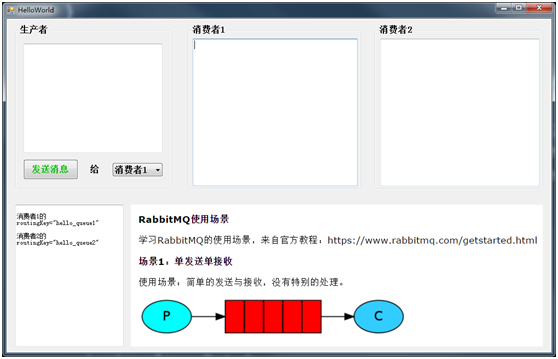
界面如下:
大致流程是
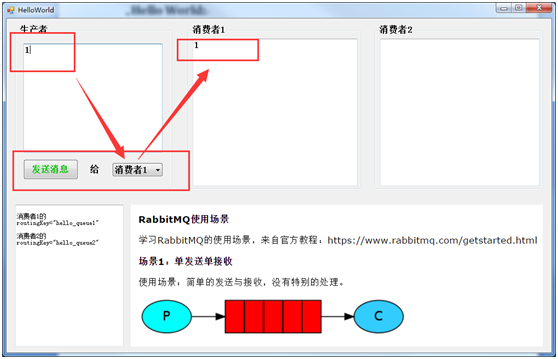
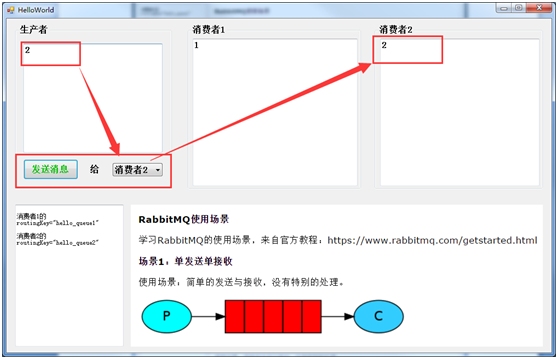
生产者发送消息到队列,然后队列(rabbitmq)把消息发送给消费者(消费者向rabbitmq索取消息)
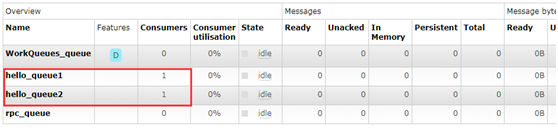
两个消费者:
WinForm实现Rabbitmq官网6个案例-Hello World的更多相关文章
- WinForm实现Rabbitmq官网6个案例-RPC
获取源码 客户端代码: namespace RabbitMQDemo { public partial class RPC : Form { private readonly static RPC _ ...
- WinForm实现Rabbitmq官网6个案例-Publishe/Subscribe
代码: namespace RabbitMQDemo { public partial class PublishSubscribe : Form { private string exchangeN ...
- WinForm实现Rabbitmq官网6个案例-Work Queues
代码: namespace RabbitMQDemo { public partial class WorkQueues : Form { private string queueName = &qu ...
- WinForm实现Rabbitmq官网6个案例-Topics
代码: namespace RabbitMQDemo { public partial class Topics : Form { private string exchangeName = &quo ...
- WinForm实现Rabbitmq官网6个案例-Routing
代码: namespace RabbitMQDemo { public partial class Routing : Form { private string exchangeName = &qu ...
- 官网英文版学习——RabbitMQ学习笔记(一)认识RabbitMQ
鉴于目前中文的RabbitMQ教程很缺,本博主虽然买了一本rabbitMQ的书,遗憾的是该书的代码用的不是java语言,看起来也有些不爽,且网友们不同人学习所写不同,本博主看的有些地方不太理想,为此本 ...
- 2022年官网下安装RabbitMQ最全版与官网查阅方法
目录 一.Erlang环境部署 1.百度搜索"Erlang",或者访问网址:https://www.erlang.org/,找到DOWNLOAD双击进入. 2.找到支持的windo ...
- Yeoman 官网教学案例:使用 Yeoman 构建 WebApp
STEP 1:设置开发环境 与yeoman的所有交互都是通过命令行.Mac系统使用terminal.app,Linux系统使用shell,windows系统可以使用cmder/PowerShell/c ...
- MXNet官网案例分析--Train MLP on MNIST
本文是MXNet的官网案例: Train MLP on MNIST. MXNet所有的模块如下图所示: 第一步: 准备数据 从下面程序可以看出,MXNet里面的数据是一个4维NDArray. impo ...
随机推荐
- 无比迅速敏捷地开发iOS超精美控件
目录 前言 设计 编码 PaintCode 前言 自从人生第一篇博客<iOS中的预编译指令的初步探究>问世以来 浏览量竟然达到了360多,(路过的大神勿笑!)这些浏览量使我兴奋异常但又令我 ...
- windows phpinfo上不能找到memcache扩展 php版本5.6
我的memcache用的我是memcached-win64-1.4.4-14.zip这个版本memcache扩展库下载地址:http://windows.php.net/downloads/pecl/ ...
- php正则验证邮箱、手机号、姓名、身份证、特殊符号等
1.邮箱验证 1 $email='1515212@qq'; 2 $preg_email='/^[a-zA-Z0-9]+([-_.][a-zA-Z0-9]+)*@([a-zA-Z0-9]+[-.])+( ...
- Eclipse打开时“发现了以元素'd:skin'”开头的无效内容。此处不应含有子元素的解决方法
把有问题的 devices.xml 文件删除,再在sdk 里面 tools\lib 下找到devices.xml 文件,将这个文件拷贝到你删除的那个文件夹里,重启 eclipse 就 OK 啦!
- mono for android读书笔记之硬件编程(转)
本章将会介绍: 传感器的API 加速器编程,设备的方向,近场检测 网络编程 蓝牙编程 上述的技术的应用场景很多,比如: 1.检测当前的网络是否可用,并提醒用户,检测当前的网络类型,比如Wifi.3G. ...
- JS框架设计之对象扩展一种子模块
对象扩展 说完了,对象的创建(框架的命名空间的创建)以及如何解决多库之间的命名空间冲突问题之后,接下来,就是要扩展我们的对象,来对框架进行扩展,我们需要一种新功能,将新添加的功能整合到我们定义的对象中 ...
- 第3章—高级装配—配置profile bean
配置profile bean 3.1.@profile注解是spring提供的一个用来标明当前运行环境的注解. 我们正常开发的过程中经常遇到的问题是,开发环境是一套环境,qa测试是一套环境,线上部署又 ...
- android studio ndk 开发入门
ndk 开发没什么神秘的ndk 说白了就是一个交叉编译的工具链,用它来生成各个CPU架构下的静态或动态链接库,linux 下就是 .a 和 .so 文件.原理就是 java 通过 JNI 和 C.C+ ...
- WPF 使用依赖属性自定义控件
使用依赖属性自定义控件,依赖属性必须定义在自定义控件中,不能定义在其他文件中 一.先实现一个类继承你要复写的类 using System; using System.Collections.Gener ...
- js中字符串的替换
定义和用法 replace() 方法用于在字符串中用一些字符替换另一些字符,或替换一个与正则表达式匹配的子串. 语法 stringObject.replace(regexp/substr,replac ...