
ASP.NET Zero--12.一个例子(5)商品分类管理-编辑分类
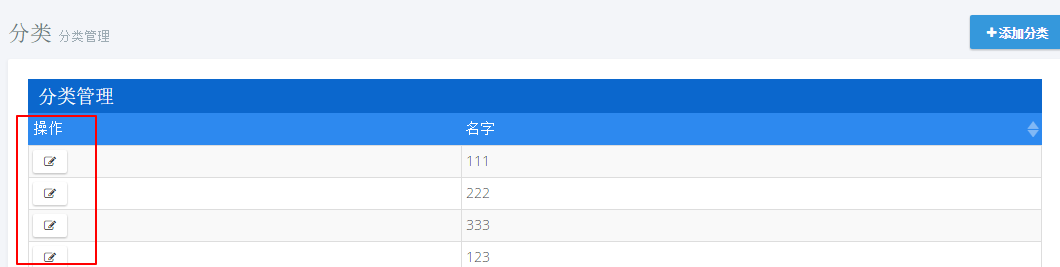
1.添加编辑按钮
actions: {

                    title: app.localize('Actions'),//操作列

                    width: '15%',

                    sorting: false,

                    display: function (data) {

                        var $span = $('<span></span>');

                        $('<button class="btn btn-default btn-xs" title="' + app.localize('Edit') + '"><i class="fa fa-edit"></i></button>')

                                .appendTo($span)

                                .click(function () {

                                    _editModal.open({ id: data.record.id });

                                });

                        return $span;

                    }

                },
2.模态框创建
@using MyCompanyName.AbpZeroTemplate.Web.Areas.Mpa.Models.Common.Modals

@Html.Partial("~/Areas/Mpa/Views/Common/Modals/_ModalHeader.cshtml", new ModalHeaderViewModel("编辑分类"))

<div class="modal-body">

    <form name="CategoryForm">

        <input type="hidden" name="Id" value="@Model.Id" />

        <div class="form-group form-md-line-input form-md-floating-label">

            <input type="text" name="Name" value="@Model.Name" class="form-control edited" required >

            <label>名称</label>

        </div>

    </form>

</div>

@Html.Partial("~/Areas/Mpa/Views/Common/Modals/_ModalFooterWithSaveAndCancel.cshtml")
var EditCategoryModal = (function ($) {

    app.modals.EditCategoryModal = function () {

        var _modalManager;

        var _categoryService = abp.services.app.category;

        var _$categoryForm = null;

        this.init = function (modalManager) {

            _modalManager = modalManager;

            _$categoryForm = _modalManager.getModal().find('form[name=CategoryForm]');

            _$categoryForm.validate();

        };

        this.save = function () {

            if (!_$categoryForm.valid()) {

                return;

            }

            var category = _$categoryForm.serializeFormToObject();

            _modalManager.setBusy(true);

            _categoryService.updateCategory(

                category

            ).done(function () {

                abp.notify.info(app.localize('SavedSuccessfully'));

                _modalManager.close();

                abp.event.trigger('app.editCategoryModalSaved');

            }).always(function () {

                _modalManager.setBusy(false);

            });

        };

    };

})(jQuery);
3.添加方法
void UpdateCategory(CreateCategoryInput input);

CategoryOutput GetCategoryForEdit(EntityRequestInput input);
public void UpdateCategory(CreateCategoryInput input)

        {

int count = _categoryRepository.Count(a => a.Name.Equals(input.Name) && a.Id!=input.Id);

            if (count > )

            {

                throw new UserFriendlyException("分类名称已存在!");

            }

            var category=_categoryRepository.Get(input.Id);

            category.Name = input.Name;

        }

public CategoryOutput GetCategoryForEdit(EntityRequestInput input)

        {

            var category = _categoryRepository.Get(input.Id);

            return new CategoryOutput()

            {

                Id = category.Id,

                Name = category.Name

            };

        }
4.修改Index.js
...

var _createModal = new app.ModalManager({

            viewUrl: abp.appPath + 'Mpa/Category/CreateModal',//加载视图

            scriptUrl: abp.appPath + 'Areas/Mpa/Views/Category/_CreateModal.js',//加载对应js

            modalClass: 'CreateCategoryModal'

        });

        var _editModal = new app.ModalManager({

            viewUrl: abp.appPath + 'Mpa/Category/EditModal',

            scriptUrl: abp.appPath + 'Areas/Mpa/Views/Category/_EditModal.js',

            modalClass: 'EditCategoryModal'

        });

...

//事件注册

        abp.event.on('app.createCategoryModalSaved', function () {

            getCategories(true);

        });

        abp.event.on('app.editCategoryModalSaved', function () {

            getCategories(true);

        });
5.控制器
private ICategoryAppService _categoryAppService;

        public CategoryController(ICategoryAppService categoryAppService)

        {

            _categoryAppService = categoryAppService;

        }

...

public ActionResult EditModal(int id)

        {

            CategoryOutput category=_categoryAppService.GetCategoryForEdit(new EntityRequestInput(id));

            CategoryViewModel categoryViewModel=new CategoryViewModel()

            {

                Id = category.Id,

                Name = category.Name

            };

            return PartialView("_EditModal", categoryViewModel);

        }
6.添加ViewModel
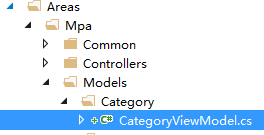
public class CategoryViewModel

    {

        public int Id { get; set; }

        public string Name { get; set; }

    }
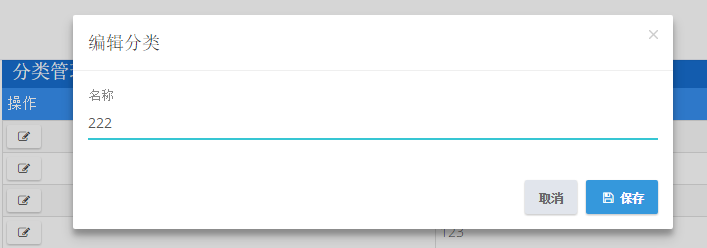
7.测试
ASP.NET Zero--12.一个例子(5)商品分类管理-编辑分类的更多相关文章
- [asp.net core]SignalR一个例子
摘要 在一个后台管理的页面想实时监控一些操作的数据,想到用signalR. 一个例子 asp.net core+signalR 使用Nuget安装包:Microsoft.AspNetCore.Sign ...
- ASP.NET Zero--13.一个例子(6)商品分类管理-删除分类
1.添加按钮 首先添加一个删除按钮,打开文件Index.js[..\MyCompanyName.AbpZeroTemplate.Web\Areas\Mpa\Views\Category\Index.j ...
- ASP.NET Zero--15.一个例子(8)商品分类管理-权限控制
1.添加权限常量 打开文件AppPermissions.cs [..\MyCompanyName.AbpZeroTemplate.Core\Authorization\AppPermissions.c ...
- ASP.NET Zero--8.一个例子(1)菜单添加
以一个商品分类管理功能来编写,代码尽量简单易懂.从一个实体开始,一直到权限控制,由浅到深一步步对功能进行完善. 1.打开语言文件 [..\MyCompanyName.AbpZeroTemplate.C ...
- 这算是ASP.NET MVC的一个大BUG吗?
这是昨天一个同事遇到的问题,我觉得这是一个蛮大的问题,而且不像是ASP.NET MVC的设计者有意为之,换言之,这可能是ASP.NET MVC的一个Bug(不过也有可能是保持原始请求数据而作的妥协). ...
- 返璞归真 asp.net mvc (12) - asp.net mvc 4.0 新特性之移动特性
原文:返璞归真 asp.net mvc (12) - asp.net mvc 4.0 新特性之移动特性 [索引页][源码下载] 返璞归真 asp.net mvc (12) - asp.net mvc ...
- 通过一个例子了解Ajax
Ajax指的Asyncronous JavaScript and XML Ajax并不是什么新的编程语言, 它是现有一些东西的应用.从它的名称中就可以看出来 假如我们设想, 浏览器展示了一个页面,但需 ...
- [ASP.NET MVC2 系列] ASP.Net MVC教程之《在15分钟内用ASP.Net MVC创建一个电影数据库应用程序》
[ASP.NET MVC2 系列] [ASP.NET MVC2 系列] ASP.Net MVC教程之<在15分钟内用ASP.Net MVC创建一个电影数据库应用程序> ...
- 《The art of software testing》的一个例子
这几天一直在看一本书,<The art of software testing>,里面有一个例子挺有感触地,写出来和大家分享一下: [问题] 从输入对话框中读取三个整数值,这三个整数值代表 ...
随机推荐
- javascript 中this的使用场景全
1. global this 2.function this 3.prototype this 4. object this 5.DOM this 6 HTML this 7 override thi ...
- 去掉谷歌input记住账号或密码时默认出现的黄色背景
在谷歌浏览器会默认记住账号,而记住账号之后其input的背景会变成黄色,解决的办法如下: 方法一:直接用css的内阴影来覆盖黄色,代码如下: input:-webkit-autofill { -web ...
- ComboBox值排序
ComboBox值排序先是想通过冒泡排序,但是冒泡排序是int类型,又打算通过下标,进行字符串排序,然后想到了一个简单的办法……先存入ArrayList排序Sort清空ComboBox再遍历存入 ...
- CentOS 6.4 x64 Cacti 监控安装配置
Cacti 监控安装配置 环境: 安装Cacti 的服务器 Linux 6.4 x64 ip 10.8.8.11 一: 配置iptables , selinux vi ...
- mysql trouble shooting---- 从库停止同步lock_wait_timeout_exceeded_try_restarting_transaction
问题描述: 数据库从库停止同步. 问题分析: show slave status\G;(也可使用show full processlist) 显示 某个update语句出错,Lock wait tim ...
- Extjs6中的新特性
Ext JS在Sencha框架中引入了许多新的和令人兴奋的改进.这些变化为基于所有现代浏览器.设备和屏幕尺寸带来了新的功能和可用性. 工具包(ToolKits) Ext JS 6最大的变化就是将Ext ...
- Delphi 与 DirectX
关于DirectX 在Delphi下的使用 源:Delphi 与 DirectX
- Run Loop简介 分类: ios技术 ios相关 2015-03-11 22:21 73人阅读 评论(0) 收藏
做了一年多的IOS开发,对IOS和Objective-C深层次的了解还十分有限,大多还停留在会用API的级别,这是件挺可悲的事情.想学好一门语言还是需要深层次的了解它,这样才能在使用的时候得心应手,出 ...
- BZOJ2064: 分裂
2064: 分裂 Time Limit: 10 Sec Memory Limit: 64 MBSubmit: 360 Solved: 220[Submit][Status][Discuss] De ...
- 【腾讯优测干货分享】微信小程序之自动化亲密接触
本文来自于腾讯优测公众号(wxutest),未经作者同意,请勿转载,原文地址:http://mp.weixin.qq.com/s/HcPakz5CV1SHnu-U8n85pw 导语 山雨欲来风满楼,最 ...