
centos7安装elasticsearch-head
elasticsearch-head安装前准备
1.操作系统
64位CentOS Linux release 7.2.1511 (Core)
2.git是必需的
elasticsearch-head是一款开源软件,被托管在github上面,所以如果我们要使用它,必须先安装git,通过git获取elasticsearch-head。我一开始在centos上装了git,但是后来仔细一想,我windows上已经装过了,没必要为了获取elasticsearch-head再在centos上装git。不过既然已经装了,那我们就在centos上获取吧。
可参考我的另一片文章安装git:centos7安装git
3.nodejs也是必需的
运行elasticsearch-head会用到grunt,而grunt需要npm包管理器,所以nodejs是必须要安装的。
可参考我的另一片文章安装nodejs:centos7安装nodejs
4.单独部署elasticsearch-head
elasticsearch5.0之后,elasticsearch-head不做为插件放在其plugins目录下了,所以可以单独部署一台服务器,没必要和elasticsearch部署在同一台机器
下载elasticsearch-head
使用git拷贝elasticsearch-head到本地
[root@localhost local]# cd /usr/local/
[root@localhost local]# git clone git://github.com/mobz/elasticsearch-head.git
安装elasticsearch-head依赖包
[root@localhost _site]# cd /usr/local/elasticsearch-head/
[root@localhost local]# cnpm install
如果出现下面的黄色警告,不用管,不影响使用。
npminstall WARN package.json not exists: /usr/local/package.json
修改Gruntfile.js
[root@localhost _site]# cd /usr/local/elasticsearch-head/
[root@localhost elasticsearch-head]# vi Gruntfile.js
在connect-->server-->options下面添加:hostname:’*’,允许所有IP可以访问
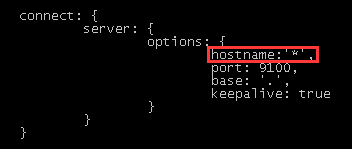
修改elasticsearch-head默认连接地址:
[root@localhost elasticsearch-head]# cd /usr/local/elasticsearch-head/_site/
[root@localhost _site]# vi app.js
将this.base_uri = this.config.base_uri || this.prefs.get("app-base_uri") || "http://localhost:9200";中的localhost修改成你es的服务器地址,我的是:192.168.1.60:9200
配置elasticsearch允许跨域访问
进入elasticsearch服务器,打开elasticsearch的配置文件elasticsearch.yml,在文件末尾追加下面两行代码即可:
http.cors.enabled: true
http.cors.allow-origin: "*"
打开9100端口
如果想在别的机器上访问,防火墙必须开启9100端口
永久打开9100端口
[root@localhost elasticsearch-head]# firewall-cmd --zone=public --add-port=9100/tcp --permanent
重启防火墙
[root@localhost elasticsearch-head]# firewall-cmd --reload
启动elasticsearch
这里就不介绍了。
只有启动了elasticsearch,连接的时候才能连接上。
下面是我个人整理的一些笔记,有兴趣可以看下
centos7 elasticsearch之kibana安装
启动elasticsearch-head
[root@localhost _site]# cd /usr/local/elasticsearch-head/
[root@localhost elasticsearch-head]# node_modules/grunt/bin/grunt server
[root@localhost elasticsearch-head]# cd /usr/local/elasticsearch-head/

[root@localhost elasticsearch-head]#  node_modules/grunt/bin/grunt server

Running "connect:server" (connect) task

Waiting forever...

Started connect web server on http://localhost:9100
如上,表示elasticsearch-head启动成功
访问elasticsearch-head
浏览器输入网址:http://192.168.1.20:9100/

参考网址
http://www.cnblogs.com/valor-xh/p/6293689.html
http://www.cnblogs.com/xing901022/p/6030296.html
如有错误,欢迎指正,共同学习。
centos7安装elasticsearch-head的更多相关文章
- Centos7安装elasticsearch、logstash、kibana、elasticsearch head
环境:Centos7, jdk1.8 安装logstash 1.下载logstash 地址:https://artifacts.elastic.co/downloads/logstash/logsta ...
- centos7 安装 elasticsearch
安装java环境 这里使用yum方式安装,前提是必须有网络 yum install java-1.8.0-openjdk 安装完成,查看java版本 [root@localhost ~]# java ...
- centos7安装Elasticsearch及Es-head插件详细教程(图文)
懒惰了很久,今天来写一下Elasticsearch在centos7上安装教程以及安装过程中可能出现的报错解决方式,有不对的地方,烦请各位看官多多指教! 一.ES安装 1.环境检查 确保有java环境, ...
- centos7 安装elasticsearch
[root@localhost local]# tar xzvf elasticsearch-2.3.5.tar.gz [root@localhost elasticsearch-2.3.5]# bi ...
- Centos7安装Elasticsearch和Kibana
这里使用的6.6.0版本,ES需要JDK环境,对应1.8 Elasticsearch安装: 1.下载:https://elasticsearch.cn/download/ 2.解压: 3.修改配置:j ...
- centos7安装elasticsearch
[root@aaron tools]# wget https://artifacts.elastic.co/downloads/elasticsearch/elasticsearch-5.5.1.zi ...
- centos7环境安装ElasticSearch
操作系统: Centos7 .64位 ========================================= 查看系统版本和系统位数: [root@localhost /]# cat /e ...
- Centos7下安装Elasticsearch 5.6.6
环境 因为elasticsearch是用java编写的,所以需要先安装JDK ES 5,安装需要 JDK 8 以上ES 6.5,安装需要 JDK 11 以上ES 7.2.1,内置了 JDK 12 安装 ...
- 【elasticsearch】(2)centos7 超简单安装elasticsearch 的监控、测试的集群工具elasticsearch head
elasticsearch-head是elasticsearch(下面称ES)比较普遍使用的可监控.测试等功能的集群管理工具,是由H5编写的单独的网页程序.使用方法网上很多,这里教大家一个超简单安装h ...
- ElasticSearch(一):CentOS7 安装 ElasticSearch6.4.0
一.安装jre支持 在CentOS中安装ElasticSearch需要Java1.8.0,可执行命令# java -version查看当前系统所安装Java版本是否为1.8.0版本. 若非1.8.0 ...
随机推荐
- 4609: [Wf2016]Branch Assignment 最短路 DP (阅读理解题)
Bzoj的翻译出锅了所以来官方题面:这个题应该是单向边而BZOJ说的是双向边,什么你WA了?谁叫你懒得看英文...... 显然我们能正向反向两遍SPFA处理出每个点到总部的距离和总部到每个点的距离.如 ...
- gitbook构建文档命令
安装node: sudo ln -s /opt/node-v8.3.9-linux-x64/bin/node /usr/local/bin/node sudo ln -s /opt/node-v8.3 ...
- window 7喇叭有红叉,耳机扬声器已拔出驱动无法修复
win7系统没声音前提是声卡驱动已经安装完全,且没有问题.Windows 7系统电脑有耳机的存在,但是还是显示扬声器耳机或耳机已拔出 ,未修复故障,首先可以百度下看下其他教程,尝试过还是不行的时候,可 ...
- 喵哈哈村的魔法考试 Round #13 (Div.2) 题解
喵哈哈村的木星传说(一) 旋转90°,找找规律就知道(x,y)->(n-1-y,x) 然后输出就好了. #include<bits/stdc++.h> using namespace ...
- webpack - HtmlWebpackPlugin理解
该插件的两个主要作用: 为html文件中引入的外部资源如script.link动态添加每次compile后的hash,防止引用缓存的外部文件问题 可以生成创建html入口文件,比如单页面可以生成一个h ...
- db2存储过程动态sql被截断
编写存储过程,使用动态sql时,调试时发现变量赋值后被截断. 关键代码如下: 实现的效果是先把上下游做对比的sql语句和相关参数存入RKDM_DATA_VOID_RULE, 执行存储过程后把两个sql ...
- 关于RabbitMQ关键性问题的总结
摘要:本篇是本人对RabbitMQ使用的关键性问题进行的总结,如性能上限.数据存储.集群等, 具体的RabbitMQ概念.安装.使用方法.SpringAMQP配置,假设读者已有了基础. 1. ...
- [Android Pro] https://blog.csdn.net/gaugamela/article/details/79143309
原文地址:https://blog.csdn.net/gaugamela/article/details/79143309 最近遇到这样一个问题: 第三方的SDK除了Jar包外,还提供了对应的so文件 ...
- autorelease' is unavailable
ARC forbids explicit message send of'release' 'release' is unavailable: not available inautomatic re ...
- [Python设计模式] 第7章 找人帮忙追美眉——代理模式
github地址:https://github.com/cheesezh/python_design_patterns 题目1 Boy追求Girl,给Girl送鲜花,送巧克力,送洋娃娃. class ...