
RN animated组动画
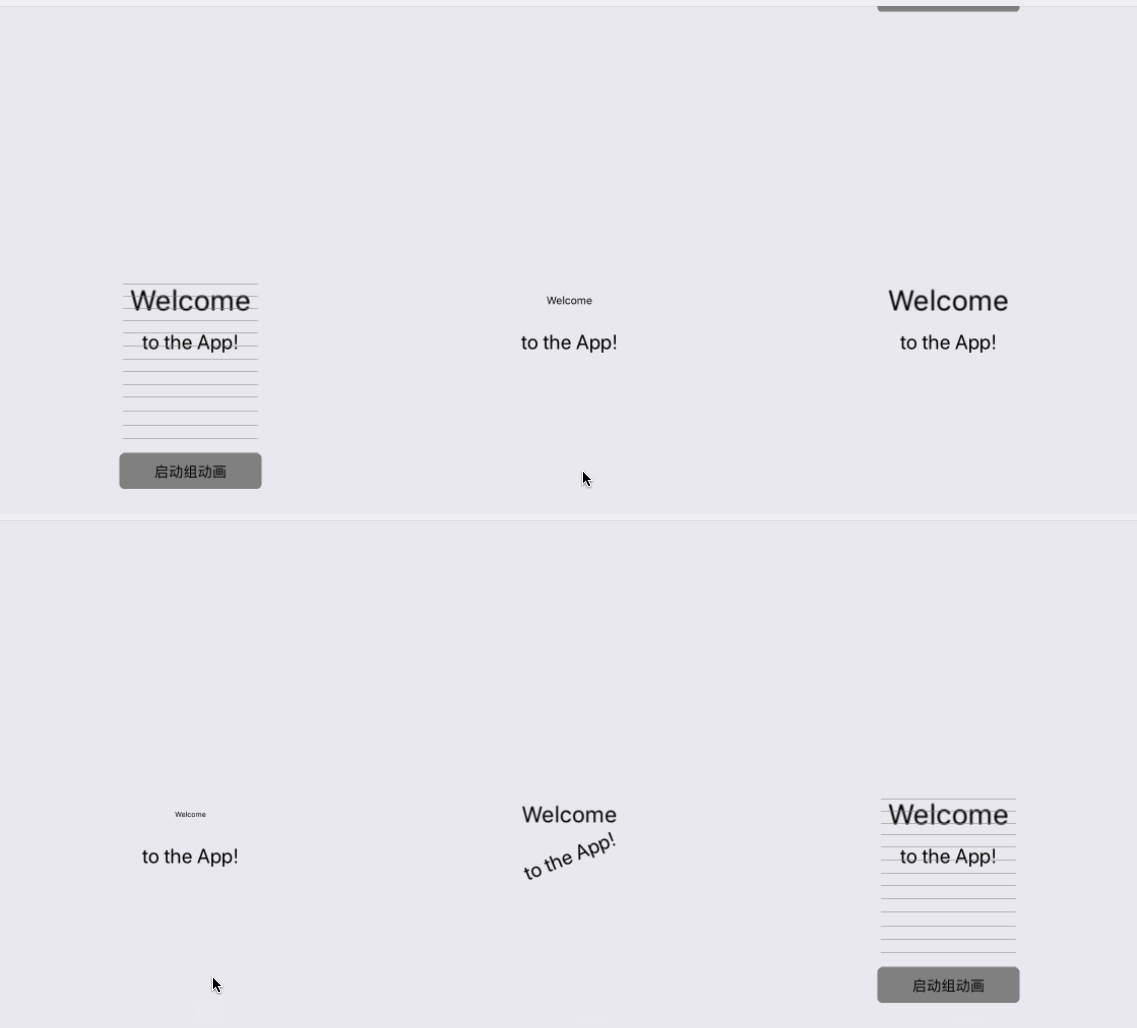
代码:
export default class AnimationGroupScene extends Component {

    constructor() {

        super()

        this.animatedValue1 = new Animated.Value()

        this.animatedValue2 = new Animated.Value()

        this.animatedValue3 = new Animated.Value()

    }

    componentDidMount() {

        this.animate()

    }

    animate() {

        this.animatedValue1.setValue()

        this.animatedValue2.setValue()

        this.animatedValue3.setValue()

        const createAnimation = function (value, duration, easing, delay = ) {

            return Animated.timing(

                value,

                {

                    toValue: ,

                    duration,

                    easing,

                    delay

                }

            )

        }

        Animated.parallel([

            createAnimation(this.animatedValue1, , Easing.ease),

            createAnimation(this.animatedValue2, , Easing.ease, ),

            createAnimation(this.animatedValue3, , Easing.ease, )

        ]).start()

    }

    render() {

        const scaleText = this.animatedValue1.interpolate({

            inputRange: [, ],

            outputRange: [0.5, ]

        })

        const spinText = this.animatedValue2.interpolate({

            inputRange: [, ],

            outputRange: ['0deg', '720deg']

        })

        const introButton = this.animatedValue3.interpolate({

            inputRange: [, ],

            outputRange: [-, ]

        })

        return (

            <View style={styles.container}>

                <Animated.View

                    style={{transform: [{scale: scaleText}]}}>

                    <Text>Welcome</Text>

                </Animated.View>

                <Animated.View

                    style={{marginTop: , transform: [{rotate: spinText}]}}>

                    <Text

                        style={{fontSize: }}>

                        to the App!

                    </Text>

                </Animated.View>

                <Animated.View

                    style={{top: introButton, position: 'absolute'}}>

                    <TouchableHighlight

                        onPress={this.animate.bind(this)}

                        style={styles.button}>

                        <Text>启动组动画</Text>

                    </TouchableHighlight>

                </Animated.View>

            </View>

        );

    }

}

const styles = StyleSheet.create({

    container: {

        flex: ,

        marginTop: ,

        justifyContent: 'center',

        alignItems: 'center',

    },

    button: {

        marginTop: ,

        backgroundColor: '#808080',

        height: ,

        width: ,

        borderRadius: ,

        justifyContent: 'center',

        alignItems: 'center',

    },

});
RN animated组动画的更多相关文章
- RN animated缩放动画
效果图: 代码: import React, {Component} from 'react'; import { AppRegistry, StyleSheet, Text, Animated, T ...
- RN Animated透明度动画
主要代码解析: 如果我们希望吧Animated.Value从0变化到1,把组件位置从60px移动到0px,把不透明度从0编导1,就可以使用style的属性来实现 <Animated.Text s ...
- RN animated帧动画
效果图: 代码: export default class AnimationFrameScene extends Component { constructor () { super() this. ...
- iOS开发UI篇—核心动画(转场动画和组动画)
转自:http://www.cnblogs.com/wendingding/p/3801454.html iOS开发UI篇—核心动画(转场动画和组动画) 一.转场动画简单介绍 CAAnimation的 ...
- Core Animation中的组动画
实际开发中一个物体的运动往往是复合运动,单一属性的运动情况比较少,但恰恰属性动画每次进行动画设置时一次只能设置一个属性进行动画控制(不管是 基础动画还是关键帧动画都是如此),这样一来要做一个复合运动的 ...
- Vue系列之 => 使用第三方animated.css动画
<!DOCTYPE html> <html lang="en"> <head> <meta charset="UTF-8&quo ...
- react-native Animated, 旋转动画
Animated 仅封装了四个可以动画化的组件: View.Text.Image.ScrollView 可以使用 Animated.createAnimatedComponent()来封装你自己的组件 ...
- animated js动画示例
function fabtn(a){ $(a).find('i').addClass('animated wobble'); setTimeout(function(){ $(a).find('i') ...
- CSS属性组-动画、转换、渐变
一.动画 animation动画属性是一个简写属性,用于设置六个动画属性 aninmation-name动画名称,被调用 animation-duration完成动画需要的持续时间 animation ...
随机推荐
- [Paper] **Before GAN: sparse coding
读罢[UFLDL] ConvNet,为了知识体系的完整,看来需要实战几篇论文深入理解一些原理. 如下是未来博文系列的初步设想,为了hold住 GAN而必备的知识体系,也是必经之路. [Paper] B ...
- ASP.NET MVC 4 (十三) 基于表单的身份验证
在前面的章节中我们知道可以在MVC应用程序中使用[Authorize]特性来限制用户对某些网址(控制器/控制器方法)的访问,但这都是在对用户认证之后,而用户的认证则依然是使用ASP.NET平台的认证机 ...
- JPA实体类中常用的注解
这两天在看黎活明老师的JPA的讲解视频,现在只了解这么多,记录备用. import java.util.Date; import javax.persistence.Basic; import jav ...
- IntelliJ IDE破解
1.购买正版用户 2.激活码 一:下载以下jar,放到 bin 破解补丁无需使用注册码,下载地址 idea14 keygen下载地址 二:在下面两个文件中加入-javaagent:E:\IDEA\In ...
- VS2017 配置freeglut3.0.0
配置freeglut: 1. 先下载cmake和freeglut3.0.0文件,并使用cmake编译freeglut,再使用vs2017生成解决方案,详细步骤见https://blog.csdn.ne ...
- 腾讯云极速配置NodeJS+LNMP运行环境
版权声明:本文由吴逸翔原创文章,转载请注明出处: 文章原文链接:https://www.qcloud.com/community/article/848754001487150669 来源:腾云阁 h ...
- DBeaver连接达梦数据库
1.连接类型选择ODBC. 2.编辑驱动设置: 1)Class Name:dm.jdbc.driver.DmDriver 2)URL Template:jdbc:dm://{dbserver}/{da ...
- 【win10】显示窗口标题栏颜色
win10默认窗口标题栏是白色的,看起来不习惯. 修改方法如下. 1.按win+X,[设置]->[个性化]->[颜色],勾选如图所示[标题栏]即可.
- java封装实现Excel建表读写操作
对 Excel 进行读写操作是生产环境下常见的业务,网上搜索的实现方式都是基于POI和JXL第三方框架,但都不是很全面.小编由于这两天刚好需要用到,于是就参考手写了一个封装操作工具,基本涵盖了Exce ...
- Multi-Database Transaction Demo
public ResultM UploadFile(FileInfoM pFileInfoM) { ResultM result = }; DbModel db = new DbModel(); Db ...