
10 Interesting Linux Command Line Tricks and Tips Worth Knowing
I passionately enjoy working with commands as they offer more control over a Linux system than GUIs(Graphical User Interfaces) applications, therefore am always on the look out to discover or figure out interesting ways and ideas to make Linux so easy and fun to operate, primarily from the terminal.
It is always thrilling when we discover new tricks or tips while using Linux especially a command line geek like myself.
Suggested Read: 5 Interesting Command Line Tips and Tricks in Linux – Part 1
And the feeling of wanting to share newly learned practices or commands with millions of Linux users out there, particularly the newbies who are still getting their way around this exciting operating system normally sets in.
Suggested Read: 10 Useful Linux Command Line Tricks for Newbies – Part 2
In this article, we will review a number of useful command line tricks and tips that can significantly enhance your Linux usage skills.
1. Lock or Hide a File or Directory in Linux
The simplest way of locking a file or directory is by using Linux file permissions. In case your the owner of a file or directory, you can block (remove read, write and execute privileges) other users and groups from accessing it as follows:
$ chmod 700 tecmint.info

OR

$ chmod go-rwx tecmint.info
To know more about Linux file permissions, read this article Managing Users & Groups, File Permissions & Attributes in Linux.
To hide the file/directory from other system users, rename it with a (.) at the start of the file or directory:
$ mv filename .tecmint.info
2. Translate rwx Permissions into Octal Format in Linux
By default, when you run the ls command, it displays file permissions in rwx format, but to understand the equivalence of this format and the octal format, you can learn how to translate rwx permissions into Octal format in Linux.
3. How to Use ‘su’ When ‘sudo’ Fails
Although sudo command is used to execute commands with superuser privileges, there are moments when it fails to work as in the example below.
Here, I want to empty the contents of a large file named uptime.log but the operation has failed even when I used sudo.
$ cat /dev/null >/var/log/uptime.log

$ sudo cat /dev/null >/var/log/uptime.log

Empty Large File Content in Linux
In such as case, you need to switch to the root user account using su command to perform the operation like so:
$ su

$ sudo cat /dev/null >/var/log/uptime.log

$ cat /var/log/uptime.log
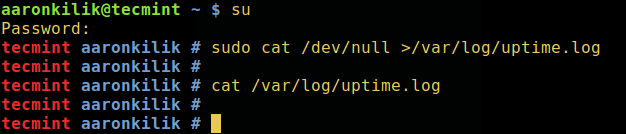
Switch to Super User
Try to understand the difference between su and sudo, in addition, read through their man pages for more guidelines:
$ man sudo

$ man su
4. Kill a Process in Linux
Sometimes when you want to terminate a process using kill or killall or pkill commands, it may fail to work, you realize that the process still continues to run on the system.
In order to destructively kill a process, send the -KILL siganl to it.
First determine its process ID and then kill it like so:
$ pidof vlc

$ sudo kill -KILL 10279

Find and Kill Process in Linux
Check the kill command for additional usage options and information.
5. Delete File Permanently in Linux
Normally, we use the rm command to delete files from a Linux system, however, these files do not completely get deleted, they are simply stored and hidden on the hard disk and can still be recovered these files in Linux and viewed by another person.
To prevent this, we can use the shred command which overwrites the file content and optionally deletes the file as well.
$ shred -zvu tecmint.pdf
The options used in the above command:
-z– adds a final overwrite with zeros to hide shredding.-u– helps to truncate and remove file after overwriting.-v– shows progress.

Delete File Permanently in Linux
Read through shred man page for additional usage instructions:
$ man shred
6. Rename Multiple Files in Linux
You can rename multiple files in Linux on the go by invoking the rename command.
It renames the filenames supplied according to a rule specified in the first argument.
The command below renames all .pdf files to .doc, here 's/\.pdf$/\.doc/' is the rule:
$ rename -v 's/\.pdf$/\.doc/' *.pdf

Rename Multiple Files in Linux
The next example renames all files matching "*.bak" to strip the extension, where 's/\e.bak$//' is the rule:
7. Check for Spelling of Words in Linux
The look command displays lines beginning with a given string, it can help you to check for the spelling of word from within the command line. Although it is not so effective and reliable, look is still a useful alternative to other powerful spelling-checkers:
$ look linu

$ look docum

Spell Checking in Linux
8. Search for Description of Keyword in Manual Page
The man command is used to display manual entry pages of commands, when used with the -k switch, it searches the short descriptions and manual page names for the keyword printf (such as adjust, apache and php in the commands below) as regular expression.
$ man -k adjust

$ man -k apache

$ man -k php
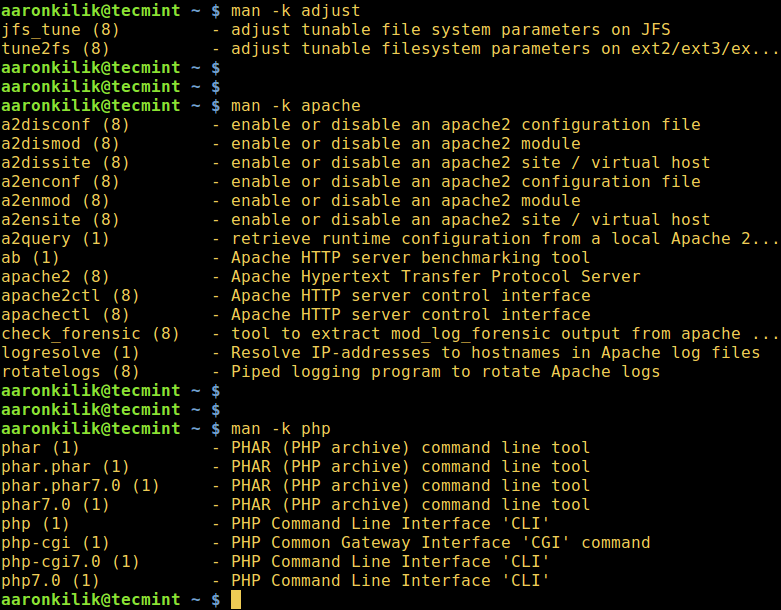
Show Description of Keyword in Manual Pages
9. Watch Logs in Real-Time in Linux
With watch command, you can run another Linux command periodically while displaying its output on fullscreen and alongside tail command which is used to view the last parts of a file, it is possible to watch the recording of log entries in a logfile.
In the example below, you will watch the system authentication logfile. Open two terminal windows, display the logfile for watching in real-time in the first window like so:
$ sudo watch tail /var/log/auth.log
You can also use tail command which shows the last parts of a file. Its -f flag enables watching changes in a file in real-time, therefore it is possible to watch the recording of log entries in a logfile.
$ sudo tail -f /var/log/auth.log
And run the commands below in the second terminal as you observe the logfile content from the first window:
$ sudo mkdir -p /etc/test

$ sudo rm -rf /etc/test
10. List All Shell builtin Commands
A shell builtin is a command or a function, called from within and executed directly in the shell itself, instead of an external executable program which the shell would load from the hard disk and execute.
To list all shell builtins and their usage syntax, run:
$ help
As a concluding remark, command line tricks and tips always come in handy and make learning and using Linux easy and fun especially for newbies.
You can as well share with us other useful and interesting command line tricks or tips in Linux that you have come across via the comment form below.
10 Interesting Linux Command Line Tricks and Tips Worth Knowing的更多相关文章
- 15 Examples To Master Linux Command Line History
When you are using Linux command line frequently, using the history effectively can be a major produ ...
- [笔记]The Linux command line
Notes on The Linux Command Line (by W. E. Shotts Jr.) edited by Gopher 感觉博客园是不是搞了什么CSS在里头--在博客园显示效果挺 ...
- 《The Linux Command Line》 读书笔记04 Linux用户以及权限相关命令
Linux用户以及权限相关命令 查看身份 id:Display user identity. 这个命令的输出会显示uid,gid和用户所属的组. uid即user ID,这是账户创建时被赋予的. gi ...
- 《The Linux Command Line》 读书笔记02 关于命令的命令
<The Linux Command Line> 读书笔记02 关于命令的命令 命令的四种类型 type type—Indicate how a command name is inter ...
- 《The Linux Command Line》 读书笔记01 基本命令介绍
<The Linux Command Line> 读书笔记01 基本命令介绍 1. What is the Shell? The Shell is a program that takes ...
- Linux Command Line Basics
Most of this note comes from the Beginning the Linux Command Line, Second Edition by Sander van Vugt ...
- Linux Command Line 解析
Linux Command Line 解析 0 处理模型 Linux kernel的启动包括很多组件的初始化和相关配置,这些配置参数一般是通过command line进行配置的.在进行后续分析之前,先 ...
- Reso | The Linux Command Line 的中文版
http://book.haoduoshipin.com/tlcl/book/zh/ 本书是 The Linux Command Line 的中文版, 为大家提供了多种不同的阅读方式. 中英文双语版- ...
- Linux Command Line(II): Intermediate
Prerequisite: Linux Command Line(I): Beginner ================================ File I/O $ cat > a ...
随机推荐
- IL学习资料
读懂IL代码就这么简单 由浅入深CIL系列 .net IL 指令速查
- VPS之openVPN的安装配置
原文地址:http://www.blogjava.net/dongbule/archive/2010/11/01/336714.html 上次写的<VPS的购买和使用>中提到了openVP ...
- Flex利用titleIcon属性给Panel容器标题部添加一个ICON图标
Flex利用titleIcon属性,给Panel容器标题部添加一个ICON图标. 让我们先来看一下Demo(可以右键View Source或点击这里察看源代码): 下面是完整代码(或点击这里察看): ...
- LNMP环境下压力测试时的主要调试参数
LNMP环境下压力测试时的主要调试参数: 进行HTTP的压力测试时,很多时候会遇到很小的并发数,服务器就会出现不响应,或者连接超时,一般导致的原因有如下几点: 一.Nginx主要调试参数 主模块参数: ...
- 标准C++中的STL容器类简单介绍
SGI -- Silicon Graphics[Computer System] Inc.硅图[计算机系统]公司. STL -- Standard Template Library 标准模板库. ...
- Linux makefile 教程 很具体,且易懂
近期在学习Linux下的C编程,买了一本叫<Linux环境下的C编程指南>读到makefile就越看越迷糊,可能是我的理解能不行. 于是google到了下面这篇文章.通俗易懂.然后把它贴出 ...
- TP复习11
## ThinkPHP 3.1.2 模板中的基本语法#讲师:赵桐正微博:http://weibo.com/zhaotongzheng 本节课大纲:一.导入CSS和JS文件 1.css link js ...
- 实现顶部轮播,下部listview经典布局的两种方式
开头: 在做android开发的时候,我们经常会遇到这样的布局,上面是一个图片轮播图,下面是一些列表的项目.很多新闻app,视频类app都采用这样的布局.起初的时候 由于没有很多参考,我自己想到了一种 ...
- ScrollView反弹效果 仿小米私密短信效果
转载请标明出处:http://blog.csdn.net/lmj623565791/article/details/28441197 如今非常多APP都给ScrollView加入了反弹效果.QQ.小米 ...
- 3.1html学习之列表
一.含义: ul:unorder list ol:order list li:list item dl:definition list dt:definition term dd:definition ...