
Android笔记之自定义对话框
效果如下图
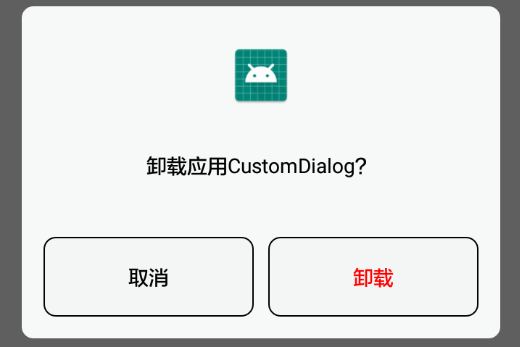
对话框布局
dialog_uninstallation_confirmation.xml
<?xml version="1.0" encoding="utf-8"?>

<LinearLayout xmlns:android="http://schemas.android.com/apk/res/android"

    xmlns:tools="http://schemas.android.com/tools"

    android:layout_width="match_parent"

    android:layout_height="match_parent"

    android:layout_marginLeft="15dp"

    android:layout_marginRight="15dp"

    android:background="@drawable/uninstallation_dialog_background"

    android:orientation="vertical">

    <ImageView

        android:id="@+id/iconImageView"

        android:layout_width="match_parent"

        android:layout_height="45dp"

        android:layout_gravity="center"

        android:layout_marginTop="25dp"

        android:layout_marginBottom="30dp"

        tools:src="@mipmap/ic_launcher" />

    <TextView

        android:id="@+id/messageTextView"

        android:layout_width="match_parent"

        android:layout_height="wrap_content"

        android:gravity="center"

        android:textColor="@android:color/black"

        tools:text="是否卸载CustomDialog" />

    <LinearLayout

        android:layout_width="match_parent"

        android:layout_height="wrap_content"

        android:layout_marginTop="40dp"

        android:layout_marginBottom="15dp">

        <TextView

            android:id="@+id/cancelTextView"

            android:layout_width="match_parent"

            android:layout_height="wrap_content"

            android:layout_marginLeft="15dp"

            android:layout_marginRight="5dp"

            android:layout_weight="1"

            android:background="@drawable/uninstallation_dialog_button_background"

            android:gravity="center"

            android:padding="18dp"

            android:text="取消"

            android:textColor="@android:color/black" />

        <TextView

            android:id="@+id/uninstallTextView"

            android:layout_width="match_parent"

            android:layout_height="wrap_content"

            android:layout_marginLeft="5dp"

            android:layout_marginRight="15dp"

            android:layout_weight="1"

            android:background="@drawable/uninstallation_dialog_button_background"

            android:gravity="center"

            android:padding="18dp"

            android:text="卸载"

            android:textColor="#FF0000" />

    </LinearLayout>

</LinearLayout>
自定义的对话框类
UninstallationConfirmationDialog.java
package com.bu_ish.custom_dialog_example;

import android.app.Dialog;

import android.content.Context;

import android.os.Bundle;

import android.view.View;

import android.view.Window;

import android.view.WindowManager;

import android.widget.ImageView;

import android.widget.TextView;

public abstract class UninstallationConfirmationDialog extends Dialog {

    private ImageView iconImageView;

    private TextView messageTextView;

    private int iconResId;

    private String message;

    public abstract void onCancelClicked();

    public abstract void onUninstallClicked();

    public UninstallationConfirmationDialog(Context context) {

        super(context, R.style.UninstallationConfirmationDialog);

    }

    public UninstallationConfirmationDialog setIcon(int resId) {

        this.iconResId = resId;

        return this;

    }

    public UninstallationConfirmationDialog setMessage(String message) {

        this.message = message;

        return this;

    }

    @Override

    public void show() {

        super.show();

        Window window = getWindow();

        WindowManager.LayoutParams layoutParams = window.getAttributes();

        layoutParams.width = WindowManager.LayoutParams.MATCH_PARENT;

        window.setAttributes(layoutParams);

    }

    @Override

    protected void onCreate(Bundle savedInstanceState) {

        super.onCreate(savedInstanceState);

        setContentView(R.layout.dialog_uninstallation_confirmation);

        iconImageView = findViewById(R.id.iconImageView);

        messageTextView = findViewById(R.id.messageTextView);

        iconImageView.setImageResource(iconResId);

        messageTextView.setText(message);

        findViewById(R.id.cancelTextView).setOnClickListener(new View.OnClickListener() {

            @Override

            public void onClick(View v) {

                onCancelClicked();

                dismiss();

            }

        });

        findViewById(R.id.uninstallTextView).setOnClickListener(new View.OnClickListener() {

            @Override

            public void onClick(View v) {

                onUninstallClicked();

                dismiss();

            }

        });

    }

}
对话框style
    <style name="UninstallationConfirmationDialog" parent="@android:style/Theme.Dialog">

        <item name="android:windowNoTitle">true</item>

        <item name="android:windowBackground">@android:color/transparent</item>

    </style>
P.S.
对话框默认风格是带标题的,通过windowNoTitle设置为无标题
为保证对话框宽度与屏幕匹配,须通过Window.setAttributes(WindowManager.LayoutParams)设置宽度
完整Demo链接:https://pan.baidu.com/s/1RItjQZ7v1xMHL7b5C6lLzw,提取码:qbwu
Android笔记之自定义对话框的更多相关文章
- [android] 手机卫士自定义对话框布局
手机防盗页面部分 点击手机防盗,进行判断,如果没有设置密码,显示一个设置密码的对话框,如果已经设置密码了,弹出输入密码对话框 密码保存在SharedPreferences中,数据取出进行判断 自定义一 ...
- Android开发之自定义对话框
由于系统自带的对话框不好看,于是本人就自定义了一个对话框,以后有类似的就可以直接使用啦.先上效果图: 1,布局文件dialog_clear_normal.xml <?xml version=&q ...
- android笔记:DatePickerDialog日期设置对话框
在开发中,可以通过DatePickerDialog来设置日期,TimePickerDialog来设置时间. 实例化DatePickerDialog对象之后,再调用show方法就可以显示对话框了. 具体 ...
- Android笔记之自定义的RadioGroup、RadioButton,以及View实例状态的保存与恢复
效果图 activity_main.xml <?xml version="1.0" encoding="utf-8"?> <LinearLay ...
- Android笔记之自定义PopupWindow
效果图 popup_window_addition.xml <?xml version="1.0" encoding="utf-8"?> <L ...
- Android开发学习笔记-自定义对话框
系统默认的对话框只能显示简单的标题内容以及按钮,而如果想要多现实其他内容则就需要自定义对话框,下面是自定义对话框的方法. 1.先定义对话框的模版 <?xml version="1.0& ...
- Android笔记之为自定义对话框添加移动动画效果
给底部的对话框添加移动动画效果 可通过Window.setWindowAnimations(int resId)设置 SharingDialog.java package com.bu_ish.sha ...
- Android—关于自定义对话框的工具类
开发中有很多地方会用到自定义对话框,为了避免不必要的城府代码,在此总结出一个工具类. 弹出对话框的地方很多,但是都大同小异,不同无非就是提示内容或者图片不同,下面这个类是将提示内容和图片放到了自定义函 ...
- Android中的AlertDialog使用示例五(自定义对话框)
在Android开发中,我们经常会需要在Android界面上弹出一些对话框,比如询问用户或者让用户选择.这些功能我们叫它Android Dialog对话框,AlertDialog实现方法为建造者模式. ...
随机推荐
- hdu3338 / 方格横纵和问题终极版,最大流斩
此题被誉为神奇最大流,诱惑我去做了下,感觉也是通常的思路. 题意:1.用1-9去填,满足所给的行/列和要求(和那个什么游戏差不多...) 求一种合法方案,输出.如: 一看,直接就建图了,每个点在白 ...
- 使用iframe实现提交表单不刷新页面
正常情况下,当你向服务器发送数据的时候,你的浏览器将会打开action页面,并且不会重回到当前页面.但是有的时候,我们因为各种各样的要求,而不希望浏览器在提交数据的时候去刷新当前的页面或者转向到新的页 ...
- AC日记——【模板】线段树 2 洛谷 P3373
P3373 [模板]线段树 2387通过1.8K提交标签难度 提高+/省选- 提交 讨论 题解 最新讨论 更多讨论 2333最后三个点卡常数.迷之RE感觉这题很迷啊好像一共三组测试数据.友情提示:开l ...
- BZOJ2243 [SDOI2011]染色(树链剖分+线段树合并)
题目链接 BZOJ2243 树链剖分 $+$ 线段树 线段树每个节点维护$lc$, $rc$, $s$ $lc$代表该区间的最左端的颜色,$rc$代表该区间的最右端的颜色 $s$代表该区间的所有连续颜 ...
- HDU 4349 Xiao Ming's Hope 找规律
原题链接:http://acm.hdu.edu.cn/showproblem.php?pid=4349 Xiao Ming's Hope Time Limit: 2000/1000 MS (Java/ ...
- 继承LIst 的类JSON序列化,无法序列化属性的问题
/// <summary> /// Paged list /// </summary> /// <typeparam name="T">T< ...
- 设置linux编码utf-8
#vim /etc/sysconfig/i18n LANG="en_US.UTF-8" SYSFONT="latarcyrheb-sun16" source / ...
- Geoserver跨域请求设置
使用OpenLayers请求GeoServer发布的WFS服务时,如果不是相同的域可能会出现如下问题. 已拦截跨源请求:同源策略禁止读取位于 http://localhost:8080/geoserv ...
- 邁向IT專家成功之路的三十則鐵律 鐵律五:IT人穩定發展之道-去除惡習
在我們努力邁向IT專家成功之路的過程當中,實際上會遭遇到許多障礙來影響我們前進,然而在這諸多障礙之中,最難克服的並非是旁人對我們所造成的影響,而是無形之間自己對自己所造的阻礙,如果沒有隨時隨地加以自反 ...
- 自己封装的CMusic类 【转】
http://www.cnblogs.com/zhangminaxiang/archive/2013/02/27/2936011.html 缘由: 在改正俄罗斯方块程序的功能的时候,想给这个程序增加一 ...