
Flutter实战视频-移动电商-66.会员中心_编写ListTile通用方法
66.会员中心_编写ListTile通用方法
布局List里面嵌套一个ListTile的布局效果

里面有很多条记录,以后可能还会增加,所以这里我们做一个通用的组件
通用组件方法
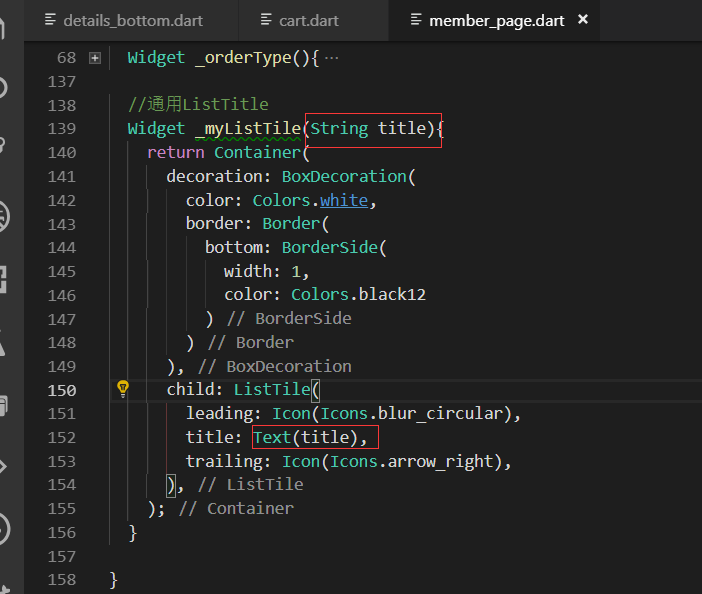
这里使用Column布局
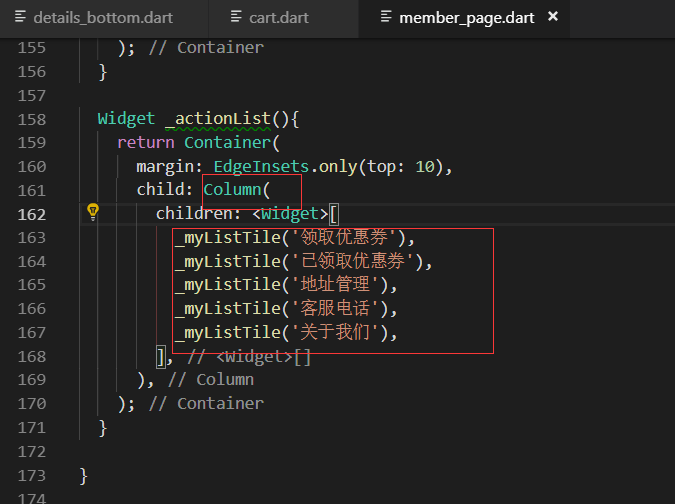
调用总的方法
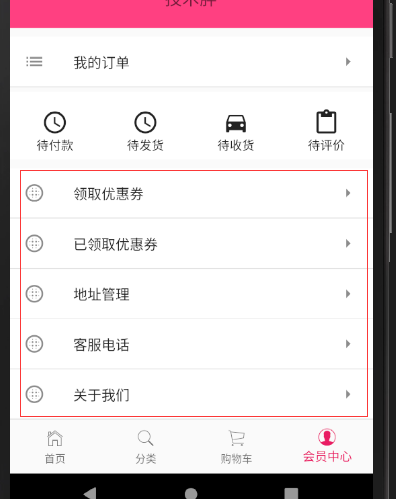
效果展示
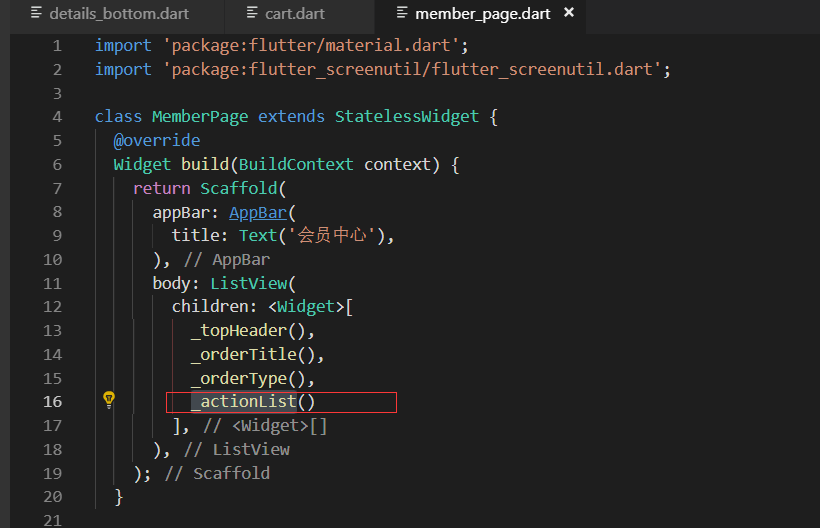
最终代码:
import 'package:flutter/material.dart';

import 'package:flutter_screenutil/flutter_screenutil.dart';

class MemberPage extends StatelessWidget {

  @override

  Widget build(BuildContext context) {

    return Scaffold(

      appBar: AppBar(

        title: Text('会员中心'),

      ),

      body: ListView(

        children: <Widget>[

          _topHeader(),

          _orderTitle(),

          _orderType(),

          _actionList()

        ],

      ),

    );

  }

  Widget _topHeader(){

    return Container(

      width: ScreenUtil().setWidth(),

      padding: EdgeInsets.all(),

      color: Colors.pinkAccent,//亮粉色

      child: Column(

        children: <Widget>[

          Container(

            margin: EdgeInsets.only(top: ),

            child: ClipOval(//圆形的头像

              child: Image.network('http://blogimages.jspang.com/blogtouxiang1.jpg'),

            ),

          ),

          //头像下面的文字,为了好看也是嵌套一个Container

          Container(

            margin: EdgeInsets.only(top: ),

            child: Text(

              '技术胖',

              style: TextStyle(

                fontSize: ScreenUtil().setSp(),

                color: Colors.black54

              )

            ),

          )

        ],

      ),

    );

  }

  //我的订单标题

  Widget _orderTitle(){

    return Container(

      margin: EdgeInsets.only(top: ),

      decoration: BoxDecoration(

        color: Colors.white,

        border: Border(

          bottom: BorderSide(width: ,color: Colors.black12)

        )

      ),

      child: ListTile(

        leading: Icon(Icons.list),

        title: Text('我的订单'),

        trailing: Icon(Icons.arrow_right),

      ),

    );

  }

  Widget _orderType(){

    return Container(

      margin: EdgeInsets.only(top:),

      width: ScreenUtil().setWidth(),

      height: ScreenUtil().setHeight(),

      padding: EdgeInsets.only(top: ),

      color:Colors.white,

      child: Row(

        children: <Widget>[

          Container(

            width: ScreenUtil().setWidth(),

            child: Column(

              children: <Widget>[

                Icon(

                  Icons.query_builder,

                  size: ,

                ),

                Text(

                  '待付款'

                )

              ],

            ),

          ),

           Container(

            width: ScreenUtil().setWidth(),

            child: Column(

              children: <Widget>[

                Icon(

                  Icons.query_builder,

                  size: ,

                ),

                Text(

                  '待发货'

                )

              ],

            ),

          ),

           Container(

            width: ScreenUtil().setWidth(),

            child: Column(

              children: <Widget>[

                Icon(

                  Icons.directions_car,

                  size: ,

                ),

                Text(

                  '待收货'

                )

              ],

            ),

          ),

           Container(

            width: ScreenUtil().setWidth(),

            child: Column(

              children: <Widget>[

                Icon(

                  Icons.content_paste,

                  size: ,

                ),

                Text(

                  '待评价'

                )

              ],

            ),

          )

        ],

      ),

    );

  }

  //通用ListTitle

  Widget _myListTile(String title){

    return Container(

      decoration: BoxDecoration(

        color: Colors.white,

        border: Border(

          bottom: BorderSide(

            width: ,

            color: Colors.black12

          )

        )

      ),

      child: ListTile(

        leading: Icon(Icons.blur_circular),

        title: Text(title),

        trailing: Icon(Icons.arrow_right),

      ),

    );

  }

  Widget _actionList(){

    return Container(

      margin: EdgeInsets.only(top: ),

      child: Column(

        children: <Widget>[

          _myListTile('领取优惠券'),

          _myListTile('已领取优惠券'),

          _myListTile('地址管理'),

          _myListTile('客服电话'),

          _myListTile('关于我们'),

        ],

      ),

    );

  }

}
Flutter实战视频-移动电商-66.会员中心_编写ListTile通用方法的更多相关文章
- Flutter实战视频-移动电商-64.会员中心_顶部头像UI布局
64.会员中心_顶部头像UI布局 会员中心的样式 member.dart 清除原来的代码生成一个基本的结构 默认返回一个scaffold脚手架工具,body里面布局使用ListView,这样不会出现纵 ...
- Flutter实战视频-移动电商-65.会员中心_订单区域UI布局
65.会员中心_订单区域UI布局 我的订单区域 member.dart写我的标题的方法 布局使用瓦片布局 先做修饰,decoration颜色的背景,下边线的样式 //我的订单标题 Widget _or ...
- Flutter实战视频-移动电商-30.列表页_商品列表UI界面布局
30.列表页_商品列表UI界面布局 小程序里面的布局方式 小程序的图片上这里使用的是warp布局,因为首页里面火爆专区,已经用过了warp来布局了. 所以这里我们没有必要再讲一遍,这里我们使用List ...
- Flutter实战视频-移动电商-34.列表页_小BUG的修复
34.列表页_小BUG的修复 当高粱酒的子类没有数据返回的时候就会报错. 解决接口空数据报错的问题 没有数据的时候,给用户一个友好的提示, 我们没有数据的时候还要告诉用户,提示一下他没有数据,在我们的 ...
- Flutter实战视频-移动电商-05.Dio基础_引入和简单的Get请求
05.Dio基础_引入和简单的Get请求 博客地址: https://jspang.com/post/FlutterShop.html#toc-4c7 第三方的http请求库叫做Dio https:/ ...
- Flutter实战视频-移动电商-08.Dio基础_伪造请求头获取数据
08.Dio基础_伪造请求头获取数据 上节课代码清楚 重新编写HomePage这个动态组件 开始写请求的方法 请求数据 .但是由于我们没加请求的头 所以没有返回数据 451就是表示请求错错误 创建请求 ...
- Flutter实战视频-移动电商-21.分类页_类别信息接口调试
21.分类页_类别信息接口调试 先解决一个坑 取消上面的GridVIew的回弹效果.就是在拖这个gridview的时候有一个滚动的效果 physics: NeverScrollableScrollPh ...
- Flutter实战视频-移动电商-25.列表页_使用Provide控制子类-1
25.列表页_使用Provide控制子类-1 主要是二级分类的UI布局 1分15秒 生成我们的右侧动态类 定义list变量 开始写里面的子项,把每一个小的写了 再拼成一个大的 这样我们的小类就写完了 ...
- Flutter实战视频-移动电商-26.列表页_使用Provide控制子类-2
26.列表页_使用Provide控制子类-2 主要实现功能,点击一级分类,二级分类跟着变.这里主要用哦我们的provide 新建provide provide文件夹下创建:child_category ...
随机推荐
- Long-term stable release maintenance
http://en.wikipedia.org/wiki/Linux_kernel 2014.5.28 2.6.32 2 December 2009[122] 2.6.32.62[123] Willy ...
- tensor搭建--windows 10 64bit下安装Tensorflow+Keras+VS2015+CUDA8.0 GPU加速
windows 10 64bit下安装Tensorflow+Keras+VS2015+CUDA8.0 GPU加速 原文见于:http://www.jianshu.com/p/c245d46d43f0 ...
- PHP后台批量删除数据
html <form action="" method="post"> <div><input type="submit ...
- Ubuntu NDK配置与JNI demo
NDK配置 1.下载最新版本NDK(android-ndk-r9d-linux-x86_64.tar.bz2) 下载网页:http://developer.android.com/tools/sdk/ ...
- springboot实战--笔记
由于这本书看过一遍,所以这里是二次复习,记录的东西比较少,就不分章节了. 共12章,524页,预计时间是18h 第一章 spring基础: 第二章 spring常用配置: bean的Scope:sin ...
- EasyDarwin开源流媒体服务器内存管理优化
-本文由EasyDarwin开源团队成员Fantasy贡献 前言 最近在linux上跑EasyDarwin发现一个很奇怪的问题,当有RTSPSession连接上来的时候,发现进程的虚拟内存映射一下就多 ...
- 清除inline-block元素默认间距
1. font-size:0; 2.letter-spaceing:-0.5em;
- 编译和使用bsdiff
在android开发中,越到后面生成apk文件越来越大,每次用户更新都是全部下载更新,浪费时间和流量,如果能增量更新就不错了,使用bsdiff就是为了生成更新包 bsdiff下载地址:http://w ...
- const与define应用上该怎么取舍
const与define应用上该怎么取舍 #define WYB 100; const float WYB = 100; define是在预编译的时候展开替换的,const是编译运行阶段使用 defi ...
- Ubuntu 12.04安装grub2过程中出错怎么办【转】
本文转载自:https://zhidao.baidu.com/question/491448169666671012.html 其实是可以不用优盘启动的.但使用优盘没有风险.你的系统虽然出现==不能安 ...