
How to change java version in Linux
How to change default Java version on Linux
Exception in thread "main" java.lang.UnsupportedClassVersionError: com/xmodulo/hmon/gui/NetConf : Unsupported major.minor version 51.0
When a Java program is compiled, the build environment sets a "target" which is the oldest JRE version the program can support. If you run the Java program on a Linux system which does not meet the lowest JRE version requirement, you will encounter the following error while starting the program.
Exception in thread "main" java.lang.UnsupportedClassVersionError: com/xmodulo/hmon/gui/NetConf : Unsupported major.minor version 51.0
For example, in this case the program is compiled for Java JRE 1.7 but the system only has Java JRE 1.6.
To solve this problem, you need to change the default Java version you are using to Java JRE 1.7 or higher (assuming that such JRE is already installed).
First, check available Java versions on your Linux system by using update-alternatives command:
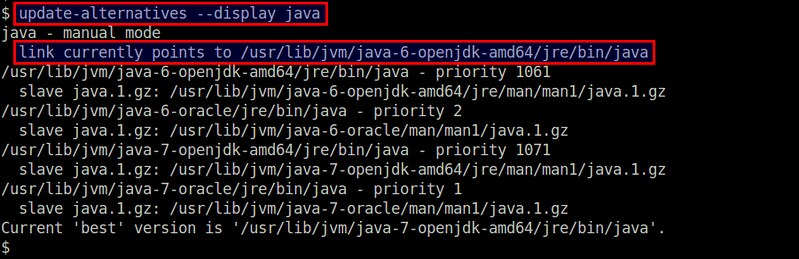
In this example, there are four different Java versions that are installed: OpenJDK JRE 1.6, Oracle Java JRE 1.6, OpenJDK JRE 1.7 and Oracle Java JRE 1.7. The default Java version is currently set to OpenJDK JRE 1.6.
If the necessary Java JRE is not installed, you can always install it using these instructions.
Now that there are suitable candidates to change to, you can switch the default Java version among available Java JREs by running the following command:
When prompted, select the Java version you would like to use. In this example, we choose Oracle Java JRE 1.7.

Now you can verify the default Java version as follows.

Finally, if you defined JAVA_HOME environment variable somewhere, update the variable according to the newly set default Java version.
How to change java version in Linux的更多相关文章
- 解决linux下javac -version和java -version版本显示不一致
解决linux下javac -version和java -version版本显示不一致 [javascript] view plaincopy [root@localhost usr]# $JAVA_ ...
- linux JAVA_HOME和 java -version不匹配
~/.bashrc 中更新了jdk, JAVA_HOME 起效果了,但是java -version还是老的. 原因是/usr/bin/java 和usr/bin/javac是一个链接,得改. 使用 ...
- Linux更换jdk版本,java -version还是原来的版本问题
服务器上默认安装版本是: 使用jenkins最新的安装包 2.73.1,启动报错52.0!需要使用1.8进行启动. 两种方式,要么tomcat直接指定,要么修改环境变量,这里我使用修改安装java版本 ...
- [非原创]Project facet Java version 1.8 is not supported解决记录
原博地址:http://blog.csdn.net/dingchenxixi/article/details/51496998 一看知道是因为jdk版本不一致所导致,如何解决? 方法一: 选中项目 P ...
- Project facet Java version 1.8 is not supported解决记录
一看知道是因为jdk版本不一致所导致,如何解决? 方法一: 选中项目 Properties , 选择 Project Facets,右击选择 Java , Change Version 方法二: 在 ...
- eclipse Project facet Java version 1.8 is not supported.
在移植eclipse项目时,如果遇到 “Project facet Java version 1.7 is not supported.” 项目中的jdk1.7不支持.说明项目是其他版本jdk编译的, ...
- 运行java -version报cannot restore segment prot after reloc: Permission denied
linux 安装jdk1.6后,运行java -version,没有出现相关的版本信息,而是出现了以下错误: dl failure on line 685Error: failed /usr/loca ...
- 项目移植过程中报:“Project facet Java version 1.7 is not supported.” 错误
转载: http://my.oschina.net/nly/blog/349081 在移植eclipse项目时,如果遇到 报:“Project facet Java version 1.7 is no ...
- ubuntu中安装jdk 分类: java 学习笔记 linux ubuntu 2015-07-06 17:49 74人阅读 评论(0) 收藏
参考文献:ubuntu 13.04 安装 JDK 先去oracle官网下载jdk,这一段我就不赘述了. 下载好之后先解压,解压方式参见 linux常用的压缩与解压缩命令 ,解压之后,将文件剪贴至/us ...
随机推荐
- IOException 简单解决方法
java.lang.IllegalStateException异常解决方法 这个异常大多数是由文件读取,下载时抛出,但是偶尔也会由类型转换时异常抛出此异常. 错误:Optional int param ...
- ural 1009. K-based Numbers(简单dp)
http://acm.timus.ru/problem.aspx?space=1&num=1009 题意:将一个n位数转化为合法的K进制数,有多少种情况.合法的K进制数即不含前导0,且任意两个 ...
- 产生冠军(toposort)
http://acm.hdu.edu.cn/showproblem.php?pid=2094 #include <stdio.h> #include <iostream> #i ...
- join()和fromkeys()的用法与注意事项
join()和fromkeys()的用法与注意事项 1.join()的用法与注意事项: join()可以使用集合,列表,字符串的子元素,拼接,下面介绍用法: str.join(data) 2.from ...
- js判断客户端是手机端还是PC端
封装函数: function isPC() { var userAgentInfo = navigator.userAgent; var Agents = ["Android", ...
- ACM_哥德巴赫猜想(素数筛)
哥德巴赫猜想 Time Limit: 2000/1000ms (Java/Others) Problem Description: 哥德巴赫猜想大概是这么一回事:“偶数(>=4) == 两个质数 ...
- 【转】Linux下history命令用法
转自:http://blog.sina.com.cn/s/blog_5caa94a00100gyls.html 如果你经常使用 Linux 命令行,那么使用 history(历史)命令可以有效地提升你 ...
- [转]五个Linux下用户空间的调试工具
有几个Linux下的用户空间调试工具和技术,它们用来分析用户空间的问题相当有用.它们是: 'print' 语句 查询 (/proc, /sys 等) 跟踪 (strace/ltrace) Valgri ...
- Ubuntu16安装jdk8配置Tomcat9
一.配置jdk 1.下载解压是肯定不能少的 2.配置环境变量根据自己需求来 export JAVA_HOME=/usr/software/jdk1.8.0_121 export CLASSPATH=. ...
- GitHub代码托管平台搭建
GitHub代码托管平台搭建 注册账户以及创建仓库 要想使用github第一步当然是注册github账号了, github官网地址:https://github.com/. 之后就可以创建仓库了(免费 ...