
[Unit Testing] AngularJS Unit Testing - Karma
Install Karam:
npm install -g karma
npm install -g karma-cli
Init Karam:
karma init
First test:
1. Add test file to the karma.conf.js:
    // list of files / patterns to load in the browser

    files: [

        'test/hello.js'

    ],
2. Add test file:
describe('First Unit testing with Karma', function() {

    it('sholud work', function() {

        expect(true).toBe(false);

    })

})
Of course, it will failed.
Then we make it pass:
describe('First Unit testing with Karma', function() {

    it('sholud work', function() {

        expect(true).toBe(true);

    })

})
Testing with AngularJS
Install angular-mocks:
npm install angular-mocks
Include the angular.js and angular-mocks.js file before the test file:
    // list of files / patterns to load in the browser

    files: [

        'test/hello.js',

        'bower_components/angular/angular.js',

        'node_modules/angular-mocks/angular-mocks.js',

        'test/anuglarjs.js'

    ],
Write the test file:
describe('Testing with AngularJS', function() {

    //Want $scope and element can be used globally

    var $scope,

        element;

    //We need to inject $compile, $rootScope

    beforeEach(inject(function($compile, $rootScope) {

        $scope = $rootScope;

        //create an 'angular element'

        element = angular.element("<div>{{2+2}}</div>");

        //then compile it to real angular element

        //also it requires link function and scope

        element = $compile(element)($rootScope);

    }));

    it('should equals to 4', function() {

        //make sure to $digest() it to get the change

        $scope.$digest();

        expect(element.html()).toBe("5");  // change to "4" to make it pass

    })

})
Now, "4" is not "5", then it will failed, switch to "4" to make it pass.
Testing Directive:
    .directive('aGreatEye', function () {

        return {

            restrict: 'E',

            replace: true,   //Important to add replace: true, otherwise, it would be <h1 class="ng-binding">...</h1>"

            template: '<h1>lidless, wreathed in flame, {{1 + 1}} times</h1>'

        };

    });
describe('Testing directive', function() {

    var $scope,

        $compile,

        element;

    beforeEach(module('app'));

    beforeEach(inject(function(_$compile_, _$rootScope_) {

        $compile = _$compile_;

        $scope = _$rootScope_;

    }));

    it("Replaces the element with the appropriate content", function() {

        element = $compile('<a-great-eye></a-great-eye>')($scope);

        $scope.$digest();

        expect(element.html()).toBe('lidless, wreathed in flame, 2 times');

    })

});
Underscore notation: The use of the underscore notation (e.g.: _$rootScope_) is a convention wide spread in AngularJS community to keep the variable names clean in your tests. That's why the $injector strips out the leading and the trailing underscores when matching the parameters. The underscore rule applies only if the name starts and ends with exactly one underscore, otherwise no replacing happens.
Testing Directives With External Templates:
1. Install 'karma-ng-html2js-preprocessor': https://github.com/karma-runner/karma-ng-html2js-preprocessor
npm install karma-ng-html2js-preprocessor --save-dev
2. Add config to karma.config.js:
    // preprocess matching files before serving them to the browser

    // available preprocessors: https://npmjs.org/browse/keyword/karma-preprocessor

    preprocessors: {

        '*.html': ['ng-html2js']

    },

      ngHtml2JsPreprocessor: {

          // strip this from the file path

          stripPrefix: '/'  //because currently all the html files are located in / root

      },
3. Add html into beforeEach:
describe('Testing directive', function() {

    var $scope,

        $compile,

        element;

    beforeEach(module('app'));

    // Add html file here

    beforeEach(module('directivetest.html'));

    beforeEach(inject(function(_$compile_, _$rootScope_) {

        $compile = _$compile_;

        $scope = _$rootScope_;

    }));

    it("Replaces the element with the appropriate content", function() {

        element = $compile('<a-great-eye></a-great-eye>')($scope);

        $scope.$digest();

        expect(element.html()).toBe('lidless, wreathed in flame, 2 times');

    })

});
    .directive('aGreatEye', function () {

        return {

            restrict: 'E',

            replace: true,

            templateUrl: 'directivetest.html'

        };

    });

   /*directivetest.html*/

   <h1>lidless, wreathed in flame, {{1 + 1}} times</h1>
Testing Directive Scope:
1. Check after a click event, scope value changed:
    .directive('aGreatEye', function () {

        return {

            restrict: 'EA',

            replace: true,

            templateUrl: 'directivetest.html',

            link: function(scope, element) {

                scope.isClicked = false;

                element.bind('click', function() {

                    scope.isClicked = true;

                })

            }

        };

    });
    it("isClicked is true after click", function() {

        element = $compile('<a-great-eye></a-great-eye>')($scope);

        $scope.$digest();

        element.triggerHandler('click');

        expect($scope.isClicked).toBe(true);

    });
2. Isolated scope testing:
    .directive('aGreatEye', function () {

        return {

            restrict: 'EA',

            replace: true,

            scope: {},

            templateUrl: 'directivetest.html',

            link: function(scope, element) {

                scope.isClicked = false;

                element.bind('click', function() {

                    scope.isClicked = true;

                })

            }

        };

    });
    it("isolated scope testing", function() {

        element.triggerHandler('click');

        expect(element.isolateScope().isClicked).toBe(true);

    });
You can no long use "element.scope()" or "$scope", you should use "element.isolateScope()".
Testing Directive Scope Binding:
Tow ways binding:
    .directive('aGreatEye', function () {

        return {

            restrict: 'EA',

            replace: true,

            scope: {

                flavor: "=" //Accpet an object

            },

            templateUrl: 'directivetest.html',

            link: function(scope, element) {

                element.bind('click', function() {

                    scope.isClicked = true;

                    scope.flavor.message += " World!";

                })

            }

        };

    });
    beforeEach(inject(function(_$compile_, _$rootScope_) {

        $compile = _$compile_;

        $scope = _$rootScope_;

        $scope.goPro = {message: "Hello"};

        element = $compile('<div a-great-eye flavor="goPro"></div>')($scope);

        $scope.$digest();

    }));

    it("after click the scope.data should be Hello World!", function() {

        element.triggerHandler('click');

        expect($scope.goPro.message).toBe('Hello World!');

        expect(element.isolateScope().flavor.message).toBe("Hello World!");

    });
Testing Speed:
Using ddescriber plugin to speed up unit testing.
Install the plugin "ddscriber for jasmine". Ctrl+Shift+D, to open the dailog. In the dialog you can choose which test to be included or not.
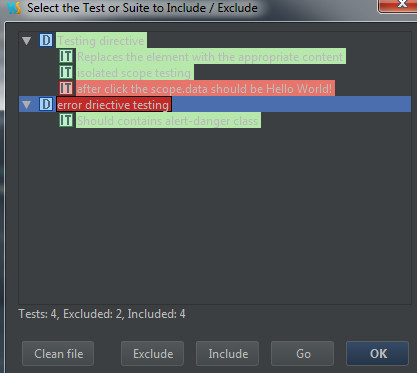
The code is modfied as:
/**

 * Created by Answer1215 on 1/16/2015.

 */

ddescribe('Testing directive', function() {

    var $scope,

        $compile,

        element;

    beforeEach(module('app'));

    beforeEach(module('directivetest.html'));

    beforeEach(inject(function(_$compile_, _$rootScope_) {

        $compile = _$compile_;

        $scope = _$rootScope_;

        $scope.goPro = {message: "Hello"};

        element = $compile('<div a-great-eye flavor="goPro"></div>')($scope);

        $scope.$digest();

    }));

    iit("Replaces the element with the appropriate content", function() {

        expect(element.html()).toContain("lidless, wreathed in flame, 2 times");

    });

    //it("isClicked is true after click", function() {

    //    element.triggerHandler('click');

    //    expect($scope.isClicked).toBe(true);

    //});

    iit("isolated scope testing", function() {

        element.triggerHandler('click');

        //expect(element.isolateScope().isClicked).toBe(true);

    });

    xit("after click the scope.data should be Hello World!", function() {

        element.triggerHandler('click');

        expect($scope.goPro.message).toBe('Hello World!');

        //expect(element.isolateScope().flavor.message).toBe("Hello World!");

    });

});

xdescribe("error driective testing", function() {

    var $scope, $compile, element;

    beforeEach(module('app'));

    beforeEach(module('error.html'));

    beforeEach(inject(function(_$compile_, _$rootScope_) {

        $scope = _$rootScope_;

        $compile = _$compile_;

        element = $compile('<error></error>')($scope);

        $scope.$digest();

    }));

    iit("Should contains alert-danger class", function() {

        expect(element.find('div').hasClass('alert-danger')).toBe(true);

    });

});
ddscribe / iit -- include
xdscribe / xit -- exclude
Testing Service:
Testing service, you need to inject the service into beforeEach.
ddescribe('testing service', function() {

    var SmithService;

    beforeEach(module('app'));

    beforeEach(inject(function(_SmithService_) {

        SmithService = _SmithService_;

    }));

    iit('should append Smith after each name', function() {

        expect(SmithService.getName("John")).toBe("John Smith");

    })

});
This testing case is test whenever use a service to get a name we will append " Smith" to the end.
  .service('SmithService', function() {

        var SmithService = {};

        SmithService.getName = function(name) {

            return name + " Smith";

        }

        return SmithService;

    });
Testing Controller:
Testing controller, you need to inject the $controller into beforeEach. And get ctrl instence by using:
appCtrl = $controller("AppCtrl")
ddescribe('Test Controller', function() {

    var ctrl;

    beforeEach(module('app'));

    beforeEach(inject(function(_$controller_) {

        ctrl = _$controller_("TestCtrl");

    }));

    iit('Test Controller', function() {

        expect(ctrl.message).toBe("Hello");

    });

});
    .controller('TestCtrl', function() {

        var vm = this;

        vm.message = "Hello";

    });
[Unit Testing] AngularJS Unit Testing - Karma的更多相关文章
- Unit Testing, Integration Testing and Functional Testing
转载自:https://codeutopia.net/blog/2015/04/11/what-are-unit-testing-integration-testing-and-functional- ...
- Difference Between Performance Testing, Load Testing and Stress Testing
http://www.softwaretestinghelp.com/what-is-performance-testing-load-testing-stress-testing/ Differen ...
- AngularJS测试框架 karma备忘
AngularJS测试框架karma安装 安装karma $ --save-dev 安装karma组件 $ npm install karma-jasmine karma-chrome-launche ...
- Go testing 库 testing.T 和 testing.B 简介
testing.T 判定失败接口 Fail 失败继续 FailNow 失败终止 打印信息接口 Log 数据流 (cout 类似) Logf format (printf 类似) SkipNow 跳过当 ...
- [Angular + Unit] AngularJS Unit testing using Karma
http://social.technet.microsoft.com/wiki/contents/articles/32300.angularjs-unit-testing-using-karma- ...
- [AngularJS Unit tesint] Testing keyboard event
HTML: <div ng-focus="vm.onFocus(month)", aria-focus="{{vm.focus == month}}", ...
- [AngularJS + Unit Testing] Testing Directive's controller with bindToController, controllerAs and isolate scope
<div> <h2>{{vm.userInfo.number}} - {{vm.userInfo.name}}</h2> </div> 'use str ...
- [AngularJS + Unit Testing] Testing a component with requiring ngModel
The component test: describe('The component test', () => { let component, $componentController, $ ...
- [Unit Testing] Fundamentals of Testing in Javascript
In this lesson, we’ll get the most fundamental understanding of what an automated test is in JavaScr ...
随机推荐
- FileOutputStream保存文件
//保存文件,根据传入的路径,存放在SD卡目录下public boolean saveToPath(String title, String pageName) { Bitmap b = getCha ...
- Xshell_Using X11 forwarding
FROM:http://www.netsarang.com/tutorial/xshell/1018/Using_X11_forwarding The X11 forwarding feature i ...
- JQuery学习(选择器-可见性-hidden)
<%@ page language="java" import="java.util.*" pageEncoding="UTF-8"% ...
- redis linux安装与简单集群配置
由于项目原因最近在使用redis,把redis的安装以及配置记录下来方便查看. 1.下载 地址http://download.redis.io/releases/ 需要哪个版本就使用那个版本 2.解 ...
- 设计模式之美:Command(命令)
索引 别名 意图 结构 参与者 适用性 效果 相关模式 实现 实现方式(一):直接注入 Receiver 对象,Command 决定调用哪个方法. 实现方式(二):注入 Receiver 的指定方法, ...
- [MSSQL2012]CUME_DIST函数
CUME_DIST函数以某列作为基准,计算其它行相对于基准行数据的比例.差距比例,比较容易理解 先看下测试数据 DECLARE @TestData TABLE( ID INT IDENTITY ...
- [C++] C/C++ 取整函数ceil(),floor()
使用floor函数.floor(x)返回的是小于或等于x的最大整数.如: floor(10.5) == 10 floor(-10.5) == -11 使用ceil函数.ceil(x)返回 ...
- [游戏模版8] Win32 透明贴图
>_<:The same with previous introduction. In the InitInstance fanction make a little change: &g ...
- [stm32] GPIO及最小框架
1.GPIO硬件结构图: 2.GPIO程序结构: 3.框架介绍: 这里的ASM是固定启动文件夹,startup_stm32f10x_hd.s表示当前stm32类型为高容量设备,当然还有md.s等. C ...
- webApp 阅读器项目实践
这是一个webApp 阅读器的项目,是慕课网的老师讲授的一个实战,先给出项目源码在GitHub的地址:https://github.com/yulifromchina/MobileWebReader. ...