
SpringBoot2.0+Mybatis-Plus3.0+Druid1.1.10 一站式整合
SpringBoot2.0+Mybatis-Plus3.0+Druid1.1.10 一站式整合
一、先快速创建一个springboot项目,其中pom.xml加入mybatis-plus 和druid需要的依赖
pom.xml
<?xml version="1.0" encoding="UTF-8"?>

<project xmlns="http://maven.apache.org/POM/4.0.0" xmlns:xsi="http://www.w3.org/2001/XMLSchema-instance"

         xsi:schemaLocation="http://maven.apache.org/POM/4.0.0 http://maven.apache.org/xsd/maven-4.0.0.xsd">

    <modelVersion>4.0.0</modelVersion>

    <groupId>com.kyplatform</groupId>

    <artifactId>kyplatform</artifactId>

    <version>0.0.1-SNAPSHOT</version>

    <packaging>jar</packaging>

    <name>kyplatform</name>

    <description>kyplatform for Spring Boot</description>

    <parent>

        <groupId>org.springframework.boot</groupId>

        <artifactId>spring-boot-starter-parent</artifactId>

        <version>2.0.6.RELEASE</version>

        <relativePath/> <!-- lookup parent from repository -->

    </parent>

    <properties>

        <project.build.sourceEncoding>UTF-8</project.build.sourceEncoding>

        <project.reporting.outputEncoding>UTF-8</project.reporting.outputEncoding>

        <java.version>1.8</java.version>

    </properties>

    <dependencies>

        <dependency>

            <groupId>org.springframework.boot</groupId>

            <artifactId>spring-boot-starter-web</artifactId>

        </dependency>

        <dependency>

            <groupId>mysql</groupId>

            <artifactId>mysql-connector-java</artifactId>

            <!--<scope>compile</scope>-->

        </dependency>

        <dependency>

            <groupId>org.projectlombok</groupId>

            <artifactId>lombok</artifactId>

            <optional>true</optional>

        </dependency>

        <dependency>

            <groupId>org.springframework.boot</groupId>

            <artifactId>spring-boot-starter-test</artifactId>

            <scope>test</scope>

        </dependency>

        <!--mybatis-plus -->

        <dependency>

            <groupId>com.baomidou</groupId>

            <artifactId>mybatis-plus-boot-starter</artifactId>

            <version>3.0.4</version>

        </dependency>

        <!--启动热部署-->

        <dependency>

            <groupId>org.springframework.boot</groupId>

            <artifactId>spring-boot-devtools</artifactId>

            <optional>true</optional>

        </dependency>

        <!-- druid-spring-boot-starter -->

<!--        <dependency>

            <groupId>com.alibaba</groupId>

            <artifactId>druid-spring-boot-starter</artifactId>

            <version>1.1.10</version>

        </dependency>-->

        <dependency>

            <groupId>com.alibaba</groupId>

            <artifactId>druid</artifactId>

            <version>1.1.10</version>

        </dependency>

        <!-- https://mvnrepository.com/artifact/org.apache.velocity/velocity -->

        <dependency>

            <groupId>org.apache.velocity</groupId>

            <artifactId>velocity</artifactId>

            <version>1.7</version>

        </dependency>

    </dependencies>

    <build>

        <plugins>

            <plugin>

                <groupId>org.springframework.boot</groupId>

                <artifactId>spring-boot-maven-plugin</artifactId>

            </plugin>

        </plugins>

    </build>

</project>
二、编写application.yml文件
# DataSource Config

spring:

  datasource:

    type: com.alibaba.druid.pool.DruidDataSource

    # 下面为连接池的补充设置,应用到上面所有数据源中

    # 初始化大小,最小,最大

    druid:

      driver-class-name: com.mysql.jdbc.Driver

      url: jdbc:mysql://127.0.0.1:3306/xxxxxx?characterEncoding=utf8

      username: root

      password: *******

      initialSize: 5

      minIdle: 5

      maxActive: 20

      # 配置获取连接等待超时的时间

      maxWait: 60000

      # 配置间隔多久才进行一次检测,检测需要关闭的空闲连接,单位是毫秒

      timeBetweenEvictionRunsMillis: 60000

      # 配置一个连接在池中最小生存的时间,单位是毫秒

      minEvictableIdleTimeMillis: 300000

      validationQuery: SELECT 1 FROM DUAL

      testWhileIdle: true

      testOnBorrow: false

      testOnReturn: false

      # 打开PSCache,并且指定每个连接上PSCache的大小

      poolPreparedStatements: true

      maxPoolPreparedStatementPerConnectionSize: 20

      # 配置监控统计拦截的filters,去掉后监控界面sql无法统计,'wall'用于防火墙

      #filters: stat,wall,log4j

      # 通过connectProperties属性来打开mergeSql功能;慢SQL记录

      connection-properties: druid.stat.mergeSql=true;druid.stat.slowSqlMillis=5000

      # 合并多个DruidDataSource的监控数据

      useGlobalDataSourceStat: true

#      web-stat-filter:

#          enabled: false

#      jsp-servlet:

#          class-name: com.alibaba.druid.support.http.StatViewServlet

#      init-parameters:

#          loginUsername: druid

#          loginPassword: druid

# Logger Config

logging:

  level:

    com.baomidou.mybatisplus.samples.quickstart: debug

mybatis-plus:

  global-config:

    db-config:

      db-type: MYSQL

      capital-mode: false #开启大写命名

      column-like: true #开启 LIKE 查询
三、接下来编写DruidConfig、DruidStatFilter、DruidStatViewServlet三个类
DruidConfig.java
package com.kyplatform.admin.config.druid;

import com.alibaba.druid.pool.DruidDataSource;

import org.springframework.boot.context.properties.ConfigurationProperties;

import org.springframework.boot.web.servlet.ServletComponentScan;

import org.springframework.context.annotation.Bean;

import org.springframework.context.annotation.Configuration;

import javax.sql.DataSource;

/**

 * 配置druid需要的配置类,引入application.properties文件中以spring.datasource开头的信息

 * 因此需要在application.properties文件中配置相关信息。

 * @author zhicaili

 *

 */

@Configuration//标识该类被纳入spring容器中实例化并管理

@ServletComponentScan //用于扫描所有的Servlet、filter、listener

public class DruidConfig {

    @Bean

    @ConfigurationProperties(prefix = "spring.datasource.druid")//加载时读取指定的配置信息,前缀为spring.datasource.druid

    public DataSource druidDataSource(){

        return new DruidDataSource();

    }

}
DruidStatFilter.java
package com.kyplatform.admin.config.druid;

import com.alibaba.druid.support.http.WebStatFilter;

import javax.servlet.annotation.WebFilter;

import javax.servlet.annotation.WebInitParam;

/**

 * 配置druid过滤规则

 */

@WebFilter(

        filterName="DruidWebStatFilter",

        urlPatterns = "/*",

        initParams = {

                @WebInitParam(name = "exclusions",value="*.js,*.jpg,*.png,*.gif,*.ico,*.css,/druid/*")//配置本过滤器放行的请求后缀

        }

)

public class DruidStatFilter  extends WebStatFilter {

}
DruidStatViewServlet.java
package com.kyplatform.admin.config.druid;

import com.alibaba.druid.support.http.StatViewServlet;

import javax.servlet.Servlet;

import javax.servlet.annotation.WebInitParam;

import javax.servlet.annotation.WebServlet;

/**

 * 配置druid页面配置

 */

@WebServlet(urlPatterns="/druid/*",initParams = {

        @WebInitParam(name="allow",value = "127.0.0.1"),// IP白名单 (没有配置或者为空,则允许所有访问)

        @WebInitParam(name = "loginUsername",value = "root"),//用户名

        @WebInitParam(name = "loginPassword",value = "admin"),//密码

        @WebInitParam(name = "resetEnable",value = "true")// 允许HTML页面上的“Reset All”功能

})

public class DruidStatViewServlet extends StatViewServlet implements Servlet {

}
配置好后,还要在springboot的启动器类中添加@ServletComponentScan
package com.kyplatform;

import org.mybatis.spring.annotation.MapperScan;

import org.springframework.boot.SpringApplication;

import org.springframework.boot.autoconfigure.EnableAutoConfiguration;

import org.springframework.boot.autoconfigure.SpringBootApplication;

import org.springframework.boot.autoconfigure.jdbc.DataSourceAutoConfiguration;

import org.springframework.boot.web.servlet.ServletComponentScan;

import org.springframework.context.annotation.Configuration;

@SpringBootApplication

@ServletComponentScan

@MapperScan("com.kyplatform.admin.mapper")

public class KyplatformApplication {

    public static void main(String[] args) {

        SpringApplication.run(KyplatformApplication.class, args);

    }

}
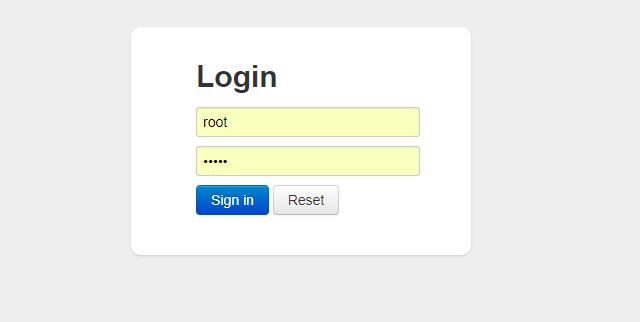
配置好后,在浏览器中输入http://127.0.0.1:9999/项目名/druid/login.html
SpringBoot2.0+Mybatis-Plus3.0+Druid1.1.10 一站式整合的更多相关文章
- SpringBoot2.x+mybatis plus3.x集成Activit7版本
最近在写一个开源项目ruoyi-vue-pro,暂时负责Activiti7工作流的搭建,接这个任务一个原因,是比较好奇Activiti7版本与先前的5.6版本究竟有什么区别,因为先前在工作当中,最开始 ...
- springboot2.0+mybatis多数据源集成
最近在学springboot,把学的记录下来.主要有springboot2.0+mybatis多数据源集成,logback日志集成,springboot单元测试. 一.代码结构如下 二.pom.xml ...
- mybatis plus3.1.0 热加载mapper
今天又开始写业务代码了,每次修改SQL都要重启服务,实在是浪费时间. 想起之前研究过的<mybatis plus3.1.0 热加载mapper>,一直没有成功,今天静下心来分析了问题,终于 ...
- spring boot:使用分布式事务seata(druid 1.1.23 / seata 1.3.0 / mybatis / spring boot 2.3.2)
一,什么是seata? Seata:Simpe Extensible Autonomous Transcaction Architecture, 是阿里中间件开源的分布式事务解决方案. 前身是阿里的F ...
- Oracle数据库升级(10.2.0.4->11.2.0.4)
环境: RHEL5.4 + Oracle 10.2.0.4 目的: 在本机将数据库升级到11.2.0.4 之前总结的Oracle数据库异机升级:http://www.cnblogs.com/jyzha ...
- Springboot2.0(Spring5.0)中个性化配置项目上的细节差异
在一般的项目中,如果Spring Boot提供的Sping MVC不符合要求,则可以通过一个配置类(@Configuration)加上@EnableWebMvc注解来实现完全自己控制的MVC配置.但此 ...
- ffmpeg -i 10.wmv -c:v libx264 -c:a aac -strict -2 -f hls -hls_list_size 0 -hls_time 5 C:\fm\074\10\10.m3u8
ffmpeg -i 10.wmv -c:v libx264 -c:a aac -strict -2 -f hls -hls_list_size 0 -hls_time 5 C:\fm\074\10\1 ...
- This Android SDK requires Android Developer Toolkit version 17.0.0 or above. Current version is 10.0.0.v201102162101-104271. Please update ADT to the latest version.
win7/xp 下面安装Android虚拟机,更新SDK后,在Eclipse preference里指向android-sdk-windows时. 出现 : This Android SDK requ ...
- rake aborted! You have already activated rake 10.1.0, but your Gemfile requires rake 10.0.3. Using bundle exec may solve this.
问题: wyy@wyy:~/moumentei-master$ rake db:createrake aborted!You have already activated rake 10.1.0, b ...
随机推荐
- docker简单介绍---网络端口管理
一.查看docker支持的网络类型 docker network ls bridge:容器使用虚拟交换机的进行通信 host:使用宿主机的网络 none:只给容器分配一个lo的网卡,无法和外界进行通信 ...
- Mac osx 系统安装 eclipse
https://jingyan.baidu.com/article/fea4511ad46a86f7bb9125e5.html
- 论文阅读笔记四十五:Region Proposal by Guided Anchoring(CVPR2019)
论文原址:https://arxiv.org/abs/1901.03278 github:code will be available 摘要 区域anchor是现阶段目标检测方法的重要基石.大多数好的 ...
- JDK12----------java环境变量配置
https://jingyan.baidu.com/article/e5c39bf511bb3939d6603370.html
- django 第二天
进行了前后端简单的链接 view 视图代码如下 from django.shortcuts import render from django.http import HttpResponse fro ...
- Postgresql查询出换行符和回车符:
1.有时候,业务因为回车和换行出现的错误,第一步,首先要查询出回车符和换行符那一条数据: -- 使用chr()和chr()进行查询 SELECT * )||)||'%'; -- 其实查询chr()和c ...
- LeetCode问题
1.Two Sum """Given an array of integers, return indices of the two numbers such that ...
- ListView 上拉加载更多
ListView 上拉加载更多 首先来个效果图 界面布局 <?xml version="1.0" encoding="utf-8"?> <Re ...
- Exception in thread "main" java.lang.UnsupportedClassVersionError: org/apache/maven/cli/MavenCli : Unsupported major.minor version 51.0 报错
此报错经常出现,项目中使用的maven版本为3.2.5版本但是去写自动化脚本又需要去3.5.2版本.经常搞混,需要记录一下: 解决如下: 再次install如下: 验证成功!
- Python网络爬虫之三种数据解析方式
1. 正则解析 正则例题 import re # string1 = """<div>静夜思 # 窗前明月光 # 疑是地上霜 # 举头望明月 # 低头思故乡 ...