
【UE4 C++】 Config Settings配置文件(.ini)
简介
常见存储路径
- \Engine\Config\
- \Engine\Saved\Config\ (运行后生成)
- [ProjectName]\Config\
- [ProjectName]\Saved\Config (运行后生成)
- 打包文件
- Development/Debug
打包目录\项目名称\Saved\Config\WindowsNoEditor - Shipping
C:\Users\用户名\AppData\Local\项目名称\Saved\Config\WindowsNoEditor
- Development/Debug
常见配置文件
- DefaultEditor.ini
- DefaultEngine.ini
- DefaultGame.ini
- DefaultInput.ini
格式
文件格式: 文件名.ini
文本格式,分段和键-值对
[配置标题Section]

key1 = value1

key2 = value2

-ConsoleKeys=Tilde

+ConsoleKeys=Tilde

Bindings=(Name="Q",Command="Foo")

.Bindings=(Name="Q",Command="Bar")

; 这是一条注释
指定可配置变量 UCLASS()、UPROPERTY()
简单使用
Config=Game 默认路径为
[ProjectName]\Saved\Config\Windows\Game.ini注意配置文件的 section 设置
[/Script/ModuleName.ExampleClass]SaveConfig(CPF_Config, *ConfPath);可以用于将变量值存到配置文件中ReloadConfig(NULL, *ConfPath)可以从配置文件中读取值,实时LoadConfig() 可以从配置文件中读取值
UCLASS(Config=Game)

class TIPS_API AConfigActor : public AActor

{

	// 省略

	UPROPERTY(Config, BlueprintReadWrite)

		float Examplefloat;

	UPROPERTY(Config, BlueprintReadWrite)

		TArray<FString> ExampleArray;

};
void AConfigActor::BeginPlay()

{

	Super::BeginPlay();

	if (GConfig)

	{

		GConfig->Flush(true, GGameIni); //刷新缓存

		LoadConfig(AConfigActor::StaticClass(), *GGameIni);

		//ReloadConfig(this->GetClass(), *ConfigPath);

		//SaveConfig();

	}

}
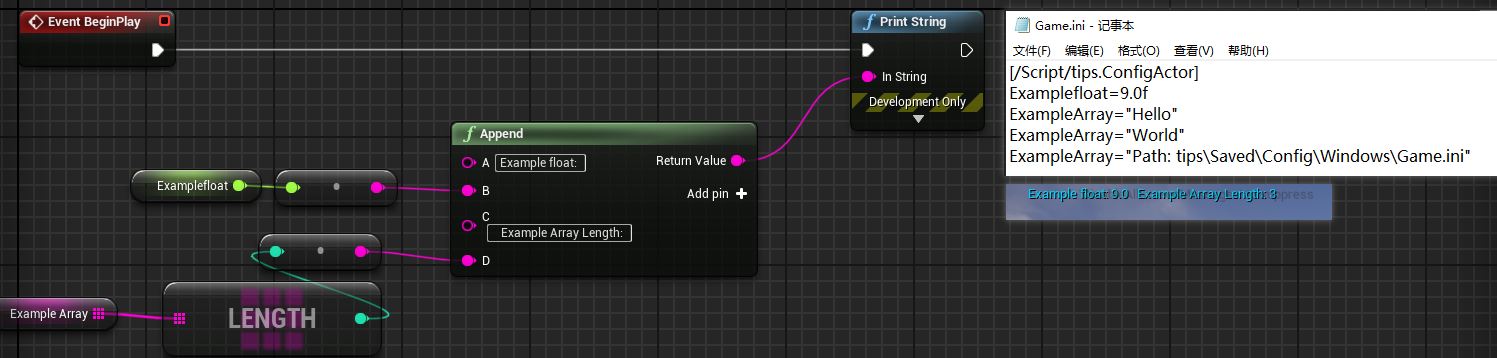
测试时,派生蓝图类,section 设为类路径也可以
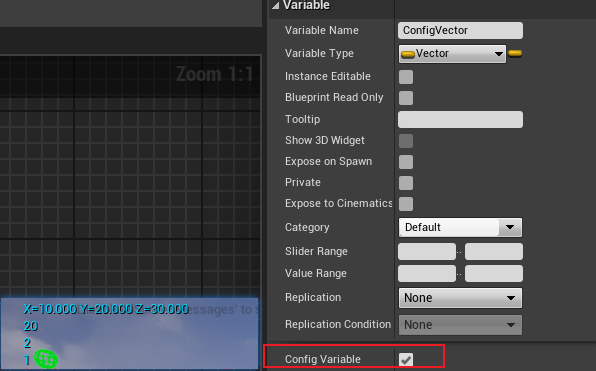
蓝图中添加的变量也可以使用配置文件,需要勾选 Config Variable
[/Game/CPPFunction/DataDrive/BP_ConfigActor.BP_ConfigActor_C]

ExampleArray=1

ExampleArray=2

ExampleArray=20

ConfigVector=(X=10.000000,Y=20.000000,Z=30.000000)
自定义配置文件
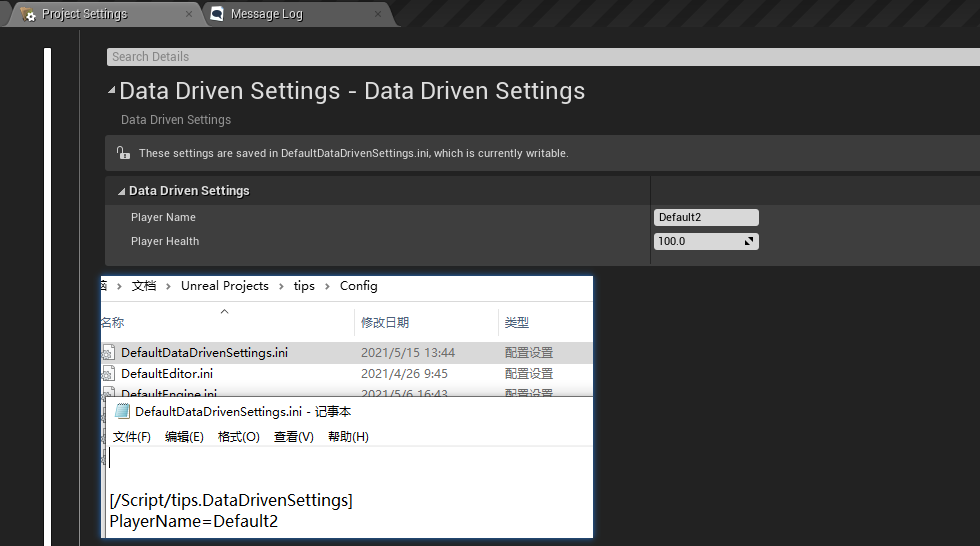
创建 UDeveloperSettings 派生类
支持 ProjectSettings 修改
生成路径为
[ProjectName]\Config\DefaultGame.iniUCLASS(Config = DataDrivenSettings, defaultconfig)
class TIPS_API UDataDrivenSettings : public UDeveloperSettings
{
GENERATED_BODY() public: /** Gets the settings container name for the settings, either Project or Editor */
virtual FName GetContainerName() const override { return TEXT("Project"); }
/** Gets the category for the settings, some high level grouping like, Editor, Engine, Game...etc. */
virtual FName GetCategoryName() const override { return TEXT("DataDrivenSettings"); }
/** The unique name for your section of settings, uses the class's FName. */
virtual FName GetSectionName() const override { return TEXT("DataDrivenSettings"); } public:
UPROPERTY(Config, EditAnywhere, BlueprintReadWrite)
FString PlayerName="Default"; UPROPERTY(Config, EditAnywhere, BlueprintReadWrite)
float PlayerHealth = 100.0f;
};
直接读写配置文件
GConfig 类型为 FConfigCacheIni* ,下面为 FConfigCacheIni 的一些方法,更详细的接口可以查看文章尾部的附录
void LoadFile( const FString& InFilename, const FConfigFile* Fallback = NULL, const TCHAR* PlatformString = NULL );

void SetFile( const FString& InFilename, const FConfigFile* NewConfigFile );

void UnloadFile( const FString& Filename );

void Detach( const FString& Filename );

bool GetString( const TCHAR* Section, const TCHAR* Key, FString& Value, const FString& Filename );

bool GetText( const TCHAR* Section, const TCHAR* Key, FText& Value, const FString& Filename );

bool GetSection( const TCHAR* Section, TArray<FString>& Result, const FString& Filename );

bool DoesSectionExist(const TCHAR* Section, const FString& Filename);

void SetString( const TCHAR* Section, const TCHAR* Key, const TCHAR* Value, const FString& Filename );

void SetText( const TCHAR* Section, const TCHAR* Key, const FText& Value, const FString& Filename );

bool RemoveKey( const TCHAR* Section, const TCHAR* Key, const FString& Filename );

bool EmptySection( const TCHAR* Section, const FString& Filename );

bool EmptySectionsMatchingString( const TCHAR* SectionString, const FString& Filename );

FString GetStr(const TCHAR * Section, const TCHAR * Key, const FString & Filename);

bool GetInt(const TCHAR * Section, const TCHAR * Key, int32 & Value, const FString & Filename);

bool GetFloat(const TCHAR * Section, const TCHAR * Key, float& Value, const FString & Filename);

bool GetDouble(const TCHAR * Section, const TCHAR * Key, double& Value, const FString & Filename);

bool GetBool(const TCHAR * Section, const TCHAR * Key, bool& Value, const FString & Filename);

int32 GetArray(const TCHAR * Section, const TCHAR * Key, TArray<FString>&out_Arr, const FString & Filename);
读取
读取系统自带的配置属性
[/Script/EngineSettings.GameMapsSettings]

GameDefaultMap=/Game/CPPFunction/MultiThread/Map_multithread.Map_multithread

EditorStartupMap=/Game/CPPFunction/MultiThread/Map_multithread.Map_multithread
if (GConfig)

{

	FString GameDefaultMap;

	bool success = GConfig->GetString(TEXT("/Script/EngineSettings.GameMapsSettings"), TEXT("GameDefaultMap"), GameDefaultMap, GEngineIni);

	if (success)

	{

		UE_LOG(LogTemp, Warning, TEXT(" GameDefaultMap: %s"), *GameDefaultMap);

		return true;

	}

}

return false;

// >> LogTemp: Warning:  GameDefaultMap: /Game/CPPFunction/MultiThread/Map_multithread.Map_multithread
读取自定义配置属性
[DarkSoul]

Name=Frank

DeadTimes=100
if (GConfig)

{

	FString Name;

	int32 DeadTimes;

	bool success = GConfig->GetString(TEXT("DarkSoul"), TEXT("Name"), Name, GGameIni);

	success &= GConfig->GetInt(TEXT("DarkSoul"), TEXT("DeadTimes"), DeadTimes, GGameIni);

	if (success)

	{

		UE_LOG(LogTemp, Warning, TEXT(" Name: %s, DeadTimes: %d"), *Name, DeadTimes);

		return true;

	}

}

return false;
- GGameIni 默认路径:
[ProjectName]\Saved\Config\Windows\Game.ini
GGameIni 也可以读取[ProjectName]\Config\DefaultGame.ini
读取自定义 SympleConfig.ini
FConfigFile CustomConfigFile;

FString Path = FPaths::ProjectConfigDir() / TEXT("SympleConfig.ini");

CustomConfigFile.Read(Path);

FString ProjectID;

bool success = CustomConfigFile.GetString(TEXT("ProjectSettings"), TEXT("ProjectID"), ProjectID);

if (success)

{

	UE_LOG(LogTemp, Warning, TEXT(" ProjectID: %s"), *ProjectID);

	return true;

}

return false;
写入
Set
if (GConfig)

	{

		FString Name = "Mike";

		TArray<FString> Buff;

		Buff.Add(TEXT("Fire"));

		Buff.Add(TEXT("Strong"));

		Buff.Add(TEXT("Speed"));

		GConfig->SetString(TEXT("DarkSoul"), TEXT("Name"), *Name, GGameIni);

		GConfig->SetArray(TEXT("DarkSoul"), TEXT("Buff"), Buff, GGameIni);

		GConfig->SetVector(TEXT("DarkSoul"), TEXT("Name"), GetActorLocation(), GGameIni);

	}
附录
系统默认配置文件
FString				GEngineIni;													/* Engine ini filename */

/** Editor ini file locations - stored per engine version (shared across all projects). Migrated between versions on first run. */

FString				GEditorIni;													/* Editor ini filename */

FString				GEditorKeyBindingsIni;										/* Editor Key Bindings ini file */

FString				GEditorLayoutIni;											/* Editor UI Layout ini filename */

FString				GEditorSettingsIni;											/* Editor Settings ini filename */

/** Editor per-project ini files - stored per project. */

FString				GEditorPerProjectIni;										/* Editor User Settings ini filename */

FString				GCompatIni;

FString				GLightmassIni;												/* Lightmass settings ini filename */

FString				GScalabilityIni;											/* Scalability settings ini filename */

FString				GHardwareIni;												/* Hardware ini filename */

FString				GInputIni;													/* Input ini filename */

FString				GGameIni;													/* Game ini filename */

FString				GGameUserSettingsIni;										/* User Game Settings ini filename */

FString				GRuntimeOptionsIni;											/* Runtime Options ini filename */

FString				GInstallBundleIni;											/* Install Bundle ini filename*/

FString				GDeviceProfilesIni;											/* Runtime DeviceProfiles ini filename - use LoadLocalIni for other platforms'
FConfigCacheIni 获取配置文件中数据的方法
// Derived functions.

FString GetStr

(

	const TCHAR*		Section,

	const TCHAR*		Key,

	const FString&	Filename

);

bool GetInt

(

	const TCHAR*		Section,

	const TCHAR*		Key,

	int32&				Value,

	const FString&	Filename

);

bool GetFloat

(

	const TCHAR*		Section,

	const TCHAR*		Key,

	float&				Value,

	const FString&	Filename

);

bool GetDouble

(

	const TCHAR*		Section,

	const TCHAR*		Key,

	double&				Value,

	const FString&	Filename

);

bool GetBool

(

	const TCHAR*		Section,

	const TCHAR*		Key,

	bool&				Value,

	const FString&	Filename

);

int32 GetArray

(

	const TCHAR*		Section,

	const TCHAR*		Key,

	TArray<FString>&	out_Arr,

	const FString&	Filename

);

/** Loads a "delimited" list of strings

 * @param Section - Section of the ini file to load from

 * @param Key - The key in the section of the ini file to load

 * @param out_Arr - Array to load into

 * @param Filename - Ini file to load from

 */

int32 GetSingleLineArray

(

	const TCHAR*		Section,

	const TCHAR*		Key,

	TArray<FString>&	out_Arr,

	const FString&	Filename

);

bool GetColor

(

	const TCHAR*		Section,

	const TCHAR*		Key,

	FColor&				Value,

	const FString&	Filename

);

bool GetVector2D(

	const TCHAR*   Section,

	const TCHAR*   Key,

	FVector2D&     Value,

	const FString& Filename);

bool GetVector

(

	const TCHAR*		Section,

	const TCHAR*		Key,

	FVector&			Value,

	const FString&	Filename

);

bool GetVector4

(

	const TCHAR*		Section,

	const TCHAR*		Key,

	FVector4&			Value,

	const FString&	Filename

);

bool GetRotator

(

	const TCHAR*		Section,

	const TCHAR*		Key,

	FRotator&			Value,

	const FString&	Filename

);

void SetInt

(

	const TCHAR*		Section,

	const TCHAR*		Key,

	int32					Value,

	const FString&	Filename

);

void SetFloat

(

	const TCHAR*		Section,

	const TCHAR*		Key,

	float				Value,

	const FString&	Filename

);

void SetDouble

(

	const TCHAR*		Section,

	const TCHAR*		Key,

	double				Value,

	const FString&	Filename

);

void SetBool

(

	const TCHAR*		Section,

	const TCHAR*		Key,

	bool				Value,

	const FString&	Filename

);

void SetArray

(

	const TCHAR*			Section,

	const TCHAR*			Key,

	const TArray<FString>&	Value,

	const FString&		Filename

);

/** Saves a "delimited" list of strings

 * @param Section - Section of the ini file to save to

 * @param Key - The key in the section of the ini file to save

 * @param out_Arr - Array to save from

 * @param Filename - Ini file to save to

 */

void SetSingleLineArray

(

	const TCHAR*			Section,

	const TCHAR*			Key,

	const TArray<FString>&	In_Arr,

	const FString&		Filename

);

void SetColor

(

	const TCHAR*		Section,

	const TCHAR*		Key,

	FColor				Value,

	const FString&	Filename

);

void SetVector2D(

	const TCHAR*   Section,

	const TCHAR*   Key,

	FVector2D      Value,

	const FString& Filename);

void SetVector

(

	const TCHAR*		Section,

	const TCHAR*		Key,

	FVector				Value,

	const FString&	Filename

);

void SetVector4

(

	const TCHAR*		Section,

	const TCHAR*		Key,

	const FVector4&		Value,

	const FString&	Filename

);

void SetRotator

(

	const TCHAR*		Section,

	const TCHAR*		Key,

	FRotator			Value,

	const FString&	Filename

);
参考
【UE4 C++】 Config Settings配置文件(.ini)的更多相关文章
- 利用GetPrivateProfileString读取配置文件(.ini)
利用GetPrivateProfileString读取配置文件(.ini) 配置文件中经常用到ini文件,在VC中其函数分别为: 写入.ini文件:bool WritePrivateProfileSt ...
- Python常用配置文件ini、json、yaml读写总结
开发项目时,为了维护一些经常需要变更的数据,比如数据库的连接信息.请求的url.测试数据等,需要将这些数据写入配置文件,将数据和代码分离,只需要修改配置文件的参数,就可以快速完成环境的切换或者测试数据 ...
- python 读取配置文件ini ---ConfigParser
Python读取ini文件需要用到 ConfigParser 模块 关于ConfigParser模块的介绍详情请参照官网解释:https://docs.python.org/2.7/library/c ...
- maven settings 配置文件
maven settings 配置文件 <?xml version="1.0" encoding="UTF-8"?> <settings xm ...
- LabVIEW--为设备添加配置文件.ini
需求:我同一个程序下载到两台机器人上,有些参数是不一样的,比如说服务器的ID或者端口,以及存放文件的位置,如果我每次下载之前改程序的话就非常麻烦了(虽然在程序里面是作为全局变量来存的),不利于后期的更 ...
- .net Core Abp See config settings - "CustomSchemaIds" for a workaround
Swagger See config settings - "CustomSchemaIds" for a workaround System.InvalidOperationE ...
- ResourceBundle类的方式来读取config.properties配置文件参数值
//获取config.properties配置文件参数值 public static ResourceBundle resource = ResourceBundle.getBundle(" ...
- Webpack探索【2】--- 安装、项目初始化、webpack.config.js配置文件
本文主要讲安装.项目初始化.webpack.config.js配置文件方面的内容.
- Vue Cli 3:vue.config.js配置文件
Vue Cli 3生成的项目结构,没有build.config目录,而是使用vue.config.js来进行配置. vue.config.js 是一个可选的配置文件,如果项目的 (和 package. ...
随机推荐
- JDK1.8源码阅读笔记(1)Object类
JDK1.8源码阅读笔记(1)Object类 Object 类属于 java.lang 包,此包下的所有类在使⽤时⽆需⼿动导⼊,系统会在程序编译期间⾃动 导⼊.Object 类是所有类的基类,当⼀ ...
- OAuth2-简介
1. 简介 OAuth(开放授权)是一个开放标准,允许用户让第三方应用访问该用户在某一网站上存储的私密的资源(如照片,视频,联系人列表),而无需将用户名和密码提供给第三方应用.因此OAUTH是安全的. ...
- 知乎大佬图文并茂的epoll讲解,看不懂的去砍他
select.poll.epoll的文章很多,自己也看过不少经典好文.不过第一次看到讲的如此通俗易懂.又图文并茂的.因此拿来分享下,供后续翻看学习. 原文链接:https://zhuanlan.zhi ...
- BeanFactory和ApplicationContext对比
一.BeanFactory和ApplicationContext对比 其中,ApplicationContext容器即时加载,就是一加载配置文件,就会创建对象,且自动装配bean(即写道xml中bea ...
- 生成随机uuid
/** * 生成随机uuid */ export function uuid() { return 'xxxxxxxx-xxxx-4xxx-yxxx-xxxxxxxxxxxx'.repla ...
- Emit优化反射(属性的设置与获取)
在频繁的通过反射来设置和获取属性的值时是比较耗时的,本章通过Emit技术优化反射来提高获取和设置属性值的效率 一.实现代码: /// <summary> /// 设置器委托 /// < ...
- windows中ren(rename-重命名)命令的使用方法
脚本(*.dat文件): cd /d %~dp0 ren * *.mp3
- UVA 11853 Paintball(几何数学+DFS)
https://vjudge.net/problem/UVA-11853 根据题意描述,相当于在一个正方形中有若干个圆形障碍物,问是否能从左边界走到右边界.判断是否有解需要一点创造性的思维:不妨把正方 ...
- CodeForce-803B Distances to Zero(贪心DP)
Distances to Zero CodeForces - 803B 题意:给定一个数列 a0, a1, ..., an - 1.对于数列中的每一项都要求出与该项最近的0与该项的距离.保证数列中有至 ...
- c++ 打包函数教程
c++当要重复运行一些代码时可以打包一个函数 当没有返回值时用void打包函数: #include <iostream> #include <stdio.h> using na ...