
JavaScript实现简单的打字游戏
完整项目下载:https://download.csdn.net/download/weixin_44893902/13131694
演示地址:https://url_777.gitee.io/typing-games/
效果图:
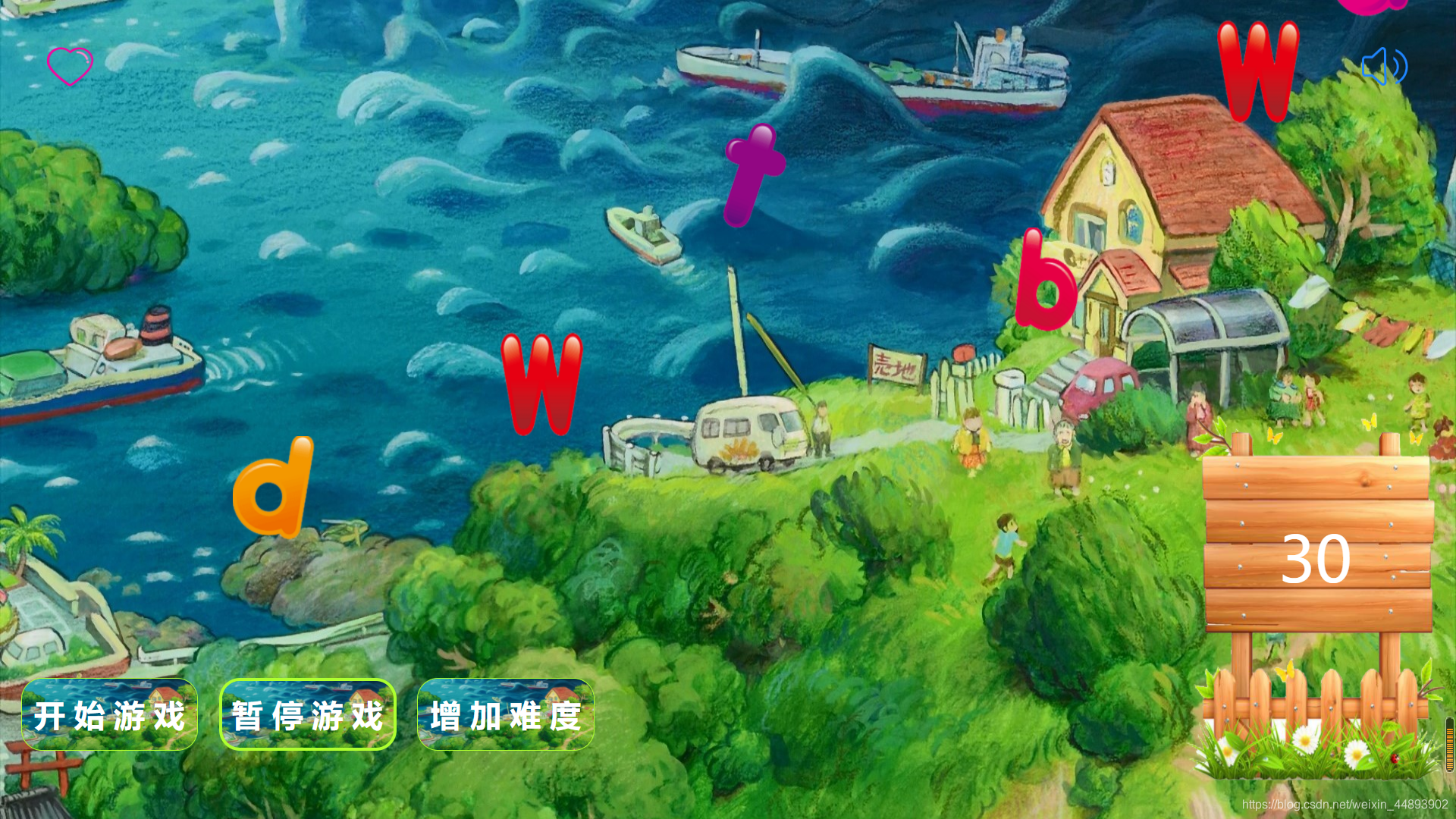
实现代码:
目录结构:
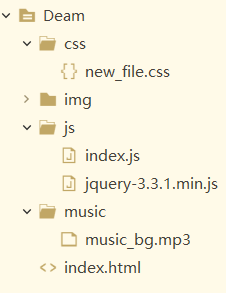
HTML:
<!DOCTYPE html>

<html>

	<head>

		<meta charset="utf-8" />

		<title>打字游戏</title>

		<link rel="stylesheet" href="css/new_file.css" />

		<script type="text/javascript" src="js/jquery-3.3.1.min.js"></script>

		<script src="js/index.js" type="text/javascript" charset="utf-8"></script>

	</head>

	<body>

		<!-- 背景音乐 -->

		<audio id="mus">

			<source src="music/music_bg.mp3"></source>

		</audio>

		<!-- 主体部分 -->

		 <div id="box">

			 <div id="">

			 </div>

			 <!-- 左右的生命和音量图标 -->

			<img src="./img/生命.png" style="float: left; margin: 45px;" width="45" height="38" id="life" />

			<img src="./img/volume.png" style="float: right; margin: 45px;" width="45" height="38" id="volume" />

			<!-- 计分模块 -->

			<div class="score"><font>0</font></div>

            <div id="game"></div>

			<!-- 重新开始界面 -->

            <div class="reload">

         	<input type="button" class="btn squick" value="重新开始" />

         	<a href="http://www.baidu.com"> <input type="button" class=" btn tu" value="退出游戏" /></a>

            </div>

			<!-- 按钮 -->

		    <input type="button" class=" btn start" value="开 始 游 戏" />

		    <input type="button" class=" btn stop" value="暂 停 游 戏" />

		    <input type="button" class=" btn quick" value="增 加 难 度" />

	</div>

</html>
CSS
*{

	margin: 0;

	padding: 0;

}

.btn{

      width: 170px;

      height: 70px;

      border-radius: 20px;

      border: 1px solid greenyellow;

	  outline: medium;

      background: url(../img/background.jpg) no-repeat;

      background-size:170px 70px;

      float: left;

	  margin-left: 20px;

	  margin-top: 300px;

      text-align: center;

      /* cursor: pointer; */

      /* user-select: none; */

      font-weight: bold;

      font-size: 30px;

      color:white;

}

.btn:hover{

	border: 3px solid greenyellow;

}

#box{

     width: 100%;

     height: 100vh;

     background:url(../img/background.jpg) no-repeat;

     background-size:100% 100%;

     overflow: hidden;

}

.score{

     width: 250px;

     height: 355px;

     background: url(../img/score.png) no-repeat;

     background-size:100% 100%;

     position: absolute;

     right:10px;

     /* bottom: -80px; */

     font-size: 60px;

     text-align: center;

     line-height: 280px;

     color: white;

     cursor: pointer;

     user-select: none;

	 margin-top: 395px;

}

.startorstop{

     width: 100%;

     height: 50px;

     position: absolute;

     bottom: 20px;

}

.reload{

      	width: 500px;

      	height: 350px;

        background: url(../img/reload.gif) no-repeat;

      	background-size:350px 270px;

      	margin: 0 auto;

      	position: relative;

      	top: -650px;

}

.squick{

	width: 130px;

    height: 50px;

	margin-top: 280px;

	margin-left: 40px;

}

.tu{

	width: 130px;

    height: 50px;

	margin-top: -49px;

	margin-left: 210px;

}

#game img{

      	position: absolute;

}

#music_btn{

      	width: 70px;

      	height: 70px;

      	position: absolute;

      	left: 10px;

      	top: 20px;

      	cursor: pointer;

      	user-select: none;

}

.play-tips{

	width: 500px;

	height: 400px;

	margin: 0 auto;

	margin-top: 150px;

	border:  1px solid red;

}

#buttons1{

	width: 700px;

	height: 200px;

	margin-bottom: 100px;

}
JavaScript
$(function(){

			var chars =['A','B','C','D','E','F','G','H','T','J','K','L','M','N','O','P','Q','R','S','G','U','V','W','X','Y','Z'];

		//积分

			var score = 0;

		 //默认游戏的状态

			var flag = true;

		 //声明刚开始游戏的状态

			var f = true;

		//开始游戏的标识

			var speed = 1;

			var start = $(".start");

			var createImgInterval;

			var downImgInterval;

		//默认游戏的状态

	   //点击开始游戏按钮所执行的函数

		start.click(function(){

			play(speed);

			var music=document.getElementById("mus");

			music.play();

			flag = true;

			if(f){

			f = false;

		}

	 });

	  //点击暂停按钮所执行的函数

		 $(".stop").click(function(){

		   if(flag){

			 flag = false;

			 $(this).val("继 续 游 戏")

			 var music=document.getElementById("mus");

			 music.pause();

		  }else{

			 flag = true;

			 $(this).val("暂 停 游 戏")

			 var music=document.getElementById("mus");

			 music.play();

		  }

	 });

	  //增加难度

	   $(".quick").click(function(){

		  if(!f){

			speed += 0.5;

			play(speed);

	   }

	 });

	 //重新开始游戏

	 $(".reload").click(function(){

	   $(this).animate({top:"-350px"});

	   $("#game").children().remove();

	   score = 0;

	   $(".score").html(score);

	   flag = true;

	   f = true;

	   speed = 1;

	   play(speed);

	   console.log(speed)

	 });

	 //创建图片

	function createImg(){

		if(flag){

		//随机创建

		var random = randomScope(0,25);

		var img = chars[random];

		var Dwidth = $(document).width();//获取浏览器的宽度

		var left = randomScope(Dwidth-100,100);

		$("#game").append("<img src='img/"+img+".png' width='80' height='100' style='left:"+left+"px; top:-100px;' />");

		}

	 }

	 //加载图片

	 function downImg(){

		 if(flag){

			 var imgs = $("#game").children();//获取生成的所有字母

			 for(var i=0;i<imgs.length;i++){

			   var img = imgs[i];

			   //当前字母

			   var Top = parseInt(img.style.top);

			   //当前字母距离顶部的值

			   var Height = $("#box").height()-200;

			   if(Top<=Height){

				 img.style.top=(Top+2)+"px";

			   }else{

				 img.remove();

//                   error.play();

				 if(score==0){

					 score=0

				 }else{

					 score -= 10;

				 }

				 $(".score").html(score);

				 if(score <= 0){

				   flag = false;

				   $(".reload").animate({"top":"30px"});

//                     gameOver.play();

				   window.clearInterval(createImgInterval);

				   window.clearInterval(downImgInterval);

				   return  ;

				 }

			   }

			 }

		 }

	 }

	  $(window).keyup(function(e){

		var eve = window.event || e;//获取事件对象

		var imgs = $("#game").children();//获取所生成的字母

		var code = eve.keyCode;//获取用户按下的键

	   if(flag){

		 for(var i =0;i<imgs.length;i++){

		   var img = imgs[i];

		   var imgSrc = img.src.split("/");

		   var name = imgSrc[imgSrc.length-1].split(".")[0];

		   if(name == chars[code-65]){

			 img.remove();

			 score+=10;

			 $(".score").html(score);

			 if(score <= 0){

			   // $(".tupian").animate({"bottom":"0px"});

			   window.clearInterval(createImgInterval);

			   window.clearInterval(downImgInterval);

			 }

			 return;

		   }

		 }

	   }

	 });

	 //定时器

	 function play(speed){

		console.log(speed)

		createImgInterval = window.setInterval(createImg,1000-speed*50);

		downImgInterval = window.setInterval(downImg,20-speed/2);

	 }

	 //随机范围方法

	 function randomScope(minScope,maxScope){

		 return Math.floor(Math.random()*(maxScope-minScope+1)+minScope);

	 }

	 var music=document.getElementById("volume");

	 music.onclick = function(){

		 var i = true;

		 var mus=document.getElementById("mus");

		 if (mus.paused) {

			 mus.play();

		     // 暂停中

		 } else {

		     // 播放中

			 mus.pause();

		 }

	 }

		});
JavaScript实现简单的打字游戏的更多相关文章
- 使用JavaScript实现简单的小游戏-贪吃蛇
最近初学JavaScript,在这里分享贪吃蛇小游戏的实现过程, 希望能看到的前辈们能指出这个程序的不足之处. 大致思路 首先要解决的问题 随着蛇头的前进,尾巴也要前进. 用键盘控制蛇的运动方向. 初 ...
- jQuery 写的简单打字游戏
var off_x; //横坐标 var count=0; //总分 var speed=5000; //速度,默认是5秒. var keyErro=0; //输入错误次数 var keyRight= ...
- 用JS写了一个打字游戏,反正我是通不了关
今天想写个简单的游戏, 打字游戏好像都没写过, 那么就写打字游戏吧, gamePad包含了关卡的信息, 可以用来调整给个关卡字符下落的速度: getRandom函数会返回一个字符对象, 这个对象包含了 ...
- java打字游戏
小记:老早之前写的程序,今天发现之前在 csdn上写的东西的图片不显示了,搞得人好郁闷,所以把之前零星的几篇文章搬个家 游戏运行截图: 字母实体类 package com.git.game; impo ...
- 用javascript实现2048的小游戏
前段时间,看了一个视频,用javascript实现的2048小游戏,发现不难,都是一些基出的语法和简单逻辑. 整个2048游戏没有很多的数据,所有,实现起来还是很有成就感的. 先上图,简直就和原版游戏 ...
- JavaScript+HTML5 实现打地鼠小游戏
一.游戏简介 打地鼠这个游戏相信大家都不陌生,也是童年时候一款经典的游戏.本次游戏的编写是以html文件形式完成的,并且使用HBulider软件进行编写,使用谷歌浏览器展示效果,游戏将会采用JavaS ...
- 无聊的人用JS实现了一个简单的打地鼠游戏
直入正题,用JS实现一个简单的打地鼠游戏 因为功能比较简单就直接裸奔JS了,先看看效果图,或者 在线玩玩 吧 如果点击颜色比较深的那个(俗称坏老鼠),将扣分50:如果点击颜色比较浅的那个(俗称好老鼠) ...
- Java之线程———GUI线程(包含打字游戏和计时器俩个GUI实列)
当java程序包含图形用户界面(GUI)时,Java虚拟机在运行应用程序时会自动启动更多的线程,其中有两个重要的线程:AWT-EventQuecue 和 AWT-Windows. AWT-EventQ ...
- 最少javascript代码完成一个2048游戏
原生javascript代码写的2048游戏.建议在谷歌浏览器下跑.'WASD'控制方向.演示地址请移步:http://runjs.cn/detail/bp8baf8b 直接贴代码~ html: &l ...
随机推荐
- 【Linux】【Services】【Docker】Docker File
Docker Images: docker commit Dockerfile:文本文件,镜像文件构建脚本: Dockerfile:由一系列用于根据基础镜像构建新的镜像文件的专用指令序列组成: 指令: ...
- 使用AOP思想实现日志的添加
//1.创建日志表syslog------->创建日志的实体类--------->在web.xml中配置监听 <listener> <listener-class ...
- Linux 目录结构及详细操作
目录 Linux 目录结构及详细操作 目录结构 目录结构的特点 目录结构挂载 目录结构发展 关闭selinux(了解) 重要目录说明(etc目录说明) 1.网卡配置文件 2.解析配置文件 3.主机名称 ...
- pipeline parameters指令
目录 一.简介 二.类型 参数类型 多参数 一.简介 参数化pipeline是指通过传参来决定pipeline的行为.参数化让写pipeline就像写函数,而函数意味着可重用.更抽象.所以,通常使用参 ...
- Nginx安全检查
1.检查是否配置Nginx账号锁定策略 描述 1.执行系统命令passwd -S nginx来查看锁定状态 出现Password locked证明锁定成功 如:nginx LK ..... (Pass ...
- 转:Memcached 线程部分源码分析
目前网上关于memcached的分析主要是内存管理部分,下面对memcached的线程模型做下简单分析 有不对的地方还请大家指正,对memcahced和libevent不熟悉的请先google之 先看 ...
- Niushop开源商店渗透测试
靶机 提取码:le8l 首先连上靶机 先扫一下靶场ip,看看开启了哪些端口 开启了80端口,扫描一下目录 一个shop的界面, 一个admin后台管理界面 其他的目录翻看了一下, 看样子是网站的配置文 ...
- java 编程基础:【注解】 提取注解信息,利用自定义注解编写测试类,注解绑定事件
提取注解信息 使用注解修饰了类.方法.成员变量等成员之后,这些注解不会自己生效,必须由开发者提供相应工具来提取并处理注解信息. Java使用java.lang.annotation.Annotat ...
- python获取命令行传参的两种种常用方法argparse解析getopt 模块解析
方法一:argparse解析 #!/usr/bin/env python3 # -*- coding:utf-8 -*- # @Time: 2020/5/20 10:38 # @Author:zhan ...
- JS获取url中query_str JavaScript RegExp 正则表达式基础详谈
面我们举例一个URL,然后获得它的各个组成部分:http://i.cnblogs.com/EditPosts.aspx?opt=1 1.window.location.href(设置或获取整个 URL ...