
iOS动画相关(持续更新)
1.When my application is entering background, because the user push the home button, the animations correctly set in pause, but when i re-open my app, the animations have disappeard.How could i fix it please ?
当我的应用进入了后台,因为用户按了home键,动画被设置成了暂停,但当我重新打开应用时,动画都消失了,我如何修复它?
This is correct and built-in behavior. When you leave the app, all animations are removed from their layers: the system calls removeAllAnimations on every layer.
你的情况是系统默认的行为.当你离开了应用后(比如进入了后台),所有的动画都从他们的layer上移除了:因为系统调用了removeAllAnimations,针对所有的layer.
附录:
UIViewController中的view显示步骤
--------------------------------------------------------------------------------------------------------
进入UIViewController时的情况:
viewDidLoad
viewWillLayoutSubviews
viewDidLayoutSubviews
viewWillAppear
viewWillLayoutSubviews
viewDidLayoutSubviews
viewDidAppear
切换了Controller后的情况(比如你在TabbarController中切换了):
viewWillDisappear
viewDidDisappear
再次切换回来后的情况:
viewWillLayoutSubviews
viewDidLayoutSubviews
viewWillAppear
viewWillLayoutSubviews
viewDidLayoutSubviews
viewDidAppear
退入到后台后的情况:
无
从后台进入程序时的情况:
viewWillLayoutSubviews
viewDidLayoutSubviews
--------------------------------------------------------------------------------------------------------
为了解决从后台切换回来或者从TabbarController切换回来动画还能继续动画效果,需要如下的解决方案:
- (void)viewWillAppear:(BOOL)animated

{

    [super viewWillAppear:animated];

    // 添加通知(处理从后台进来后的情况)

    [[NSNotificationCenter defaultCenter] addObserver:self

                                             selector:@selector(addAnimation:)

                                                 name:UIApplicationWillEnterForegroundNotification

                                               object:nil];

    // 添加动画的代码

}
- (void)addAnimation:(NSNotification *)notificaiton

{
   // 添加动画的代码

}
2.基本动画类型
旋转动画
    /* 旋转 */

    CABasicAnimation *animation = [CABasicAnimation animationWithKeyPath:@"transform.rotation.z"];

    // 一次完整的动画所持续的时间

    animation.duration = .f;

    // 重复次数

    animation.repeatCount = HUGE_VALF;

    // 起始角度

    animation.fromValue = [NSNumber numberWithFloat:0.0];

    // 终止角度

    animation.toValue   = [NSNumber numberWithFloat:-  * M_PI];

    // 添加动画

    [_showView.layer addAnimation:animation

                           forKey:@"rotate-layer"];
透明度
    // 透明度动画

    CABasicAnimation* fadeAnim = [CABasicAnimation animationWithKeyPath:@"opacity"];

    // 初始值

    fadeAnim.fromValue = [NSNumber numberWithFloat:1.0];

    // 结束值

    fadeAnim.toValue   = [NSNumber numberWithFloat:0.0];

    // 动画持续一次的时间

    fadeAnim.duration = 1.0;

    // 开始动画

    [_showView.layer addAnimation:fadeAnim forKey:@"opacity"];

    // 无论动画是否被中断,其最终的值还是被设置过了

    _showView.layer.opacity = 0.0;
borderWidth动画
    // borderWidth动画

    CABasicAnimation *borderWidthAnimation = \

        [CABasicAnimation animationWithKeyPath:@"borderWidth"];

    // 初始值

    borderWidthAnimation.fromValue = [NSNumber numberWithFloat:0.0];

    // 结束值

    borderWidthAnimation.toValue   = [NSNumber numberWithFloat:3.0];

    // 动画持续一次的时间

    borderWidthAnimation.duration    = .f;

    // 开始动画

    [_showView.layer addAnimation:borderWidthAnimation forKey:@"borderWidth"];

    // 无论动画是否被中断,其最终的值还是被设置过了

    _showView.layer.borderWidth = 3.0f;
backgroundColor动画
    // backgroundColor动画

    CABasicAnimation *borderWidthAnimation = \

        [CABasicAnimation animationWithKeyPath:@"backgroundColor"];

    // 初始值

    borderWidthAnimation.fromValue = (id)[[UIColor redColor] CGColor];

    // 结束值

    borderWidthAnimation.toValue   = (id)[[UIColor greenColor] CGColor];

    // 动画持续一次的时间

    borderWidthAnimation.duration    = .f;

    // 开始动画

    [_showView.layer addAnimation:borderWidthAnimation forKey:@"borderWidth"];

    // 无论动画是否被中断,其最终的值还是被设置过了

    _showView.layer.backgroundColor = [[UIColor greenColor] CGColor];
borderColor动画
    // borderColor动画

    CABasicAnimation *borderWidthAnimation = \

        [CABasicAnimation animationWithKeyPath:@"borderColor"];

    // 初始值

    borderWidthAnimation.fromValue = (id)[[UIColor redColor] CGColor];

    // 结束值

    borderWidthAnimation.toValue   = (id)[[UIColor greenColor] CGColor];

    // 动画持续一次的时间

    borderWidthAnimation.duration    = .f;

    // 开始动画

    [_showView.layer addAnimation:borderWidthAnimation forKey:@"borderWidth"];

    // 无论动画是否被中断,其最终的值还是被设置过了

    _showView.layer.backgroundColor = [[UIColor greenColor] CGColor];
bounds.size.height动画
    // bounds.size.height动画

    CABasicAnimation *borderWidthAnimation = \

        [CABasicAnimation animationWithKeyPath:@"bounds.size.height"];

    // 初始值

    borderWidthAnimation.fromValue = [NSNumber numberWithFloat:100.0f];

    // 结束值

    borderWidthAnimation.toValue   = [NSNumber numberWithFloat:.f];

    // 动画持续一次的时间

    borderWidthAnimation.duration    = 0.5f;

    // 选择一种动画的时间轴方式

    borderWidthAnimation.timingFunction = \

        [CAMediaTimingFunction functionWithName:kCAMediaTimingFunctionEaseOut];

    // ??

    borderWidthAnimation.fillMode = kCAFillModeForwards;

    // 开始动画

    [_showView.layer addAnimation:borderWidthAnimation forKey:@"bounds.size.height"];

    // 无论动画是否被中断,其最终的值还是被设置过了

    _showView.layer.bounds = CGRectMake(self.view.center.x, self.view.center.y, , .f);
contents动画
    // 初始化一张图片

    UIImageView *imageView = [[UIImageView alloc] initWithFrame:CGRectMake(, , , )];

    imageView.image = [UIImage imageNamed:@""];

    // 添加进view中

    [self.view addSubview:imageView];

    // contents动画

    CABasicAnimation *crossFade = [CABasicAnimation animationWithKeyPath:@"contents"];

    crossFade.duration = 2.0;

    crossFade.fromValue  = (id)([UIImage imageNamed:@""].CGImage);

    crossFade.toValue    = (id)([UIImage imageNamed:@""].CGImage);

    [imageView.layer addAnimation:crossFade forKey:@"animateContents"];

    // 进行最后的设置

    imageView.image = [UIImage imageNamed:@""];
圆角动画
    // 初始化一张图片

    UIView *showView = [[UIView alloc] initWithFrame:CGRectMake(, , , )];

    showView.backgroundColor = [UIColor redColor];

    [self.view addSubview:showView];

    // 圆角动画

    CABasicAnimation *animation = [CABasicAnimation animationWithKeyPath:@"cornerRadius"];

    animation.fromValue = [NSNumber numberWithFloat:.f];

    animation.toValue   = [NSNumber numberWithFloat:.f];

    animation.duration  = 1.0;

    [showView.layer setCornerRadius:.f];

    // 最后设置

    [showView.layer addAnimation:animation forKey:@"cornerRadius"];
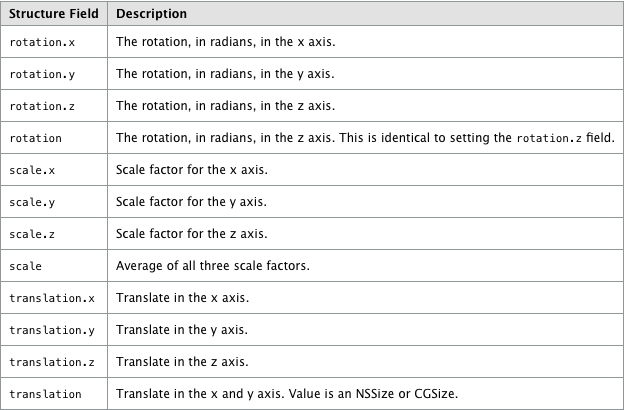
支持的动画太多了,以下是苹果的官方文档中提出的支持的动画:
|
Property |
Default animation |
|---|---|
|
Uses the default implied |
|
|
Uses the default implied |
|
|
Uses the default implied |
|
|
Uses the default implied |
|
|
Uses the default implied |
|
|
Uses the default implied |
|
|
Uses the default implied |
|
|
Uses the default implied |
|
|
Uses the default implied |
|
|
Uses the default implied |
|
|
There is no default implied animation. |
|
|
Uses the default implied |
|
|
This property is not animatable. You can achieve the same results by animating the |
|
|
Uses the default implied |
|
|
Uses the default implied |
|
|
Uses the default implied |
|
|
Uses the default implied |
|
|
Uses the default implied |
|
|
Uses the default implied |
|
|
Uses the default implied |
|
|
Uses the default implied |
|
|
Uses the default implied |
|
|
Uses the default implied |
|
|
Uses the default implied |
|
|
Uses the default implied |
|
|
Uses the default implied |
|
|
Uses the default implied |
http://www.cnblogs.com/pengyingh/articles/2379631.html
iOS动画相关(持续更新)的更多相关文章
- 移动端H5制作安卓和IOS的坑 持续更新...
移动端H5制作安卓和IOS的坑 持续更新... 前言:最近参加公司的H5页面创意竞赛,又遇到不少页面在不同系统上的坑.踩坑之余,觉得很多之前遇到的知识点都忘了,索性开一篇博文,把这些坑都统一归纳起来, ...
- 爆炸!iOS资源大礼包(持续更新...)
今天为大家整理了一些关于iOS学习的干货,献给正在奋斗的你们,首先声明一下,在整理的过程中参考了大量的博客和文章,知识的分享终究会增值,在此表示感谢,希望这篇文章给大家带来帮助. 基础部分: C语言教 ...
- <精华篇>:iOS视频大全-持续更新
注意:新浪微博分享的资料和简书分享的资料,略有不同! 小码哥swift3.0版 斗鱼项目视频:点击下载 iOS开发25个项目实战:点击下载 2016PHP全套下载:点击下载 黑马刀哥iOS视频精选 ...
- iOS Debug心得 (持续更新)
最近在维护一个内部比较混乱的APP,Debug的时候遇到很多比较痛苦的地方, 因此做一个Debug记录,对以后的开发会有比较大的帮助: 这样,在开发新项目的时候就可以争取把一些BUG扼杀在襁褓中. & ...
- iOS开发资源(持续更新)
vm10虚拟机安装Mac OS X10.10教程 马上着手开发 iOS 应用程序 (Start Developing iOS Apps Today) Xcode使用教程详细讲解 (上) Xcode使用 ...
- iOS 常用三方(持续更新)
iOS 常用三方 1.ZWMSegmentController 分页控制器 https://github.com/weiming4219/ZWMSegmentController
- css3布局相关(持续更新)
1三栏布局,两边定宽,中间自适应 2让文字位于div元素的正中央 3不管浏览器窗口如何变化,让一张图片始终显示在浏览器正中央.
- JS 字符串处理相关(持续更新)
一.JS判断字符串中是否包含某个字符串 indexOf() indexOf()方法可返回某个指定的字符串值在字符串中首次出现的位置.如果要检索的字符串值没有出现,则该方法返回 -1. var str ...
- 常用的iOS 宏定义 (持续更新中)
1.System Versioning Preprocessor Macros #define SYSTEM_VERSION_EQUAL_TO(v) ([[[UIDevice currentDevic ...
随机推荐
- spark集群安装[转]
[转]http://sofar.blog.51cto.com/353572/1352713 ====================================================== ...
- 《精通Python设计模式》学习结构型之装饰器模式
这只是实现了Python的装饰器模式. 其实,python的原生的装饰器的应用比这个要强,要广的. ''' known = {0:0, 1:1} def fibonacci(n): assert(n ...
- Java第三阶段学习(一、IO流------File类)
一.IO概述: 把内存中的数据存入到硬盘(持久化设备)中叫做:输出(写)Output操作.JAVA软件往电脑硬盘上走叫输出. 把硬盘中的数据读取到到内存里叫做:输入(读)Input操作.电脑硬盘上往J ...
- 配置tomcat报错: Unknown version of Tomcat was specified.
报错原因:路劲没选择对,应选择bin文件夹的上一层目录,也不能选择bin目录
- Python全栈开发之12、html
从今天开始,本系列的文章会开始讲前端,从htnl,css,js等,关于python基础的知识可以看我前面的博文,至于python web框架的知识会在前端学习完后开始更新. 一.html相关概念 ht ...
- 003 Ajax中传输格式为XML
一: 1.优缺点 二:大纲 1.结构设计 三:程序 1.xml <?xml version="1.0" encoding="utf-8"?> < ...
- git 设置bitbucket 邮箱、用户
1. git config --global user.name "youname" 2 .git config --global user.email "youeami ...
- 20172301 《Java软件结构与数据结构》实验一报告
20172301 <Java软件结构与数据结构>实验一报告 课程:<Java软件结构与数据结构> 班级: 1723 姓名: 郭恺 学号:20172301 实验教师:王志强老师 ...
- vue 单向数据流 & 双向绑定
在react中是单向数据绑定,而在vue中的特色是双向数据绑定.但是其实就我个人的理解是: 其实无论是vue还是react其实还是提倡单向数据流去管理状态,这一点在vuex和redux状态管理器上体现 ...
- vdp配置
转:http://jiangjianlong.blog.51cto.com/3735273/1902879 本文将介绍VDP 6.1.2的部署与配置,主要内容包括部署VDP的OVA模板.初始化配置VD ...