
scrollWidth、clientWidth、offsetWidth、width的区别
scrollWidth:对象的实际内容的宽度,不包边线宽度,会随对象中内容超过可视区后而变大。
clientWidth:对象内容的可视区的宽度,不包滚动条等边线,会随对象显示大小的变化而改变。
offsetWidth:对象整体的实际宽度,包滚动条等边线,会随对象显示大小的变化而改变。
innerWidth:
window.innerHeight=浏览器窗口的内部高度
window.innerWidth=浏览器窗口的内部宽度
例子 textarea
1、元素内无内容或者内容不超过可视区,滚动不出现或不可用的情况下。
scrollWidth=clientWidth,两者皆为内容可视区的宽度。
offsetWidth为元素的实际宽度。
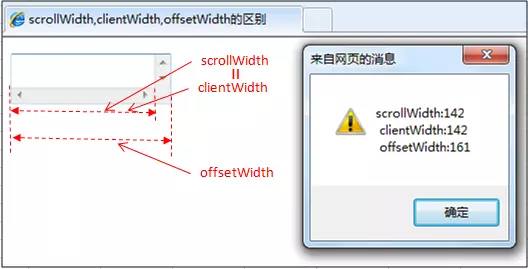
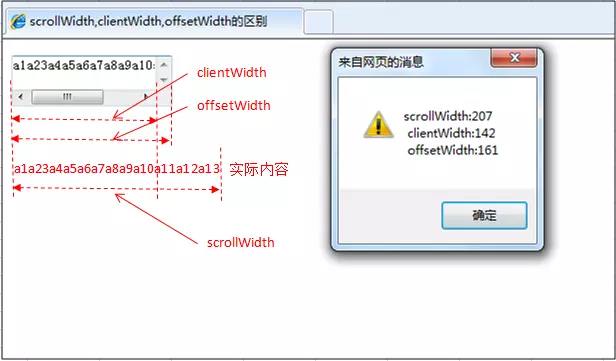
2、元素的内容超过可视区,滚动条出现和可用的情况下。
scrollWidth>clientWidth。
scrollWidth为实际内容的宽度。
clientWidth是内容可视区的宽度。
offsetWidth是元素的实际宽度。
offsetWidth属性可以返回对象的padding+border+元素width属性值之和,style.width返回值就是定义的width属性值。
offsetWidth属性仅是可读属性,而style.width是可读写的。
offsetWidth属性返回值是整数,而style.width的返回值是字符串,并且带有单位。
4.style.width仅能返回以style方式定义的内部样式表的width属性值。
scrollWidth、clientWidth、offsetWidth、width的区别的更多相关文章
- scrollwidth ,clientwidth ,offsetwidth 三者的区别
clientwidth:内容可视区域的宽度 offsetwidth:元素整体宽度 scrollwidth:实际内容的宽度
- HTML精确定位:scrollLeft,scrollWidth,clientWidth,offsetWidth
HTML精确定位:scrollLeft,scrollWidth,clientWidth,offsetWidth scrollHeight: 获取对象的滚动高度. scrollLeft:设置或获取位于对 ...
- HTML精确定位:scrollLeft,scrollWidth,clientWidth,offsetWidth之完全详解
HTML:scrollLeft,scrollWidth,clientWidth,offsetWidth到底指的哪到哪的距离之完全详解 scrollHeight: 获取对象的滚动高度. scrollLe ...
- HTML精确定位:scrollLeft,scrollWidth,clientWidth,offsetWidth之全然具体解释
HTML:scrollLeft,scrollWidth,clientWidth,offsetWidth究竟指的哪到哪的距离之全然具体解释scrollHeight: 获取对象的滚动高度. scrol ...
- H5,PC网页屏幕尺寸相关整理(scrollLeft,scrollWidth,clientWidth,offsetWidth)
HTML:scrollLeft,scrollWidth,clientWidth,offsetWidth到底指的哪到哪的距离之完全详解scrollHeight: 获取对象的滚动高度. scrollLef ...
- HTML精确定位:scrollLeft,scrollWidth,clientWidth,offsetWidth完全详细的说明
HTML:scrollLeft,scrollWidth,clientWidth,offsetWidth具体指完全解释究竟哪里的距离scrollHeight: 获取对象的高度滚动. scrollLe ...
- 转 HTML精确定位:scrollLeft,scrollWidth,clientWidth,offsetWidth之完全详解
HTML:scrollLeft,scrollWidth,clientWidth,offsetWidth到底指的哪到哪的距离之完全详解 scrollHeight: 获取对象的滚动高度. scrollLe ...
- scrollLeft,scrollWidth,clientWidth,offsetWidth 可实现导航栏固定不动(冻结)的效果
HTML精确定位:scrollLeft,scrollWidth,clientWidth,offsetWidth scrollHeight: 获取对象的滚动高度. scrollLeft:设置或获取位 ...
- Javascript:scrollWidth,clientWidth,offsetWidth的区别(转)
网页可见区域宽:document.body.clientWidth; 网页可见区域高:document.body.clientHeight; 网页可见区域高:document.body.offsetW ...
- 转:scrollWidth,clientWidth,offsetWidth的区别
scrollWidth:对象的实际内容的宽度,不包边线宽度,会随对象中内容超过可视区后而变大. clientWidth:对象内容的可视区的宽度,不包滚动条等边线,会随对象显示大小的变化而改变. off ...
随机推荐
- Linux下用OTL操作MySql(包含自己封装的类库及演示样例代码下载)
版权声明:本文为博主原创文章,未经博主同意不得转载. https://blog.csdn.net/ClamReason/article/details/23971805 首先重点推荐介绍otl介绍及使 ...
- asp.net core在发布时排除配置文件
使用命令发布 dotnet restore dotnet publish -c Release -r win-x64 -o "D:\services" 这样发布总是是将配置文件覆盖 ...
- 导入excel-uploadify+npoi
总结: 导入文件时一定要给database设置栏位 虚拟表的栏位名称可以与数据库表不一致,但顺序一定要一致,因为它是按照顺序依次插入的 sheet.FirstRowNum = 0; sheet.Fir ...
- Git复习(八)之快速理解Git结构
git pull:拉取远程服务器最新代码到本地(会自动merge) git add:将本地代码添加到暂存区 git commit:将暂存区的所有内容提交到当前分支(git会自动为我们创建第一个分支 ...
- 02Spring基于xml的IOC配置--实例化Bean的三种方式
maven依赖 <dependencies> <!--IOC相关依赖--> <dependency> <groupId>org.springframew ...
- 2018最新版 手机号、验证码正则表达式 jq + 小程序
HTML: <!-- 表单 --> <input class="weui-input" id="tel" type="tel&quo ...
- PHP--API
PHP所有能力都是函数,内置1000多个函数,不是每一个函数都默认直接可以使用,有一些需要安装或者启用额外的“插件”扩展. 1,获取字符串长度 <?php $str='hello'; echo ...
- 给定一个字符串,根据字符出现频率排序--Java实现
题目描述: 给定一个字符串,请将字符串里的字符按照出现的频率降序排列. 示例 1: 输入:"tree" 输出:"eert" 解释:'e'出现两次,'r'和't' ...
- CDH5.13.3安装手册
Server端需要打开端口 7180 7182 选址正确的版本,cdh版本不要高于cm版本 CM下载地址 http://archive.cloudera.com/cm5/cm/5/cloudera-m ...
- Firefox 的User Agent 将移除 CPU 架构信息
Mozilla 计划从 Firefox 的 User Agent(用户代理)和几个支持的 API 中移除 CPU 架构信息,以减少 Firefox 用户的“数字指纹”.Web 浏览器会自动向用户在应用 ...