
RPC学习----Thrift快速入门和Java简单示例
一.什么是RPC?
RPC(Remote Procedure Call Protocol)——远程过程调用协议,它是一种通过网络从远程计算机程序上请求服务,而不需要了解底层网络技术的协议。
RPC协议假定某些传输协议的存在,如TCP或UDP,为通信程序之间携带信息数据。在OSI网络通信模型中,RPC跨越了传输层和应用层。RPC使得开发包括网络分布式多程序在内的应用程序更加容易。
二.什么是Thrift?
thrift是一个软件框架,用来进行可扩展且跨语言的服务的开发。它结合了功能强大的软件堆栈和代码生成引擎,以构建在 C++, Java, Python, PHP, Ruby, Erlang, Perl, Haskell, C#, Cocoa, JavaScript, Node.js, Smalltalk, and OCaml 这些编程语言间无缝结合的、高效的服务。
thrift最初由facebook开发,07年四月开放源码,08年5月进入apache孵化器。
三.下载,安装,配置Thrift
本机环境:ubuntu 12.04 (64bit)
1.下载:
下载地址:http://www.apache.org/dyn/closer.cgi?path=/thrift/0.9.1/thrift-0.9.1.tar.gz (目前最新0.9.1,2014/08/11)
2.安装,配置Thrift
官网教程:http://thrift.apache.org/docs/BuildingFromSource
Building from source
First make sure your system meets all necessary Apache Thrift Requirements
If you are building from the first time out of the source repository, you will need to generate the configure scripts. (This is not necessary if you downloaded areleased tarball.) From the top directory, do:
./bootstrap.sh
Once the configure scripts are generated, thrift can be configured. From the top directory, do:
./configure
Disable a language:
./configure --without-java
You may need to specify the location of the boost files explicitly. If you installed boost in /usr/local, you would run configure as follows:
./configure --with-boost=/usr/local
If you want to override the logic of the detection of the Java SDK, use the JAVAC environment variable:
./configure JAVAC=/usb/bin/javac
Note that by default the thrift C++ library is typically built with debugging symbols included. If you want to customize these options you should use the CXXFLAGS option in configure, as such:
./configure CXXFLAGS='-g -O2'

./configure CFLAGS='-g -O2'

./configure CPPFLAGS='-DDEBUG_MY_FEATURE'
To see other configuration options run
./configure --help
Once you have run configure you can build Thrift via make:
make
and run the test suite:
make check
and the cross language test suite:
sh test/test.sh
Issues while compiling
"compiler/cpp/thriftl.cc:2190: undefined reference to `yywrap'"
you need to install the Flex library (See also Apache Thrift Requirements ) and re-run the configuration script.
mv: cannot stat "'.deps/TBinaryProtocol.Tpo': No such file or directory" while building the Thrift Runtime Library
Re-reun configure with
--enable-libtool-lock
or by turning off parallel make by placing .NOTPARALLEL: in lib/cpp/Makefile or
make -j
Although the thrift compiler build appears to be compatible with parallel make without libtool lock, the thrift runtime build is not.
Installing
From the top directory, become superuser and do:
make install
Note that some language packages must be installed manually using build tools better suited to those languages (this applies to Java, Ruby, PHP).
Look for the README file in the lib/<language>/ folder for more details on the installation of each language library package.
tar -xvf thrift-0.9..tar.gz
第2步,输入以下命令:
$cd thrift-0.9.

$./configure

$make

#sudo make install
关于配置的问题可以查看命令:
./configure --help
可以关闭你不熟悉的语言,因为thrift支持的语言非常多,可以关闭一些用不到的,如python,gt4等;
关闭命令为:
./configure --without-qt4
在install的过程中如果报一些test方面的error可以忽略.
上面的步骤走完以后,可以在任意一个目录下输入如下命令进行测试:
amosli@amosli-pc:~/workspace$ thrift -version

Thrift version 0.9.
四.Thrift基本概念
- 基本类型:
- bool:布尔值,true 或 false,对应 Java 的 boolean
- byte:8 位有符号整数,对应 Java 的 byte
- i16:16 位有符号整数,对应 Java 的 short
- i32:32 位有符号整数,对应 Java 的 int
- i64:64 位有符号整数,对应 Java 的 long
- double:64 位浮点数,对应 Java 的 double
- string:utf-8编码的字符串,对应 Java 的 String
- 结构体类型:
- struct:定义公共的对象,类似于 C 语言中的结构体定义,在 Java 中是一个 JavaBean
- 容器类型:
- list:对应 Java 的 ArrayList
- set:对应 Java 的 HashSet
- map:对应 Java 的 HashMap
- 异常类型:
- exception:对应 Java 的 Exception
- 服务类型:
- service:对应服务的类
2.服务端编码基本步骤:
- 实现服务处理接口impl
- 创建TProcessor
- 创建TServerTransport
- 创建TProtocol
- 创建TServer
- 启动Server
3.客户端编码基本步骤:
- 创建Transport
- 创建TProtocol
- 基于TTransport和TProtocol创建 Client
- 调用Client的相应方法
4.数据传输协议
- TBinaryProtocol : 二进制格式.
- TCompactProtocol : 压缩格式
- TJSONProtocol : JSON格式
- TSimpleJSONProtocol : 提供JSON只写协议, 生成的文件很容易通过脚本语言解析
tips:客户端和服务端的协议要一致
五.Java实例
  <dependency>

            <groupId>org.apache.thrift</groupId>

            <artifactId>libthrift</artifactId>

            <version>0.9.1</version>

  </dependency>

  <dependency>

            <groupId>org.slf4j</groupId>

            <artifactId>slf4j-log4j12</artifactId>

            <version>1.5.8</version>

 </dependency>
2.创建Thrift文件
创建Thrift文件:amosli@amosli-pc:/media/f91a4cca-0b96-4c30-b140-7918a196de3e/amosli/java/rpc/DemoTest/demoHello.thrift ,内容如下:
namespace java com.amos.thrift.demo

service  HelloWorldService {

  string sayHello(1:string username)

}
3.生成java文件:
thrift -r -gen java demoHello.thrift
文件目录如下:
$ tree

.

├── demoHello.thrift

└── gen-java

    └── com

        └── amos

            └── thrift

                └── demo

                    └── HelloWorldService.java
把生成的HelloWorldService.java文件拷贝到项目中去.
4.实现接口Iface
package com.amos;

/**

 * Created by amosli on 14-8-12.

 */

public class HelloWorldImpl implements HelloWorldService.Iface {

    public HelloWorldImpl() {

    }

    @Override

    public String sayHello(String username) {

        return "Hi," + username + " ,Welcome to the thrift's world !";

    }

}
5.TSimpleServer服务端
简单的单线程服务模型,一般用于测试。
编写服务端server代码:HelloServerDemo.java
package com.amos;

import org.apache.thrift.protocol.TBinaryProtocol;

import org.apache.thrift.protocol.TCompactProtocol;

import org.apache.thrift.server.TServer;

import org.apache.thrift.server.TSimpleServer;

import org.apache.thrift.transport.TServerSocket;

/**

 * Created by amosli on 14-8-12.

 */

public class HelloServerDemo {

    public static final int SERVER_PORT = 8090;

    /**

     * @param args

     */

    public static void main(String[] args) {

        HelloServerDemo server = new HelloServerDemo();

        server.startServer();

    }

    public void startServer() {

        try {

            System.out.println("HelloWorld TSimpleServer start ....");

//          TProcessor tprocessor = new HelloWorldService.Processor<HelloWorldService.Iface>(new  HelloWorldImpl());

            HelloWorldService.Processor<HelloWorldService.Iface> tprocessor = new HelloWorldService.Processor<HelloWorldService.Iface>(new HelloWorldImpl());

            // 简单的单线程服务模型,一般用于测试

            TServerSocket serverTransport = new TServerSocket(SERVER_PORT);

            TServer.Args tArgs = new TServer.Args(serverTransport);

            tArgs.processor(tprocessor);

//            tArgs.protocolFactory(new TBinaryProtocol.Factory());

            tArgs.protocolFactory(new TCompactProtocol.Factory());

            // tArgs.protocolFactory(new TJSONProtocol.Factory());

            TServer server = new TSimpleServer(tArgs);

            server.serve();

        } catch (Exception e) {

            System.out.println("Server start error!!!");

            e.printStackTrace();

        }

    }

}
6.编写客户端代码
package com.amos;

import org.apache.thrift.TException;

import org.apache.thrift.protocol.TBinaryProtocol;

import org.apache.thrift.protocol.TCompactProtocol;

import org.apache.thrift.protocol.TProtocol;

import org.apache.thrift.transport.TSocket;

import org.apache.thrift.transport.TTransport;

import org.apache.thrift.transport.TTransportException;

/**

 * Created by amosli on 14-8-12.

 */

public class HelloClientDemo {

    public static final String SERVER_IP = "localhost";

    public static final int SERVER_PORT = 8090;

    public static final int TIMEOUT = 30000;

    /**

     * @param args

     */

    public static void main(String[] args) {

        HelloClientDemo client = new HelloClientDemo();

        client.startClient("amosli");

    }

    /**

     * @param userName

     */

    public void startClient(String userName) {

        TTransport transport = null;

        try {

            transport = new TSocket(SERVER_IP, SERVER_PORT, TIMEOUT);

            // 协议要和服务端一致

//            TProtocol protocol = new TBinaryProtocol(transport);

            TProtocol protocol = new TCompactProtocol(transport);

            // TProtocol protocol = new TJSONProtocol(transport);

            HelloWorldService.Client client = new HelloWorldService.Client(

                    protocol);

            transport.open();

            String result = client.sayHello(userName);

            System.out.println("Thrift client result =: " + result);

        } catch (TTransportException e) {

            e.printStackTrace();

        } catch (TException e) {

            e.printStackTrace();

        } finally {

            if (null != transport) {

                transport.close();

            }

        }

    }

}
项目最终结构图:

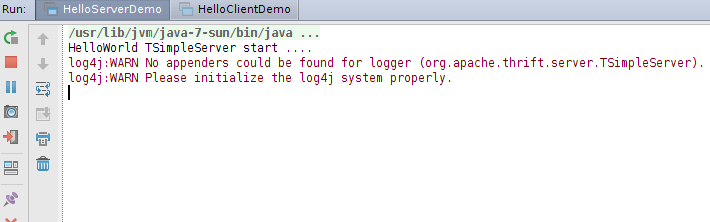
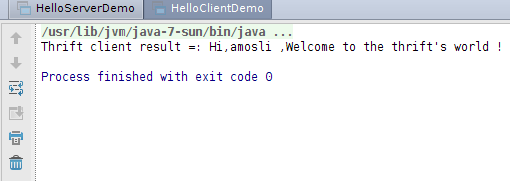
7.最终运行效果
服务端:
客户端:
本文源码:https://github.com/amosli/rpc
参考:
1.http://baike.baidu.com/view/1698865.htm?fr=aladdin
2.http://thrift.apache.org/docs/BuildingFromSource
3.http://www.micmiu.com/soa/rpc/thrift-sample/
4.http://blog.chinaunix.net/uid-20357359-id-2876170.html
5.http://baike.baidu.com/view/7287257.htm?fromtitle=RPC&fr=aladdin
RPC学习----Thrift快速入门和Java简单示例的更多相关文章
- Thrift快速入门
Thrift 简单示例 2017-01-19 16:47:57 首先通过先面两个示例简单感受一下Thrift(RPC)服务端与客户端之间的通信...... RPC学习----Thrift快速入门和Ja ...
- Netty学习——Thrift的入门使用
Netty学习——Thrift的入门使用 希望你能够,了解并使用它.因为它是一个效率很高的框架 官网地址:http://thrift.apache.org/ 1.Thrift数据类型 一门技术如果需要 ...
- 前端学习 node 快速入门 系列 —— 初步认识 node
其他章节请看: 前端学习 node 快速入门 系列 初步认识 node node 是什么 node(或者称node.js)是 javaScript(以下简称js) 运行时的一个环境.不是一门语言. 以 ...
- MongoDB学习笔记:快速入门
MongoDB学习笔记:快速入门 一.MongoDB 简介 MongoDB 是由C++语言编写的,是一个基于分布式文件存储的开源数据库系统.在高负载的情况下,添加更多的节点,可以保证服务器性能.M ...
- 前端学习 node 快速入门 系列 —— npm
其他章节请看: 前端学习 node 快速入门 系列 npm npm 是什么 npm 是 node 的包管理器,绝大多数 javascript 相关的包都放在 npm 上. 所谓包,就是别人提供出来供他 ...
- 前端学习 node 快速入门 系列 —— 模块(module)
其他章节请看: 前端学习 node 快速入门 系列 模块(module) 模块的导入 核心模块 在 初步认识 node 这篇文章中,我们在读文件的例子中用到了 require('fs'),在写最简单的 ...
- 前端学习 node 快速入门 系列 —— 简易版 Apache
其他章节请看: 前端学习 node 快速入门 系列 简易版 Apache 我们用 node 来实现一个简易版的 Apache:提供静态资源访问的能力. 实现 直接上代码. - demo - stati ...
- 前端学习 node 快速入门 系列 —— 服务端渲染
其他章节请看: 前端学习 node 快速入门 系列 服务端渲染 在简易版 Apache一文中,我们用 node 做了一个简单的服务器,能提供静态资源访问的能力. 对于真正的网站,页面中的数据应该来自服 ...
- 前端学习 node 快速入门 系列 —— 报名系统 - [express]
其他章节请看: 前端学习 node 快速入门 系列 报名系统 - [express] 最简单的报名系统: 只有两个页面 人员信息列表页:展示已报名的人员信息列表.里面有一个报名按钮,点击按钮则会跳转到 ...
随机推荐
- python subprocess.Popen 非阻塞
1.非阻塞设置subprocess.Popen(args, stdout=subprocess.PIPE,stderr=subprocess.PIPE) def non_block_read(outp ...
- DOM杂记
INPUT 监听输入框值的变化:"input"
- Aptana插件安装方法
本人用的是Zend Studio10.0,在开发项目过程中,发现该软件无法对css和js进行代码提示,这样用起来很不方便,然后在网上找了一下Aptana插件 进入Aptana官网:http://www ...
- asp.net扩展名不显示并获得URL值
由vs2013新建"web窗体应用程序"的网站,URL不显示扩展名.那今天就实现该功能 1.首先打开vs2013>新建项目>如下图选择 2.选择项目右击>管理Nu ...
- 易语言5.6 精简破解版[Ctoo]
说明:本易语言5.6破解版 加入了[E剑终情]大神制作的完美通杀补丁,本人还修复了静态编译的问题. 关于静态编译失效的问题,大家解压之后会看到易语言根目录有一个"易言语静态编译配置工具&qu ...
- NPOI操作Excel导入DataTable中
using NPOI.HSSF.UserModel; using NPOI.SS.UserModel; using System.Data; using System.IO; using NPOI.X ...
- golang中string以及slice之间的一些问题
好记性不如烂笔头o_O slice切片不会开辟新的空间 a := []int{0,1,2,3} b := make([]int, 8) b = a[:] b[2] = 9 fmt.Println(a) ...
- Android 二维码 生成和识别(附Demo源码)
今天讲一下目前移动领域很常用的技术——二维码.现在大街小巷.各大网站都有二维码的踪迹,不管是IOS. Android.WP都有相关支持的软件.之前我就想了解二维码是如何工作,最近因为工作需要使用相关技 ...
- MFC CEdit 自动换行功能
最近在写一个程序,对话框上的CEdit控件需显示一串字符,字符可能比较长,要根据编辑框的宽度自动换行.控件属性中已经设置了Multiline为true.Auto VScroll为true,Virtic ...
- VC++ 两种动态调整控件位置的方法(CButton设置为Radio形式会出现错误)
((CButton*)GetDlgItem(IDC_CHECK1))->MoveWindow(, cy - , , ); ((CButton*)GetDlgItem(IDC_CHECK2))-& ...