
[PowerShell Utils] Remotely install Hyper-V and Failover Cluster feature on a list of windows 2012 servers
Hello everyone, this is the second post of the series. .
Background
===============
In my environment, I have 15 Windows hosts. I need to configure them from the OS installation to configure fail over cluster and then create and run VMs on them. Without scripting, manually complete related tasks would be very bored and easy to make mistakes. I started using PowerShell and it really helped ease the pain.
Now, let's take a look at the second script that you will love to use.
What can this one do
===============
I have 15 hosts recently joined domain, and I want all of them to join a fail over cluster. The first thing I am facing is to install hyper-v and fail over cluster feature on all these 15 hosts.
Installing Hyper-V feature requires to restart the host.
This script will help you install these two features on all the hosts remotely, avoiding constantly check if the server is back online. Everything in one click!
Logic Intro
===============
First, the script will turn off the windows firewall on target host.
Second, you will see whether hyper-v feature is already installed. If did, continue. If not, hyper-v feature will be installed.
Hyper-V feature installation requires server restart. The script will restart the host and keep trying to contact the target server until it gets back online.
Third, check if fail over cluster feature needs to be installed.
Finally, list these two features status on this server.
All above steps will be repeated for another server.
Script is here
===============
PowerShell
#

#Functions defined here

#

function autoinstall-hypervfailoverfeatures ($ComputerName)

{

    #Turnoff windows firewall, or Test-Connection will fail

    Get-NetFirewallProfile -CimSession $ComputerName | Set-NetFirewallProfile -Enabled False

    Get-WindowsFeature -Name Failover-Clustering -ComputerName $ComputerName

    Get-WindowsFeature -Name hyper-v -ComputerName $ComputerName

    #Verify features and install them

    $hypervFeature = Get-WindowsFeature -Name Hyper-V -ComputerName $ComputerName

    if($hypervFeature.Installed)

    {

        Write-Host "Hyper-V installed already on $ComputerName."

    }

    else

    {

        Write-Host "Installing Hyper-V feature on $ComputerName."

        Install-WindowsFeature –Name Hyper-V -ComputerName $ComputerName -IncludeManagementTools -Restart

    }

    #Wait for restart command to take effect, or fail over cluster feature will start installing, failing the whole thing.

    Start-Sleep -s 10

    $count = 1

    While (!(Test-Connection -Cn $ComputerName -BufferSize 16 -Count 1 -Quiet))

    {

        $count++

        $totalseconds = $count * 5

        Write-Host "$ComputerName did not response to ping command."

        Write-Host "Waited $totalseconds seconds. Wait for another 5 seconds, will try again."

        Start-Sleep -s 5

    }

    Write-host "Server is now alive. Proceed......"

    $failoverclusterFeature = Get-WindowsFeature -Name Failover-Clustering -ComputerName $ComputerName

    if($failoverclusterFeature.Installed)

    {

        Write-Host "Failover cluster installed already on $ComputerName."

    }

    else

    {

        Write-Host "Installing Failover cluster feature on $ComputerName"

        Install-WindowsFeature –Name Failover-Clustering -ComputerName $ComputerName -IncludeManagementTools -Restart

    }

    Write-Host "Features status shown below:"

    Get-WindowsFeature -Name Failover-Clustering -ComputerName $ComputerName

    Get-WindowsFeature -Name hyper-v -ComputerName $ComputerName

}

function AutoInstall-HypverVFailoverFeatures-Exec

{

     param ([string[]]$computernames)

     foreach  ($computer in $computernames)

     {

        autoinstall-hypervfailoverfeatures($computer)

     }

}

#

#List all the server you want to install Hyper-V and Failover cluster

#

AutoInstall-HypverVFailoverFeatures-Exec host9,host10
At last
===============
Wensheng and I worked together on this script.
Thank you, Wensheng.
24th Nov Update
===============
Wensheng wrote a shorter version, here it is.
Note this is a workflow of PowerShell, and it is parallel, meaning all the hosts operates at the same time! And he used Restart-Computer cmdlet as an alternative to keep pinging target computer. A lot better.
Usage:
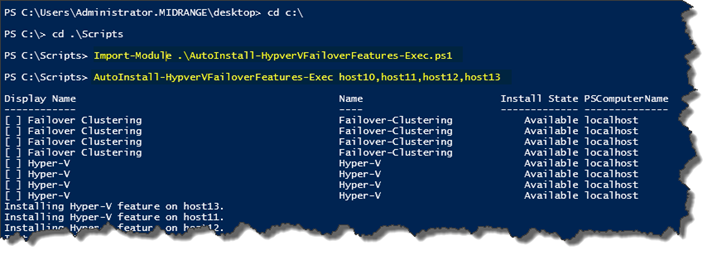
PowerShell
 workflow AutoInstall-HypverVFailoverFeatures-Exec

{

    param ([string[]]$computernames)

    foreach ($computer in $computernames)

    {

        #Turnoff windows firewall

        "Turning off windows firewall on $computer."

        Get-NetFirewallProfile -CimSession $computer | Set-NetFirewallProfile -Enabled False

        #show cluster and hyper-v feature status

        "Showing features status on $computer."

        Get-WindowsFeature -Name Failover-Clustering,hyper-v -ComputerName $computer

    }

    foreach -parallel ($computer in $computernames)

    {

        #Verify features and install them

        $hypervFeature = Get-WindowsFeature -Name Hyper-V -ComputerName $computer

        if($hypervFeature.Installed)

        {

            "Hyper-V installed already on $computer."

        }

        else

        {

            "Installing Hyper-V feature on $computer."

            Install-WindowsFeature –Name Hyper-V -ComputerName $computer -IncludeManagementTools

            Restart-Computer -Wait -PSComputerName $computer -Force

        }

        $failoverclusterFeature = Get-WindowsFeature -Name Failover-Clustering -ComputerName $computer

        if($failoverclusterFeature.Installed)

        {

            "Failover cluster installed already on $computer."

        }

        else

        {

            "Installing Failover cluster feature on $computer"

            Install-WindowsFeature –Name Failover-Clustering -ComputerName $computer -IncludeManagementTools

        }

    }

    foreach  ($computer in $computernames)

    {

        "$computer Current features status shown below:"

        Get-WindowsFeature -Name Failover-Clustering,hyper-v -ComputerName $computer

    }

}
Happy Powershelling, everybody.
[PowerShell Utils] Remotely install Hyper-V and Failover Cluster feature on a list of windows 2012 servers的更多相关文章
- What is a Microsoft Failover Cluster Virtual Adapter
What is a Microsoft Failover Cluster Virtual Adapter anyway? A question often asked is, "What i ...
- Hyper V NAT 网络设置 固定IP / DHCP
Hyper V 默认的Default Switch同时支持了NAT网络以及DHCP,虚拟机能够访问外网. 但使用过程中发现这个IP网段经常变化,而且Hyper V没有提供管理其NAT网络与DHCP的图 ...
- windows server 2008 r2 企业版 hyper v做虚拟化的相关问题处理
windows server 2008 r2 企业版 hyper v做虚拟化的相关问题处理 今天在dell r710 上用windows server 2008 r2企业版hyper v 做虚拟化,添 ...
- 设置Hyper V
1.打开服务器管理器 2.添加角色和功能 3.安装类型 -> 基于角色或基于功能的安装 4.服务器选择 -> 下一步 5.服务器角色 勾选"Hyper V"
- bundle install 出现 'gem install mysql2 -v '0.3.15' succeeds before bunding '
bundle install 出现 'gem install mysql2 -v '0.3.15' succeeds before bunding ' 解决:sudo apt-get install ...
- HYPER -V 独立安装的 2016版本 中文版 下载好慢啊
HYPER -V 独立安装的 2016版本 中文版 下载好慢啊
- Powershell script to install Windows Updates (msu) from folder
######################################################### # # Name: InstallWindowsUpdates.ps1 # Auth ...
- [PowerShell Utils] Create a list of virtual machines based on configuration read from a CSV file in Hyper-V
Hello everyone, this is the third post of the series. . Background =============== In my solution, ...
- windows rails new demo时候出错Make sure that `gem install mysql2 -v '0.3.15'` succeeds before bundling.
rails new demo --database=mysql最后报错Gem files will remain installed in D:/BillFiles/rails_dev/Ruby193 ...
随机推荐
- 【BZOJ 4818】 4818: [Sdoi2017]序列计数 (矩阵乘法、容斥计数)
4818: [Sdoi2017]序列计数 Time Limit: 30 Sec Memory Limit: 128 MBSubmit: 560 Solved: 359 Description Al ...
- [ZOJ3781]Paint the Grid Reloaded
思路: 先用DFS缩点,然后BFS找出每个点出发能到达的最长路,取$min$. 注意多组数据,初始化一定要仔细,刚开始存边的$e$忘记初始化,一直WA,调了半个晚上. 一开始和网上的题解对拍$T=1$ ...
- MAC下安装Brew[转]
MAC下安装Brew 1.安装XCode xcode-select --install 2.安装HomeBrew ruby -e "$(curl -fsSL https://raw.gith ...
- HNOI 越狱
题目描述 监狱有连续编号为 1…N的 N 个房间,每个房间关押一个犯人,有 M种宗教,每个犯人可能信仰其中一种.如果相邻房间的犯人的宗教相同,就可能发生越狱,求有多少种状态可能发生越狱. 输入输出格式 ...
- Codeforces Round #272 (Div. 2) B. Dreamoon and WiFi dp
B. Dreamoon and WiFi 题目连接: http://www.codeforces.com/contest/476/problem/B Description Dreamoon is s ...
- hdu 5774 Where Amazing Happens 水题
Where Amazing Happens 题目连接: http://acm.hdu.edu.cn/showproblem.php?pid=5774 Description As the premie ...
- QThreadPool线程池的使用,线程与Widget通过信号与槽的方式通信。
因为QRunnable类并非继承自QObject,不能使用信号和槽,为了能够使用信号与槽和Widget通信,需要对QRunnable进行封装. 定义一个类QMyRunnable,该类首先继承自QObj ...
- 回顾JavsScript对象的克隆
JS对象的数据类型分为两大类:原始类型(string, boolean, number,undefined, function)和 对象类型(array, object, null). 1.浅度克隆 ...
- mui选择器和dom获取元素的区别(记得把mui对象转为dom对象才能调用用dom方法)
<!DOCTYPE html><html> <head><meta charset="UTF-8"><meta name=&q ...
- 《Go语言实战》摘录:6.5 并发 - 通道
6.5 通道