
mvn install报错
好不容易第一次部署运行报错:
[INFO] BUILD FAILURE
[INFO] ------------------------------------------------------------------------
[INFO] Total time: 15:47 min
[INFO] Finished at: 2019-03-10T21:26:26+08:00
[INFO] ------------------------------------------------------------------------
[ERROR] Failed to execute goal org.codehaus.cargo:cargo-maven2-plugin:1.4.4:redeploy (deploy) on project hello1: Execution deploy of goal org.codehaus.cargo:cargo-maven2-plugin:1.4.4:redeploy failed: Failed to create deployer with implementation class org.codehaus.cargo.container.glassfish.GlassFish4xInstalledLocalDeployer for the parameters (container [id = [glassfish4x]], deployer type [installed]).: InvocationTargetException: The container configuration directory "c://glassfish5/glassfish/domains" does not exist. Please configure the container before attempting to perform any local deployment. Read more on: http://cargo.codehaus.org/Local+Configuration -> [Help 1]
[ERROR]
[ERROR] To see the full stack trace of the errors, re-run Maven with the -e switch.
[ERROR] Re-run Maven using the -X switch to enable full debug logging.
[ERROR]
[ERROR] For more information about the errors and possible solutions, please read the following articles:
[ERROR] [Help 1] http://cwiki.apache.org/confluence/display/MAVEN/PluginExecutionException
解决:
编辑下图文件
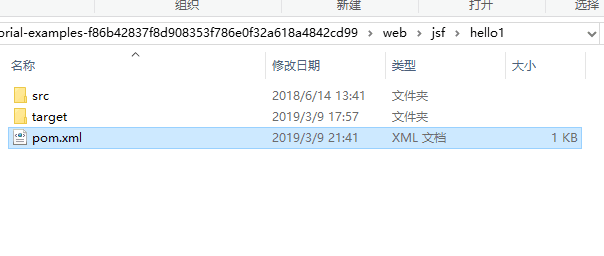
<project xmlns="http://maven.apache.org/POM/4.0.0" xmlns:xsi="http://www.w3.org/2001/XMLSchema-instance" xsi:schemaLocation="http://maven.apache.org/POM/4.0.0 http://maven.apache.org/xsd/maven-4.0.0.xsd">

    <modelVersion>4.0.0</modelVersion>

    <parent>

        <artifactId>jsf</artifactId>

        <groupId>org.glassfish.javaeetutorial</groupId>

        <version>8.1-SNAPSHOT</version>

    </parent>

    <groupId>org.glassfish.javaeetutorial</groupId>

    <artifactId>hello1</artifactId>

    <version>8.1-SNAPSHOT</version>

    <packaging>war</packaging>

    <name>${project.artifactId}</name>

<build>

  <defaultGoal>compile</defaultGoal>

</build>

<profiles>

    <profile>

		<id>windows</id>

		<activation>

			<os>

				<family>windows</family>

			</os>

		</activation>

		<properties>

			<glassfish.home>E:\Program Files (x86)\glassfish\glassfish5</glassfish.home>

		</properties>

	</profile>

</profiles>

</project>
增加16-31行
更改下面的地址为自己的glassfish地址
<glassfish.home>E:\Program Files (x86)\glassfish\glassfish5</glassfish.home>
mvn install报错的更多相关文章
- mvn install 报错Failed to execute goal org.apache.maven.plugins:maven-compiler-plugin:2.3.2 错误: 找不到符号
报错信息 在Eclipse中执行mvn install时,console端显示如下报错信息: [ERROR] Failed to execute goal org.apache.maven.plugi ...
- Eclipse中mvn install 报错error in opening zip file
报错信息 [ERROR] Failed to execute goal org.apache.maven.plugins:maven-compiler-plugin:2.3.2:compile (de ...
- Xcode8 pod install 报错 “Generating Pods project Abort trap
Xcode8 pod install 报错 "Generating Pods project Abort trap 今天在写一个新项目的时候,使用cocoapods在执行 $ pod ins ...
- centos在yum install报错:Another app is currently holding the yum lock解决方法
centos在yum install报错:Another app is currently holding the yum lock,这个问题可能是很多的新手经常遇到问题,之前也有人问我,包括本人在刚 ...
- mvn deploy 报错:Return code is: 400, ReasonPhrase: Bad Request. ->
mvn deploy 报错:Return code is: 400, ReasonPhrase: Bad Request. -> TEST通过没有报错,但是最终部署到Nexus中时出现错误. 后 ...
- mavne install 报错org.apache.maven.surefire.util.SurefireReflectionException: java.lang.reflect.InvocationTargetException
maven install 报错 org.apache.maven.surefire.util.SurefireReflectionException: java.lang.reflect.Invoc ...
- mac下brew install 报错
mac下brew install 报错 错误提示: 原因:是这个brew的权限不正确 修改一下这个brew的权限 chown root:wheel /usr/local/bin/brew
- ubuntu,装完PYTHON3 pip3 install 报错
ubuntu,装完PYTHON3 pip3 install 报错CalledProcessError: Command 'lsb_release -a' returned non-zero exit ...
- 使用CMake生成解决方案后构建INSTALL报错
错误 1 error MSB3073: 命令“setlocal"D:\Program Files\CMake\bin\cmake.exe" -DBUILD_TYPE=Debug - ...
随机推荐
- Mysql union
union简单来说就是多表链接,主要是用于(模糊)查询,全库搜索 多表搜索需要先将需要查询的表用union连接,然后在每一个union后面添加上相同的where条件 菜鸟教程
- MapReduce Kmeans算法含测试数据
使用时,需要修改K值,args值 运行流程: 先初始化中心点->map中和距离最近的中心点生成一对传入reduce->reduce中把相同key值的存到一起->更新中心点,计算和上一 ...
- jpa batch批量操作save和persist比较
1.网上最常见的JPA----entityManager批量操作方法 private EntityManager em; @PersistenceContext(name = "Entity ...
- Java实现微信小程序支付(准备)
Java语言开发微信小程序支付功能: 1.通过https://pay.weixin.qq.com/wiki/doc/api/jsapi.php?chapter=11_1路径到官方下载Java的支付SD ...
- CodeForces - 359C-Prime Number
Simon has a prime number x and an array of non-negative integers a1, a2, ..., an. Simon loves fracti ...
- Educational Codeforces Round 3 B
B. The Best Gift time limit per test 2 seconds memory limit per test 256 megabytes input standard in ...
- MATLAB教程
基本操作:https://www.w3cschool.cn/matlab/ MATLAB2018a下载安装教程http://www.zhanshaoyi.com/6938.html
- 关于django的模板层
你可能已经注意到我们在例子视图中返回文本的方式有点特别. 也就是说,HTML被直接硬编码在 Python代码之中. def current_datetime(request): now = datet ...
- windows开机启动软件设置
开机启动软件设置 操作步骤如下: 1.按win+r,输入 C:\ProgramData\Microsoft\Windows\Start Menu\Programs\Startup,点击确定: 2.拖动 ...
- my02_Atlas mysql5.7安装配置
软件环境:centos7.3,glib-2.49,lua5.1,Atlas2.2.1,mysql5.7 依赖包安装******************************************* ...