
Entity Framework Code-First(9.11):DataAnnotations - InverseProperty Attribute
DataAnnotations - InverseProperty Attribute:
We have seen in the Code-First Convention section that Code-First creates {Class Name}_{Primary Key} foreign key column if you have not included foreign key property in a parent class. The InverseProperty attribute is used when you have multiple relationships between classes.
Consider the following example.
public class Student

{

    public Student()

    {

    }

    public int StudentID { get; set; }

    public string StudentName { get; set; }

    public Standard CurrentStandard { get; set; }

    public Standard PreviousStandard { get; set; }

}

public class Standard

{

    public Standard()

    {

    }

    public int StandardId { get; set; }

    public string StandardName { get; set; }

    public ICollection<Student> CurrentStudents { get; set; }

    public ICollection<Student> PreviousStudents { get; set; }

}
As you can see in the above example, Student class includes two navigation properties to Standard class. The same way Standard class includes two collection navigation properties for Student. Code-First creates four columns for this relationship, as shown below.
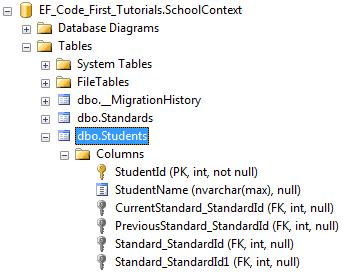
InverseProperty overrides this convention and specifies alignment of the properties. The following example uses InverseProperty in Standard class to fix this problem.
public class Student

{

    public Student()

    {

    }

    public int StudentID { get; set; }

    public string StudentName { get; set; }

    public Standard CurrentStandard { get; set; }

    public Standard PreviousStandard { get; set; }

}

public class Standard

{

    public Standard()

    {

    }

    public int StandardId { get; set; }

    public string StandardName { get; set; }

    [InverseProperty("CurrentStandard")]

    public ICollection<Student> CurrentStudents { get; set; }

    [InverseProperty("PreviousStandard")]

        public ICollection<Student> PreviousStudents { get; set; }

}
As you can see in the above example, we have applied InverseProperty attribute to CurrentStudents & PreviousStudents property and specify which reference property of Student class it belongs to. Now, Code-First will create only two foreign key column in Student table as shown below.
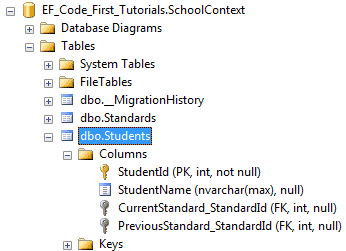
You can also use ForeignKey attribute to include foreign key property with different name as shown below.
public class Student

{

    public Student()

    {

    }

    public int StudentID { get; set; }

    public string StudentName { get; set; }

    public int CurrentStandardId { get; set; }

    public int PreviousStandardId { get; set; }

    [ForeignKey("CurrentStandardId")]

    public Standard CurrentStandard { get; set; }

    [ForeignKey("PreviousStandardId")]

    public Standard PreviousStandard { get; set; }

}

public class Standard

{

    public Standard()

    {

    }

    public int StandardId { get; set; }

    public string StandardName { get; set; }

    [InverseProperty("CurrentStandard")]

    public ICollection<Student> CurrentStudents { get; set; }

    [InverseProperty("PreviousStandard")]

    public ICollection<Student> PreviousStudents { get; set; }

}
The above example will create the following columns.
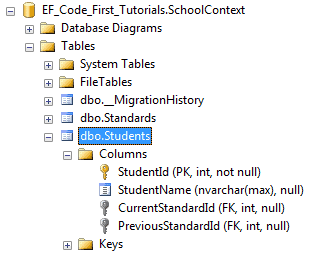
Thus, you can use InverseProperty and ForeignKey attribute for multiple relationships between the same classes.
Entity Framework Code-First(9.11):DataAnnotations - InverseProperty Attribute的更多相关文章
- Entity Framework Code-First(9.6):DataAnnotations - StringLength Attribute
DataAnnotations - StringLength Attribute: StringLength attribute can be applied to a string type pro ...
- Entity Framework Code-First(9.5):DataAnnotations - MaxLength Attribute
DataAnnotations - MaxLength Attribute: MaxLength attribute can be applied to a string or array type ...
- Entity Framework Code-First(9.10):DataAnnotations - NotMapped Attribute
DataAnnotations - NotMapped Attribute: NotMapped attribute can be applied to properties of a class. ...
- Entity Framework Code-First(9.9):DataAnnotations - ForeignKey Attribute
DataAnnotations - ForeignKey Attribute: ForeignKey attribute can be applied to properties of a class ...
- Entity Framework Code-First(9.8):DataAnnotations - Column Attribute
DataAnnotations - Column Attribute: Column attribute can be applied to properties of a class. Defaul ...
- Entity Framework Code-First(9.7):DataAnnotations - Table Attribute
DataAnnotations - Table Attribute: Table attribute can be applied to a class. Default Code-First con ...
- Entity Framework Code-First(9.2):DataAnnotations - TimeStamp Attribute
DataAnnotations - TimeStamp Attribute: TimeStamp attribute can be applied to only one byte array pro ...
- Entity Framework Code-First(9.1):DataAnnotations - Key Attribute
DataAnnotations - Key Attribute: Key attribute can be applied to properties of a class. Default Code ...
- Entity Framework Code-First(9.4):DataAnnotations - Required Attribute
Required attribute can be applied to a property of a domain class. EF Code-First will create a NOT N ...
随机推荐
- inline-block间距解决方案
当我们将元素设为inline-block时,总是会莫名其妙出现一些间距 <!DOCTYPE html> <html> <head> <meta charset ...
- 浏览器对同一IP的最大并发请求数记录
转载自http://www.iefans.net/liulanqi-zuida-bingfa-lianjieshu/,以方便查阅 版本 HTTP 1.0 服务器(宽带连接) HTTP 1.1 服务器( ...
- 20145229吴姗珊 《Java程序设计》2天小总结
20145229吴姗珊 <Java程序设计>2天小总结 教材学习内容总结 由于这周学的内容比较简单,主要是关于日期.日期之类的东西.所以自己从书上看了一些内容 总结了第四章 认识对象 和第 ...
- mac下搭建前端自动化工程
好多年没有接触前端,发现前端行业发生了巨大的变化,很多新鲜术语,比如node.git.grunt.less.sass.预编译.自动化.模块化等等,看得让人晕头转向,不要担心,我会把这之前之后学习成果都 ...
- 深度学习—BN的理解(二)
神经网络各个操作层的顺序: 1.sigmoid,tanh函数:conv -> bn -> sigmoid -> pooling 2.RELU激活函数:conv -> bn -& ...
- linux应用之xampp集成环境的安装及配置(centos)
1.xampp集成环境的下载 在xampp的官网上选择对应系统的版本进行下载,官网地址:https://www.apachefriends.org/zh_cn/index.html #wget htt ...
- jspsmartupload 文件上传让input数据和文件上传同时提交
一.使用原因: 文件上传时,表单的属性中必须要有multipart/form-data,如以下例子: <form name="form_post" class="a ...
- FEC之我见三
继续上文讲解: 3) 标准的RTP头结构如下所示: 其中第一个字节中的x标志位是否扩展了RTP头,RTP协议允许用户自定义的扩展,扩展的字段紧挨上述RTP固定头.RTP扩展投中承载如下信息: 1).当 ...
- uoj279温暖会指引我们前行
暖气来啦~ 动态树维护最大生成树裸题 #include<iostream> #include<cstdio> #include<cstdlib> #include& ...
- js基础:关于Boolean() 与 if
最近面试比较多,但每次我问这个问题的时候,答出来的同学并不多 var a = 0; if( a) { alert(1); } 这个问题有部分人会答alert(1), 有些人会答不执行. 结果是不执 ...