
Jenkins中配置邮件通知实例演示
前言:本文通过安装配置Jenkins实现邮件通知,告知一个C# Git Repo的build成功与否
一、预配条件
- 在windows上安装Jenkins和它推荐安装的Plugins
- 创建一个@163.com邮箱账号,用来发送邮件
- 准备一个测试用的git repo,此处我提供了 https://github.com/wenboyang214/jenkinsCsharpTest.git
- 运行下列脚本,Jenkins需要设置git、msbuild等的环境变量,请自行设置
二、对邮箱账号本身进行设置(此处以163邮箱为例)
Note: Jenkins中配置的邮箱secret需要授权码,而不是密码本身。因此我们需要获取授权码。
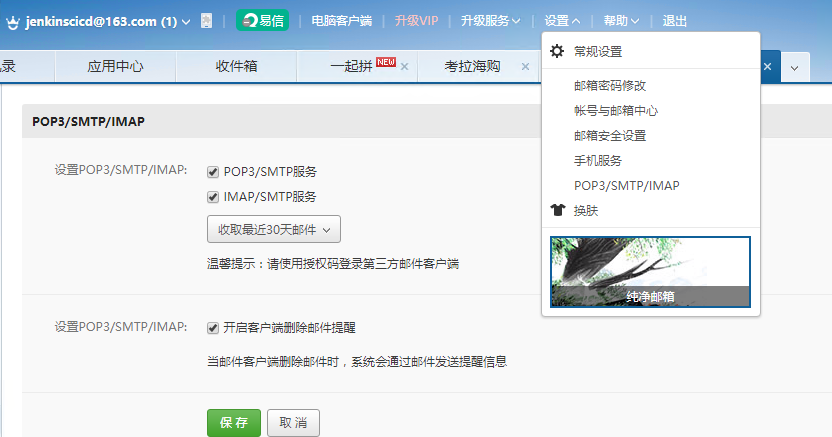
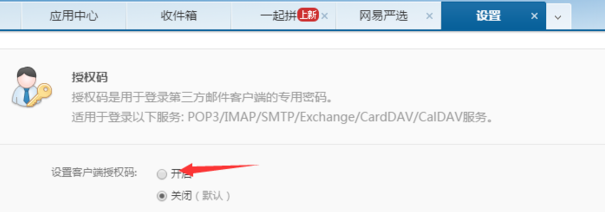
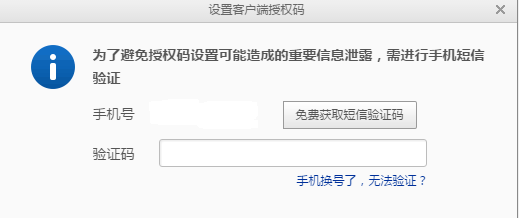
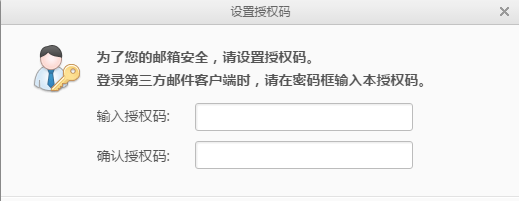
三、配置Jenkins 的系统参数
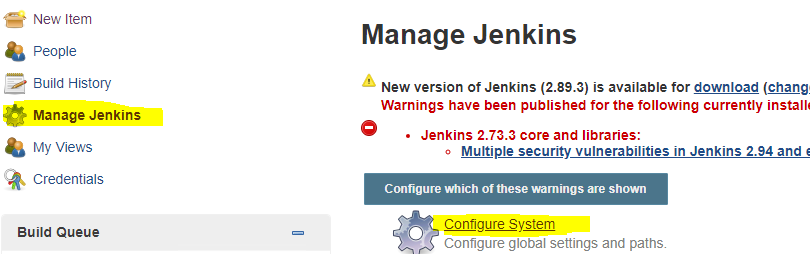
你需要做如下截图的配置
1.最好更改一下Jenkins的Workspace Root Directory,避免符号的一些错误

2.设置Jenkins的System Admin e-mail address,此处的邮箱要和你email notification的邮箱一致

3.在Extended E-mail Notification中进行如下设置,没设置的地方,保持默认
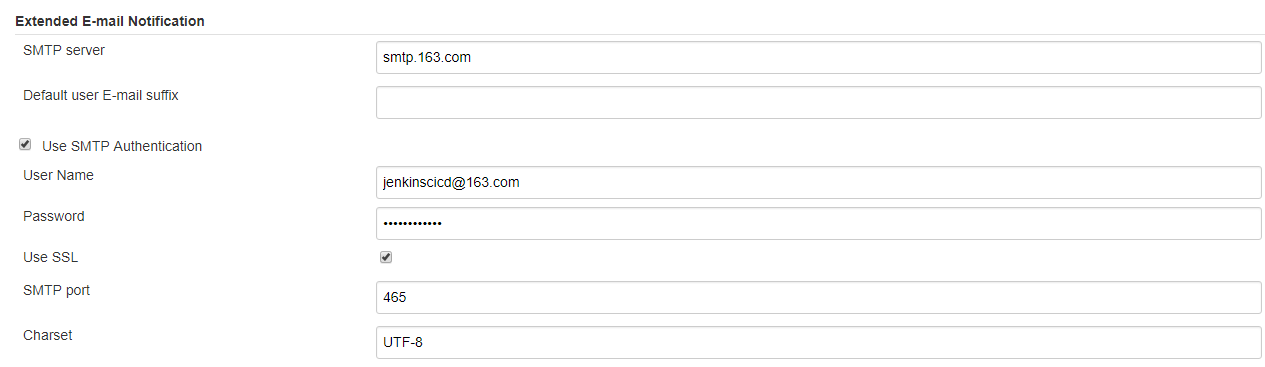
四、测试邮箱提醒功能
1.简单创建一个新的Pipeline item 名称为”test”
2.将下列脚本copy到Pipeline script中
#!/usr/bin/env groovy Jenkinsfile

pipeline {

    agent any

    environment {

        def gitRepo="https://github.com/wenboyang214/jenkinsCsharpTest.git"

        def mailRecipients="wenbya@163.com"

    }

    stages {

        stage('1. check the git repo'){

        steps{

                git "${gitRepo}"

            }

         }

        stage('3. msbuild the project'){

            steps{

                bat "msbuild .\\JenkinsTest\\JenkinsTest.sln"

            }

        }

    }

    post {

        always {

            echo 'testing email notification'

        }

        success {

            echo 'This will run only if successful'

            emailext(

                body: '''${SCRIPT, template="groovy-html.template"}''',

                mimeType: 'text/html',

                subject: "[Jenkins]${currentBuild.fullDisplayName}",

                to: "${mailRecipients}",

                replyTo: "${mailRecipients}",

                recipientProviders: [[$class: 'CulpritsRecipientProvider'],[$class: 'DevelopersRecipientProvider']]

            )

        }

        failure {

            echo 'This will run only if failed'

            emailext( body: '''${SCRIPT, template="groovy-html.template"}''',

                mimeType: 'text/html',

                subject: "[Jenkins]${currentBuild.fullDisplayName}",

                to: "${mailRecipients}",

                replyTo: "${mailRecipients}",

                recipientProviders: [[$class: 'CulpritsRecipientProvider'],[$class: 'DevelopersRecipientProvider']]

            )

        }

        unstable {

            echo 'This will run only if the run was marked as unstable'

        }

        changed {

            echo 'This will run only if the state of the Pipeline has changed'

            echo 'For example, if the Pipeline was previously failing but is now successful'

        }

    }

}
然后直接启动这个test item
五、进行对错改动,并检查邮箱是否收到邮件
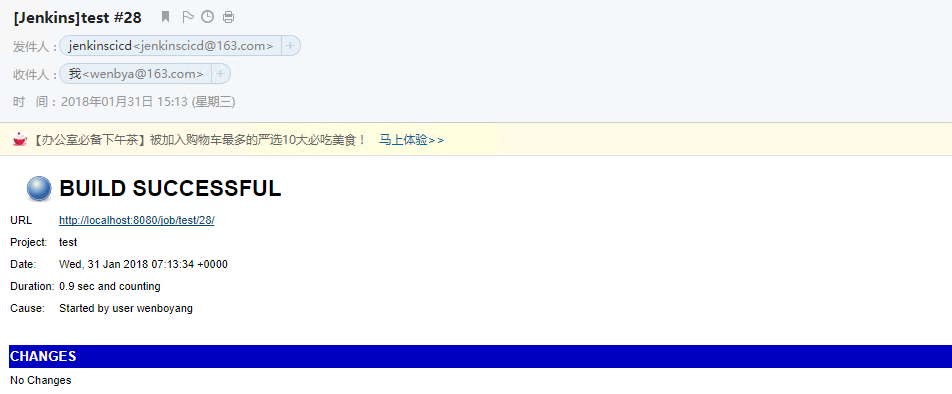
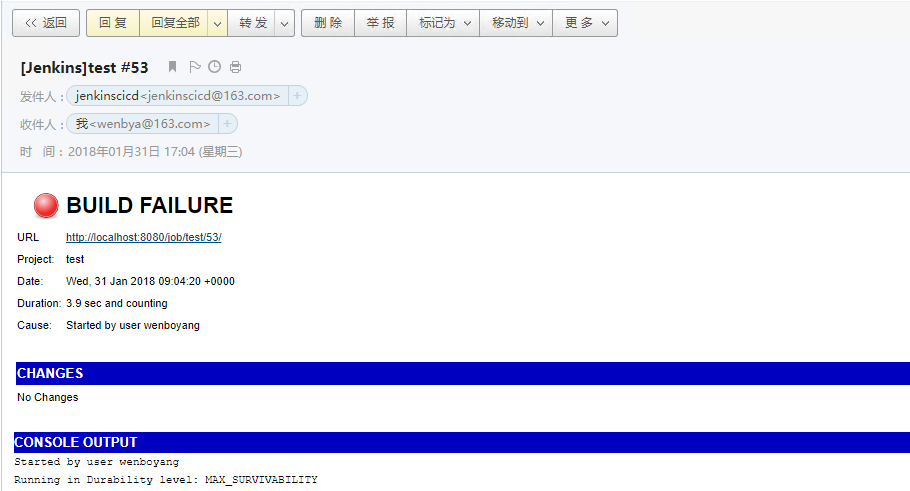
更改msbuild的路径,故意让其build出错,检查是否能收到报错邮件。
bat “msbuild .\JenkinsTest\JenkinsTest.sln” => bat “msbuild .\JenkinsTest1\JenkinsTest.sln”
Jenkins中配置邮件通知实例演示的更多相关文章
- Jenkins 配置邮件通知步骤
Jenkins 配置邮件通知前言 可以在Jenkins 中配置邮件通知,比如在构建失败时发送邮件通知项目组来及时修复问题. Jenkins 邮件通知功能的插件主要包括: Mailer Plugin ( ...
- 环境部署(八):jenkins配置邮件通知
完成基于jenkins的持续集成部署后,任务构建执行完成,测试结果需要通知到相关人员.这篇博客,介绍如何在jenkins中配置邮件通知的方法... 一.安装邮件插件 由于Jenkins自带的邮件功能比 ...
- jenkins持续集成(三): jenkins配置邮件通知
完成基于jenkins的持续集成部署后,任务构建执行完成,测试结果需要通知到相关人员.这篇博客,介绍如何在jenkins中配置邮件通知的方法... 一.安装邮件插件 由于Jenkins自带的邮件功能比 ...
- Jenkins中的邮件配置
摘自http://blog.csdn.net/fullbug/article/details/53024562 Jenkins是一个很受欢迎的CI持续集成工具,能够实现项目的自动构建.打包.测试.发布 ...
- Jenkins 配置邮件通知
jenkins 是一个开源的自动化服务器.通过Jenkins,可以通过自动化加速软件开发过程.Jenkins管理和控制各种开发的生命周期过程,包括构建,文档,测试,包,阶段,部署,静态分析等等.您可以 ...
- Jenkins中Jelly邮件模板的配置
[链接]Jenkins中Jelly邮件模板的配置http://blog.csdn.net/hwhua1986/article/details/47975237
- Jenkins中配置selenium测试
Jenkins中配置selenium测试 2015/03/23 第一步在jenkins中配置selenium服务器 第二步工程配置: 第三步:执行构建: 第四步,查看报告:
- 2.在Jenkins中配置及执行 maven + selenium + testng项目
1. 在Jenkins中配置Maven与Git 1)在系统管理>管理插件>可选插件 页面分别下载Git plugin 与 Maven Integration plugin插件,安装完成后再 ...
- Ossec 安装并配置邮件通知
Ossec 安装并配置邮件通知 目录 Ossec 安装并配置邮件通知 1. 介绍 2. 软硬件环境 3. 安装步骤 3.1 Server 3.2 Agent 3.3 配置邮件通知 4. 参考资料 1. ...
随机推荐
- Appium Studio 初体验(windows做ios自动化,录制appium脚本)
偶然的机会遇到了这个工具——Appium Studio, 在官网是这么解释的 Get your Appium testing projects going within minutesInstall ...
- CSS 表格实例
CSS 表格实例CSS 表格属性可以帮助您极大地改善表格的外观.CSS Table 属性属性 描述border-collapse 设置是否把表格边框合并为单一的边框.border-spacing 设置 ...
- .net 2.0 使用linq
.net 2.0 使用linq,主要是使用Linq to Object,没有测试Linq to XML. 方法: 新建一个net2.0的程序,然后添加对System.Core.Dll的引用.引用时vs ...
- 解密自动CPS变换
7.2 1 前言 我最一开始听到 CPS 变换这个词是在王垠的博客里 (请求不要喷我),就是那篇他第一次宣传他的40行代码的文章. 我当时什么都看不懂,所以没太注意,不过我也正在学程序语言方面的东西, ...
- windows 脚本
sudo.vbs http://blog.csdn.net/qidi_huang/article/details/52242053 c:\windows\sudo.vbs 'ShellExecute ...
- Python-str-操作-6
#字符串的索引与切片 s = 'ABCDLSESRF' #索引 s1 = s[0] print(s1) s2 = s[2] print(s2) s3 = s[-1] print(s3) s4 = s[ ...
- C. Party Lemonade
链接 [http://codeforces.com/group/1EzrFFyOc0/contest/913/problem/C] 分析 看代码,巧妙的贪心 代码 #include<bits/s ...
- first time to use github
first time to use github and feeling good. 学习软件工程,老师要求我们用这个软件管理自己的代码,网站是全英的,软件也简单易用,方便 https://githu ...
- log4php的使用方法与详细配置
log4php的使用 首先引入logger.php文件.log4php可以通过引入logger.php来完成自动加载的过程.文件位置如下: 日志记录器自身没有定义日志的输出目的地和格式,所以我们通常需 ...
- 『编程题全队』Beta 阶段冲刺博客四
1.提供当天站立式会议照片一张 2.每个人的工作 (有work item 的ID) (1) 昨天已完成的工作 孙志威: 1.新增添加提醒事项的按钮 2.添加了新建提醒框 3.测试了新的SubTask思 ...