
spring cloud config安全
前面两篇介绍了spring cloud config服务端和客户端的简单配置,本篇介绍如何保护config server及对应config client修改。
保护config server,主要是使用spring security进行最简单的basic安全认证(也可自定义认证方式,这里不做扩展)
配置服务端代码示例:
在pom文件中增加依赖:
        <dependency>

            <!-- spring security 安全认证 -->

            <groupId>org.springframework.boot</groupId>

            <artifactId>spring-boot-starter-security</artifactId>

        </dependency>
配置文件application.yml增加security配置:
security:

  basic:

    enabled: true  #启用基本认证(默认)

  user:   #配置security用户名密码,默认值为“user”的用户名和随机生成的密码

    name: user

    password: password123
启动服务,测试一下。请求http://localhost:18083/master/config-server-dev.yml,会发现弹出了security的basic登录验证:
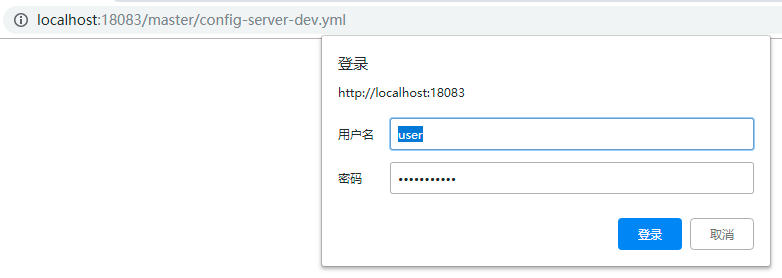
输入上面配置的用户名密码(user/password123),返回配置信息
客户端代码示例:
在pom文件中增加依赖:
        <dependency>

            <!-- spring security 安全认证 -->

            <groupId>org.springframework.boot</groupId>

            <artifactId>spring-boot-starter-security</artifactId>

        </dependency>
修改配置文件bootstrap.yml:
spring:

  application:

    name: config-client

  cloud:

    config:

      profile: test   #对应spring.profiles.active

      label: master   #分支名。当使用配置服务器是git时,默认是master

#      uri: http://localhost:18083  #更改配置服务器的位置,默认地址是http://localhost:8888

      uri: http://user:password123@localhost:18083  #配置服务器增加了安全认证,这里需要提供用户名密码

      username: user  #配置服务器的用户名密码,此配置会覆盖uri中的配置

      password: password123
在上面的配置中,可以在uri上加上用户名密码,也可以直接配置spring.cloud.config.username和spring.cloud.config.password,不过后面这种会覆盖uri中的配置(至于为什么要设置这两种配置方式,是因为当spring cloud config与注册中心配合使用时,是没有uri的,所以只能在下面配置username和password)
启动服务,测试一下。请求http://localhost:18084/profile,返回配置信息:

至此,spring cloud config安全配置完成~
spring cloud config安全的更多相关文章
- spring cloud config 入门
简介 Spring cloud config 分为两部分 server client config-server 配置服务端,服务管理配置信息 config-client 客户端,客户端调用serve ...
- Spring Cloud Config
Spring Cloud Config provides server and client-side support for externalized configuration in a dist ...
- Spring Cloud官方文档中文版-Spring Cloud Config(上)
官方文档地址为:http://cloud.spring.io/spring-cloud-static/Dalston.SR2/#spring-cloud-feign 文中例子我做了一些测试在:http ...
- Spring Cloud官方文档中文版-Spring Cloud Config(下)-客户端等
官方文档地址为:http://cloud.spring.io/spring-cloud-static/Dalston.SR2/#_serving_alternative_formats 文中例子我做了 ...
- SpringCloud的配置管理:Spring Cloud Config
演示如何使用ConfigServer提供统一的参数配置服务 ###################################################################一.概 ...
- 搭建spring cloud config
很久没更新了,因为不是专职研究spring cloud,因此更新速度得看工作强度大不大,每天能抽出的时间不多,如果更新太慢了,并且有小伙伴看的话,请见谅了. Spring Cloud简介 Spring ...
- Spring Cloud Config - RSA简介以及使用RSA加密配置文件
简介 RSA非对称加密有着非常强大的安全性,HTTPS的SSL加密就是使用这种方法进行HTTPS请求加密传输的.因为RSA算法会涉及Private Key和Public Key分别用来加密和解密,所以 ...
- Spring Cloud Config 分布式配置中心使用教程
一.简介 在分布式系统中,由于服务数量巨多,为了方便服务配置文件统一管理,实时更新,所以需要分布式配置中心组件.在Spring Cloud中,有分布式配置中心组件spring cloud config ...
- 【spring实战第五版遇到的坑】第14章spring.cloud.config.uri和token配置项无效
本文使用的Spring Boot版本为:2.1.4.RELEASE Spring Cloud版本为:Greenwich.SR1 按照书上的做法,在application.yml中配置配置服务器的地址和 ...
- .NET Core微服务之基于Steeltoe使用Spring Cloud Config统一管理配置
Tip: 此篇已加入.NET Core微服务基础系列文章索引 => Steeltoe目录快速导航: 1. 基于Steeltoe使用Spring Cloud Eureka 2. 基于Steelt ...
随机推荐
- C++ MFC棋牌类小游戏day6
双人单机小游戏做完了,规则那部分还没介绍,暂时不打算介绍了,因为写的这个bug太多,我打算重新修改. 链接:https://pan.baidu.com/s/1XQKPSv0Tw36Qi2TeaRJiM ...
- Struts2学习第三天——保存登陆信息及数据校验
在JSP中服务器端保存数据的作用域通常有request.session.application,它们对应的Servlet API分别是HttpServletRquerst.HttpSession.Se ...
- 【python-appium】手机一直提示重新安装settings unlock 输入法等 注释掉以下代码
注释掉目录:C:\Program Files (x86)\Appium\node_modules\appium\lib\devices\android\android.js this.initUnic ...
- NET Core微服务之路:SkyWalking+SkyApm-dotnet分布式链路追踪系统的分享
对于普通系统或者服务来说,一般通过打日志来进行埋点,然后再通过elk或splunk进行定位及分析问题,更有甚者直接远程服务器,直接操作查看日志,那么,随着业务越来越复杂,企业应用也进入了分布式服务化的 ...
- WeexSDK之注册Handlers
先看代码: + (void)_registerDefaultHandlers { [self registerHandler:[WXResourceRequestHandlerDefaultImpl ...
- kill 结束进程
kill 支持的信号 kill -1 重启进程 kill -9 终止进程 pkill 和 killall 的区别在于pkill 可以踢终端用户 pkill -9 -t tty1
- 排名前 16 的 Java 工具类
在Java中,工具类定义了一组公共方法,这篇文章将介绍Java中使用最频繁及最通用的Java工具类.以下工具类.方法按使用流行度排名,参考数据来源于Github上随机选取的5万个开源项目源码. 一. ...
- maven个人总结
一.解压maven(apache-maven-3.6.0-bin.zip) ---apache-maven-3.6.0 ---bin(Binary书写) >存放二进制可执行的文件(命令),例如m ...
- postgresql-磁盘空间不足问题排查
问题背景 加压测试过程中发现插入数据过程中报错:could not write to hash-join temporary file: 设备上没有空间.但是查看服务器还有很多空闲空间,是什么导致这样 ...
- 简单标签SimpleTag
想要开发自定义标签,大多数情况下都要重写doStartTag(),doAfterBody()和doEndTag()方法,并且还要知道SKIP_BODY,EVAL_BODY等等的变量代表着什么,在什么方 ...