
ExtJS Form
form表单中多选框和复选框
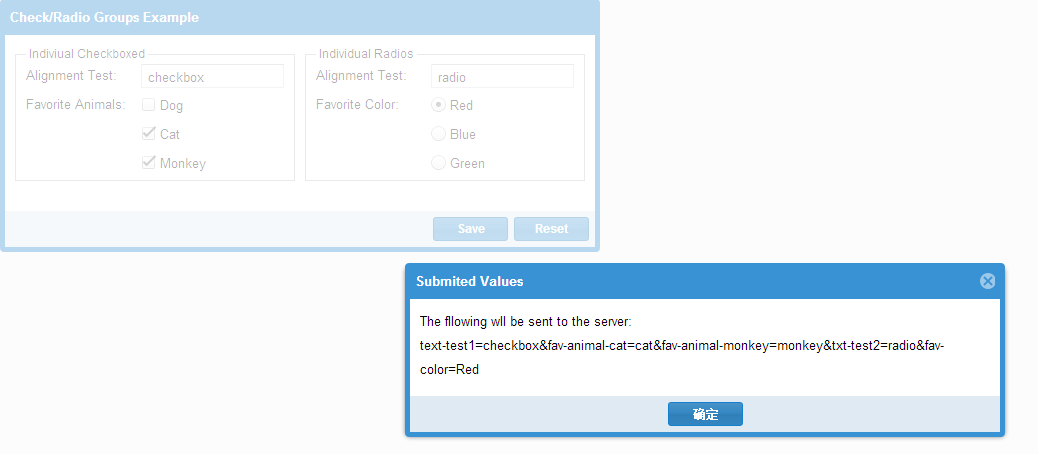
Ext.require([

    'Ext.form.*',

    'Ext.layout.container.Column',

    'Ext.window.MessageBox',

    'Ext.fx.target.Element'

]);

Ext.onReady(function () {

    var individual = {

        xtype: 'container',

        layout: 'hbox',

        margin: '0 0 10',

        items: [{

            xtype: 'fieldset',

            flex: 1,

            title: 'Indiviual Checkboxed', //geren checkbox

            defaultType: 'checkbox',

            defaults: {

                anchor: '100%',

                hideEmptyLabel: false //fieldLabel 当没有设置fieldLabel 的时候,fieldLabel空间会被保留

            },

            items: [{

                xtype: 'textfield',

                name: 'text-test1',

                fieldLabel: 'Alignment Test'

            }, {

                fieldLabel: 'Favorite Animals',

                boxLabel: 'Dog',

                name: 'fav-animal-dog', //

                inputValue: 'dog'

            }, {

                boxLabel: 'Cat',

                name: 'fav-animal-cat', //

                inputValue: 'cat'

            }, {

                checked: true, //默认选中

                boxLabel: 'Monkey',

                name: 'fav-animal-monkey', //

                inputValue: 'monkey'

            }]

        }, {

            xtype: 'component',

            width: 10

        }, {

            xtype: 'fieldset',

            flex: 1,

            title: 'Individual Radios', //个人radio

            defaultType: 'radio',

            layout: 'anchor',

            defaults: {

                anchor: '100%',

                hideEmptyLabel: false

            },

            items: [{

                xtype: 'textfield',

                name: 'txt-test2',

                fieldLabel: 'Alignment Test'

            }, {

                checked: true,

                fieldLabel: 'Favorite Color',

                boxLabel: 'Red',

                name: 'fav-color',

                inputValue: 'Red'

            }, {

                boxLabel: 'Blue',

                name: 'fav-color',

                inputValue: 'blue'

            }, {

                boxLabel: 'Green',

                name: 'fav-color',

                inputValue: 'green'

            }]

        }]

    };

    var fp = Ext.create('Ext.FormPanel', {

        title: 'Check/Radio Groups Example',

        frame: true,

        fieldDefaults: {

            labelWidth: 110,

            labelStyle: 'color:green,padding-left:4px'

        },

        width: 600,

        renderTo:Ext.getBody(),

        bodyPadding: 10,

        items: [

            individual

        ],

        buttons: [{

            text: 'Save',

            handler: function () {
         //fp.getForm()返回的Ext.form.Basic对象。

                if (fp.getForm().isValid()) {

                    Ext.Msg.alert('Submited Values', 'The fllowing wll be sent to the server:<br/>' +

                    fp.getForm().getValues(true).replace(/&/g, ', ')

                    );

                }

            }

        }, {

            text: 'Reset',

            handler: function () {

                fp.getForm().reset();

            }

        }]

    });

});
Ext.form.Basic
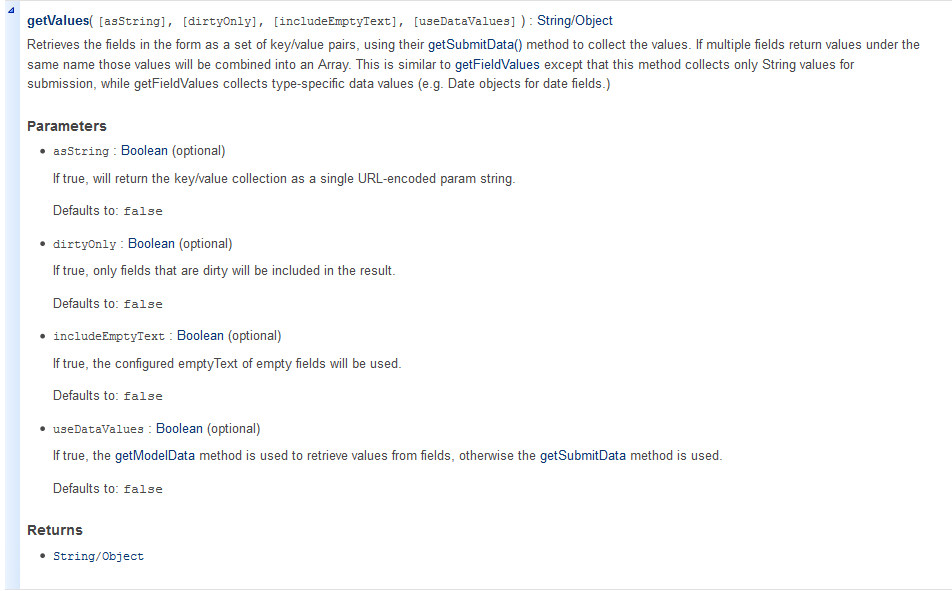
检索字段作为一组键/值对的形式,用自己的getSubmitData()方法来收集值。如果多个领域相同的名称下返回值,这些值将被组合成一个阵列。这是类似于getFieldValues的但该方法只收集提交的字符串值,而getFieldValues收集特定类型的数据值(如Date对象的日期字段)。
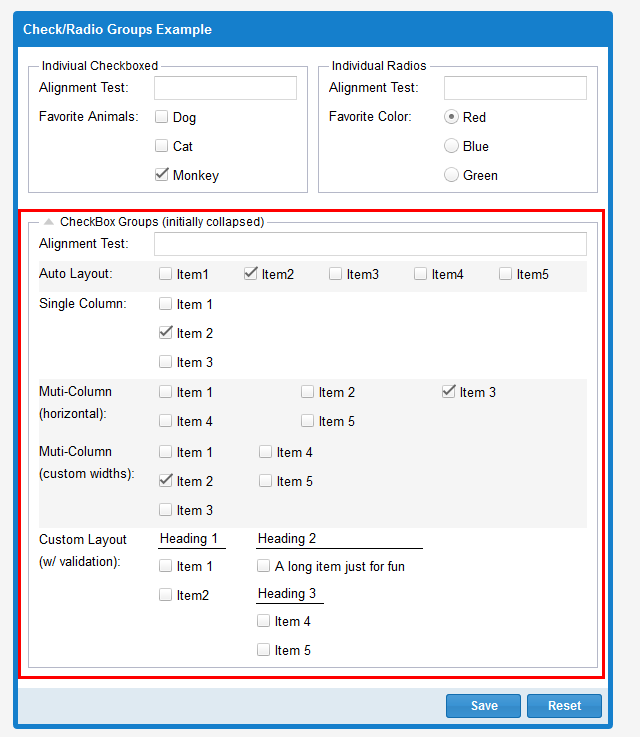
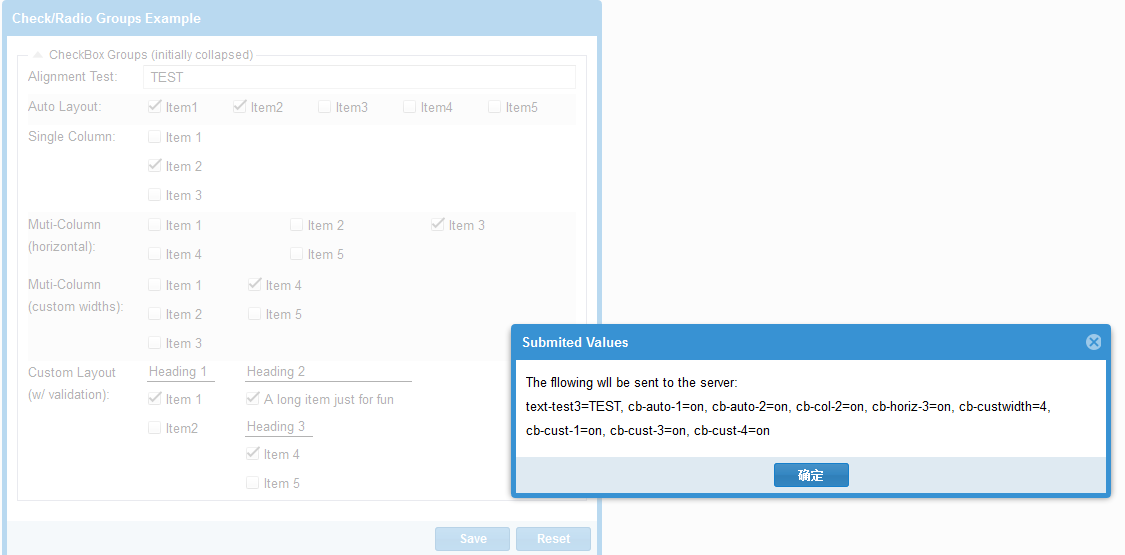
checkboxgroup
var checkGroup = {

        xtype: 'fieldset',

        title: 'CheckBox Groups (initially collapsed)',

        layout: 'anchor',

        defaults: {

            anchor: '100%'

        },

        collapsible: true, //可折叠的

        collapsed: false, //true:fieldset的状态 默认是折叠起来的 false:展开

        items: [{

            xtype: 'textfield',

            name: 'text-test3',

            fieldLabel: 'Alignment Test' //队列测试

        }, {

            //Use the default,auomtic layout to distribute the controls evenly

            //across a single row 横向导航

            xtype: 'checkboxgroup',

            fieldLabel: 'Auto Layout', //自动布局

            cls: 'x-check-group-alt',

            items: [

                { boxLabel: 'Item1', name: 'cb-auto-1' },

                { boxLabel: 'Item2', name: 'cb-auto-2', checked: true },

                { boxLabel: 'Item3', name: 'cb-auto-3' },

                { boxLabel: 'Item4', name: 'cb-auto-4' },

                { boxLabel: 'Item5', name: 'cb-auto-5' }

            ]

        }, {

            xtype: 'checkboxgroup',

            fieldLabel: 'Single Column',

            //put all controls in a single column with width 100% 把所有控件放在一行里 宽度100%

            columns: 1, //每行显示一列

            items: [

                { boxLabel: 'Item 1', name: 'cb-col-1' },

                { boxLabel: 'Item 2', name: 'cb-col-2', checked: true },

                { boxLabel: 'Item 3', name: 'cb-col-3' }

            ]

        }, {

            xtype: 'checkboxgroup',

            fieldLabel: 'Muti-Column (horizontal)', //多列 对行

            cls: 'x-check-group-alt',

            //Distribute controls across 3 even columns,filling each row //平等分配成三行

            //form left to right before starting the next row

            columns: 3, //每行显示三列

            items: [

                { boxLabel: 'Item 1', name: 'cb-horiz-1' },

                { boxLabel: 'Item 2', name: 'cb-horiz-2' },

                { boxLabel: 'Item 3', name: 'cb-horiz-3' },

                { boxLabel: 'Item 4', name: 'cb-horiz-4' },

                { boxLabel: 'Item 5', name: 'cb-horiz-5' }

            ]

        }, {

            xtype: 'checkboxgroup',

            fieldLabel: 'Muti-Column<br />(custom widths)',

            cls: 'x-check-group-alt',

            //Specify exact column widths(could also include float values for %)

            //制定确切的列宽 (也可以用百分比)

            columns: [100, 100], //每行两列 每列宽度100

            vertical: true,

            items: [

                { boxLabel: 'Item 1', name: 'cb-custwidth', inputValue: 1 },

                { boxLabel: 'Item 2', name: 'cb-custwidth', inputValue: 2, checked: true },

                { boxLabel: 'Item 3', name: 'cb-custwidth', inputValue: 3 },

                { boxLabel: 'Item 4', name: 'cb-custwidth', inputValue: 4 },

                { boxLabel: 'Item 5', name: 'cb-custwidth', inputValue: 5 }

            ]

        }, {

            xtype: 'checkboxgroup',

            fieldLabel: 'Custom Layout <br />(w/ validation)',

            allowBlanl: false,

            msgTarget: 'side',

            autoFitErrors: false,

            anchor: '-18',

            //You can change the 'layout' to anything you want,and include any nested(嵌套)

            //container structure(结构,构造),for complete layout control.In this example we only

            //want one item in the middle column,which would not be possible using the

            //default 'checkboxgroup' layout's columns config.we also want to put

            //heading at the top of each column

            layout: 'column',

            defaultType: 'container',

            items: [{

                columnWidth: .25,

                items: [

                    { xtype: 'component', html: 'Heading 1', cls: 'x-form-check-group-label' },

                    { xtype: 'checkboxfield', boxLabel: 'Item 1', name: 'cb-cust-1' },

                    { xtype: 'checkboxfield', boxLabel: 'Item2', name: 'cb-cust-2' }

                ]

            }, {

                columnWidth: .5,

                items: [

                    { xtype: 'component', html: 'Heading 2', cls: 'x-form-check-group-label' },

                    { xtype: 'checkboxfield', boxLabel: 'A long item just for fun', name: 'cb-cust-3' }

                ]

            }, {

                columnWidth: .25,

                items: [

                    { xtype: 'component', html: 'Heading 3', cls: 'x-form-check-group-label' },

                    { xtype: 'checkboxfield', boxLabel: 'Item 4', name: 'cb-cust-4' },

                    { xtype: 'checkboxfield', boxLabel: 'Item 5', name: 'cb-cust-5' }

                ]

            }]

        }]

    };
ExtJS Form的更多相关文章
- Extjs Form用法详解(适用于Extjs5)
Extjs Form是一个比较常用的控件,主要用来显示和编辑数据的,今天这篇文章将介绍Extjs Form控件的详细用法,包括创建Form.添加子项.加载和更新数据.验证等. 本文的示例代码适用于Ex ...
- 2014年12月20日00:33:14-遮罩+进度条-extjs form.isvalid
1.Extjs : 遮罩+进度条 2.Extjs: extjs form.isvalid http://stackoverflow.com/questions/19354433/extjs-form- ...
- 实用ExtJS教程100例-011:ExtJS Form 使用JSON数据赋值和取值
上一节中我们演示了ExtJS Form的异步加载和提交数据,本节中我们将演示如何使用JSON数据为ExtJS Form中的字段赋值和取值. 系列ExtJS教程持续更新中,点击查看>>最新E ...
- 实用ExtJS教程100例-010:ExtJS Form异步加载和提交数据
ExtJS Form 为我们提供了两个方法:load 和 submit,分别用来加载和提交数据,这两个方法都是异步的. 系列ExtJS教程持续更新中,点击查看>>最新ExtJS教程目录 F ...
- 实用ExtJS教程100例-009:ExtJS Form无刷新文件上传
文件上传在Web程序开发中必不可少,ExtJS Form中有一个filefield字段,用来选择文件并上传.今天我们来演示一下如何通过filefield实现ExtJS Form无刷新的文件上传. 首先 ...
- Extjs form 表单的 submit
说明:extjs form表单的提交方式是多种多样的,本文只是介绍其中的一种方法,本文介绍的方法可能不是完美的,但是对于一般的应用应该是没有问题的. 本文包括的主要内容有:form面板设计.f ...
- extjs form.load()加载服务端数据
formPanel.getForm().load({ url: 'getApproveRefundInf?refundIdDetail=${refundIdDetail}', waitMsg: '请稍 ...
- extjs form 取值 赋值 重置
一.从form中获取field的三个方法: 1.Ext.getCmp('id'); 2.FormPanel.getForm().findField('id/name'); 3.Ext.get('id/ ...
- 93.EXTJS Form之VTypes
转自:http://blog.sina.com.cn/s/blog_7778950d0100y2pg.html 本文我们主要探讨一下EXTJS的Form中验证的问题,可能用过EXTJS的Form的人都 ...
- extjs form submit 总是执行failure
代码: function createWeekReort() { if (form.getForm().isValid()) { Ext.Msg.confirm("提示", &qu ...
随机推荐
- 《effective C++》:条款37——绝不重新定义继承而来的缺省参数值
引子: 阿里的一道题: #include <IOSTREAM> using namespace std; class A{ public: ) { cout<<"a~ ...
- php 翻转字符串
//方法一 function strrev_charset($string,$charset='utf-8'){ if(!is_string($string) || !mb_check_encodin ...
- BitmapFactory.Options对图片进行缩放
package com.pingyijinren.helloworld.activity; import android.graphics.Bitmap; import android.graphic ...
- python学习之-- redis模块操作 string
redis 模块操作之--> String String:redis中的string在内存中按照一个key 对应一个 value来存储. 使用方法如下:set(name, value, ex=N ...
- python学习之-- 装饰器
高阶函数+嵌套函数 == 装饰器 什么是装饰器: 其实也是一个函数. 功能:为其他的函数添加附加功能 原则:不能修改被装饰的函数的源代码和调用方式 学习装饰器前首先要明白以下3条事项: 1:函数 即 ...
- HDU 1074 Doing Homework【状态压缩DP】
题目链接: http://acm.hdu.edu.cn/showproblem.php?pid=1074 题意: 给定作业截止时间和完成作业所需时间,比截止时间晚一天扣一分,问如何安排作业的顺序使得最 ...
- 实验二:编写输出“Hello word!”
一:编写输出“Hello word!” 1.运行eclipse,在project name中输入要创建的项目名称. 2.创建java类,点击File->New->Class,在弹出窗口中N ...
- MAC地址泛红攻击
一.环境 IP地址: Windows10 IP:10.13.153.55 Windows7: IP:192.168.83.130 Linux: IP:192.168.83.129 ...
- 关于oracle存储过程的若干问题备忘
1.在oracle中,数据表别名不能加as,如: select a.appname from appinfo a;-- 正确select a.appname from appinfo as a;-- ...
- css实现文字渐变
css文件渐变虽然兼容性比较差,但是用在移动端和chrome中还是没有问题的. 实现文件渐变的方法有两种 1. 使用 background 的属性 2. 使用 mask 属性 方式一. <!DO ...