
java web开发入门十(idea创建maven SSM项目)基于intellig idea
一、搭建项目骨架
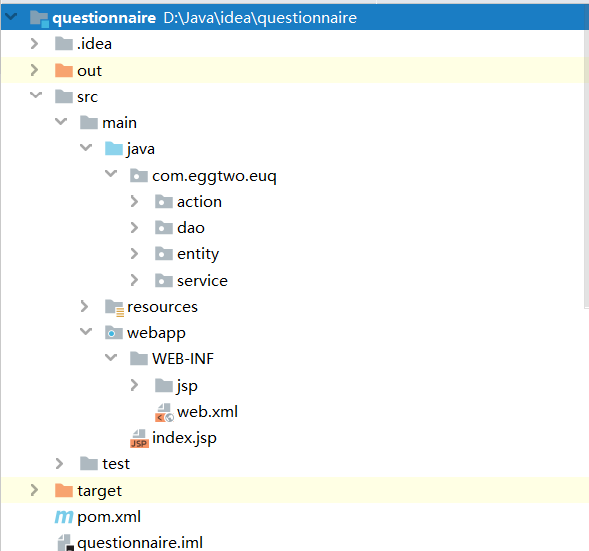
二、配置pom.xml
<?xml version="1.0" encoding="UTF-8"?>

<project xmlns="http://maven.apache.org/POM/4.0.0" xmlns:xsi="http://www.w3.org/2001/XMLSchema-instance"

         xsi:schemaLocation="http://maven.apache.org/POM/4.0.0 http://maven.apache.org/xsd/maven-4.0.0.xsd">

    <modelVersion>4.0.0</modelVersion>

    <groupId>com.eggtwo</groupId>

    <artifactId>questionnaire</artifactId>

    <version>1.0-SNAPSHOT</version>

    <packaging>war</packaging>

    <name>questionnaire Maven Webapp</name>

    <!-- FIXME change it to the project's website -->

    <url>http://www.example.com</url>

    <!-- 定义版本常量 -->

    <properties>

        <project.build.sourceEncoding>UTF-8</project.build.sourceEncoding>

        <maven.compiler.source>1.7</maven.compiler.source>

        <maven.compiler.target>1.7</maven.compiler.target>

        <!--json-->

        <jackson.version>2.6.1</jackson.version>

        <!-- mybatis版本号 -->

        <mybatis.version>3.4.2</mybatis.version>

        <!-- spring版本号 -->

        <spring.version>4.2.5.RELEASE</spring.version>

        <!-- log4j日志版本号 -->

        <log4j.version>1.2.17</log4j.version>

    </properties>

    <dependencies>

        <!-- junit测试 -->

        <dependency>

            <groupId>junit</groupId>

            <artifactId>junit</artifactId>

            <version>4.12</version>

            <scope>test</scope>

        </dependency>

        <!--连接池-->

        <dependency>

            <groupId>c3p0</groupId>

            <artifactId>c3p0</artifactId>

            <version>0.9.1.2</version>

        </dependency>

        <!--cglib代理-->

        <dependency>

            <groupId>cglib</groupId>

            <artifactId>cglib</artifactId>

            <version>3.2.4</version>

        </dependency>

        <!-- 文件上传 -->

        <dependency>

            <groupId>commons-fileupload</groupId>

            <artifactId>commons-fileupload</artifactId>

            <version>1.2.2</version>

        </dependency>

        <dependency>

            <groupId>commons-io</groupId>

            <artifactId>commons-io</artifactId>

            <version>2.4</version>

        </dependency>

        <!-- Jackson Json处理工具包 -->

        <dependency>

            <groupId>com.fasterxml.jackson.core</groupId>

            <artifactId>jackson-databind</artifactId>

            <version>${jackson.version}</version>

        </dependency>

        <dependency>

            <groupId>com.fasterxml.jackson.core</groupId>

            <artifactId>jackson-core</artifactId>

            <version>${jackson.version}</version>

        </dependency>

        <dependency>

            <groupId>com.fasterxml.jackson.core</groupId>

            <artifactId>jackson-annotations</artifactId>

            <version>${jackson.version}</version>

        </dependency>

        <!-- 导入mysql数据库链接jar包 -->

        <dependency>

            <groupId>mysql</groupId>

            <artifactId>mysql-connector-java</artifactId>

            <version>5.1.48</version>

        </dependency>

        <!-- mybatis -->

        <dependency>

            <groupId>org.mybatis</groupId>

            <artifactId>mybatis</artifactId>

            <version>${mybatis.version}</version>

        </dependency>

        <!-- mybatis和spring整合 -->

        <dependency>

            <groupId>org.mybatis</groupId>

            <artifactId>mybatis-spring</artifactId>

            <version>1.3.1</version>

        </dependency>

        <!-- spring web mvc -->

        <dependency>

            <groupId>org.springframework</groupId>

            <artifactId>spring-web</artifactId>

            <version>${spring.version}</version>

        </dependency>

        <dependency>

            <groupId>org.springframework</groupId>

            <artifactId>spring-webmvc</artifactId>

            <version>${spring.version}</version>

        </dependency>

        <!-- spring core-->

        <dependency>

            <groupId>org.springframework</groupId>

            <artifactId>spring-tx</artifactId>

            <version>${spring.version}</version>

        </dependency>

        <dependency>

            <groupId>org.springframework</groupId>

            <artifactId>spring-jdbc</artifactId>

            <version>${spring.version}</version>

        </dependency>

        <dependency>

            <groupId>org.springframework</groupId>

            <artifactId>spring-context-support</artifactId>

            <version>${spring.version}</version>

        </dependency>

        <dependency>

            <groupId>org.springframework</groupId>

            <artifactId>spring-test</artifactId>

            <version>${spring.version}</version>

        </dependency>

        <!-- aop -->

        <dependency>

            <groupId>org.springframework</groupId>

            <artifactId>spring-aspects</artifactId>

            <version>${spring.version}</version>

        </dependency>

        <dependency>

            <groupId>org.aspectj</groupId>

            <artifactId>aspectjweaver</artifactId>

            <version>1.8.13</version>

        </dependency>

        <dependency>

            <groupId>org.springframework</groupId>

            <artifactId>spring-messaging</artifactId>

            <version>${spring.version}</version>

        </dependency>

        <dependency>

            <groupId>org.springframework</groupId>

            <artifactId>spring-jms</artifactId>

            <version>${spring.version}</version>

        </dependency>

        <dependency>

            <groupId>org.springframework</groupId>

            <artifactId>spring-expression</artifactId>

            <version>${spring.version}</version>

        </dependency>

        <!-- log4j日志文件管理包 -->

        <dependency>

            <groupId>log4j</groupId>

            <artifactId>log4j</artifactId>

            <version>${log4j.version}</version>

        </dependency>

        <!-- servlet -->

        <dependency>

            <groupId>javax.servlet</groupId>

            <artifactId>servlet-api</artifactId>

            <version>2.5</version>

            <scope>provided</scope>

        </dependency>

        <dependency>

            <groupId>taglibs</groupId>

            <artifactId>standard</artifactId>

            <version>1.1.2</version>

        </dependency>

        <dependency>

            <groupId>jstl</groupId>

            <artifactId>jstl</artifactId>

            <version>1.2</version>

        </dependency>

        <!-- 编译jsp页面 -->

        <dependency>

            <groupId>javax.servlet.jsp</groupId>

            <artifactId>jsp-api</artifactId>

            <version>2.0</version>

            <scope>provided</scope>

        </dependency>

    </dependencies>

    <build>

        <finalName>questionnaire</finalName>

        <pluginManagement><!-- lock down plugins versions to avoid using Maven defaults (may be moved to parent pom) -->

            <plugins>

                <plugin>

                    <artifactId>maven-clean-plugin</artifactId>

                    <version>3.1.0</version>

                </plugin>

                <!-- see http://maven.apache.org/ref/current/maven-core/default-bindings.html#Plugin_bindings_for_war_packaging -->

                <plugin>

                    <artifactId>maven-resources-plugin</artifactId>

                    <version>3.0.2</version>

                </plugin>

                <plugin>

                    <artifactId>maven-compiler-plugin</artifactId>

                    <version>3.8.0</version>

                </plugin>

                <plugin>

                    <artifactId>maven-surefire-plugin</artifactId>

                    <version>2.22.1</version>

                </plugin>

                <plugin>

                    <artifactId>maven-war-plugin</artifactId>

                    <version>3.2.2</version>

                </plugin>

                <plugin>

                    <artifactId>maven-install-plugin</artifactId>

                    <version>2.5.2</version>

                </plugin>

                <plugin>

                    <artifactId>maven-deploy-plugin</artifactId>

                    <version>2.8.2</version>

                </plugin>

                <!--mybatis自动代码生成插件-->

                <plugin>

                    <groupId>org.mybatis.generator</groupId>

                    <artifactId>mybatis-generator-maven-plugin</artifactId>

                    <version>1.3.2</version>

                    <configuration>

                        <verbose>true</verbose>

                        <overwrite>true</overwrite>

                    </configuration>

                </plugin>

            </plugins>

        </pluginManagement>

        <!--默认不编译java包下面的.xml文件-->

        <resources>

            <resource>

                <directory>src/main/java</directory><!---设置编译的包-->

                <includes>

                    <include>**/*.xml</include><!--该路径下的.xml类型文件也要编译-->

                    <include>**/*.properties</include><!---该路径下的.properties类型文件也要编译-->

                </includes>

                <filtering>false</filtering>

            </resource>

            <resource>

                <directory>src/main/resources</directory>

                <filtering>true</filtering>

            </resource>

        </resources>

    </build>

</project>
三、开发java和配置xml
.添加entity、dao、service、action、xml配置
省略
四、运行报错
org.apache.ibatis.binding.BindingException: Invalid bound statement (not found): com.eggtwo.euq.dao.MemberDao.add

    at org.apache.ibatis.binding.MapperMethod$SqlCommand.<init>(MapperMethod.java:230)

    at org.apache.ibatis.binding.MapperMethod.<init>(MapperMethod.java:48)

    at org.apache.ibatis.binding.MapperProxy.cachedMapperMethod(MapperProxy.java:65)

    at org.apache.ibatis.binding.MapperProxy.invoke(MapperProxy.java:58)

    at com.sun.proxy.$Proxy14.add(Unknown Source)

    at com.eggtwo.euq.service.MemberService.add(MemberService.java:18)

    at com.eggtwo.euq.service.MemberService$$FastClassBySpringCGLIB$$9411767b.invoke(<generated>)

    at org.springframework.cglib.proxy.MethodProxy.invoke(MethodProxy.java:204)

    at org.springframework.aop.framework.CglibAopProxy$CglibMethodInvocation.invokeJoinpoint(CglibAopProxy.java:720)

    at org.springframework.aop.framework.ReflectiveMethodInvocation.proceed(ReflectiveMethodInvocation.java:157)

    at org.springframework.transaction.interceptor.TransactionInterceptor$1.proceedWithInvocation(TransactionInterceptor.java:99)

    at org.springframework.transaction.interceptor.TransactionAspectSupport.invokeWithinTransaction(TransactionAspectSupport.java:281)

    at org.springframework.transaction.interceptor.TransactionInterceptor.invoke(TransactionInterceptor.java:96)

    at org.springframework.aop.framework.ReflectiveMethodInvocation.proceed(ReflectiveMethodInvocation.java:179)

    at org.springframework.aop.interceptor.ExposeInvocationInterceptor.invoke(ExposeInvocationInterceptor.java:92)

    at org.springframework.aop.framework.ReflectiveMethodInvocation.proceed(ReflectiveMethodInvocation.java:179)

DEBUG - Invoking afterPropertiesSet() on bean with name 'member/add'

    at org.springframework.aop.framework.CglibAopProxy$DynamicAdvisedInterceptor.intercept(CglibAopProxy.java:655)

DEBUG - Rendering view [org.springframework.web.servlet.view.JstlView: name 'member/add'; URL [/WEB-INF/jsp/member/add.jsp]] in DispatcherServlet with name 'springmvc'

    at com.eggtwo.euq.service.MemberService$$EnhancerBySpringCGLIB$$9a99eaa9.add(<generated>)

    at com.eggtwo.euq.action.MemberController.add(MemberController.java:29)

    at sun.reflect.NativeMethodAccessorImpl.invoke0(Native Method)

    at sun.reflect.NativeMethodAccessorImpl.invoke(NativeMethodAccessorImpl.java:62)

    at sun.reflect.DelegatingMethodAccessorImpl.invoke(DelegatingMethodAccessorImpl.java:43)

    at java.lang.reflect.Method.invoke(Method.java:498)

    at org.springframework.web.bind.annotation.support.HandlerMethodInvoker.invokeHandlerMethod(HandlerMethodInvoker.java:178)

    at org.springframework.web.servlet.mvc.annotation.AnnotationMethodHandlerAdapter.invokeHandlerMethod(AnnotationMethodHandlerAdapter.java:444)

    at org.springframework.web.servlet.mvc.annotation.AnnotationMethodHandlerAdapter.handle(AnnotationMethodHandlerAdapter.java:432)

    at org.springframework.web.servlet.DispatcherServlet.doDispatch(DispatcherServlet.java:959)

    at org.springframework.web.servlet.DispatcherServlet.doService(DispatcherServlet.java:893)

    at org.springframework.web.servlet.FrameworkServlet.processRequest(FrameworkServlet.java:968)

    at org.springframework.web.servlet.FrameworkServlet.doGet(FrameworkServlet.java:859)

    at javax.servlet.http.HttpServlet.service(HttpServlet.java:634)

    at org.springframework.web.servlet.FrameworkServlet.service(FrameworkServlet.java:844)

    at javax.servlet.http.HttpServlet.service(HttpServlet.java:741)

    at org.apache.catalina.core.ApplicationFilterChain.internalDoFilter(ApplicationFilterChain.java:231)

    at org.apache.catalina.core.ApplicationFilterChain.doFilter(ApplicationFilterChain.java:166)

    at org.apache.tomcat.websocket.server.WsFilter.doFilter(WsFilter.java:53)

    at org.apache.catalina.core.ApplicationFilterChain.internalDoFilter(ApplicationFilterChain.java:193)

    at org.apache.catalina.core.ApplicationFilterChain.doFilter(ApplicationFilterChain.java:166)

    at org.springframework.web.filter.CharacterEncodingFilter.doFilterInternal(CharacterEncodingFilter.java:121)

    at org.springframework.web.filter.OncePerRequestFilter.doFilter(OncePerRequestFilter.java:107)

    at org.apache.catalina.core.ApplicationFilterChain.internalDoFilter(ApplicationFilterChain.java:193)

    at org.apache.catalina.core.ApplicationFilterChain.doFilter(ApplicationFilterChain.java:166)

    at org.apache.catalina.core.StandardWrapperValve.invoke(StandardWrapperValve.java:202)DEBUG - Forwarding to resource [/WEB-INF/jsp/member/add.jsp] in InternalResourceView 'member/add'

    at org.apache.catalina.core.StandardContextValve.invoke(StandardContextValve.java:96)

    at org.apache.catalina.authenticator.AuthenticatorBase.invoke(AuthenticatorBase.java:526)

    at org.apache.catalina.core.StandardHostValve.invoke(StandardHostValve.java:139)

    at org.apache.catalina.valves.ErrorReportValve.invoke(ErrorReportValve.java:92)

    at org.apache.catalina.valves.AbstractAccessLogValve.invoke(AbstractAccessLogValve.java:678)

    at org.apache.catalina.core.StandardEngineValve.invoke(StandardEngineValve.java:74)

    at org.apache.catalina.connector.CoyoteAdapter.service(CoyoteAdapter.java:343)

    at org.apache.coyote.http11.Http11Processor.service(Http11Processor.java:408)

    at org.apache.coyote.AbstractProcessorLight.process(AbstractProcessorLight.java:66)

    at org.apache.coyote.AbstractProtocol$ConnectionHandler.process(AbstractProtocol.java:860)

    at org.apache.tomcat.util.net.NioEndpoint$SocketProcessor.doRun(NioEndpoint.java:1589)

    at org.apache.tomcat.util.net.SocketProcessorBase.run(SocketProcessorBase.java:49)

    at java.util.concurrent.ThreadPoolExecutor.runWorker(ThreadPoolExecutor.java:1149)

    at java.util.concurrent.ThreadPoolExecutor$Worker.run(ThreadPoolExecutor.java:624)

    at org.apache.tomcat.util.threads.TaskThread$WrappingRunnable.run(TaskThread.java:61)

    at java.lang.Thread.run(Thread.java:748)
原因是因为:maven项目默认不把java包下面的.xml文件编译输出,如下图:
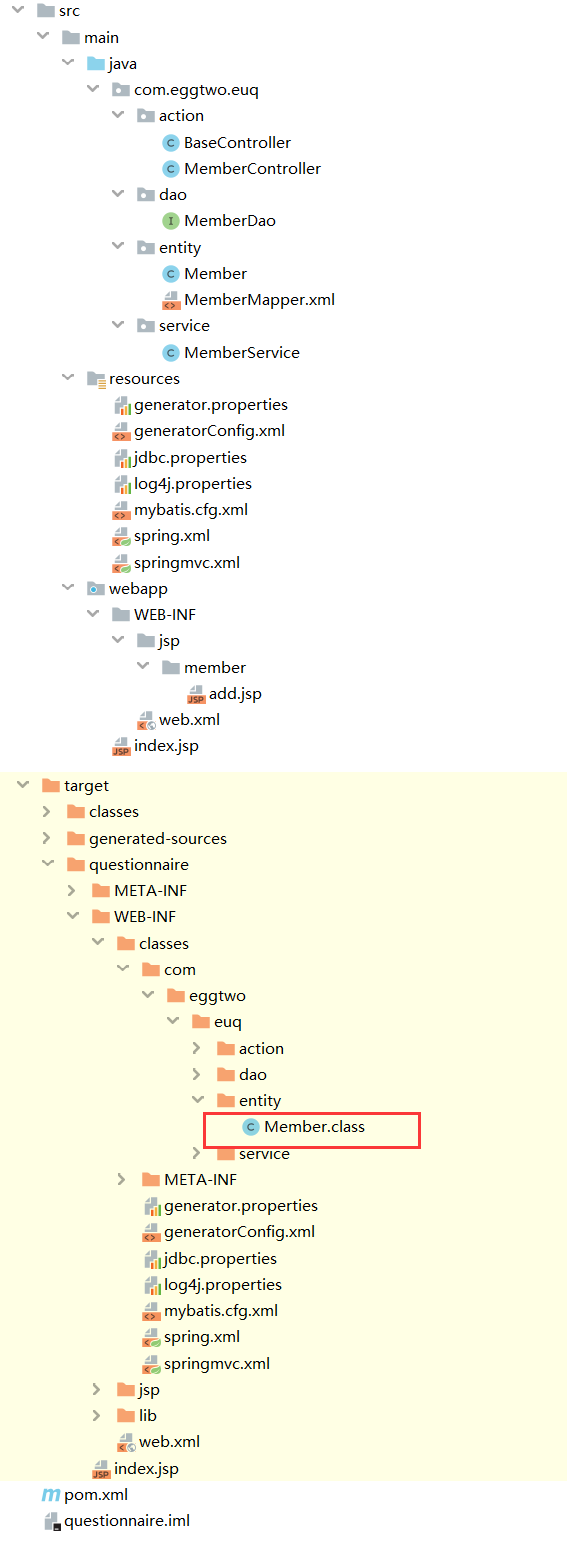
解决办法:打开pom.xml,在build节点下添加如下代码:
<!--默认不编译java包下面的.xml文件-->

        <resources>

            <resource>

                <directory>src/main/java</directory><!---设置编译的包-->

                <includes>

                    <include>**/*.xml</include><!--该路径下的.xml类型文件也要编译-->

                    <include>**/*.properties</include><!---该路径下的.properties类型文件也要编译-->

                </includes>

                <filtering>false</filtering>

            </resource>

            <resource>

                <directory>src/main/resources</directory>

                <filtering>true</filtering>

            </resource>

        </resources>
java web开发入门十(idea创建maven SSM项目)基于intellig idea的更多相关文章
- Java开发工程师(Web方向) - 01.Java Web开发入门 - 第4章.Maven
第4章--Maven Maven实战 Java Web应用的部署: 手动式: 编译:javac -cp $CATALINA_HOME/lib/servlet-api.jar web-inf/class ...
- Java WEB开发环境搭建以及创建Maven Web项目
根据此链接博文学习配置: http://www.cnblogs.com/zyw-205520/p/4767633.html 1.JDK的安装 自行百度,(最好是jdk1.7版本的) 测试如下图,即完成 ...
- java web开发入门一(servlet和jsp)基于eclispe
servlet 用java语言开发动态资源网站的技术,在doGet方法中拼接显示html,在doPost方法中提交数据.类似于.net的ashx技术. servlet生成的class文件存放在tomc ...
- java web开发入门十二(idea创建maven SSM项目需要解决的问题)基于intellig idea(2019-11-09 11:23)
一.spring mvc action返回string带双引号问题 解决方法: 在springmvc.xml中添加字符串解析器 <!-- 注册string和json解析适配器 --> &l ...
- java web开发入门十一(idea maven mybatis自动代码生成)基于intellig idea
6.idea maven mybatis逆向工程(代码生成器) 1.配置pom.xml 在plugins标签下添加mybatis-generator-maven-plugin <plugin&g ...
- day04 Java Web 开发入门
day04 Java Web 开发入门 1. web 开发相关介绍 2. web 服务器 3. Tomcat服务器启动的问题 4. Tomcat目录结构 5. Web应用程序(虚拟目录映射,缺省web ...
- java web 开发入门实例
学习是个技巧活,关键是要找到重点的地方,新手在这方面的坑尤其多.看别人的教程一步一步的跟着做,隔几步就遇到一个新知识点,忍不住就百度往深处了解,一晃半天就过去了. 有的知识点要深入学习的,有的是了解下 ...
- java WEB开发入门
WEB开发入门 1 进入web JAVASE:标准- standard JAVA桌面程序 GUI SOCKET JAVAEE:企业-浏览器控制 web 2 软件结构 C/S :client ...
- java web 开发入门 --- tomcat/servlet/jsp
在做java web 开发时,要先安装tomcat.它是一个web服务器,也叫web容器,我们把写好的jsp, html页面放到它里面,然后启动它,就可以用浏览器访问这些页面,地址栏中输入localh ...
随机推荐
- Mybatis中的Mapper.xml映射文件sql查询接收多个参数
我们都知道,在Mybatis中的Mapper.xml映射文件可以定制动态SQL,在dao层定义的接口中定义的参数传到xml文件中之后,在查询之前mybatis会对其进行动态解析,通常使用#{}接收 ...
- [Node.js] TypeScript 实现 sleep 函数
看过不少网友的文章, 有各种方法, 但我想要的是一个能线性执行的sleep函数. /** * 等待指定的时间 * @param ms */ static async sleep(ms: number) ...
- ABAP 新语法-实例讲解
主要内容 内联声明 构造表达式 内表操作 Open SQL 其他 本文列出了ABAP新语法的一些使用方式,供大家学习参考. 内联声明 代码实现: *&--------------------- ...
- Delphi - 16进制取反 Not
//Not直接实现十六进制取反var I, J : word; begin I := $96E5; J := Not I; ShowMessage(Format('%x',[J])); end; 作者 ...
- golang中,slice的几个易混淆点
slice在golang中是最常用的类型,一般可以把它作为数组使用,但是比数组要高效呀.不过,我感觉这个东西用的不好坑太多了.还是需要了解下他底层的实现 slice的结构定义 type slice s ...
- Java开发设计——七大原则
Java开发设计——七大原则 摘要:本文主要介绍了在做面向对象开发时要注意的七个原则. 部分内容来自以下博客: https://www.cnblogs.com/xiyuekamisama/p/1057 ...
- npm和cnpm命令后无响应
问题: 1.把前端环境配制完毕之后,打开项目,输入cnpm install之后,光标一直在另起一行的位置闪,但是丝毫没有在安装的迹象. 2.打开cmd,在窗体中输入node -v 可以显示版本,但是输 ...
- Windows 10 Java开发环境配置
一.JDK下载 安装java开发环境,第一步就是下载jdk安装包.打开浏览器进入oracle官网下载.这里注意jdk和jre的区别,jdk(java develop environment)是java ...
- 个人项目:WC
一.GitHub项目地址:https://github.com/lseap/myWC 二.PSP表格: PSP2.1 Personal Software Process Stages 预估耗时(分钟) ...
- 010.[转] maven的三大生命周期
一.Maven的生命周期 Maven的生命周期就是对所有的构建过程进行抽象和统一.包含了项目的清理.初始化.编译.测试.打包.集成测试.验证.部署和站点生成等几乎所有的构建步骤. Maven的生命周期 ...