
基于.Net实现前端对话框和消息框
关于前端对话框、消息框的优秀插件多不胜数。造轮子是为了更好的使用轮子,并不是说自己造的轮子肯定好。所以,这个博客系统基本上都是自己实现的,包括日志记录、响应式布局等等一些本可以使用插件的。好了,废话不多时。我们来实现自己的对话框和消息框。
对话框
要求:可拖动、点击按钮后可回调
画一个简单的模型框
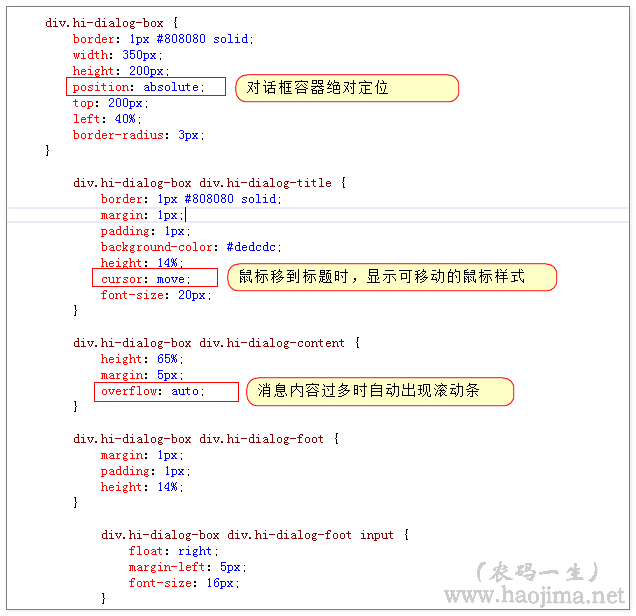
<div class="hi-dialog-box clearfix"> <div class="hi-dialog-title">系统提示</div> <div class="hi-dialog-content"> </div> <div class="hi-dialog-foot"> <input type="button" class="hi-dialog-determine" value="确定" /> <input type="button" class="hi-dialog-cancel" value="取消" /> </div></div>div.hi-dialog-box { border: 1px #808080 solid; width: 350px; height: 200px; border-radius: 3px; } div.hi-dialog-box div.hi-dialog-title { border: 1px #808080 solid; margin: 1px; padding: 1px; padding: 0px 0px 0px 5px; background-image: initial; background-position: initial; background-size: initial; background-repeat: initial; background-attachment: initial; background-origin: initial; background-clip: initial; border-left: 3px solid rgb(108, 226, 108); line-height: 20px; width: 640px; clear: both; border-radius: 0px !important; border-top: 0px !important; border-right: 0px !important; border-bottom: 0px !important; border-image: initial !important; bottom: auto !important; float: none !important; height: auto !important; left: auto !important; outline: 0px !important; overflow: visible !important; position: static !important; right: auto !important; top: auto !important; vertical-align: baseline !important; box-sizing: content-box !important; font-family: Consolas, "Bitstream Vera Sans Mono", "Courier New", Courier, monospace !important; min-height: auto !important; color: gray !important;">#dedcdc; height: 14%; cursor: move; font-size: 20px; } div.hi-dialog-box div.hi-dialog-content { height: 65%; margin: 5px; } div.hi-dialog-box div.hi-dialog-foot { margin: 1px; padding: 1px; height: 14%; } div.hi-dialog-box div.hi-dialog-foot input { float: right; margin-left: 5px; font-size: 16px; }是不是像那么回事了,不过现在还不能拖动。拖动,说白了就是在鼠标移动的时候不停的修改绝对定位。
首先修改以下样式:
用js代码实现拖动效果:
/鼠标按下时 $("div.hi-dialog-title").mousedown(function (event) { $("html").unbind();//首先清除事件方法 var click_clientX = event.clientX;//记录鼠标按下时相对当前窗口的 x 坐标 var click_clientY = event.clientY;//记录鼠标按下时相对当前窗口的 y 坐标 //取的对话框容器 var dialogBox = $(this).closest("div.hi-dialog-box"); //记录对话框容器当前位置 var dialogBoxX = parseInt($(dialogBox).css("left")); var dialogBoxY = parseInt($(dialogBox).css("top")); //鼠标移动时 $("html").mousemove(dialog_mousemove = function (event) { //鼠标按下后移动量加上原来的位置 var top = event.clientY - click_clientY + dialogBoxY; var left = event.clientX - click_clientX + dialogBoxX; //修改对话框位置(这里就实现了移动效果了) $(dialogBox).css({ "left": left, "top": top }); }); //鼠标按键松开时 $("html").mouseup(function () { //清除鼠标移动事件 $("html").unbind("mousemove", dialog_mousemove); }); });点击按钮后可回调
很多时候,我们点击确定或取消的时候我们需要执行回调(比如“您是否删除”,点击了确定后肯定需要做删除操作)。
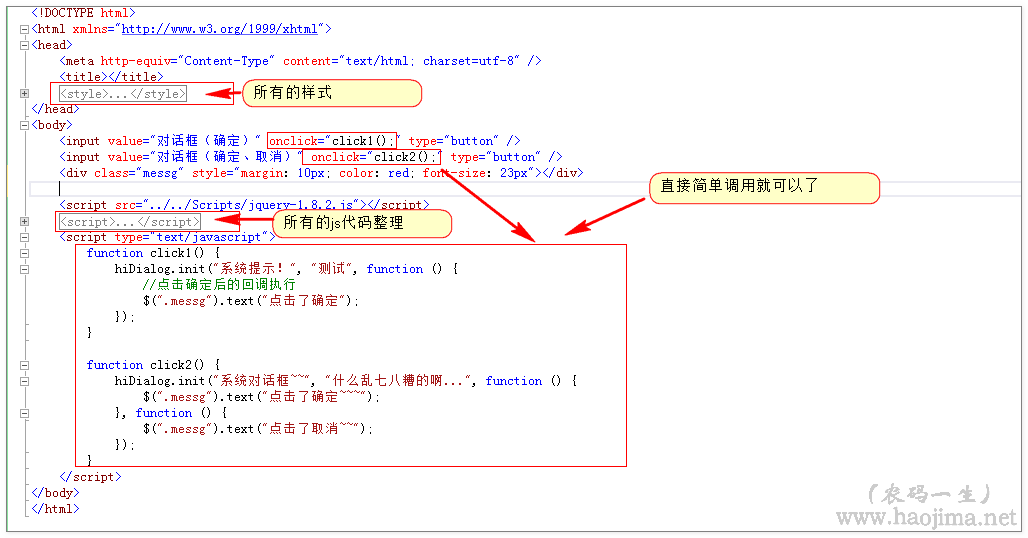
全部代码:(当然,这只是简单实现。还有很多需要继续细化的效果,如:背景遮罩、如果实现点击多次对话框)
<!DOCTYPE html>
<html xmlns="http://www.w3.org/1999/xhtml">
<head>
<meta http-equiv="Content-Type" content="text/html; charset=utf-8" />
<title></title>
<style type="text/css">
* {
box-sizing: border-box;
}
.clearfix:after {
content: ' ';
display: table;
clear: both;
}
.clearfix {
*zoom: 1;
}
div.hi-dialog-box {
border: 1px #808080 solid;
width: 350px;
height: 200px;
position: absolute;
top: 200px;
left: 40%;
border-radius: 3px;
}
div.hi-dialog-box div.hi-dialog-title {
border: 1px #808080 solid;
margin: 1px;
padding: 1px;
background-color: #dedcdc;
height: 14%;
cursor: move;
font-size: 20px;
}
div.hi-dialog-box div.hi-dialog-content {
height: 65%;
margin: 5px;
overflow: auto;
}
div.hi-dialog-box div.hi-dialog-foot {
margin: 1px;
padding: 1px;
height: 14%;
}
div.hi-dialog-box div.hi-dialog-foot input {
float: right;
margin-left: 5px;
font-size: 16px;
}
</style>
</head>
<body>
<input value="对话框(确定)" onclick="click1();" type="button" />
<input value="对话框(确定、取消)" onclick="click2();" type="button" />
<div class="messg" style="margin: 10px; color: red; font-size: 23px"></div>
<script src="../../Scripts/jquery-1.8.2.js"></script>
<script type="text/javascript">
var hiDialog = {
init: function (title, messg, determineCallback, cancelCallback) {
title = title || "系统提示";
var determine = "", cancel = "";
if (typeof (determineCallback) == "function")
determine = '<input type="button" class="hi-dialog-determine" value="确定" />';
if (typeof (cancelCallback) == "function")
cancel = '<input type="button" class="hi-dialog-cancel" value="取消" />';
if (!$("div.hi-dialog-box").length) {
var hi_dialog_box = '<div class="hi-dialog-box clearfix">\
<div class="hi-dialog-title"></div>\
<div class="hi-dialog-content">\
</div>\
<div class="hi-dialog-foot">\
</div>\
</div>';
$("body").append(hi_dialog_box);
}
var $box = $("div.hi-dialog-box");
$box.find("div.hi-dialog-title").html(title);
$box.find("div.hi-dialog-content").html(messg);
$box.find("div.hi-dialog-foot").html(determine + cancel);
$("div.hi-dialog-box").show();
$box.find(".hi-dialog-determine").click(function () {
determineCallback();
hiDialog.close();
});
$box.find(".hi-dialog-cancel").click(function () {
cancelCallback();
hiDialog.close();
});
//鼠标按下时
$("div.hi-dialog-title").mousedown(function (event) {
$("html").unbind();
var click_clientX = event.clientX;
var click_clientY = event.clientY;
var dialogBox = $(this).closest("div.hi-dialog-box");
var dialogBoxX = parseInt($(dialogBox).css("left"));
var dialogBoxY = parseInt($(dialogBox).css("top"));
//鼠标移动时
$("html").mousemove(dialog_mousemove = function (event) {
var top = event.clientY - click_clientY + dialogBoxY;
var left = event.clientX - click_clientX + dialogBoxX;
$(dialogBox).css({ "left": left, "top": top });
});
//鼠标按键松开时
$("html").mouseup(function () {
$("html").unbind("mousemove", dialog_mousemove);
});
});
},
close: function () {
$("div.hi-dialog-box").hide();
}
}
</script>
<script type="text/javascript">
function click1() {
hiDialog.init("系统提示!", "测试", function () {
//点击确定后的回调执行
$(".messg").text("点击了确定");
});
}
function click2() {
hiDialog.init("系统对话框~~", "什么乱七八糟的啊...", function () {
$(".messg").text("点击了确定~~~");
}, function () {
$(".messg").text("点击了取消~~");
});
}
</script>
</body>
</html>
消息框
要求:自动定时关闭消息框、有消息分类(如:警告、错误、成功等)
画一个简单的模型框
<div class="hi-message-box">
<img class="hi-message-type" src="" />
<span class="hi-message-messg">你不爱我了~~</span>
</div>
添上基本样式
<style type="text/css">
div.hi-message-box {
padding: 10px;
padding-top: 15px;
padding-bottom: 20px;
background-color: #aee0c1;
min-width: 200px;
max-width: 500px;
font-size: 19px;
border-radius: 3px;
}
</style>
看上去是不是很简单呢?下面我们给它加上定时关闭消息功能。
定时关闭消息(表骂我,就是这么简单。我也想写复杂的。)
setTimeout(function () { $("div.hi-message-box").fadeOut("slow");}, 1200);
加上消息类型(其实就是根据参数加不同的图片而已)
setTimeout(function () {
$("div.hi-message-box").fadeOut("slow");
}, 1200);
加上图标是不是更像那么回事了?
如上,我们同样需要稍微整理下实现代码:
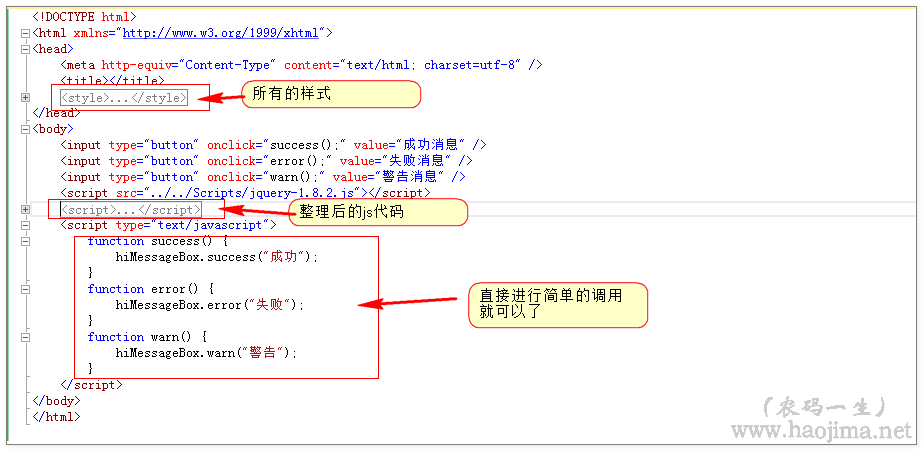
<!DOCTYPE html><head> <meta http-equiv="Content-Type" content="text/html; charset=utf-8" /> <title></title> <style type="text/css"> * { box-sizing: border-box; } .clearfix:after { content: ' '; display: table; clear: both; } .clearfix { *zoom: 1; } div.hi-message-box { padding: 10px; padding-top: 15px; padding-bottom: 20px; background-color: #aee0c1; position: absolute; min-width: 200px; max-width: 500px; font-size: 19px; border-radius: 3px; top:200px; left:45%; } div.hi-message-box img { vertical-align: bottom; } </style></head><body> <input type="button" onclick="success();" value="成功消息" /> <input type="button" onclick="error();" value="失败消息" /> <input type="button" onclick="warn();" value="警告消息" /> <script src="../../Scripts/jquery-1.8.2.js"></script> <script type="text/javascript"> var hiMessageBox = { init: function (type, messg) { var hiMessageBox = '<div class="hi-message-box">\ <img class="hi-message-type" src="" />\ <span class="hi-message-messg"></span>\ </div>'; if (!$("div.hi-message-box").length) { $("body").append(hiMessageBox); } var $box = $("div.hi-message-box"); $box.find(".hi-message-messg").text(messg); switch (type) { case 0://success 成功 $box.find("img.hi-message-type").attr("src", "imgs/Tick_24px.png") break; case 1://warn 警告 $box.find("img.hi-message-type").attr("src", "imgs/Warning_24px.png") break; case 2:// $box.find("img.hi-message-type").attr("src", "imgs/Delete_24px.png") break; } $("div.hi-message-box").fadeIn("slow") setTimeout(function () { $("div.hi-message-box").fadeOut("slow"); }, 1200); }, success: function (messg) { this.init(0, messg); }, warn: function (messg) { this.init(1, messg); }, error: function (messg) { this.init(2, messg); } }; </script> <script type="text/javascript"> function success() { hiMessageBox.success("成功"); } function error() { hiMessageBox.error("失败"); } function warn() { hiMessageBox.warn("警告"); } </script></body></html>
<!DOCTYPE html><head> <meta http-equiv="Content-Type" content="text/html; charset=utf-8" /> <title></title> <style type="text/css"> * { box-sizing: border-box; } .clearfix:after { content: ' '; display: table; clear: both; } .clearfix { *zoom: 1; } div.hi-dialog-box { border: 1px #808080 solid; width: 350px; height: 200px; position: absolute; top: 200px; left: 40%; border-radius: 3px; } div.hi-dialog-box div.hi-dialog-title { border: 1px #808080 solid; margin: 1px; padding: 1px; background-color: #dedcdc; height: 14%; cursor: move; font-size: 20px; } div.hi-dialog-box div.hi-dialog-content { height: 65%; margin: 5px; overflow: auto; } div.hi-dialog-box div.hi-dialog-foot { margin: 1px; padding: 1px; height: 14%; } div.hi-dialog-box div.hi-dialog-foot input { float: right; margin-left: 5px; font-size: 16px; } </style></head><body> <input value="对话框(确定)" onclick="click1();" type="button" /> <input value="对话框(确定、取消)" onclick="click2();" type="button" /> <div class="messg" style="margin: 10px; color: red; font-size: 23px"></div> <script src="../../Scripts/jquery-1.8.2.js"></script> <script type="text/javascript"> var hiDialog = { init: function (title, messg, determineCallback, cancelCallback) { title = title || "系统提示"; var determine = "", cancel = ""; if (typeof (determineCallback) == "function") determine = '<input type="button" class="hi-dialog-determine" value="确定" />'; if (typeof (cancelCallback) == "function") cancel = '<input type="button" class="hi-dialog-cancel" value="取消" />'; if (!$("div.hi-dialog-box").length) { var hi_dialog_box = '<div class="hi-dialog-box clearfix">\ <div class="hi-dialog-title"></div>\ <div class="hi-dialog-content">\ </div>\ <div class="hi-dialog-foot">\ </div>\ </div>'; $("body").append(hi_dialog_box); } var $box = $("div.hi-dialog-box"); $box.find("div.hi-dialog-title").html(title); $box.find("div.hi-dialog-content").html(messg); $box.find("div.hi-dialog-foot").html(determine + cancel); $("div.hi-dialog-box").show(); $box.find(".hi-dialog-determine").click(function () { determineCallback(); hiDialog.close(); }); $box.find(".hi-dialog-cancel").click(function () { cancelCallback(); hiDialog.close(); }); //鼠标按下时 $("div.hi-dialog-title").mousedown(function (event) { $("html").unbind(); var click_clientX = event.clientX; var click_clientY = event.clientY; var dialogBox = $(this).closest("div.hi-dialog-box"); var dialogBoxX = parseInt($(dialogBox).css("left")); var dialogBoxY = parseInt($(dialogBox).css("top")); //鼠标移动时 $("html").mousemove(dialog_mousemove = function (event) { var top = event.clientY - click_clientY + dialogBoxY; var left = event.clientX - click_clientX + dialogBoxX; $(dialogBox).css({ "left": left, "top": top }); }); //鼠标按键松开时 $("html").mouseup(function () { $("html").unbind("mousemove", dialog_mousemove); }); }); }, close: function () { $("div.hi-dialog-box").hide(); } } </script> <script type="text/javascript"> function click1() { hiDialog.init("系统提示!", "测试", function () { //点击确定后的回调执行 $(".messg").text("点击了确定"); }); } function click2() { hiDialog.init("系统对话框~~", "什么乱七八糟的啊...", function () { $(".messg").text("点击了确定~~~"); }, function () { $(".messg").text("点击了取消~~"); }); } </script></body></html> |
消息框
要求:自动定时关闭消息框、有消息分类(如:警告、错误、成功等)
画一个简单的模型框
|
1
2
3
4
|
<div class="hi-message-box"> <img class="hi-message-type" src="" /> <span class="hi-message-messg">你不爱我了~~</span> </div> |
添上基本样式
|
1
2
3
4
5
6
7
8
9
10
11
12
|
<style type="text/css"> div.hi-message-box { padding: 10px; padding-top: 15px; padding-bottom: 20px; background-color: #aee0c1; min-width: 200px; max-width: 500px; font-size: 19px; border-radius: 3px; } </style> |
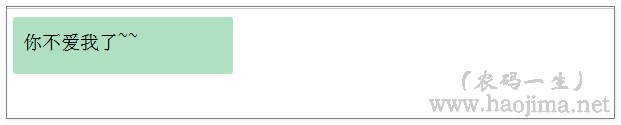
效果图:
看上去是不是很简单呢?下面我们给它加上定时关闭消息功能。
定时关闭消息(表骂我,就是这么简单。我也想写复杂的。)
效果图:

加上消息类型(其实就是根据参数加不同的图片而已)
|
1
2
3
|
setTimeout(function () { $("div.hi-message-box").fadeOut("slow");}, 1200); |
效果图:

加上图标是不是更像那么回事了?
如上,我们同样需要稍微整理下实现代码:
效果图:
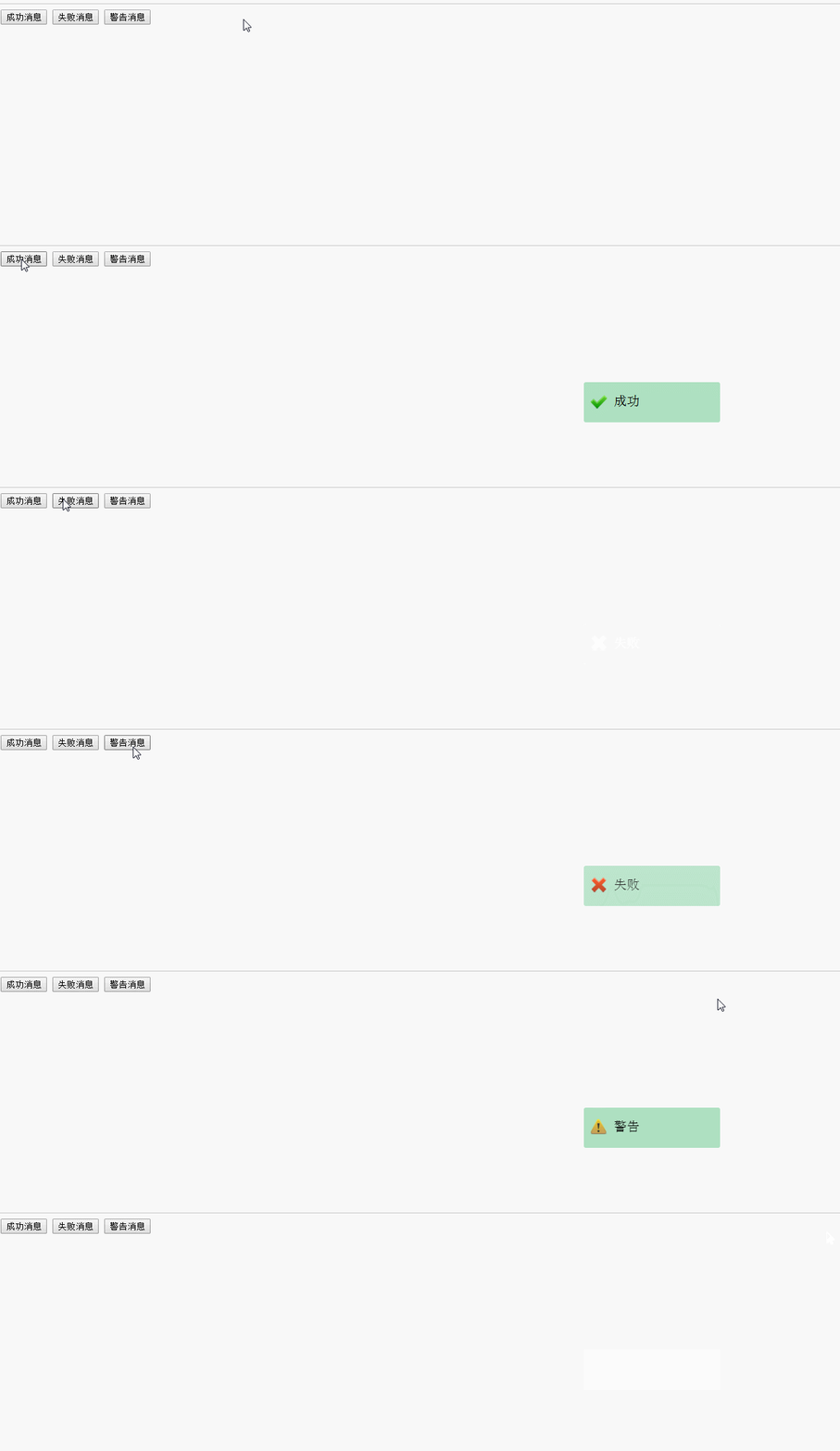
全部代码:(同样,消息框也只是进行了简单实现。还有太多没有考虑,如(参数定位消息框位置、设置定时关闭时间、多次触发消息框))
|
1
2
3
4
5
6
7
8
9
10
11
12
13
14
15
16
17
18
19
20
21
22
23
24
25
26
27
28
29
30
31
32
33
34
35
36
37
38
39
40
41
42
43
44
45
46
47
48
49
50
51
52
53
54
55
56
57
58
59
60
61
62
63
64
65
66
67
68
69
70
71
72
73
74
75
76
77
78
79
80
81
82
83
84
85
86
87
88
89
90
91
92
|
<!DOCTYPE html><head> <meta http-equiv="Content-Type" content="text/html; charset=utf-8" /> <title></title> <style type="text/css"> * { box-sizing: border-box; } .clearfix:after { content: ' '; display: table; clear: both; } .clearfix { *zoom: 1; } div.hi-message-box { padding: 10px; padding-top: 15px; padding-bottom: 20px; background-color: #aee0c1; position: absolute; min-width: 200px; max-width: 500px; font-size: 19px; border-radius: 3px; top:200px; left:45%; } div.hi-message-box img { vertical-align: bottom; } </style></head><body> <input type="button" onclick="success();" value="成功消息" /> <input type="button" onclick="error();" value="失败消息" /> <input type="button" onclick="warn();" value="警告消息" /> <script src="../../Scripts/jquery-1.8.2.js"></script> <script type="text/javascript"> var hiMessageBox = { init: function (type, messg) { var hiMessageBox = '<div class="hi-message-box">\ <img class="hi-message-type" src="" />\ <span class="hi-message-messg"></span>\ </div>'; if (!$("div.hi-message-box").length) { $("body").append(hiMessageBox); } var $box = $("div.hi-message-box"); $box.find(".hi-message-messg").text(messg); switch (type) { case 0://success 成功 $box.find("img.hi-message-type").attr("src", "imgs/Tick_24px.png") break; case 1://warn 警告 $box.find("img.hi-message-type").attr("src", "imgs/Warning_24px.png") break; case 2:// $box.find("img.hi-message-type").attr("src", "imgs/Delete_24px.png") break; } $("div.hi-message-box").fadeIn("slow") setTimeout(function () { $("div.hi-message-box").fadeOut("slow"); }, 1200); }, success: function (messg) { this.init(0, messg); }, warn: function (messg) { this.init(1, messg); }, error: function (messg) { this.init(2, messg); } }; </script> <script type="text/javascript"> function success() { hiMessageBox.success("成功"); } function error() { hiMessageBox.error("失败"); } function warn() { hiMessageBox.warn("警告"); } </script></body></html> |
以上所述是基于基于.Net实现前端对话框和消息框的全部叙述,希望对大家有所帮助,如果大家想了解更多内容,敬请关注脚本之家!
您可能感兴趣的文章:
相关文章
- 2010-06-06Asp.net下用JQuery找出哪一个元素引起PostBack
- 2006-09-09ASP.NET技巧:请求网址并解析返回的html
- 2011-06-06从ASP.NET得到Microsoft Word文档的代码
- 2007-03-03relaxlife.net发布一个自己开发的中文分词程序
- 2013-03-03C#反射(Reflection)对类的属性get或set值实现思路
- 2012-05-05asp.net 简便无刷新文件上传系统
- 2013-06-06读取纯真IP数据库的公用组件接口QQWry.NET
- 2013-04-04Asp.net静态方法之Grid转DataTable方法实现步骤
- 2012-11-11asp.net中对象失去焦点时自动提交数据 V2
- 2013-10-10C#判断文件路径是否存在或者判断文件是否存在的方法
最新评论




基于.Net实现前端对话框和消息框的更多相关文章
- 一步步开发自己的博客 .NET版(10、前端对话框和消息框的实现)
关于前端对话框.消息框的优秀插件多不胜数.造轮子是为了更好的使用轮子,并不是说自己造的轮子肯定好.所以,这个博客系统基本上都是自己实现的,包括日志记录.响应式布局.评论功能等等一些本可以使用插件的.好 ...
- php网页,想弹出对话框, 消息框 简单代码
php网页,想弹出对话框, 消息框 简单代码 <?php echo "<script language=\"JavaScript\">alert(\&q ...
- 基于Metronic的Bootstrap开发框架经验总结(6)--对话框及提示框的处理和优化
在各种Web开发过程中,对话框和提示框的处理是很常见的一种界面处理技术,用得好,可以给用户很好的页面体验,Bootstrap开发也一样,我们往往在页面新增.编辑.查看详细等界面使用弹出对话框层的方式进 ...
- (转)基于Metronic的Bootstrap开发框架经验总结(6)--对话框及提示框的处理和优化
http://www.cnblogs.com/wuhuacong/p/4775282.html 在各种Web开发过程中,对话框和提示框的处理是很常见的一种界面处理技术,用得好,可以给用户很好的页面体验 ...
- Python -- Gui编程 -- Tkinter的使用 -- 对话框消息框
1.消息框 tkMessageBox.py import tkinter from tkinter import messagebox def cmd(): global n global butto ...
- 窗口-EasyUI Window 窗口、EasyUI Dialog 对话框、EasyUI Messager 消息框
EasyUI Window 窗口 扩展自 $.fn.panel.defaults.通过 $.fn.window.defaults 重写默认的 defaults. 窗口(window)是一个浮动的.可拖 ...
- MFC之向导页、消息框、文件选择、字体、颜色(三)
属性页对话框的分类 属性页对话框想必大家并不陌生,XP系统中桌面右键点属性,弹出的就是属性页对话框,它通过标签切换各个页面.另外,我们在创建MFC工程时使用的向导对话框也属于属性页对话框,它通过点击“ ...
- QT学习 之 对话框 (四) 字体对话框、消息对话框、文件对话框、进程对话框(超详细中文注释)
QMessageBox类: 含有Question消息框.Information消息框.Warning消息框和Critical消息框等 通常有两种方式可以来创建标准消息对话框: 一种是采用“基于属性”的 ...
- 在微信框架模块中,基于Vue&Element前端的微信公众号和企业微信的用户绑定
在一个和微信相关的业务管理系统,我们有时候需要和用户的微信账号信息进行绑定,如对公众号.企业微信等账号绑定特定的系统用户,可以进行扫码登录.微信信息发送等操作,用户的绑定主要就是记录公众号用户的ope ...
随机推荐
- 【Android】4.3 屏幕布局和旋转
分类:C#.Android.VS2015:创建日期:2016-02-06 为了控制屏幕的放置方向(纵向.横向),可以在Resource下同时定义两种不同的布局文件夹:layout和layout-lan ...
- 关于navigationBar的颜色计算与默认透明度
NavigationBar的默认透明度为85% 颜色叠加计算公式: RGB需要分开计算,以叠加白色背景为例: 原始颜色(217,10,20) 设置透明度85% 计算过程: R=217 + (255-2 ...
- Latex中文utf-8编码的三种方式
我们知道Latex一般用CJK和CTEX宏包支持中文编辑,CJK和CTEX的默认编码是GBK,而windows下的默然编码就是GBK,因此CJK和CTEX不需要特殊配置就可以直接支持中文Latex编译 ...
- haproxy 配置mysql的代理
应用场境,是如果mysql服务器没有外网的,需要一个有外网的代理服务器做代理,这时就可以用haproxy做个四层的代理: listen mysql bind mode tcp balance roun ...
- 【Util】之——cookie
拿走即用 使用前引入文件:http://files.cnblogs.com/ccto/util-cookie.js 使用方法: //设置cookie CookieUtil.set("name ...
- angular学习笔记(九)-css类和样式2
在上一个例子中,元素的类名使用拼接的方法,这样,类名中就不得不带有true或false,并且不易维护,所以,angular使用ng-class属性来控制元素的类名: 我们来看一个小例子,点击error ...
- python 开发在线音乐播放器-简易版
在线音乐播放器,使用python的Tkinter库做了一个界面,感觉这个库使用起来还是挺方便的,音乐的数据来自网易云音乐的一个接口,通过urllib.urlopen模块打开网址,使用Json模块进行数 ...
- python __slots__使用详解
1.动态添加属性 class Lang(object): def __init__(self,name,score): self.name=name self.score=score def lang ...
- vs2010静态链接Qt
先按照这个帖子弄好静态库 http://www.cnblogs.com/rollenholt/articles/2518642.html 注意原文中config那一步最后一个"-" ...
- LeetCode: Rotate List 解题报告
Rotate List Given a list, rotate the list to the right by k places, where k is non-negative. For exa ...