
MyBatis框架(二)
导包,
配置mybatis的总配置文件: mybatis-config.xml,
 <?xml version="1.0" encoding="UTF-8" ?>
 <!DOCTYPE configuration
   PUBLIC "-//mybatis.org//DTD Config 3.0//EN"
   "http://mybatis.org/dtd/mybatis-3-config.dtd">
 <configuration>
     <!-- 引入数据库的信息的属性文件 -->
     <properties resource="db.properties"></properties>

     <typeAliases>
         <package name="model"/>
     </typeAliases>

     <environments default="hanqi">
         <environment id="hanqi">
             <!--
                 JDBC:
                 MANAGED:托管
              -->
             <transactionManager type="JDBC" />
             <!--
                 配置数据库源
                 POOLED: 连接池
                 UNPOOLED: 非连接池
                 JNDI: 使用应用服务器上的数据库连接
              -->
             <dataSource type="POOLED">
                 <property name="username" value="${jdbc.username}"/>
                 <property name="password" value="${jdbc.password}"/>
                 <property name="url" value="${jdbc.url}"/>
                 <property name="driver" value="${jdbc.driver}"/>
             </dataSource>
         </environment>

     </environments>

     <mappers>
         <!--
         <mapper resource="mapper/StudentMapper.xml" />
         <mapper class=""></mapper>
         <mapper url="f:/test/StudentMapper.xml"></mapper>
          -->
         <!--
         如果有多个,用包名,自动在包下面搜索
          -->
         <package name="com.hanqi.maya.mapper" />
     </mappers>

 </configuration>
新建每个实体类的接口和映射文件,并在xml映射文件中引入接口
 package mapper;

 import java.util.List;
 import java.util.Map;

 import model.Student;

 public interface StudentMapper {
     public List<Student> selectAllStudent();

     public int insertStudent(Student s);

     public int updateStudent(Map m);

     public int deleteStudent(Map m);

 }
 <?xml version="1.0" encoding="UTF-8" ?>
 <!DOCTYPE mapper
   PUBLIC "-//mybatis.org//DTD Mapper 3.0//EN"
   "http://mybatis.org/dtd/mybatis-3-mapper.dtd">
 <mapper namespace="mapper.StudentMapper">

     <select id="selectAllStudent" resultType="Student">
         select * from student
     </select>

     <insert id="insertStudent" parameterType="Student" useGeneratedKeys="true" keyProperty="sno" keyColumn="SNO">
         insert into student values(test1.nextval, #{name}, #{sex}, #{sbirthday}, #{sclass})
     </insert>

     <update id="updateStudent" parameterType="Map">
         update student s set s.sname=#{stuname},s.sbirthday=#{newDate}
         where s.sno=#{stusno}
     </update>

     <delete id="deleteStudent" parameterType="Map">
         delete student s where s.sno=#{stusno}
     </delete>

 </mapper>
namespace中如果是ID,可以随便写,需要唯一,如果是引入接口,需要接口和本文件名一致。
测试:
 package test;

 import static org.junit.Assert.*;

 import java.util.Date;
 import java.util.HashMap;
 import java.util.List;
 import java.util.Map;

 import org.apache.ibatis.session.SqlSession;
 import org.junit.After;
 import org.junit.Before;
 import org.junit.Test;
 import mapper.StudentMapper;
 import model.Student;
 import util.MyBatisUtil;

 public class JUTest {

     private SqlSession ss;
     //定义接口类,拿到接口
     private StudentMapper sm;

     @Before
     public void setUp() throws Exception {
         ss=MyBatisUtil.getSession();
         sm=ss.getMapper(StudentMapper.class);
     }

     @After
     public void tearDown() throws Exception {
         MyBatisUtil.destory(ss);
     }

     @Test
     public void test() {
         List<Student> slist=sm.selectAllStudent();

         /*Student s=new Student(null,"name","sex",new Date(),95053);
         int a=sm.insertStudent(s);
         System.out.println(a);*/

         /*Map m=new HashMap();
         m.put("stusno", "101");
         m.put("stuname", "修改1");
         m.put("newDate",new Date());
         int a=sm.updateStudent(m);
         System.out.println(a);*/

         Map m1=new HashMap();
         m1.put("stusno", "s");
         int b=sm.deleteStudent(m1);

         for(Student s:slist){
             System.out.println(s);
         }

     }

 }
关联查询:
一对一查询(三种方式),
一对多查询
部门表P_Dept和员工表P_Emp
员工表中有部门编号
员工类中有部门属性
部门类中有员工集合属性
通过联合查询,查询员工时得到员工属性和部门,查询部门时通过联合查询得出员工列表
结构:
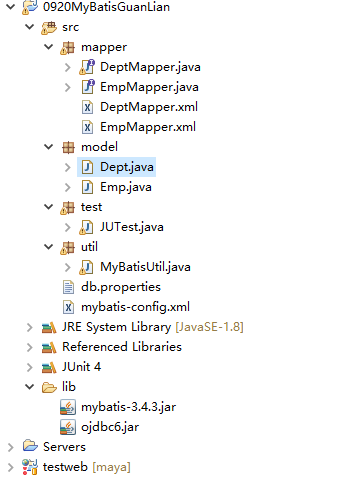
model包:
 packa1ge model;

 import java.util.Date;

 public class Emp {
     private int empno;
     private String ename;
     private String job;
     private int mgr;
     private Date hiredate;
     private int sal;
     private int comm;
     private int deptno;
     private int sex;
     private Dept dept;
     public Emp() {
         super();
         // TODO Auto-generated constructor stub
     }
     public Emp(int empno, String ename, String job, int mgr, Date hiredate, int sal, int comm, int deptno, int sex,
             Dept dept) {
         super();
         this.empno = empno;
         this.ename = ename;
         this.job = job;
         this.mgr = mgr;
         this.hiredate = hiredate;
         this.sal = sal;
         this.comm = comm;
         this.deptno = deptno;
         this.sex = sex;
         this.dept = dept;
     }
     public int getEmpno() {
         return empno;
     }
     public void setEmpno(int empno) {
         this.empno = empno;
     }
     public String getEname() {
         return ename;
     }
     public void setEname(String ename) {
         this.ename = ename;
     }
     public String getJob() {
         return job;
     }
     public void setJob(String job) {
         this.job = job;
     }
     public int getMgr() {
         return mgr;
     }
     public void setMgr(int mgr) {
         this.mgr = mgr;
     }
     public Date getHiredate() {
         return hiredate;
     }
     public void setHiredate(Date hiredate) {
         this.hiredate = hiredate;
     }
     public int getSal() {
         return sal;
     }
     public void setSal(int sal) {
         this.sal = sal;
     }
     public int getComm() {
         return comm;
     }
     public void setComm(int comm) {
         this.comm = comm;
     }
     public int getDeptno() {
         return deptno;
     }
     public void setDeptno(int deptno) {
         this.deptno = deptno;
     }
     public int getSex() {
         return sex;
     }
     public void setSex(int sex) {
         this.sex = sex;
     }
     public Dept getDept() {
         return dept;
     }
     public void setDept(Dept dept) {
         this.dept = dept;
     }
     @Override
     public String toString() {
         return "Emp [empno=" + empno + ", ename=" + ename + ", job=" + job + ", mgr=" + mgr + ", hiredate=" + hiredate
                 + ", sal=" + sal + ", comm=" + comm + ", deptno=" + deptno + ", sex=" + sex + ", dept=" + dept + "]";
     }

 }
 package model;

 import java.util.List;

 public class Dept {
     private int deptno;
     private String dname;
     private String loc;
     private List<Emp> elist;
     public Dept() {
         super();
         // TODO Auto-generated constructor stub
     }
     public Dept(int deptno, String dname, String loc) {
         super();
         this.deptno = deptno;
         this.dname = dname;
         this.loc = loc;
     }

     public Dept(int deptno, String dname, String loc, List<Emp> elist) {
         super();
         this.deptno = deptno;
         this.dname = dname;
         this.loc = loc;
         this.elist = elist;
     }

     public List<Emp> getElist() {
         return elist;
     }
     public void setElist(List<Emp> elist) {
         this.elist = elist;
     }
     public int getDeptno() {
         return deptno;
     }
     public void setDeptno(int deptno) {
         this.deptno = deptno;
     }
     public String getDname() {
         return dname;
     }
     public void setDname(String dname) {
         this.dname = dname;
     }
     public String getLoc() {
         return loc;
     }
     public void setLoc(String loc) {
         this.loc = loc;
     }
     @Override
     public String toString() {
         return "Dept [deptno=" + deptno + ", dname=" + dname + ", loc=" + loc + ", elist=" + elist + "]";
     }

 }
mapper包:
 package mapper;

 import java.util.List;

 import model.Dept;
 import model.Emp;

 public interface DeptMapper {
     Dept selectDeptByDeptno(Integer id);
 }
 <?xml version="1.0" encoding="UTF-8" ?>
 <!DOCTYPE mapper
   PUBLIC "-//mybatis.org//DTD Mapper 3.0//EN"
   "http://mybatis.org/dtd/mybatis-3-mapper.dtd">
 <mapper namespace="mapper.DeptMapper">

     <resultMap type="Dept" id="abc">
         <collection property="elist" column="deptno"
             select="mapper.EmpMapper.selectEmpByDeptno" />
     </resultMap>

     <select id="selectDeptByDeptno" parameterType="Integer" resultMap="abc">
         select * from p_dept d where d.deptno=#{deptno}
     </select>

 </mapper>
 package mapper;

 import java.util.List;

 import model.Emp;

 public interface EmpMapper {
     //查询所有信息
     List<Emp> selectAllEmp();
     // 根据部门id查询员工
     List<Emp> selectEmpByDeptno(Integer deptno);
 }
 <?xml version="1.0" encoding="UTF-8" ?>
 <!DOCTYPE mapper
   PUBLIC "-//mybatis.org//DTD Mapper 3.0//EN"
   "http://mybatis.org/dtd/mybatis-3-mapper.dtd">
 <mapper namespace="mapper.EmpMapper">

     <!-- 对象及联 -->
     <resultMap type="Emp" id="empList">
         <id property="empno" column="empno" />
         <result property="ename" column="ename" />
         <result property="job" column="job" />
         <result property="mgr" column="mgr" />
         <result property="hiredate" column="hiredate" />
         <result property="sal" column="sal" />
         <result property="comm" column="comm" />
         <result property="deptno" column="deptno" />
         <result property="sex" column="sex"/>
         <result property="dept.deptno" column="deptno"/>
         <result property="dept.dname" column="dname"/>
         <result property="dept.loc" column="loc"/>
     </resultMap>

     <select id="selectAllEmp" resultMap="empList">
         select * from p_Emp e left join p_Dept d  on d.deptno=e.deptno

     </select>

     <!-- 关联 -->
     <!-- <resultMap type="Emp" id="empList1">
         <id property="empno" column="empno" />
         <result property="ename" column="ename" />
         <result property="job" column="job" />
         <result property="mgr" column="mgr" />
         <result property="hiredate" column="hiredate" />
         <result property="sal" column="sal" />
         <result property="comm" column="comm" />
         <result property="deptno" column="deptno" />
         <result property="sex" column="sex"/>
         <association property="dept" resultMap="deptlist"></association>
     </resultMap>
     <resultMap type="Dept" id="deptlist">
         <result property="deptno" column="deptno"/>
         <result property="dname" column="dname"/>
         <result property="loc" column="loc"/>
     </resultMap>

     <select id="selectAllEmp" resultMap="empList1">
         select * from p_Emp e left join p_Dept d  on d.deptno=e.deptno
     </select> -->
     <!-- 关联查询 -->
 <!--     <resultMap type="Emp" id="empList3">
         <association property="dept" column="deptno"
             select="mapper.DeptMapper.selectDeptById" />
     </resultMap>

     <select id="selectAllEmp" resultMap="empList3">
         select * from p_EMP t
     </select> -->
     <!-- 一对多 -->
     <select id="selectEmpByDeptno" parameterType="Integer" resultType="Emp">
         SELECT * FROM p_emp e WHERE e.deptno=#{deptno}
     </select>

 </mapper>
测试:
 package test;

 import static org.junit.Assert.*;

 import java.util.List;

 import org.apache.ibatis.session.SqlSession;
 import org.junit.After;
 import org.junit.Before;
 import org.junit.Test;

 import mapper.DeptMapper;
 import mapper.EmpMapper;
 import model.Dept;
 import model.Emp;
 import util.MyBatisUtil;

 public class JUTest {
     private SqlSession ss;
     private EmpMapper em;
     private DeptMapper dm;

     @Before
     public void setUp() throws Exception {
         ss = MyBatisUtil.getSession();
         em = ss.getMapper(EmpMapper.class);
         dm = ss.getMapper(DeptMapper.class);
     }

     @After
     public void tearDown() throws Exception {
         MyBatisUtil.destory(ss);
     }

     @Test
     public void test() {
         /*List<Emp> slist=em.selectAllEmp();
         for(Emp e:slist){
             System.out.println(e);
         }*/

         /*List<Emp> elist = em.selectEmpByDeptno(10);
         System.out.println(elist);*/

         Dept d = dm.selectDeptByDeptno(10);
         System.out.println(d);
     }

 }
MyBatis框架(二)的更多相关文章
- Mybatis框架二:增删改查
这里是搭建框架和准备数据: http://www.cnblogs.com/xuyiqing/p/8600888.html 实现增删改查功能: 测试类: package junit; import ja ...
- 用IntelliJ IDEA 开发Spring+SpringMVC+Mybatis框架 分步搭建二:配置MyBatis 并测试(2 配置spring-dao和测试)
用IntelliJ IDEA 开发Spring+SpringMVC+Mybatis框架 分步搭建二:配置MyBatis 并测试(1 搭建目录环境和依赖) 四:在\resources\spring 下面 ...
- 用IntelliJ IDEA 开发Spring+SpringMVC+Mybatis框架 分步搭建二:配置MyBatis 并测试(1 构建目录环境和依赖)
引言:在用IntelliJ IDEA 开发Spring+SpringMVC+Mybatis框架 分步搭建一 的基础上 继续进行项目搭建 该部分的主要目的是测通MyBatis 及Spring-dao ...
- OSGI企业应用开发(九)整合Spring和Mybatis框架(二)
上篇文章中,我们完成了在OSGI应用中整合Spring和Mybatis框架的准备工作,本节我们继续Spring和Mybatis框架的整合. 一.解决OSGI整合Spring中的Placeholder问 ...
- (转)MyBatis框架的学习(二)——MyBatis架构与入门
http://blog.csdn.net/yerenyuan_pku/article/details/71699515 MyBatis框架的架构 MyBatis框架的架构如下图: 下面作简要概述: S ...
- java实现微信支付宝等多个支付平台合一的二维码支付(maven+spring springmvc mybatis框架)
首先申明,本人实现微信支付宝等支付平台合多为一的二维码支付,并且实现有效时间内支付有效,本人采用的框架是spring springmvc mybatis 框架,maven管理.其实如果支付,不需要my ...
- Java框架之MyBatis框架(二)
Mybatis框架是相对于优化dao层的框架,其有效的减少了频繁的连接数据库(在配置文件xml中进行配置),将sql语句与java代码进行分离(写在XXXXmapper.xml文件中,一个表对应一个x ...
- JavaWeb_(Mybatis框架)使用Mybatis对表进行增、删、改、查操作_二
系列博文: JavaWeb_(Mybatis框架)JDBC操作数据库和Mybatis框架操作数据库区别_一 传送门 JavaWeb_(Mybatis框架)使用Mybatis对表进行增.删.改.查操作_ ...
- 【mybatis annotation】数据层框架应用--Mybatis(二) 基于注解实现数据的CRUD
使用MyBatis框架进行持久层开发 MyBatis是支持普通SQL查询,存储过程和高级映射的优秀持久层框架. MyBatis消除了几乎所有的JDBC代码和参数的手工设置以及对结果集的检索. MyBa ...
- SpringMVC框架二:SpringMVC与MyBatis整合
下面整合SpringMVC和MyBatis框架,并做一个小案例 创建数据库springmvc,并创建两张表,加入一些数据: 两张表:商品表,用户表 CREATE DATABASE springmvc; ...
随机推荐
- Ultimate thread group线程组和Stepping thread group线程组测试场景
Ultimate thread group线程组 当测试需求是要求进行波浪型的压力测试场景时,使用该线程组,例如:测试场景总共有10个线程,然后分为三个波段进行测试,每个波段负载策略设置为一样,如图:
- Java中"==" 和 equals 的区别
"=="比较的是地址值 equals 比较的是内容 看例子能够更加清晰的理解 eg: String s1="java",s2="java"; ...
- 欠了好久的CRM帖子,双11来读。
又一年双11了,觉得天猫双11越来越没特色了. 从折扣,音符旋律到红包,今年15年却找不出往年的热度,只是商家还是一样的急,备着活动目标计划,做着库存价格打标视觉设计这种苦逼的日子. 欠了好久的CRM ...
- [2012-06-29]sed根据行号范围执行替换
测试数据: personball@vostro:SHELL$cat aaa <instrumentation android:name="aaa" android:name= ...
- c#实现服务端webSocket
现阶段socket通信使用TCP.UDP协议,其中TCP协议相对来说比较安全稳定!本文也是来讲解TCP为主(恕在下学艺不精). 下面是个人理解的tcp/ip进行通讯之间的三次握手! 1.客户端先发送报 ...
- window的设置属性
1.windowAnimationStyle 用于设置一组window动画的引用style资源,window的动画属性由R.styleable.WindowAnimation定义. Winow动画类属 ...
- [转]linux中颜色的含义
绿色文件---------- 可执行文件,可执行的程序 红色文件-----------压缩文件或者包文件 蓝色文件----------目录 www.2cto.com 白色文件-------- ...
- 最近找java实习面试被问到的东西总结(Java方向)
时间,就是这么很悄悄的溜走了将近两个年华,不知不觉的,研二了,作为一个一般学校的研究生,不知道该说自己是不学无术,还是说有过努力,反正,这两年里,有过坚持,有过堕落,这不,突然间,有种开窍的急迫感,寻 ...
- [译] 反思 1 号进程 / Rethinking PID 1
By Lennart Poettering 译 SReadFox 原文链接:http://0pointer.de/blog/projects/systemd.html 译注:笔者大约在 2011 年读 ...
- CSS3动画效果之transition
CSS3中有两种方式实现动画,transition和animation+@keyframe. 两者的作用机制不一样:transition定义在可能要进行动画的元素上,对某些CSS属性进行监听,一旦CS ...