
5.request对象详解

可以通过request对象获取表单提交的值,get或者post方式都是可以得
例子:login.jsp表单
<%@ page language="java" import="java.util.*"

    contentType="text/html; charset=utf-8"%>

<%

    String path = request.getContextPath();

    String basePath = request.getScheme() + "://"

            + request.getServerName() + ":" + request.getServerPort()

            + path + "/";

%>

<!DOCTYPE HTML PUBLIC "-//W3C//DTD HTML 4.01 Transitional//EN">

<html>

<head>

<base href="<%=basePath%>">

<title>My JSP 'login.jsp' starting page</title>

<meta http-equiv="pragma" content="no-cache">

<meta http-equiv="cache-control" content="no-cache">

<meta http-equiv="expires" content="0">

<meta http-equiv="keywords" content="keyword1,keyword2,keyword3">

<meta http-equiv="description" content="This is my page">

<!--

    <link rel="stylesheet" type="text/css" href="styles.css">

    -->

</head>

<body>

    <h1>用户注册</h1>

    <hr>

    <form action="request.jsp" name="regForm" method="post">

        <table>

            <tr>

                <td>用户名:</td>

                <td><input type="text" name="username" />

                </td>

            </tr>

            <tr>

                <td>爱好:</td>

                <td>

                <input type="checkbox" name="favorite" value="read" />读书

                <input type="checkbox" name="favorite" value="music" />音乐

                <input type="checkbox" name="favorite" value="movie" />电影

                <input type="checkbox" name="favorite" value="internet" />上网

                </td>

            </tr>

            <tr>

                <td colspan="2"><input type="submit" value="注册"></td>

            </tr>

        </table>

    </form>

</body>

</html>
2.request.jsp接收表单的内容并且打印出来
<%@ page language="java" import="java.util.*" contentType="text/html; charset=utf-8" %>
<%
String path = request.getContextPath();
String basePath = request.getScheme()+"://"+request.getServerName()+":"+request.getServerPort()+path+"/";
%> <!DOCTYPE HTML PUBLIC "-//W3C//DTD HTML 4.01 Transitional//EN">
<html>
<head>
<base href="<%=basePath%>"> <title>My JSP 'login.jsp' starting page</title> <meta http-equiv="pragma" content="no-cache">
<meta http-equiv="cache-control" content="no-cache">
<meta http-equiv="expires" content="0">
<meta http-equiv="keywords" content="keyword1,keyword2,keyword3">
<meta http-equiv="description" content="This is my page">
<!--
<link rel="stylesheet" type="text/css" href="styles.css">
--> </head> <body>
<h1>request内置对象</h1>
<%
request.setCharacterEncoding("utf-8");
%>
用户名<%=request.getParameter("username") %><br>
爱好<%
String[] favorites = request.getParameterValues("favorite");
for(int i = 0;i<favorites.length;i++){
out.println(favorites[i]+"  ");
}
%>
<hr>
</body>
</html>
3.效果如下:


注意编码的问题:在request接收的时候需要设置编码,否则中文会乱码
request.setCharacterEncoding("utf-8");
4.也可以通过简单的url传递参数而不通过提交表单的方式
<a href = "request.jsp?username=cai" >URL传参</a>
获取的时候一样通过request的方法
<%=request.getParameter("username") %>
但是url传递参数会出现中文乱码的问题,要解决需要打开tomcat目录下的conf的server.xml
在这里添加一句,改成这样子
   <Connector port="8080" protocol="HTTP/1.1"

               connectionTimeout="20000"

               redirectPort="8443" URIEncoding="utf-8"/>
重启tomcat服务器即可
5.可以在request对象中保存一些属性,以键值对的形式存在
设置password的值是123456
<% request.setAttribute("password","123465");%>
获取password的值
<%=request.getAttribute("password")%>
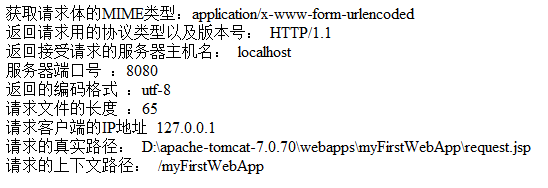
6.其他的函数
 获取请求体的MIME类型:<%=request.getContentType()%><br>

   返回请求用的协议类型以及版本号: <%=request.getProtocol()%><br>

   返回接受请求的服务器主机名:  <%=request.getServerName()%><br>

   服务器端口号 :<%=request.getServerPort()%><br>

  返回的编码格式 :<%=request.getCharacterEncoding()%><br>

  请求文件的长度 :<%=request.getContentLength()%><br>

  请求客户端的IP地址 <%=request.getRemoteAddr()%><br>

  请求的真实路径: <%=request.getRealPath("request.jsp")%><br>

  请求的上下文路径: <%=request.getContextPath()%><br>
结果:
5.request对象详解的更多相关文章
- django中request对象详解(转载)
django中的request对象详解 Request 我们知道当URLconf文件匹配到用户输入的路径后,会调用对应的view函数,并将 HttpRequest对象 作为第一个参数传入该函数. ...
- request对象详解
先来了解一下Request的主要方法: setAttribute(String name,Object):设置名字为name的request的参数值getAttribute(String name): ...
- jsp request 对象详解
转自:http://www.cnblogs.com/qqnnhhbb/archive/2007/10/16/926234.html 1.request对象 客户端的请求信息被封装在request对象中 ...
- JSP中Out和Request对象详解
内置表示不需要new便可直接使用. 一.基础知识 1.缓冲区:IO最原始是一个一个字节的读取,这就像吃米饭的时候一粒一粒的吃,很没有效率,这时候就有了碗,一碗一碗的吃,岂不痛快. 2.Get提交不能超 ...
- django的views里面的request对象详解大全
简介 HTTP 应用的信息是通过 请求报文 和 响应报文 传递的,关于更多的相关知识,可以阅读<HTTP权威指南>获得. 其中 请求报文 由客户端发送,其中包含和许多的信息,而 djang ...
- django中的request对象详解
Request 我们知道当URLconf文件匹配到用户输入的路径后,会调用对应的view函数,并将 HttpRequest对象 作为第一个参数传入该函数. 我们来看一看这个HttpRequest对 ...
- Django_视图中的request对象详解(八)
本文参考:http://www.cnblogs.com/MnCu8261/p/5871085.html Request 我们知道当URLconf文件匹配到用户输入的路径后,会调用对应的view函数,并 ...
- response对象和request对象详解
request方法列举:request.getAuthType() // 获取保护servlet的认证方案名(BASIC或SSL),未受保护的servlet返回的就是nullrequest.getCh ...
- mvc-servlet---ServletConfig与ServletContext对象详解(转载)
ServletConfig与ServletContext对象详解 一.ServletConfig对象 在Servlet的配置文件中,可以使用一个或多个<init-param>标签为s ...
随机推荐
- Android 真机无线调试
有很多人在学Android的时候最开始接触的都是模拟机的测试,如果像好的模拟机比如genimotion,次一点的蓝手指,测试都还比较可以.有的也不缺乏是用真机测试.本人开始用华为真机测试,也是一直连线 ...
- QBC查询
1.基本语法 session.beginTransaction(); Criteria criteria = session.createCriteria(Person.class); SimpleE ...
- 张高兴的 Windows 10 IoT 开发笔记:使用 ADS1115 读取模拟信号
考虑到 Raspberry Pi 读取模拟信号是很烦人的事情,更何况是在没人玩的 Windows 10 IoT 下,所以准备正儿八经的写点东西. 需求:使用 Raspberry Pi 读取输出模拟信号 ...
- 12、借助Jacob实现Java打印报表(Excel、Word)
12.使用Jacob来处理文档 Word或Excel程序是以一种COM组件形式存在的.如果能够在Java中调用相应组件,便能使用它的方法来获取文档中的文本信息.Jacob是一个JAVA到微软的COM接 ...
- Json及Json字符串
JSON(JavaScript Object Notation)是一种独立于开发语言的用于存储和交换文本数据的格式,JSON 语法是JavaScript 语法的子集. Json 可以保存数组格式和对象 ...
- 更改maven中央仓库
前言 1.由于原生的中央仓库 http://repo1.maven.org/maven2/,有一些包不在里面,目前流行的仓库有 http://mvnrepository.com/ 2.找出连接 2.1 ...
- Cannot be cast to java.lang.Comparable异常
Set集合中的treeSet问题:cannot be cast to java.lang.Comparable: 原理: Set不保存重复的元素,与Collection类似,只是行为不同,Set是基于 ...
- 01 json环境搭建
1 导包 <project xmlns="http://maven.apache.org/POM/4.0.0" xmlns:xsi="http://www.w3.o ...
- Thinkphp5使用阿里大于短信验证
现在各种平台登录验证很多时候会使用短信验证,快捷安全,有很多平台提供短信验证服务,相比较而言阿里大于价格比较便宜,快捷,所以在在千锋日常的php教学中多以此为例来说明短信验证的使用.下面我们在tp5中 ...
- 如何使用kali的Searchsploit查找软件漏洞
Searchsploit Searchsploit会通过本地的exploit-db, 查找软件漏洞信息 打开kali的命令行, 输入: searchsploit 查看系统帮助 查找mssql的漏洞 如 ...