
toastr 通知提示插件
jquery toastr 一款轻量级的通知提示框插件。
网页开发中经常会用到提示框,自带的alert样式无法调整,用户体验差。
所以一般通过自定义提示框来实现弹窗提示信息,而jquery toastr正是为此的一款非常棒的插件。
开发中用angular比较多,所以笔记记录了angular一些常见使用,与jquery版本有些许不同 ,相差不大。
在HTML引用js文件
<link rel="stylesheet" type="text/css" href="angular-toastr.css" />

<script type="text/javascript" src="angular-toastr.tpls.js"></script>
在angular模版中注入依赖
angular.module('app', ['ngAnimate', 'toastr'])
toastr使用中会用到动画,所以需加上ngAnimate,如果不引入ngAnimate,没有动画效果,不影响显示。
开始使用
1.成功提示
toastr.success('Hello world!', 'Toastr fun!');

2.普通提示
toastr.info('We are open today from 10 to 22', 'Information');

3.错误提示
toastr.error('Your credentials are gone', 'Error');
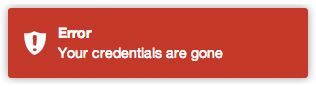
4.警告提示
toastr.warning('Your computer is about to explode!', 'Warning');
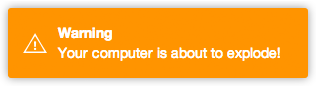
第一个参数为提示内容,第二个参数为提示标题,如果不需要标题,则可省略第二个参数
toastr.success('I don\'t need a title to live');

关闭提示框
toastr.clear([toast]);
获取当前显示的提示框
toastr.active();
刷新打开的提示框(第二个参数配置超时时间)
toastr.refreshTimer(toast, 5000);
全局配置
app.config(function(toastrConfig) {

  angular.extend(toastrConfig, {

    autoDismiss: false,

    containerId: 'toast-container',

    maxOpened: 0,

    newestOnTop: true,

    positionClass: 'toast-top-right',

    preventDuplicates: false,

    preventOpenDuplicates: false,

    target: 'body'

  });

});
- autoDismiss: true 显示最新的toastr
- containerId: 默认为"toast-container",设置toastr容器的id名称.
- maxOpened: 页面一次性最多显示多少个toastr.
- newestOnTop: true 新的toastr会显示在旧的toastr前面
- positionClass: 设置toastr显示位置的class
- preventDuplicates: true 重复内容的提示框只出现一次,无论提示框是打开还是关闭
- preventOpenDuplicates: true 重复内容的提示框在开启时只出现一个 如果当前的提示框已经打开,不会多开。直到提示框关闭后,才可再开)
- target: 默认为'body', 设置toastr的目标容器
| positionClass | |
|---|---|
| toast-top-left | 顶端左边 |
| toast-top-right | 顶端右边 |
| toast-top-center | 顶端中间 |
| toast-top-full-width | 顶端中间(宽度铺满) |
| toast-bottom-right | 底部右边 |
| toast-bottom-left | 底部左边 |
| toast-bottom-center | 底部中间 |
| toast-bottom-full-width | 底部中间(宽度铺满) |
app.config(function(toastrConfig) {

  angular.extend(toastrConfig, {

    allowHtml: false,

    closeButton: false,

    closeHtml: '<button>×</button>',

    extendedTimeOut: 1000,

    iconClasses: {

      error: 'toast-error',

      info: 'toast-info',

      success: 'toast-success',

      warning: 'toast-warning'

    },

    messageClass: 'toast-message',

    onHidden: null,

    onShown: null,

    onTap: null,

    progressBar: false,

    tapToDismiss: true,

    templates: {

	  toast: 'directives/toast/toast.html',

	  progressbar: 'directives/progressbar/progressbar.html'

	},

    timeOut: 5000,

    titleClass: 'toast-title',

    toastClass: 'toast'

  });

});
- allowHtml: 设置提示内容可包含html格式
- closeButton: 设置显示"X" 关闭按钮
- closeHtml: 自定义html替代closeButton内容,closeButton为true时才显示.
- extendedTimeOut: 设置当你鼠标滑入后的timeout,该timeout会更新关闭所需的timeout.
- extraData: 如果重写模版,你可以自定义全局数据给你的toasts
- iconClasses: 设置各个类型的icon图标class
- messageClass: 设置toastr提示信息的class
- progressBar: 设置显示timeout时间进度条
- tapToDismiss: 设置toastr被点击时关闭
- templates: 自定义模版
- timeOut: 设置toastr过多久关闭
- titleClass: 设置toastr标题的class
- toastClass: 设置toastr基本的class
参考文章:
jquery: https://github.com/CodeSeven/toastr
angular: https://github.com/Foxandxss/angular-toastr
toastr 通知提示插件的更多相关文章
- 漂亮灵活设置的jquery通知提示插件toastr
toastr是一款非常棒的基于jquery库的非阻塞通知提示插件,toastr可设定四种通知模式:成功,出错,警告,提示,而提示窗口的位置,动画效果都可以通过能数来设置,在官方站可以通过勾选参数来生成 ...
- 消息提示插件toastr.js与Messenger组件
Toastr是一款基于jQuery的通知插件,可以灵活的自定义样式和拓展其功能! toastr是一个基于Jquery简单.漂亮的消息提示插件,使用简单.方便,可以根据设置的超时时间自动消失. cdn最 ...
- PNotify – 简单易用的 JS 通知,消息提示插件
PNotify 是一个 JavaScript 通知插件,前身为 Pines Notify.它旨在提供无与伦比的灵活性,同时很容易使用.它可以提供无阻塞的通知,允许用户无需关闭通知或者提示信息就可以点击 ...
- Jquery消息提示插件toastr使用详解
toastr是一个基于jQuery简单.漂亮的消息提示插件,使用简单.方便,可以根据设置的超时时间自动消失. 1.使用很简单,首选引入toastr的js.css文件 html <script s ...
- Jquery消息提示插件toastr使用
toastr是一个基于jQuery简单.漂亮的消息提示插件,使用简单.方便,可以根据设置的超时时间自动消失. 相关文件到官网去下载即可 1.引入toastr的js和css文件 <link hre ...
- Jquery消息提示插件toastr
toastr是一个基于jQuery简单.漂亮的消息提示插件,使用简单.方便,可以根据设置的超时时间自动消失. 1.使用很简单,首选引入toastr的js.css文件 <script src=&q ...
- 应用 CSS3 动画实现12种风格的通知提示
今天我们想分享几个简单的款式的网站通知效果.有很多的方式来呈现消息给用户:从经典的咆哮般的通知到窗口顶部的通知栏.各个网站的通知样式和效果千篇一律,难得出现创意的通知效果.这里是实现一个应用 CSS3 ...
- 使用 Swift 制作一个新闻通知中心插件(1)
input[type="date"].form-control,.input-group-sm>input[type="date"].input-grou ...
- Swift 制作一个新闻通知中心插件1
使用 Swift 制作一个新闻通知中心插件(1) 随着 iOS 8 的发布,苹果为开发者们开放了很多新的 API,而在这些开放的接口中 通知中心插件 无疑是最显眼的一个.通知中心就不用过多介绍了,相信 ...
随机推荐
- [BC]Four Inages Strategy(三维空间判断正方形)
题目连接 :http://bestcoder.hdu.edu.cn/contests/contest_showproblem.php?cid=577&pid=1001 题目大意:在三维空间中, ...
- 打包zip下载
//首先引入的文件为org.apache的切记不是jdk的import org.apache.tools.zip.ZipOutputStream;import org.apache.tools.zip ...
- Azure 基础 : 使用 template 简化部署
笔者在前文中介绍了如何使用 PowerShell 脚本在 Azure 上创建虚拟主机.正如你所看到的,整个创建过程还是有点繁琐的,因为我们需要使用 PowerShell 脚本创建并关联所有相关的组件. ...
- 聊聊pthread_cond_wait的虚假唤醒
使用条件变量时,仅仅从pthread_cond_wait返回就说条件成立是不恰当的.我们正确使用pthread_cond_wait的唯一方式是当线程被从pthread_cond_wait唤醒时,再检查 ...
- C++输入输出cin与cout
输入对象 istream:cin(标准输入) 输出对象 ostream: cout(标准输出), cerr(标准错误),clog(输出程序运行时的一般性信息)
- Xilinx ISE14.1用Verilog语言实现一个半加器并测试
<一>建立一个工程 注:Xilinx ISE的安装在此不再过多说明,网上有参考资料 1.打开软件进入如下界面 2.创建工程 File-->New Project 3.创建文件(我取名 ...
- Django开发小型站之前期准备(一)
语言:python3.5 工具:JetBrains PyCharm virtualenvwrapper优点: 1.使不同的应用开发环境独立 2.环境升级不影响其他应用,也不会影响全局的python环境 ...
- Python 判断是否为质数或素数
一个大于1的自然数,除了1和它本身外,不能被其他自然数(质数)整除(2, 3, 5, 7等),换句话说就是该数除了1和它本身以外不再有其他的因数. 首先我们来第一个传统的判断思路: def handl ...
- Django 模板中 include 标签使用小结
include 标签允许在模板中包含其它的模板的内容. 标签的参数是所要包含的模板名称,可以是一个变量,也可以是用单/双引号硬编码的字符串. 每当在多个模板中出现相同的代码时,就应该考虑是否要使用 { ...
- HTML DOM应用案例1
<!DOCTYPE html> <html lang="en"> <head> <meta charset="UTF-8&quo ...