
SpringBoot用@ConfigurationProperties获取配置文件值
SpringBoot的配置文件有yml和properties两种,看一些文章说yml以数据为中心,比较好。个人觉得properties更好用,所以这里以properties格式为例来说。
我们都知道@Value 注解可以从配置文件读取一个配置,如果只是配置某个值,比如 某一个域名,配置为xxx.domain = www.xxx.com ,这样直接在代码里用@Value获取,比较方便。
但是如果是一组相关的配置,比如验证码相关的配置,有图片验证码、手机验证码、邮箱验证码,如果想把验证码的长度做成可配置。是否能像springboot的配置,
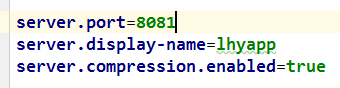
参照着写成:
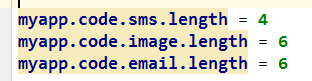
肯定是可以的!
参照源码是最好的学习方式,下面来看springboot是怎么做的
server对应着一个配置类:ServerProperties(只粘贴出了部分成员变量,来说明问题)
@ConfigurationProperties(prefix = "server", ignoreUnknownFields = true)

public class ServerProperties

        implements EmbeddedServletContainerCustomizer, EnvironmentAware, Ordered {

    /**

     * Server HTTP port.

     */

    private Integer port;

    @NestedConfigurationProperty

    private Compression compression = new Compression();

  //省略其他成员变量、getter 、setter
Compression类部分代码:
public class Compression {

    /**

     * If response compression is enabled.

     */

    private boolean enabled = false;
看过后应该很明白了,之所以能写成server.port=8081,server.display-name=lhyapp,server.compression.enabled=true ,是因为 ServerProperties 类上使用了
@ConfigurationProperties(prefix = "server", ignoreUnknownFields = true) 注解,其中prefix 指定配置文件里的前缀, 如果想弄成这样式的 server.compression.enabled = true ,就需要再声名一个类 Compression ,然后在ServerProperties 中引用这个类,属性名对应配置文件中的配置名。
@ConfigurationProperties:
告诉SpringBoot将本类中的所有属性和配置文件中相关的配置进行绑定;
prefix = "xxx":配置文件中哪个下面的所有属性进行一一映射
只有这个组件是容器中的组件,才能容器提供的@ConfigurationProperties功能;
@ConfigurationProperties(prefix = "xxx")默认从全局配置文件中获取值;
下边实现上面说的验证码配置,需要的类:

代码:
CoreConfiguration.java
@Configuration

@EnableConfigurationProperties(SecurityProperties.class)

public class CoreConfiguration {

    //配置一些bean

    //@Bean

    //public XXXX xxxx(){}

}
SecurityProperties.java
@ConfigurationProperties(prefix = "myapp")

public class SecurityProperties {

    private ValidateCodeProperties code = new ValidateCodeProperties();

    public ValidateCodeProperties getCode() {

        return code;

    }

    public void setCode(ValidateCodeProperties code) {

        this.code = code;

    }

}
ValidateCodeProperties.java
public class ValidateCodeProperties {

    private SmsCodeProperties sms = new SmsCodeProperties();

    private ImageCodeProperties image = new ImageCodeProperties();

    public SmsCodeProperties getSms() {

        return sms;

    }

    public void setSms(SmsCodeProperties sms) {

        this.sms = sms;

    }

    public ImageCodeProperties getImage() {

        return image;

    }

    public void setImage(ImageCodeProperties image) {

        this.image = image;

    }

}
SmsCodeProperties.java
public class SmsCodeProperties {

    private int length = 4;

    public int getLength() {

        return length;

    }

    public void setLength(int length) {

        this.length = length;

    }

}
在application.properties 里配置
myapp.code.sms.length = 10
使用配置:
  @Autowired

    private SecurityProperties securityProperties;

    @RequestMapping("/length")

    public @ResponseBody String length(){

        int length = securityProperties.getCode().getSms().getLength();

        return String.valueOf(length);

    }
SpringBoot用@ConfigurationProperties获取配置文件值的更多相关文章
- Spring Boot入门(二):使用Profile实现多环境配置管理&如何获取配置文件值
在上一篇博客Spring Boot入门(一):使用IDEA创建Spring Boot项目并使用yaml配置文件中,我们新建了一个最原始的Spring Boot项目,并使用了更为流行的yaml配置文件. ...
- Spring Boot入门(二):获取配置文件值
本篇博客主要讲解下在Spring Boot中如何获取配置文件的值. 1. 使用yaml配置文件 Spring Boot默认生成的配置文件为application.properties,不过它也支持ya ...
- springboot拦截器中获取配置文件值
package com.zhx.web.interceptor; import com.zhx.util.other.IpUtil; import org.slf4j.Logger; import o ...
- SpringBoot配置分析、获取到SpringBoot配置文件信息以及几种获取配置文件信息的方式
Spring入门篇:https://www.cnblogs.com/biehongli/p/10170241.html SpringBoot的默认的配置文件application.properties ...
- JAVAEE——SpringBoot配置篇:配置文件、YAML语法、文件值注入、加载位置与顺序、自动配置原理
转载 https://www.cnblogs.com/xieyupeng/p/9664104.html @Value获取值和@ConfigurationProperties获取值比较 @Confi ...
- SpringBoot获取配置文件,就这么简单。
在讲SpringBoot 获取配置文件之前我们需要对SpringBoot 的项目有一个整体的了解,如何创建SpringBoot 项目,项目结构等等知识点,我在这里就不一一讲述了,没有学过的小伙伴可以自 ...
- spring-boot -配置文件值注入
/** * 将配置文件中配置的每一个属性的值,映射到这个组件中 * @ConfigurationProperties:告诉SpringBoot将本类中的所有属性和配置文件中相关的配置进行绑定: 默认在 ...
- Spring Boot之配置文件值注入(@ConfigurationProperties)
前言:Spring Boot配置文件值的注入有两种方式,分别是 @ConfigurationProperties @Value 这里我们使用第一种 首先我们创建一个application.yml文件, ...
- @Profile使用及SpringBoot获取profile值
版权声明:本文为博主原创文章,遵循 CC 4.0 by-sa 版权协议,转载请附上原文出处链接和本声明.本文链接:https://blog.csdn.net/Fmuma/article/details ...
随机推荐
- 移动端meta设置
网页作者: <meta name="author" content="name, email@gmail.com"/>声明文档使用的字符编码: &l ...
- 阿里ETL工具datax学习(一)
阿里云开源离线同步工具DataX3.0介绍 一. DataX3.0概览 DataX 是一个异构数据源离线同步工具,致力于实现包括关系型数据库(MySQL.Oracle等).HDFS.Hive.Ma ...
- AngularJS实战之路由ui-view传参
angular路由传参 首页 <!DOCTYPE html> <html ng-app="app"> <head> <title>路 ...
- oss+上传文件夹
最近公司做工程项目,实现文件夹云存储上传. 网上找了一天,发现网上很多代码都存在相似问题,最后终于找到了一个满足我需求的项目. 工程如下: 这里对项目的文件夹传输功能做出分析,怎么实现文件夹上传的,如 ...
- bzoj2004(矩阵快速幂,状压DP)
每个长度为p的区间都必须出现k次1,数据又很小,我们使用状压. dp[i][j]->dp[i+1][j'],dp[i][j]表示当前考虑到了第i个车站,包括第i个其后的p个的状态(有车停或没车停 ...
- 用css写出下拉框(代码转自wq群)
做网易云音乐首页时遇到的问题,鼠标指在右上角头像时出现下拉框. <style>/* css*/ #body{ float: left; } #xialakuang{ background- ...
- codeforces815A Karen and Game 2017-06-27 15:22 31人阅读 评论(0) 收藏
C. Karen and Game time limit per test 2 seconds memory limit per test 512 megabytes input standard i ...
- QOpenGLFunctions的使用(2)
QOpenGLFunctions的使用(2) 前一小结请参考:QOpenglFuncations(1) www.icmzn.com 本小节介绍相关的类: 1. The QGLContext class ...
- Yarn的资源隔离机制
源调度和资源隔离是YARN作为一个资源管理系统,最重要和最基础的两个功能.资源调度由ResourceManager完成,而资源隔离由各个NodeManager实现,在文章“Hadoop YARN中内存 ...
- 《mysql必知必会》学习_第八章_20180730_欢
第八章学习LIKE操作符,百分百(%)通配符,下划线(_)通配符 P47 select prod_id,prod_name from products where prod_name LIKE 'je ...