
Hadoop基础-MapReduce的常用文件格式介绍
Hadoop基础-MapReduce的常用文件格式介绍
作者:尹正杰
版权声明:原创作品,谢绝转载!否则将追究法律责任。
一.MR文件格式-SequenceFile
1>.生成SequenceFile文件(SequenceFileOutputFormat)
The Apache Hadoop software library is a framework that allows for the distributed processing of large data sets across clusters of computers using simple programming models. It is designed to scale up from single servers to thousands of machines, each offering local computation and storage. Rather than rely on hardware to deliver high-availability, the library itself is designed to detect and handle failures at the application layer, so delivering a highly-available service on top of a cluster of computers, each of which may be prone to failures.
word.txt 文件内容
 /*

 @author :yinzhengjie

 Blog:http://www.cnblogs.com/yinzhengjie/tag/Hadoop%E8%BF%9B%E9%98%B6%E4%B9%8B%E8%B7%AF/

 EMAIL:y1053419035@qq.com

 */

 package cn.org.yinzhengjie.sequencefile.output;

 import org.apache.hadoop.io.LongWritable;

 import org.apache.hadoop.io.Text;

 import org.apache.hadoop.mapreduce.Mapper;

 import java.io.IOException;

 public class SeqMapper extends Mapper<LongWritable, Text , LongWritable, Text> {

     @Override

     protected void map(LongWritable key, Text value, Context context) throws IOException, InterruptedException {

         context.write(key,value);

     }

 }
SeqMapper.java 文件内容
 /*

 @author :yinzhengjie

 Blog:http://www.cnblogs.com/yinzhengjie/tag/Hadoop%E8%BF%9B%E9%98%B6%E4%B9%8B%E8%B7%AF/

 EMAIL:y1053419035@qq.com

 */

 package cn.org.yinzhengjie.sequencefile.output;

 import org.apache.hadoop.conf.Configuration;

 import org.apache.hadoop.fs.FileSystem;

 import org.apache.hadoop.fs.Path;

 import org.apache.hadoop.io.LongWritable;

 import org.apache.hadoop.io.SequenceFile;

 import org.apache.hadoop.io.Text;

 import org.apache.hadoop.mapreduce.Job;

 import org.apache.hadoop.mapreduce.lib.input.FileInputFormat;

 import org.apache.hadoop.mapreduce.lib.output.FileOutputFormat;

 import org.apache.hadoop.mapreduce.lib.output.SequenceFileOutputFormat;

 /**

  * 把wc.txt变为SequenceFile

  * k-偏移量-LongWritable

  * v-一行文本-Text

  */

 public class SeqApp {

     public static void main(String[] args) throws Exception {

         Configuration conf = new Configuration();

         conf.set("fs.defaultFS","file:///");

         FileSystem fs = FileSystem.get(conf);

         Job job = Job.getInstance(conf);

         job.setJobName("Seq-Out");

         job.setJarByClass(SeqApp.class);

         //设置输出格式,这里的输出格式要和咱们Mapper程序的格式要一致哟!

         job.setOutputKeyClass(LongWritable.class);

         job.setOutputValueClass(Text.class);

         job.setMapperClass(SeqMapper.class);

         FileInputFormat.addInputPath(job, new Path("D:\\10.Java\\IDE\\yhinzhengjieData\\MyHadoop\\word.txt"));

         Path outPath = new Path("D:\\10.Java\\IDE\\yhinzhengjieData\\MyHadoop\\seqout");

         if (fs.exists(outPath)){

             fs.delete(outPath);

         }

         FileOutputFormat.setOutputPath(job,outPath);

         //设置文件输出格式为SequenceFile

         job.setOutputFormatClass(SequenceFileOutputFormat.class);

         //设置SeqFile的压缩类型为块压缩

         SequenceFileOutputFormat.setOutputCompressionType(job,SequenceFile.CompressionType.BLOCK);

         //以上设置参数完毕后,我们通过下面这行代码就开始运行job

         job.waitForCompletion(true);

     }

 }
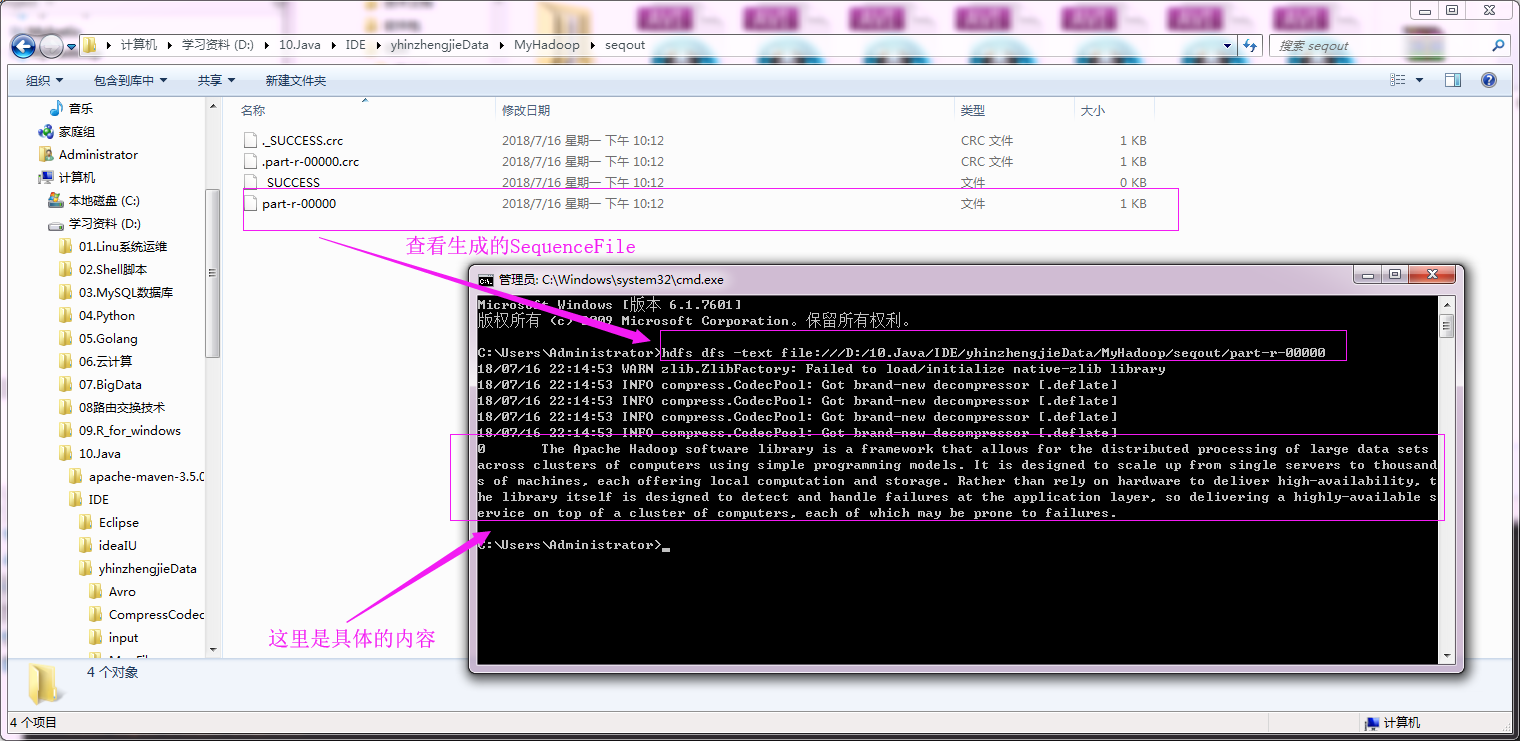
运行以上代码之后,我们可以去输出目录通过hdfs命令查看生成的SequenceFile文件内容,具体操作如下:
2>.对SequenceFile文件进行单词统计测试(SequenceFileInputFormat)
我们就不用去可以找具体的SequenceFile啦,我们直接用上面生成的Sequence进行测试,具体代码如下:
 /*

 @author :yinzhengjie

 Blog:http://www.cnblogs.com/yinzhengjie/tag/Hadoop%E8%BF%9B%E9%98%B6%E4%B9%8B%E8%B7%AF/

 EMAIL:y1053419035@qq.com

 */

 package cn.org.yinzhengjie.sequencefile.input;

 import org.apache.hadoop.io.IntWritable;

 import org.apache.hadoop.io.LongWritable;

 import org.apache.hadoop.io.Text;

 import org.apache.hadoop.mapreduce.Mapper;

 import java.io.IOException;

 public class SeqMapper extends Mapper<LongWritable, Text, Text, IntWritable> {

     @Override

     protected void map(LongWritable key, Text value, Context context) throws IOException, InterruptedException {

         String line = value.toString();

         String[] arr = line.split(" ");

         for(String word: arr){

             context.write(new Text(word),new IntWritable(1));

         }

     }

 }
SeqMapper.java 文件内容
 /*

 @author :yinzhengjie

 Blog:http://www.cnblogs.com/yinzhengjie/tag/Hadoop%E8%BF%9B%E9%98%B6%E4%B9%8B%E8%B7%AF/

 EMAIL:y1053419035@qq.com

 */

 package cn.org.yinzhengjie.sequencefile.input;

 import org.apache.hadoop.io.IntWritable;

 import org.apache.hadoop.io.Text;

 import org.apache.hadoop.mapreduce.Reducer;

 import java.io.IOException;

 public class SeqReducer extends Reducer<Text, IntWritable, Text, IntWritable> {

     protected void reduce(Text key, Iterable<IntWritable> values, Context context) throws IOException, InterruptedException {

         Integer sum = 0;

         for (IntWritable value : values) {

             sum += value.get();

         }

         context.write(key, new IntWritable(sum));

     }

 }
SeqReducer.java 文件内容
 /*

 @author :yinzhengjie

 Blog:http://www.cnblogs.com/yinzhengjie/tag/Hadoop%E8%BF%9B%E9%98%B6%E4%B9%8B%E8%B7%AF/

 EMAIL:y1053419035@qq.com

 */

 package cn.org.yinzhengjie.sequencefile.input;

 import org.apache.hadoop.conf.Configuration;

 import org.apache.hadoop.fs.FileSystem;

 import org.apache.hadoop.fs.Path;

 import org.apache.hadoop.io.IntWritable;

 import org.apache.hadoop.io.Text;

 import org.apache.hadoop.mapreduce.Job;

 import org.apache.hadoop.mapreduce.lib.input.FileInputFormat;

 import org.apache.hadoop.mapreduce.lib.input.SequenceFileInputFormat;

 import org.apache.hadoop.mapreduce.lib.output.FileOutputFormat;

 public class SeqApp  {

     public static void main(String[] args) throws Exception {

         Configuration conf = new Configuration();

         conf.set("fs.defaultFS","file:///");

         FileSystem fs = FileSystem.get(conf);

         Job job = Job.getInstance(conf);

         job.setJobName("Seq-in");

         job.setJarByClass(SeqApp.class);

         job.setOutputKeyClass(Text.class);

         job.setOutputValueClass(IntWritable.class);

         job.setMapperClass(SeqMapper.class);

         job.setReducerClass(SeqReducer.class);

         //将我们生成的SequenceFile文件作为输入

         FileInputFormat.addInputPath(job, new Path("D:\\10.Java\\IDE\\yhinzhengjieData\\MyHadoop\\seqout"));

         Path outPath = new Path("D:\\10.Java\\IDE\\yhinzhengjieData\\MyHadoop\\out");

         if (fs.exists(outPath)){

             fs.delete(outPath);

         }

         FileOutputFormat.setOutputPath(job, outPath);

         //设置输入格式

         job.setInputFormatClass(SequenceFileInputFormat.class);

         //以上设置参数完毕后,我们通过下面这行代码就开始运行job

         job.waitForCompletion(true);

     }

 }
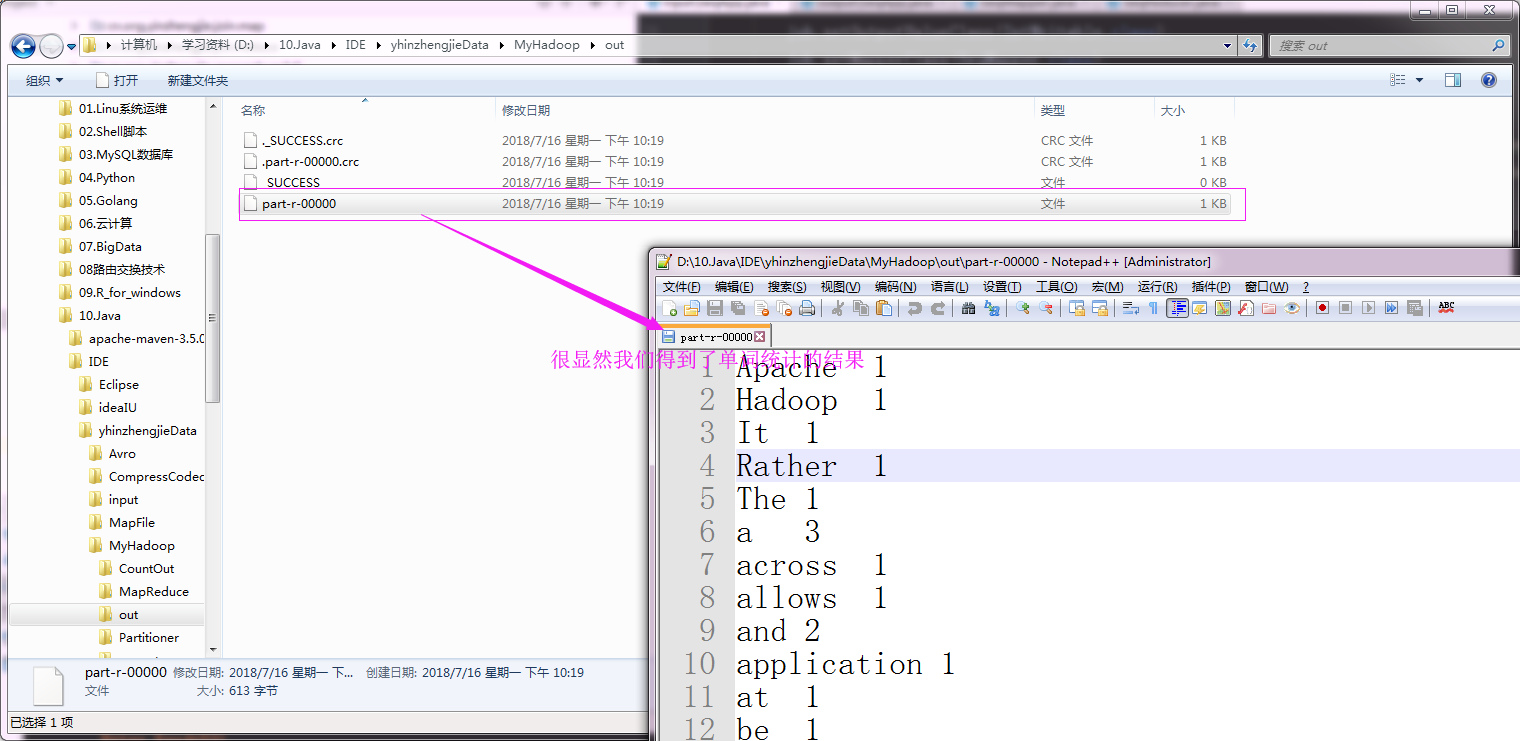
运行以上代码之后,我们可以查看输出的单词统计情况,具体操作如下:
二.MR文件格式-DB
1>.创建数据库表信息
create database yinzhengjie;

use yinzhengjie;

create table wordcount(id int,line varchar(100));

insert into wordcount values(1,'hello my name is yinzhengjie');

insert into wordcount values(2,'I am a good boy');

create table wordcount2(word varchar(100),count int);

2>.编写代码
 /*

 @author :yinzhengjie

 Blog:http://www.cnblogs.com/yinzhengjie/tag/Hadoop%E8%BF%9B%E9%98%B6%E4%B9%8B%E8%B7%AF/

 EMAIL:y1053419035@qq.com

 */

 package cn.org.yinzhengjie.dbformat;

 import org.apache.hadoop.io.Writable;

 import org.apache.hadoop.mapreduce.lib.db.DBWritable;

 import java.io.DataInput;

 import java.io.DataOutput;

 import java.io.IOException;

 import java.sql.PreparedStatement;

 import java.sql.ResultSet;

 import java.sql.SQLException;

 /**

  *  设置数据对应的格式,需要实现两个接口,即Writable, DBWritable。

  */

 public class MyDBWritable implements Writable, DBWritable {

     //注意 : 这里我们定义了2个私有属性,这两个属性分别对应的数据库中的字段,id和line

     private int id;

     private String line;

     //wrutable串行化

     public void write(DataOutput out) throws IOException {

         out.writeInt(id);

         out.writeUTF(line);

     }

     //writable反串行化,注意反串行化的顺序要和串行化的顺序保持一致

     public void readFields(DataInput in) throws IOException {

         id = in.readInt();

         line = in.readUTF();

     }

     //DB串行化,设置值的操作

     public void write(PreparedStatement st) throws SQLException {

         //指定表中的第一列为id列

         st.setInt(1, id);

         //指定表中的第二列为line列

         st.setString(2,line);

     }

     //DB反串行,赋值操作

     public void readFields(ResultSet rs) throws SQLException {

         //读取数据库的第一列,我们赋值给id

         id = rs.getInt(1);

         //读取数据库的第二列,我们赋值给line

         line = rs.getString(2);

     }

     public int getId() {

         return id;

     }

     public void setId(int id) {

         this.id = id;

     }

     public String getLine() {

         return line;

     }

     public void setLine(String line) {

         this.line = line;

     }

 }
MyDBWritable.java 文件内容
 /*

 @author :yinzhengjie

 Blog:http://www.cnblogs.com/yinzhengjie/tag/Hadoop%E8%BF%9B%E9%98%B6%E4%B9%8B%E8%B7%AF/

 EMAIL:y1053419035@qq.com

 */

 package cn.org.yinzhengjie.dbformat;

 import org.apache.hadoop.io.Writable;

 import org.apache.hadoop.mapreduce.lib.db.DBWritable;

 import java.io.DataInput;

 import java.io.DataOutput;

 import java.io.IOException;

 import java.sql.PreparedStatement;

 import java.sql.ResultSet;

 import java.sql.SQLException;

 public class MyDBWritable2 implements Writable, DBWritable {

     //这两个属性分别对应的数据库中的字段,word和count分别对应的是输出表中的字段哟。

     private String word;

     private int count;

     //wrutable串行化

     public void write(DataOutput out) throws IOException {

         out.writeUTF(word);

         out.writeInt(count);

     }

     //writable反串行化

     public void readFields(DataInput in) throws IOException {

         word = in.readUTF();

         count = in.readInt();

     }

     //DB串行化

     public void write(PreparedStatement st) throws SQLException {

         st.setString(1,word);

         st.setInt(2,count);

     }

     //DB反串行

     public void readFields(ResultSet rs) throws SQLException {

         word = rs.getString(1);

         count = rs.getInt(2);

     }

     public String getWord() {

         return word;

     }

     public void setWord(String word) {

         this.word = word;

     }

     public int getCount() {

         return count;

     }

     public void setCount(int count) {

         this.count = count;

     }

 }
MyDBWritable2.java 文件内容
 /*

 @author :yinzhengjie

 Blog:http://www.cnblogs.com/yinzhengjie/tag/Hadoop%E8%BF%9B%E9%98%B6%E4%B9%8B%E8%B7%AF/

 EMAIL:y1053419035@qq.com

 */

 package cn.org.yinzhengjie.dbformat;

 import org.apache.hadoop.io.IntWritable;

 import org.apache.hadoop.io.LongWritable;

 import org.apache.hadoop.io.Text;

 import org.apache.hadoop.mapreduce.Mapper;

 import java.io.IOException;

 /**

  * 注意MyDBWritable为数据库输入格式哟

  */

 public class DBMapper extends Mapper<LongWritable, MyDBWritable, Text, IntWritable> {

     @Override

     protected void map(LongWritable key, MyDBWritable value, Context context) throws IOException, InterruptedException {

         String line = value.getLine();

         String[] arr = line.split(" ");

         for(String word : arr){

             context.write(new Text(word), new IntWritable(1));

         }

     }

 }
DBMapper.java 文件内容
 /*

 @author :yinzhengjie

 Blog:http://www.cnblogs.com/yinzhengjie/tag/Hadoop%E8%BF%9B%E9%98%B6%E4%B9%8B%E8%B7%AF/

 EMAIL:y1053419035@qq.com

 */

 package cn.org.yinzhengjie.dbformat;

 import org.apache.hadoop.io.IntWritable;

 import org.apache.hadoop.io.NullWritable;

 import org.apache.hadoop.io.Text;

 import org.apache.hadoop.mapreduce.Reducer;

 import java.io.IOException;

 public class DBReducer extends Reducer<Text, IntWritable, MyDBWritable2, NullWritable> {

     protected void reduce(Text key, Iterable<IntWritable> values, Context context) throws IOException, InterruptedException {

         Integer sum = 0;

         for (IntWritable value : values) {

             sum += value.get();

         }

         MyDBWritable2 db = new MyDBWritable2();

         //设置需要往数据表中写入数据的值

         db.setWord(key.toString());

         db.setCount(sum);

         //将数据写到到数据库中

         context.write(db,NullWritable.get());

     }

 }
DBReducer.java 文件内容
 /*

 @author :yinzhengjie

 Blog:http://www.cnblogs.com/yinzhengjie/tag/Hadoop%E8%BF%9B%E9%98%B6%E4%B9%8B%E8%B7%AF/

 EMAIL:y1053419035@qq.com

 */

 package cn.org.yinzhengjie.dbformat;

 import org.apache.hadoop.conf.Configuration;

 import org.apache.hadoop.io.IntWritable;

 import org.apache.hadoop.io.Text;

 import org.apache.hadoop.mapreduce.Job;

 import org.apache.hadoop.mapreduce.lib.db.DBConfiguration;

 import org.apache.hadoop.mapreduce.lib.db.DBInputFormat;

 import org.apache.hadoop.mapreduce.lib.db.DBOutputFormat;

 public class DBApp {

     public static void main(String[] args) throws Exception {

         Configuration conf = new Configuration();

         conf.set("fs.defaultFS","file:///");

         Job job = Job.getInstance(conf);

         job.setJobName("DB");

         job.setJarByClass(DBApp.class);

         job.setOutputKeyClass(Text.class);

         job.setOutputValueClass(IntWritable.class);

         job.setMapperClass(DBMapper.class);

         job.setReducerClass(DBReducer.class);

         String driver = "com.mysql.jdbc.Driver";

         String url = "jdbc:mysql://192.168.0.254:5200/yinzhengjie";

         String name = "root";

         String pass = "yinzhengjie";

         DBConfiguration.configureDB(job.getConfiguration(), driver, url, name, pass);

         DBInputFormat.setInput(job, MyDBWritable.class,"select * from wordcount", "select count(*) from wordcount");

         //指定表名为“wordcount2”并指定字段为2

         DBOutputFormat.setOutput(job,"wordcount2",2);

         //指定输入输出格式

         job.setInputFormatClass(DBInputFormat.class);

         job.setOutputFormatClass(DBOutputFormat.class);

         job.waitForCompletion(true);

     }

 }
运行以上代码之后,我们可以查看数据库wordcount2表中的数据是否有新的数据生成,具体操作如下:

Hadoop基础-MapReduce的常用文件格式介绍的更多相关文章
- Hadoop基础-MapReduce入门篇之编写简单的Wordcount测试代码
Hadoop基础-MapReduce入门篇之编写简单的Wordcount测试代码 作者:尹正杰 版权声明:原创作品,谢绝转载!否则将追究法律责任. 本文主要是记录一写我在学习MapReduce时的一些 ...
- Hadoop基础-MapReduce的工作原理第二弹
Hadoop基础-MapReduce的工作原理第二弹 作者:尹正杰 版权声明:原创作品,谢绝转载!否则将追究法律责任. 一.Split(切片) 1>.MapReduce处理的单位(切片) 想必 ...
- Hadoop基础-MapReduce的Join操作
Hadoop基础-MapReduce的Join操作 作者:尹正杰 版权声明:原创作品,谢绝转载!否则将追究法律责任. 一.连接操作Map端Join(适合处理小表+大表的情况) no001 no002 ...
- Hadoop基础-MapReduce的排序
Hadoop基础-MapReduce的排序 作者:尹正杰 版权声明:原创作品,谢绝转载!否则将追究法律责任. 一.MapReduce的排序分类 1>.部分排序 部分排序是对单个分区进行排序,举个 ...
- Hadoop基础-MapReduce的数据倾斜解决方案
Hadoop基础-MapReduce的数据倾斜解决方案 作者:尹正杰 版权声明:原创作品,谢绝转载!否则将追究法律责任. 一.数据倾斜简介 1>.什么是数据倾斜 答:大量数据涌入到某一节点,导致 ...
- Hadoop基础-MapReduce的Partitioner用法案例
Hadoop基础-MapReduce的Partitioner用法案例 作者:尹正杰 版权声明:原创作品,谢绝转载!否则将追究法律责任. 一.Partitioner关键代码剖析 1>.返回的分区号 ...
- Hadoop基础-MapReduce的Combiner用法案例
Hadoop基础-MapReduce的Combiner用法案例 作者:尹正杰 版权声明:原创作品,谢绝转载!否则将追究法律责任. 一.编写年度最高气温统计 如上图说所示:有一个temp的文件,里面存放 ...
- Hadoop基础-MapReduce的工作原理第一弹
Hadoop基础-MapReduce的工作原理第一弹 作者:尹正杰 版权声明:原创作品,谢绝转载!否则将追究法律责任. 在本篇博客中,我们将深入学习Hadoop中的MapReduce工作机制,这些知识 ...
- openresty开发系列13--lua基础语法2常用数据类型介绍
openresty开发系列13--lua基础语法2常用数据类型介绍 一)boolean(布尔)布尔类型,可选值 true/false: Lua 中 nil 和 false 为"假" ...
随机推荐
- 【LG3768】简单的数学题
[LG3768]简单的数学题 题面 求 \[ (\sum_{i=1}^n\sum_{j=1}^nij\text{gcd}(i,j))\text{mod}p \] 其中\(n\leq 10^{10},5 ...
- Windows下面的常用的快捷键
最小化的快捷键: 最小化当前窗口:Alt+ESC 还原刚刚最小化的窗口:Alt+Tab(次快捷键组合可以在多个窗口中切换) 显示桌面,切换之前的桌面:Win+D 在浏览器页面之间切换:Ctrl+T ...
- Flutter - 给App增加启动屏幕(Splash Screen)并且设置背景颜色
先看一下效果图,启动图最好设置为png格式的透明图,以防图片填充不满的时候背景图会非常的煞白(Flutter 默认背景色是白色). 打开android\app\src\main\res\drawabl ...
- http to https
https://www.cnblogs.com/powertoolsteam/p/http2https.html
- ngnix的基本安装及配置 centos7
1.centos7 挂载ngnix的源 rpm -ivh http://nginx.org/packages/centos/7/noarch/RPMS/nginx-release-centos-7- ...
- python 游戏(猜数字)
1. 构造猜数字核心函数 import random def guess_core(guess_min,guess_max,guess_counrt): '''猜数字核心判断函数 :param gue ...
- FUNMVP:几张图看懂区块链技术到底是什么?(转载)
几张图看懂区块链技术到底是什么? 本文转载自:http://www.cnblogs.com/behindman/p/8873191.html “区块链”的概念可以说是异常火爆,好像互联网金融峰会上没人 ...
- MySQL——约束(constraint)详解
该博客说说关于数据库中一个重要的知识点——约束 一.什么是约束约束英文:constraint 约束实际上就是表中数据的限制条件 二.约束作用表在设计的时候加入约束的目的就是为了保证表中的记录完整和有效 ...
- 《LINUX内核设计与实现》第一、二章学习总结
第一章 Linux内核简介 (一)Unix是一个强大.健壮和稳定的操作系统,特点是: Unix很简洁,仅仅提供几个几百个系统调用并且有一个非常明确的设计目的 在Unix中,所有的东西都被当作文件对待, ...
- LINUX基础实验报告
实验一:主要是介绍Linux系统概况,无运行代码. 实验二:Linux的基本操作 重要知识点 [Tab] 使用Tab键来进行命令补全,Tab键一般键盘是在字母Q旁边,这个技巧给你带来的最大的好处就是当 ...