
Android TextView中图文混排设置行间距导致高度不一致问题解决
最近项目中需要实现一个评论带表情的功能,刚开始一切顺利,非常easy,突然有一天发现文字跟表情混排的时候,TextView中图文高度不一致,excuse。。。什么鬼,之前明明测试过图文混排,不存在这个问题啊,然后检查代码,没毛病啊,
android:gravity="center_vertical" 也设置了啊,然后猛然发现一行代码:android:lineSpacingExtra="8sp",原来是设置了这个行间距导致的。知道问题出在哪了,就好解决了,度娘还是看源码,都OK的啊。
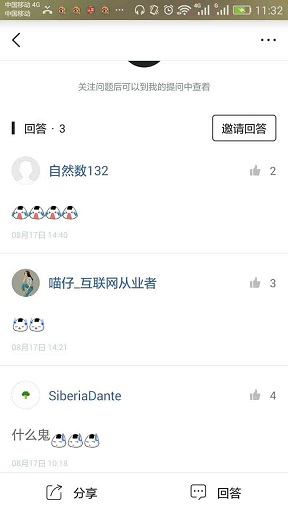
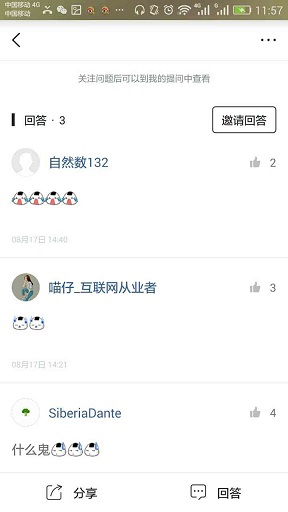
先贴一下对比图
解决之前的效果图:
解决之后的效果图:
图文混排,不可缺少:SpannableString和ImageSpan,但是阅读源码发现,ImageSpan设置对齐方式只有两种:
  /**

     * A constant indicating that the bottom of this span should be aligned

     * with the bottom of the surrounding text, i.e., at the same level as the

     * lowest descender in the text.

     */

    public static final int ALIGN_BOTTOM = 0;

    /**

     * A constant indicating that the bottom of this span should be aligned

     * with the baseline of the surrounding text.

     */

    public static final int ALIGN_BASELINE = 1;
要是ImageSpan能提供一个使其内容垂直居中的,问题不就轻松解决了吗,但是它没有提供了,****,再看,源码
ImageSpan是继承DynamicDrawableSpan的,而DynamicDrawableSpan中有两个这样的方法:getSize和draw,
 @Override

    public int getSize(Paint paint, CharSequence text,

                         int start, int end,

                         Paint.FontMetricsInt fm) {

        Drawable d = getCachedDrawable();

        Rect rect = d.getBounds();

        if (fm != null) {

            fm.ascent = -rect.bottom;

            fm.descent = 0;

            fm.top = fm.ascent;

            fm.bottom = 0;

        }

        return rect.right;

    }
@Override

    public void draw(Canvas canvas, CharSequence text,

                     int start, int end, float x,

                     int top, int y, int bottom, Paint paint) {

        Drawable b = getCachedDrawable();

        canvas.save();

        int transY = bottom - b.getBounds().bottom;

        if (mVerticalAlignment == ALIGN_BASELINE) {

            transY -= paint.getFontMetricsInt().descent;

        }

        canvas.translate(x, transY);

        b.draw(canvas);

        canvas.restore();

    }
所以我们也可以自定义去实现,最后贴上代码:
import android.content.Context;

import android.graphics.Bitmap;

import android.graphics.Canvas;

import android.graphics.Paint;

import android.graphics.Rect;

import android.graphics.drawable.Drawable;

import android.text.style.ImageSpan;

import java.lang.ref.WeakReference;

/**

 * @Created SiberiaDante

 * @Describe:

 * @Time: 2017/8/18

 * @Email: 994537867@qq.com

 * @GitHub: https://github.com/SiberiaDante

 */

public class CenterAlignImageSpan extends ImageSpan {

    private WeakReference<Drawable> mDrawableRef;

    public CenterAlignImageSpan(Context context, Bitmap bitmap, int verticalAlignment) {

        super(context, bitmap, verticalAlignment);

    }

    public CenterAlignImageSpan(Context context, int resId, int verticalAlignment) {

        super(context, resId, verticalAlignment);

    }

    @Override

    public int getSize(Paint paint, CharSequence text, int start, int end,

                       Paint.FontMetricsInt fontMetricsInt) {

        Drawable drawable = getDrawable();

        Rect rect = drawable.getBounds();

        if (fontMetricsInt != null) {

            Paint.FontMetricsInt fmPaint = paint.getFontMetricsInt();

            int fontHeight = fmPaint.descent - fmPaint.ascent;

            int drHeight = rect.bottom - rect.top;

            int centerY = fmPaint.ascent + fontHeight / 2;

            fontMetricsInt.ascent = centerY - drHeight / 2;

            fontMetricsInt.top = fontMetricsInt.ascent;

            fontMetricsInt.bottom = centerY + drHeight / 2;

            fontMetricsInt.descent = fontMetricsInt.bottom;

        }

        return rect.right;

    }

    @Override

    public void draw(Canvas canvas, CharSequence text, int start, int end, float x, int top, int y,

                     int bottom, Paint paint) {

        Drawable drawable = getCachedDrawable();

        canvas.save();

        Paint.FontMetricsInt fmPaint = paint.getFontMetricsInt();

        int fontHeight = fmPaint.descent - fmPaint.ascent;

        int centerY = y + fmPaint.descent - fontHeight / 2;

        int transY = centerY - (drawable.getBounds().bottom - drawable.getBounds().top) / 2;

        canvas.translate(x, transY);

        drawable.draw(canvas);

        canvas.restore();

    }

    private Drawable getCachedDrawable() {

        WeakReference<Drawable> wr = mDrawableRef;

        Drawable d = null;

        if (wr != null) {

            d = wr.get();

        }

        if (d == null) {

            d = getDrawable();

            mDrawableRef = new WeakReference<>(d);

        }

        return d;

    }

}
最后:
 SpannableString spannableStringCustom = new SpannableString("测试图文混排测试图文混排测试图文混排测试图文混排测试图文混排测试图文混排测试图文混排测试图文混排测试图文混排测试图文混排测试图文混排测试图文混排测试图文混排测试图文混排测试图文混排测试图文混排测试图文混排测试图文混排");

        CenterAlignImageSpan span = new CenterAlignImageSpan(this, R.mipmap.ic_launcher, ImageSpan.ALIGN_BASELINE);//重写的ImageSpan

        spannableStringCustom.setSpan(span, 0, 2, Spannable.SPAN_EXCLUSIVE_EXCLUSIVE);

        textViewCustom.setText(spannableStringCustom);
参考文章:https://segmentfault.com/a/1190000007133405
Android TextView中图文混排设置行间距导致高度不一致问题解决的更多相关文章
- 【转】Android TextView SpannableStringBuilder 图文混排颜色斜体粗体下划线删除线
spannableStringBuilder 用法详解: SpannableString ss = new SpannableString("红色打电话斜体删除线绿色下划线图片:." ...
- android:怎样在TextView实现图文混排
我们通常在TextView文本中设置文字.但是怎样设置图文混排呢? 我就在这里写一个样例 .我们须要用到一点简单的HTML知识 在TextView中预订了一些类似HTML的标签,通过标签能够使Text ...
- android开发 自定义图文混排控件
功能:图文混排,可自动缩放字体,如图: 单点触控使用的代码来自:http://blog.csdn.net/xiaanming/article/details/42833893 谢谢博主! 在该dem ...
- 使用android SpannableStringBuilder实现图文混排
项目开发中需要实现这种效果 多余两行,两行最后是省略号,省略号后面是下拉更多 之前用过的是Html.fromHtml去处理图文混排的,仅仅是文字后图片或者文字颜色字体什么的, 但是这里需要在最后文字的 ...
- 使用android SpannableStringBuilder实现图文混排,看到许多其他
项目开发需要达到这种效果 watermark/2/text/aHR0cDovL2Jsb2cuY3Nkbi5uZXQvZmFuY3lsb3ZlamF2YQ==/font/5a6L5L2T/fontsiz ...
- 【转】关于FLASH中图文混排聊天框的小结
原文链接 图文混排也是FLASH里一个很古老的话题了,我们不像美国佬那样游戏里面聊天框就是聊天框,全是文字干干净净,也不像日本人发明了并且频繁地使用颜文字.不管是做论坛.做游戏,必定要实现的一点就是带 ...
- iOS中 图文混排/自定义图文混排 作者:韩俊强
指示根视图:(准备几张图片,把label加载在window上) CustomLable *label = [[CustomLable alloc]initWithFrame:CGRectMake(0, ...
- CSS - 关于li中图文混排不能垂直居中的问题
图片和文字一起放在li标签下不能同时垂直居中 解决办法: 1.设置图片的position:absolute; 2.把文字加上span标签: span{ height:30px;line-heigh ...
- 自定义图文混排视图MyImageTextView
http://blog.csdn.net/xujunfeng000/article/details/36399339?utm_source=tuicool&utm_medium=referra ...
随机推荐
- HP-UX平台安装Oracle11gR2数据库
1. 前提条件 1.1 认证操作系统 Certification Information for Oracle Database on Linux x86-64 (Doc ID 1304727.2) ...
- Python各类并发模版
以后在写一些Python并发的时候参考下面这个模块,小西总结的挺全的,直接搬砖了. 进程并发 from multiprocessing import Pool, Manager def func(d, ...
- linux 的常用命令---------第三阶段
用户管理 为什么需要用户? 答:linux是一个多用户系统 权限管理(使之权限最小化) 用户:它是对系统中的资源做归属的 : 用户组:在用户组中包含一个或者多个用户,每个用户都同时拥有用户组的权限. ...
- 恶意代码技术第一二部分——P201421410029
学 号:201421410029 中国人民公安大学 Chinese people’ public security university 网络对抗技术 实验报告 实验四 恶意代码技术 ...
- UART串口通信
#include "sys.h" #include "delay.h" #include "usart.h" u8 rdata[]; UAR ...
- Perl 杂记
1. Perl 变量: 创建变量是以 $ 开头,比如定义一个变量: $val = "Good job !" 2. Perl 控制流 if 语法: if ( ) { },注意if ...
- JAVA框架 Spring 事务
一.我们之前在hibernate的时候,需要直接写事务,需要绑定当前线程保证获取同一个连接,虽然hibernate的帮我们封装绑定当前现成的操作,但是需要我们手动的去开启和关闭事务. 而spring帮 ...
- WebView之javascript与android交互基础加强
一.什么是js与android交互? 通俗一点就是使用js代码调用java代码,或者使用java代码调用js代码. 二.为什么要使用js与java代码交互? 1.可以做一些js网页做本身处理不了的事情 ...
- Android ListView下拉刷新时卡的问题解决小技巧
问题:ListView下拉刷新时看上去非常的卡 解决方案: 在BaseAdapter的getView方法中,有三个参数 public View getView(int position, View c ...
- overflow的使用
<div id="topFieldDiv" style="width: 650px; height: 150px; overflow-y: hidden" ...