
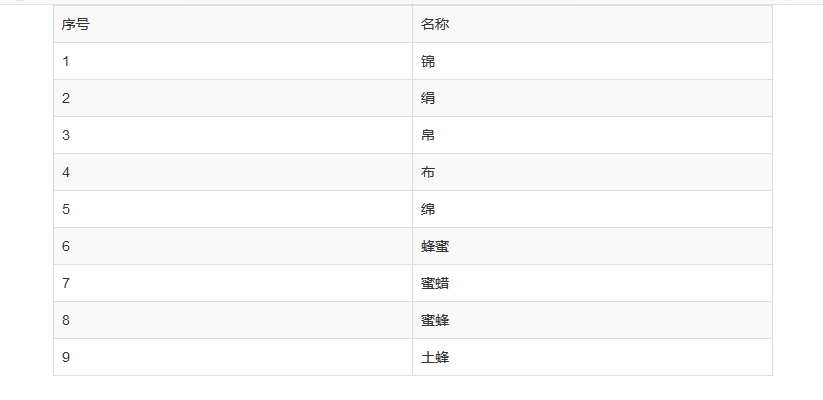
Bootstrap3基础 table-striped 表格实现隔行换色(浅灰色与白色交替)
| 内容 | 参数 |
|---|---|
| OS | Windows 10 x64 |
| browser | Firefox 65.0.2 |
| framework | Bootstrap 3.3.7 |
| editor | Visual Studio Code 1.32.1 |
| typesetting | Markdown |
code
<!DOCTYPE html>

<html lang="zh-CN">

<head>

    <meta charset="UTF-8">

    <!-- IE将使用最新的引擎渲染网页 -->

    <meta http-equiv="X-UA-Compatible" content="IE=edge">

    <!-- 页面的宽度与设备屏幕的宽度一致

         初始缩放比例 1:1 -->

    <meta name="viewport" content="width=device-width, initial-scale=1">

    <title>Demo</title>

    <meta name="author" content="www.cnblogs.com/kemingli">

    <!-- 引入外部bootstrap的css文件(压缩版),版本是3.3.7 -->

    <link rel="stylesheet" href="bootstrap/css/bootstrap.min.css">

    <!-- HTML5 shim 和 Respond.js 是为了让 IE8 支持 HTML5 元素和媒体查询(media queries)功能 -->

    <!-- 警告:通过 file:// 协议(就是直接将 html 页面拖拽到浏览器中)访问页面时 Respond.js 不起作用 -->

    <!--[if lt IE 9]>

        <script src="https://cdn.jsdelivr.net/npm/html5shiv@3.7.3/dist/html5shiv.min.js"></script>

        <script src="https://cdn.jsdelivr.net/npm/respond.js@1.4.2/dest/respond.min.js"></script>

    <![endif]-->

</head>

<body>

    <!-- start : demo -->

    <div class="container">

        <!--

        table-bordered:给表格加外边框

        table-striped:隔行换色 bootstrap是浅灰色与白色交替

        -->

        <table class="table table-bordered table-striped">

            <tr>

                <td>序号</td>

                <td>名称</td>

            </tr>

            <tr>

                <td>1</td>

                <td>锦</td>

            </tr>

            <tr>

                <td>2</td>

                <td>绢</td>

            </tr>

            <tr>

                <td>3</td>

                <td>帛</td>

            </tr>

            <tr>

                <td>4</td>

                <td>布</td>

            </tr>

            <tr>

                <td>5</td>

                <td>绵</td>

            </tr>

            <tr>

                <td>6</td>

                <td>蜂蜜</td>

            </tr>

            <tr>

                <td>7</td>

                <td>蜜蜡</td>

            </tr>

            <tr>

                <td>8</td>

                <td>蜜蜂</td>

            </tr>

            <tr>

                <td>9</td>

                <td>土蜂</td>

            </tr>

        </table>

    </div>

    <!-- end : demo -->

    <!-- NO.1 加载框架依赖的jQuery文件(压缩版),版本是1.12.4 -->

    <script src="bootstrap/js/jquery.min.js"></script>

    <!-- NO.2 加载Bootstrap的所有JS插件,版本是3.3.7 -->

    <script src="bootstrap/js/bootstrap.min.js"></script>

</body>

</html>
result
resource
- [ 文档 ] getbootstrap.com/docs/3.3
- [ 源码 ] github.com/twbs/bootstrap
- [ 源码 ] archive.mozilla.org/pub/firefox/releases/65.0/source/
- [ 平台 ] www.cnblogs.com
- [ 平台 ] github.com
- [ 扩展 - 平台] www.bootcss.com
- [ 扩展 - 浏览器 ] www.mozilla.org/zh-CN/firefox/developer
Bootstrap是前端开源框架,优秀,值得学习。
博文讲述的是V3版本,更为先进的是V4版本。学有余力的话,可作简单地了解。
Firefox是开源的浏览器,优秀,值得关注。
面对开源框架,分析、领悟与应用,能对其进行加减裁化,随心所欲而不逾矩。
博文的质量普通,仅供参考。盲目复制,处处是坑。Think twice before you act(三思而后行)!
Bootstrap3基础 table-striped 表格实现隔行换色(浅灰色与白色交替)的更多相关文章
- jQuery_完成表格的隔行换色
表格的颜色一样不利于区分,而利用jQuery则可以很方便的进行表格的隔行换色操作,原表如下: 这样看着很不方便,但是隔行换色之后非常便捷清楚. 代码如下: <!DOCTYPE html> ...
- JavaScript学习——表格的隔行换色+高亮显示
1.案例一:我们希望在后台页面中实现一个隔行换色的效果显示所有的用户信息,显示效果如下: 1)新标签 <thead> //表头 <tr> <th></th&g ...
- 使用JS创建表格以及隔行换色(包括隔N行换色)
<html> <head> <title></title> <style> table{ width:800px; border-colla ...
- 模块:jquery实现表格的隔行换色
效果图: 知识点精讲:jquery中$("tr:odd")和$("tr:even")选择器分别代表奇数行和偶数行,并且索引是从0开始,即第一行为偶数: 代码实现 ...
- Bootstrap3基础 table-bordered/hover 表格加外边框和鼠标悬停对应行的背景色加深
内容 参数 OS Windows 10 x64 browser Firefox 65.0.2 framework Bootstrap 3.3.7 editor ...
- JS案例四:表格的隔行换色以及高亮显示
<!DOCTYPE html> <html> <head> <meta charset="UTF-8"> <title> ...
- Bootstrap3基础 warning/active... 表格的状态类(不同的背景色)
内容 参数 OS Windows 10 x64 browser Firefox 65.0.2 framework Bootstrap 3.3.7 editor ...
- js课程 4-11 表格如何实现隔行换色
js课程 4-11 表格如何实现隔行换色 一.总结 一句话总结:表格奇数行和偶数行判断,赋予不同的样式. 1.表格如何隔行换色? 表格奇数行和偶数行判断,赋予不同的样式. 21 <script& ...
- table 表格隔行换色实现
table 表格隔行换色实现 <!DOCTYPE html PUBLIC "-//W3C//DTD XHTML 1.0 Transitional//EN" "htt ...
随机推荐
- a排兵布阵
来源hdu1166 C国的死对头A国这段时间正在进行军事演习,所以C国间谍头子Derek和他手下Tidy又开始忙乎了.A国在海岸线沿直线布置了N个工兵营地,Derek和Tidy的任务就是要监视这些工兵 ...
- Solve Error: nafxcw.lib(afxmem.obj) : error LNK2005: "void * __cdecl operator new[](unsigned int)" (??_U@YAPAXI@Z) already defined in libcpmt.lib(newaop.obj)
Error: nafxcw.lib(afxmem.obj) : error LNK2005: "void * __cdecl operator new[](unsigned int)&quo ...
- ubuntu下apache新建虚拟主机
最近发现在一个服务器上面布了一些项目,如果不用虚拟主机,用链接跳进去的话,有时候路径会出错,而自己在配置虚拟主机的时候又出现了一些问题,看似简单的东西,却花费了一上午,所以决定把简单的方法记下来,供和 ...
- 24.redux
Flux:Flux 是一种架构思想 https://facebook.github.io/flux/ 官网 资料: http://www.ruanyifeng.com/blog/2016/01/flu ...
- python json读取与解析
url = 'https://auction.jd.com/getJudicatureList.html? callback=jQuery8588604&page=1&limit=40 ...
- php 删除空格 和 回车
//删除空格 和 回车 function trimall($str){ $oldchar=array(""," ","\t","\ ...
- Gym 101194A / UVALive 7897 - Number Theory Problem - [找规律水题][2016 EC-Final Problem A]
题目链接: http://codeforces.com/gym/101194/attachments https://icpcarchive.ecs.baylor.edu/index.php?opti ...
- 洛谷试炼场 - 关卡1-5 - 简单字符串 - (Done)
P1055 ISBN号码 #include<bits/stdc++.h> using namespace std; string s; ]={','X'}; int main() { ci ...
- js中触摸相关变量touches,targetTouches和changedTouches的区别
touches: 当前屏幕上所有触摸点的列表; targetTouches: 当前对象上所有触摸点的列表; changedTouches: 涉及当前事件的触摸点的列表 通过一个例子来区分一下触摸事件中 ...
- RoboWare Studio 安装
RoboWare Studio是一个ROS集成开发环境.它使 ROS开发更加直观.简单.并且易于操作.可进行ROS工作区及包的管理.代码编辑.构建及调试. 下载链接:https://pan.baidu ...