
【HarmonyOS】【Demo】【JAVA UI】 鸿蒙怎么在Webview上添加组件
在大家HarmonyOS开发中,Webview组件上添加组件可能是很常见的功能了,HarmonyOS的webview和Android的webwiew存在一点点区别,今天来实现这个功能
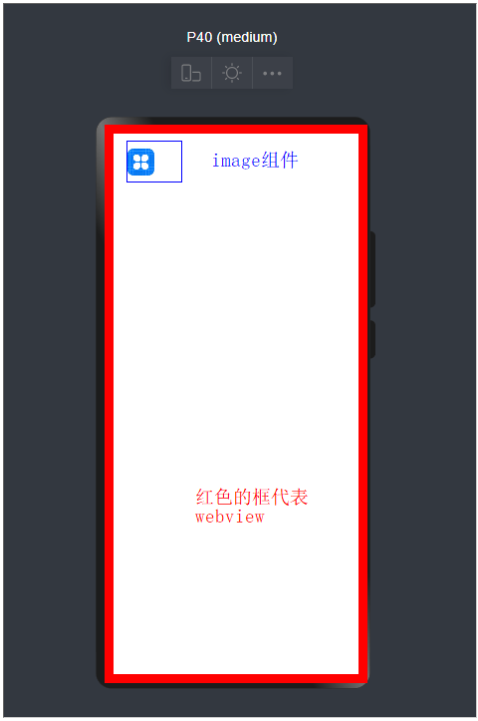
使用项目布局显示webview搭建和webview加载链接的基本功能
解决webview覆盖层不显示问题
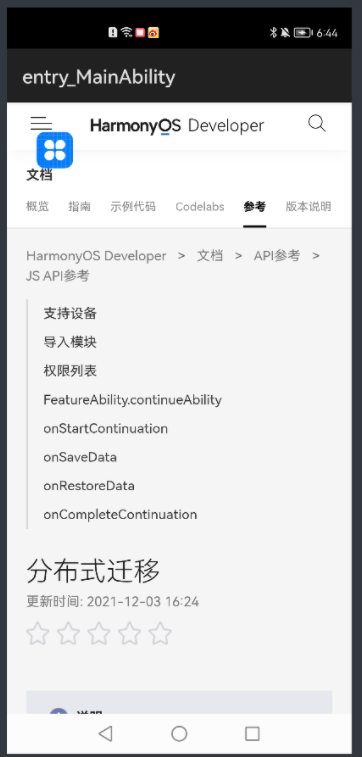
查看运行效果
基础的webview学习,大家参考如下链接 :
第一步 使用DependentLayout 简单大家一个layout布局界面
<?xml version="1.0" encoding="utf-8"?>

<DependentLayout

    xmlns:ohos="http://schemas.huawei.com/res/ohos"

    ohos:height="match_parent"

    ohos:width="match_parent"

    ohos:orientation="vertical"

    ohos:alignment="bottom">

    <ohos.agp.components.webengine.WebView

        ohos:id="$+id:webview"

        ohos:height="match_parent"

        ohos:width="match_parent">

    </ohos.agp.components.webengine.WebView>

    <Image

        ohos:id="$+id:myImage"

        ohos:height="100vp"

        ohos:width="100vp"

        ohos:image_src="$media:icon"/>

</DependentLayout>
Java代码如下:
package com.harmony.alliance.mydemo.slice;

import com.harmony.alliance.mydemo.ResourceTable;

import ohos.aafwk.ability.AbilitySlice;

import ohos.aafwk.content.Intent;

import ohos.agp.components.DirectionalLayout;

import ohos.agp.components.webengine.*;

import ohos.media.image.ImagePacker;

import ohos.media.image.PixelMap;

import ohos.media.image.common.PixelFormat;

import ohos.media.image.common.Size;

import java.io.File;

import java.io.FileOutputStream;

import java.io.IOException;

import java.io.OutputStream;

public class MainAbilitySlice extends AbilitySlice {

    private static final String EXAMPLE_URL = "https://developer.harmonyos.com/cn/docs/documentation/doc-references/js-apis-distributed-migration-0000001050024965";

    @Override

    public void onStart(Intent intent) {

        super.onStart(intent);

        super.setUIContent(ResourceTable.Layout_ability_main);

//        dl_bottom.requestForceForwardTouchEvent()

        WebView webView = (WebView) findComponentById(ResourceTable.Id_webview);

        webView.getWebConfig().setJavaScriptPermit(true);  // 如果网页需要使用JavaScript,增加此行;如何使用JavaScript下文有详细介绍

        webView.getWebConfig().setWebStoragePermit(true);

        webView.getWebConfig().setDataAbilityPermit(true);

        webView.getWebConfig().setLoadsImagesPermit(true);

        webView.getWebConfig().setMediaAutoReplay(true);

        webView.getWebConfig().setLocationPermit(true);

        webView.getWebConfig().setSecurityMode(WebConfig.SECURITY_SELF_ADAPTIVE);

        webView.load(EXAMPLE_URL);

//        HiLogUtils.PrintLog("webView.load======>>>"+EXAMPLE_URL);

    }

    @Override

    public void onActive() {

        super.onActive();

    }

    @Override

    public void onForeground(Intent intent) {

        super.onForeground(intent);

    }

}
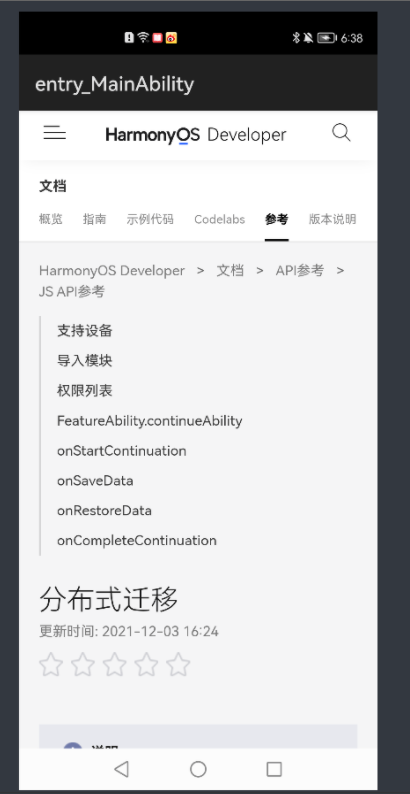
运行效果如下
第二步解决Webview覆盖层不显示的问题
这时候我们发现没有达到我想实现的效果,我们应该怎么解决呢?
2.1我们需要添加如下代码
    private void setWindowBgToAdaptWebView() {

        final String backgroundFileName = "_bg.jpg";

        File file = new File(getContext().getFilesDir(), backgroundFileName);

        if (file.exists()) {

            getWindow().setBackground(file.getPath());

            return;

        }

        PixelMap pixelMap = createBgPixelMap();

        if (pixelMap == null) {

            return;

        }

        ImagePacker imagePacker = ImagePacker.create();

        try (OutputStream outputStream = new FileOutputStream(file)) {

            ImagePacker.PackingOptions options = new ImagePacker.PackingOptions();

            if (!imagePacker.initializePacking(outputStream, options)) {

                return;

            }

            if (!imagePacker.addImage(pixelMap)) {

                return;

            }

            if (imagePacker.finalizePacking() < 0) {

                return;

            }

        } catch (IOException e) {

            e.printStackTrace();

        } finally {

            imagePacker.release();

        }

        getWindow().setBackground(file.getPath());

    }

    private PixelMap createBgPixelMap() {

        final int length = 10;

        PixelMap.InitializationOptions initializationOptions = new PixelMap.InitializationOptions();

        initializationOptions.size = new Size(length, length);

        initializationOptions.pixelFormat = PixelFormat.ARGB_8888;

        initializationOptions.editable = true;

        int[] defaultColors = new int[length * length];

        return PixelMap.create(defaultColors, initializationOptions);

}
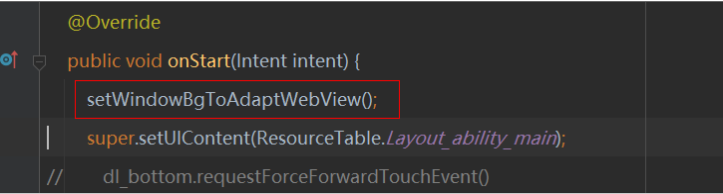
2.2我们要在OnStart的方法添加如下代码
全部代码如下
package com.harmony.alliance.mydemo.slice;

import com.harmony.alliance.mydemo.ResourceTable;

import ohos.aafwk.ability.AbilitySlice;

import ohos.aafwk.content.Intent;

import ohos.agp.components.DirectionalLayout;

import ohos.agp.components.webengine.*;

import ohos.media.image.ImagePacker;

import ohos.media.image.PixelMap;

import ohos.media.image.common.PixelFormat;

import ohos.media.image.common.Size;

import java.io.File;

import java.io.FileOutputStream;

import java.io.IOException;

import java.io.OutputStream;

public class MainAbilitySlice extends AbilitySlice {

    private static final String EXAMPLE_URL = "https://developer.harmonyos.com/cn/docs/documentation/doc-references/js-apis-distributed-migration-0000001050024965";

    @Override

    public void onStart(Intent intent) {

        setWindowBgToAdaptWebView();

        super.setUIContent(ResourceTable.Layout_ability_main);

//        dl_bottom.requestForceForwardTouchEvent()

        WebView webView = (WebView) findComponentById(ResourceTable.Id_webview);

        webView.getWebConfig().setJavaScriptPermit(true);  // 如果网页需要使用JavaScript,增加此行;如何使用JavaScript下文有详细介绍

        webView.getWebConfig().setWebStoragePermit(true);

        webView.getWebConfig().setDataAbilityPermit(true);

        webView.getWebConfig().setLoadsImagesPermit(true);

        webView.getWebConfig().setMediaAutoReplay(true);

        webView.getWebConfig().setLocationPermit(true);

        webView.getWebConfig().setSecurityMode(WebConfig.SECURITY_SELF_ADAPTIVE);

        webView.load(EXAMPLE_URL);

//        HiLogUtils.PrintLog("webView.load======>>>"+EXAMPLE_URL);

    }

    @Override

    public void onActive() {

        super.onActive();

    }

    @Override

    public void onForeground(Intent intent) {

        super.onForeground(intent);

    }

    private void setWindowBgToAdaptWebView() {

        final String backgroundFileName = "_bg.jpg";

        File file = new File(getContext().getFilesDir(), backgroundFileName);

        if (file.exists()) {

            getWindow().setBackground(file.getPath());

            return;

        }

        PixelMap pixelMap = createBgPixelMap();

        if (pixelMap == null) {

            return;

        }

        ImagePacker imagePacker = ImagePacker.create();

        try (OutputStream outputStream = new FileOutputStream(file)) {

            ImagePacker.PackingOptions options = new ImagePacker.PackingOptions();

            if (!imagePacker.initializePacking(outputStream, options)) {

                return;

            }

            if (!imagePacker.addImage(pixelMap)) {

                return;

            }

            if (imagePacker.finalizePacking() < 0) {

                return;

            }

        } catch (IOException e) {

            e.printStackTrace();

        } finally {

            imagePacker.release();

        }

        getWindow().setBackground(file.getPath());

    }

    private PixelMap createBgPixelMap() {

        final int length = 10;

        PixelMap.InitializationOptions initializationOptions = new PixelMap.InitializationOptions();

        initializationOptions.size = new Size(length, length);

        initializationOptions.pixelFormat = PixelFormat.ARGB_8888;

        initializationOptions.editable = true;

        int[] defaultColors = new int[length * length];

        return PixelMap.create(defaultColors, initializationOptions);

    }

}
第三步查看运行效果
这时候我们在看一下运行效果
更多精彩内容,请见华为开发者官方论坛→https://developer.huawei.com/consumer/cn/forum/home?ha_source=sanfang
【HarmonyOS】【Demo】【JAVA UI】 鸿蒙怎么在Webview上添加组件的更多相关文章
- cocos2d-x 3.4版本,videoPlayer和webView上添加sprite等cocos控件
本帖源于小弟自己在项目过程中为了解决在cocos2d-x中实现ios里videoPlayer自定义控件的需求,所以挖出来大神的一个帖子http://www.cocoachina.com/bbs/rea ...
- HarmonyOS Java UI之DirectionalLayout布局
在之前的章节中我使用的是Java 代码构建UI界面,从本节开始,将使用XML构建UI界面. 使用XML构建UI(默认你已经会在项目中创建XML布局文件)界面相对Java代码构建的好处是:结构清晰,代码 ...
- HarmonyOS Java UI之DependentLayout布局示例
DependentLayout简介 DependentLayout意为相对位置布局,与DirectionalLayout相比较有更多的排布方式,每个组件可以指定相对于其他同级组件的位置,也可以指定相对 ...
- WebView 上传文件 WebChromeClient之openFileChooser函数
原链接:http://blog.saymagic.cn/2015/11/08/webview-upload.html?utm_source=tuicool&utm_medium=referra ...
- Java Project部署到Tomcat服务器上
所有的JAVA程序员,在编写WEB程序时,一般都通过工具如 MyEclipse,编写一个WEB Project,通过工具让这个WEB程序和Tomcat关联.其实在我们可以通过JAVA程序部署到Tomc ...
- 【Java Spring Cloud 实战之路】添加一个SpringBootAdmin监控
0. 前言 在之前的几章中,我们先搭建了一个项目骨架,又搭建了一个使用nacos的gateway网关项目,网关项目中并没有配置太多的东西.现在我们就接着搭建在Spring Cloud 微服务中另一个重 ...
- 面向UI编程:ui.js 1.1 使用观察者模式完成组件之间数据流转,彻底分离组件之间的耦合,完成组件的高内聚
开头想明确一些概念,因为有些概念不明确会导致很多问题,比如你写这个框架为什么不去解决啥啥啥的问题,哎,心累. 什么是框架? 百度的解释:框架(Framework)是整个或部分系统的可重用设计,表现为一 ...
- java~gradle构建公用包并上传到仓库
java~gradle构建公用包并上传到仓库 我们一般会把公用的代码放在一个包里,然后其它 项目可以直接使用,就像你使用第三方包一样! 仓库 存储包的地方叫做仓库,一般可以分为本地仓库和远程仓库,本地 ...
- java~gradle构建公用包并上传到仓库~使用私有仓库的包
在新的项目里使用仓库的包 上一讲中我们说了java~gradle构建公用包并上传到仓库,如何发布公用的非自启动类的包到私有仓库,而这一讲我们将学习如何使用这些包,就像我们使用spring框架里的功能包 ...
随机推荐
- Sentry 企业级数据安全解决方案 - Relay 配置选项
Relay 的配置记录在文件 .relay/config.yml 中.要更改此位置,请将 --config 选项传递给任何 Relay 命令: ❯ ./relay run --config /path ...
- tomcat 服务器的几个重要监听 方法 与 使用
1. 总结一下tomcat 服务器里的三种监听 ServletContextListener HttpSessionListener ServletRequestListener 这是我要做的三个自定 ...
- Word2010制作课程表
原文链接:https://www.toutiao.com/i6487759634751816205/ 插入表格: 选择"插入"选项卡,"表格"功能组," ...
- 只需两步在Linux系统安装百度网盘--Ubuntu20
Linux Ubuntu系统安装百度网盘 百度网盘已支持Linux系统下载和使用.使用Linux系统下载并安装一个百度网盘是非常简单的,只需要以下两个步骤: 第一步 进入官网下载.deb类型的百度网盘 ...
- Keil MDK STM32系列(八) STM32F4基于HAL的PWM和定时器输出音频
Keil MDK STM32系列 Keil MDK STM32系列(一) 基于标准外设库SPL的STM32F103开发 Keil MDK STM32系列(二) 基于标准外设库SPL的STM32F401 ...
- 【Java常用类】两个Date类
两个Date类 java.util.Date类 两个构造器的使用 构造器一:Date():创建一个对应当前时间的Date对象 构造器二:创建指定毫秒数的Date对象 两个方法的使用 toString( ...
- 介绍一下主流的浏览器的开发者工具(js调试和查看网络请求)
1.打开开发者工具:右键-->检查 (快捷键 f12) 2.开发者工具介绍: (1): 选择页面的dom进行查看 (2):设备适配 (3)元素: ① 可以查找到界面对应的dom: ② 通过计算样 ...
- 【reverse】逆向2 寄存器与内存
[reverse]逆向2 寄存器与内存 1.通用寄存器 主要用途其实没必要记下来,因为只是CPU建议你这么做. 寄存器需要按照顺序被下来 32位就是可以存32个0或1 所以存储范围就是0-0xFFFF ...
- 【C++】STL算法
STL算法 标签:c++ 目录 STL算法 一.不变序列算法 1.熟悉的min(), max() 2.找最值还自己动手么?不了不了 3.熟悉的find()和新学会的count() 二.变值算法 1.f ...
- NOIP2020 排水系统
几度欲写,却望高精而却步,今习得__int128,君子报仇,一年不晚. NOIP2020 排水系统 DAG图,拓扑就好,核心难点在于毒瘤的分数的操作,毕竟只是T!只有分数相加,就很简单了. a/b + ...