
Android-相对布局(RelativeLayout)
<?xml version="1.0" encoding="utf-8"?>
<RelativeLayout xmlns:android="http://schemas.android.com/apk/res/android"
    android:layout_width="match_parent"
    android:layout_height="match_parent">

   相对布局这里面到所有控件,都是有相对性的
                       1.相对与父控件
                       2.相对与和自己平级的控件

</RelativeLayout>

虽然相对布局需要对没有控件设置ID,才能使用,看起来LinearLayout方便写,实际上RelativeLayout更加对灵活,因为线性布局设置垂直或者水平就整版都是垂直与水平的,相对布局控制更加灵活写

相对布局,如果不指定ID,默认都是在左上角
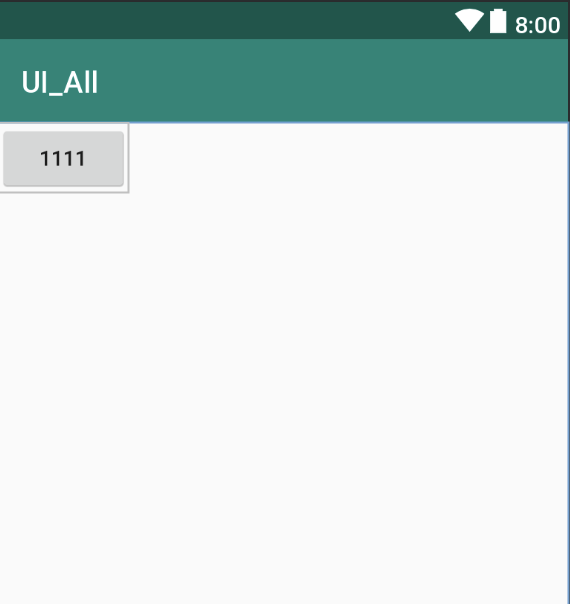
相对bt_444控件中间线对齐:
android:layout_alignBaseline="@id/bt_333"

相对bt_444控件顶部对齐:
android:layout_alignTop="@id/bt_333"
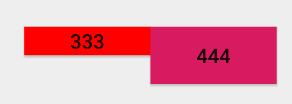
相对bt_444控件的底部对齐:
android:layout_alignBottom="@id/bt_333"

<!--

    相对于父控件系列:

            相对于父控件垂直居中

            android:layout_centerVertical="true"

            相对于父控件水平居中

            android:layout_centerHorizontal="true"

            相对于父控件正中间

            android:layout_centerInParent="true"

            相对于父控件的右边

            android:layout_alignParentRight="true"

            相对于父控件的左边

            android:layout_alignParentLeft="true"

            相对于父控件的顶部

            android:layout_alignParentTop="true"

            相对于父控件的底部

            android:layout_alignParentBottom="true"

            相对于父控件的结束(通常情况下是在父控件最右边)

            android:layout_alignParentEnd="true"

            相对于父控件的开始 最左边 相对布局的默认

            android:layout_alignParentStart="true"

        相对于平级控件系列:

            相对于bt_111控件的底部

            android:layout_below="@+id/bt_111"

            相对于bt_111控件的顶部

            android:layout_above="@id/bt_111"

            相对于bt_111控件的右边

            android:layout_toRightOf="@id/bt_111"

            相对于bt_111控件的左边

            android:layout_toRightOf="@id/bt_111"

            相对与控件的中间对齐

            android:layout_alignBaseline="@id/bt_333"

            相对与控件的顶部对齐

            android:layout_alignTop="@id/bt_333"

            相对与控件的底部对齐

            android:layout_alignBottom="@id/bt_333"

            相对与控件的中间对齐

            android:layout_alignBaseline="@id/bt_333"

            相对与控件的左对齐

            android:layout_alignLife="@id/bt_333"

            相对与控件的右对齐

            android:layout_alignRight="@id/bt_333"

            // 外边距 上下左右 一般情况下用于 View

            android:layout_marginTop="20dp"

            android:layout_marginLeft="20dp"

            android:layout_marginBottom="20dp"

            android:layout_marginRight="20dp"

            android:layout_margin="20dp"

            外边距往水平方向80dp

            android:layout_marginHorizontal="80dp"

            外边距往垂直方向80dp

            android:layout_marginVertical="80dp"

            // 内边距 上下左右 一般情况下用于 ViewGroup 用来管控View

            android:padding="40dp"

            android:paddingLeft="40dp"

            android:paddingRight="40dp"

            android:paddingTop="40dp"

            android:paddingBottom="40dp"

            内边距往水平方向60dp

            android:paddingHorizontal="60dp"

            内边距往垂直方向60dp

            android:paddingVertical="60dp"

-->
相对布局测试的代码:
<?xml version="1.0" encoding="utf-8"?>

<RelativeLayout xmlns:android="http://schemas.android.com/apk/res/android"

    android:layout_width="match_parent"

    android:layout_height="match_parent"

    android:orientation="vertical">

    <Button

        android:id="@+id/bt_111"

        android:layout_width="wrap_content"

        android:layout_height="wrap_content"

        android:text="1111"

        android:layout_centerVertical="true"

        android:layout_centerHorizontal="true"

        android:layout_centerInParent="true"

        />

    <Button

        android:id="@+id/bt_222"

        android:layout_width="wrap_content"

        android:layout_height="wrap_content"

        android:text="2222"

        android:layout_toLeftOf="@id/bt_111"

        android:layout_centerInParent="true"

        />

    <Button

        android:id="@+id/bt_333"

        android:layout_width="wrap_content"

        android:layout_height="20dp"

        android:text="333"

        android:layout_marginLeft="130dp"

        android:layout_marginTop="130dp"

        android:background="#f00"

        />

    <Button

        android:id="@+id/bt_444"

        android:layout_width="wrap_content"

        android:layout_height="40dp"

        android:text="444"

        android:layout_toRightOf="@id/bt_333"

        android:layout_alignBaseline="@id/bt_333"

        android:background="@color/colorAccent"

         />

    <Button

        android:layout_width="wrap_content"

        android:layout_height="wrap_content"

        android:text="555"

        android:layout_alignParentStart="true"

        />

</RelativeLayout>
Android-相对布局(RelativeLayout)的更多相关文章
- Android相对布局(RelativeLayout)
Android相对布局(RelativeLayout) 备注:这里的视图和元素是等同的概念. RelativeLayout是一个允许子视图相对于其他兄弟视图或是父视图显示的视图组(通过ID指定).每个 ...
- Android之布局RelativeLayout
线性布局的weight属性在等比例分配时比较方便,但是对复杂的界面,嵌套多层LinearLayout布局会导致渲染变慢,占用更多系统资源:而使用RelativeLayout的话,可能仅仅需要一层就可以 ...
- android的布局-----RelativeLayout(相对布局)
学习导图 注:父容器定位的属性值只能是Boolean ,兄弟组件定位的属性值只能是ID 典型案例(梅花) <?xml version="1.0" encoding=" ...
- Android UI -- 布局介绍(布局包括FrameLayout, LinearLayout, RelativeLayout, GridLayout)
首先介绍常用布局类 FrameLayout 最简单的布局管理器. 这个布局管理类有几个特性: 添加组件默认在左上角的. 如果添加多个组件会叠加到一起,并且都在左上角.(可以通过一gravity属性改变 ...
- Android 自学之相对布局 RelativeLayout
相对布局(RelativeLayout),相对布局容器内子组件的位置总是相对兄弟组件.父容器来决定的. RelativeLayout的XML属性及相关方法说明 XML属性 相关方法 说明 androi ...
- [Irving]Android 常用布局之RelativeLayout
RelativeLayout相对布局 相对布局 RelativeLayout 允许子元素指定它们相对于其父元素或兄弟元素的位置,这是实际布局中最常用的布局方式之一. 它灵活性大很多,当然属性也多,操作 ...
- 一步一步学android之布局管理器——RelativeLayout
今天开始学习RelativeLayout(相对布局),相对布局在平时布局的时候用的较多,因为Android适配方面的原因.相对布局可以控制组件摆放的位置(放在任一组件的上下左右等位置),下面来看看类的 ...
- Android 五大布局(LinearLayout、FrameLayout、AbsoulteLayout、RelativeLayout、TableLayout )
前言 欢迎大家我分享和推荐好用的代码段~~ 声明 欢迎转载,但请保留文章原始出处: CSDN:http://www.csdn.net ...
- android LinearLayout和RelativeLayout实现精确布局
先明确几个概念的区别: padding margin:都是边距的含义,关键问题得明白是什么相对什么的边距padding:是控件的内容相对控件的边缘的边距. margin :是控件边缘相对父空间的边距 ...
- .Net程序猿玩转Android开发---(7)相对布局RelativeLayout
相对布局RelativeLayout是Android布局中一个比較经常使用的控件,使用该控件能够布局出适合各种屏幕分辨率的布局,RelativeLayout採用相对位置进行 ...
随机推荐
- VirtualBox从USB设备(PE)启动图文教程
很多朋友都为VBox无法进入U盘启动而苦恼,别懊恼,魔笛这就为你讲解 方法/步骤 1 大家先把U盘插入实体电脑. 单击“确定”打开“磁盘管理”, 键盘上的Win+R组合键,输入diskmgnt.. ...
- "网页安全政策"(Content Security Policy,缩写 CSP)的来历
作者:阿里聚安全链接:https://www.zhihu.com/question/21979782/answer/122682029来源:知乎著作权归作者所有.商业转载请联系作者获得授权,非商业转载 ...
- C#做的在线升级小程序
转自原文C#做的在线升级小程序 日前收到一个小任务,要做一个通用的在线升级程序.更新的内容包括一些dll或exe或.配置文件.升级的大致流程是这样的,从服务器获取一个更新的配置文件,经过核对后如有新的 ...
- Git(三):Git 使用规范流程
转:http://www.ruanyifeng.com/blog/2015/08/git-use-process.html 团队开发中,遵循一个合理.清晰的Git使用流程,是非常重要的. 否则,每个人 ...
- java中执行子类的构造方法时,会不会先执行父类的构造方法
会,在创建子类的对象时,jvm会首先执行父类的构造方法,然后再执行子类的构造方法,如果是多级继承,会先执行最顶级父类的构造方法,然后依次执行各级个子类的构造方法.
- C#枚举最优雅的用法
public enum AbilityLevel { /// <summary> /// Indicates that the individual has a general knowl ...
- ios笔试题
最近找工作,有面试有笔试部分,故把笔试题自己整理了下. 面试能力要求:精通iphone的UI开发,能熟练操作复杂表视图,熟练使用图层技术, 可以自定义UI控件,使用类别扩展系统控件功能; 擅长通讯 ...
- npm安装elasticsearch-reindex
由于新版的nodejs已经集成了npm,所以之前npm也一并安装好了.同样可以通过输入 "npm -v" 来测试是否成功安装. npm -v 你可以使用以下命令来查看所有全局安装的 ...
- Node.js版-七夕无事,人艰勿拆,求别说...
七夕无事,端坐电脑前coding,略苦逼,人艰勿拆,求别说...
- input子系统分析之二:数据结构
内核版本:3.9.5 1. input_dev,用来标识输入设备 struct input_dev { const char *name; const char *phys; const char * ...