
一个简单的代码生成器(T4文本模板运用)
说要写这篇文章有一段时间了,但因为最近各方面的压力导致心情十二分的不好,下班后往往都洗洗睡了。今天痛定思痛,终于把这件拖了很久的事做了。好,不废话了,现在看看"一个简单的代码生成器" .
先看看界面吧!
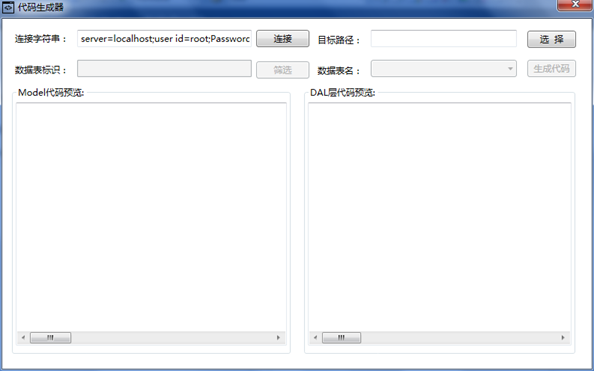
简约到如此,说是代码生成器,估计是要被吐槽的。好吧,借用园子里博友的说法,这只是一粒粟子,如果你愿意,你能看到代码生成器的“种子”。
这样运行的!
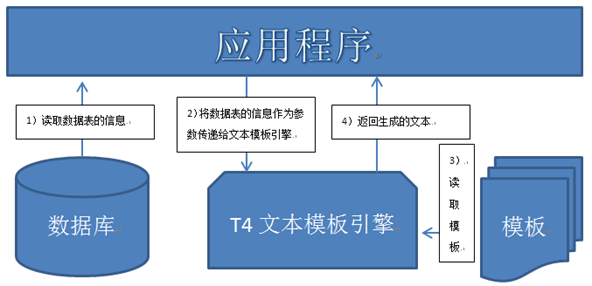
画了个简图已描述这个简单的代码生成器的工作过程。下面的介绍将以此图展开:
1)读取数据表的信息:从数据库中读取数据表的信息并转换成要为T4文本模板引擎提供的数据(EntityClassInfo);
2)将要为T4文本模板引擎提供的数据(EntityClassInfo)作为参数传递给T4文本模板引擎(其实是T4文本模板引擎的宿主,详见T4文本模板转换过程);
3)T4文本模板引擎读取模板;
4)T4文本模板引擎将生成的文本返回给应用程序。
代码:
一、在应用程序和代码中传递的参数的类型
1)EntityClassInfo.cs
using System;
using System.Collections.Generic;
using System.Linq;
using System.Text;
using System.Data;
namespace EntityInfo
{
[Serializable]
public class EntityClassInfo
{
public EntityClassInfo(DataTable dt)
{
this.ClassName = dt.TableName;
List<EntityClassPropertyInfo> ropertyListTemp = new List<EntityClassPropertyInfo>();
foreach (DataColumn dcol in dt.Columns)
{
ropertyListTemp.Add(new EntityClassPropertyInfo(dcol));
}
this.RopertyList = ropertyListTemp;
List<EntityClassPropertyInfo> primaryKeyListTemp = new List<EntityClassPropertyInfo>();
List<EntityClassPropertyInfo> notPrimaryKeyListTemp = new List<EntityClassPropertyInfo>(ropertyListTemp);
foreach (DataColumn dcol in dt.PrimaryKey)
{
primaryKeyListTemp.Add(new EntityClassPropertyInfo(dcol));
notPrimaryKeyListTemp.Remove(new EntityClassPropertyInfo(dcol));
}
this.PrimaryKeyList = primaryKeyListTemp;
this.NotPrimaryKeyList = notPrimaryKeyListTemp;
}
public string ClassName
{
get;
private set;
}
public List<EntityClassPropertyInfo> RopertyList
{
get;
private set;
}
public List<EntityClassPropertyInfo> PrimaryKeyList
{
get;
private set;
}
public List<EntityClassPropertyInfo> NotPrimaryKeyList
{
get;
private set;
}
}
}
2)EntityClassPropertyInfo.cs
using System;
using System.Collections.Generic;
using System.Linq;
using System.Text;
using System.Data;
namespace EntityInfo
{
[Serializable]
public class EntityClassPropertyInfo
{
public EntityClassPropertyInfo(DataColumn dcol)
{
this.PropertyName = dcol.ColumnName;
this.PropertyType = dcol.DataType.Name;
this.IsValueType = false;
if (dcol.DataType.IsValueType)
{
if (dcol.AllowDBNull)
{
this.PropertyType = this.PropertyType + "?";
}
else
{
this.IsValueType = true;
}
}
}
public string PropertyName
{
get;
private set;
}
public string PropertyType
{
get;
private set;
}
public bool IsValueType
{
get;
private set;
}
public override bool Equals(object obj)
{
EntityClassPropertyInfo temp = obj as EntityClassPropertyInfo;
if (this.PropertyName == temp.PropertyName && this.PropertyType == temp.PropertyType)
{
return true;
}
return false;
}
}
}
二、模板
1)生成实体类的模板:Entity.tt
<#@ template debug="false" hostspecific="false" language="C#" #>
<#@ output extension=".txt" #>
<#@ import namespace="EntityInfo" #>
<#@ parameter type="EntityInfo.EntityClassInfo" name="entity" #>
using System;
using System.Data;
using System.Configuration;
using System.Web;
using System.Web.Security;
using System.Web.UI;
using System.Web.UI.WebControls;
using System.Web.UI.WebControls.WebParts;
using System.Web.UI.HtmlControls;
/// <summary>
/// <#= entity.ClassName#> 的摘要说明
/// </summary>
public class <#= entity.ClassName#>
{
public <#= entity.ClassName#>()
{
//
// TODO: 在此处添加构造函数逻辑
//
}
<# foreach(EntityClassPropertyInfo property in entity.RopertyList)
{ #>
private <#= property.PropertyType#> m_<#= property.PropertyName#>;
<#;
}
#>
<# foreach(EntityClassPropertyInfo property in entity.RopertyList)
{ #>
public <#= property.PropertyType#> <#= property.PropertyName#>
{
set { m_<#= property.PropertyName#> = value; }
get { return m_<#= property.PropertyName#>; }
}
<#;
}
#>
}
2)生成DAL层的模板:DataAccess.tt
<#@ template debug="false" hostspecific="false" language="C#" #>
<#@ output extension=".txt" #>
<#@ import namespace="EntityInfo" #>
<#@ import namespace="System.Collections.Generic" #>
<#@ parameter type="EntityInfo.EntityClassInfo" name="entity" #>
using System;
using System.Data;
using System.Configuration;
using System.Web;
using System.Web.Security;
using System.Web.UI;
using System.Web.UI.WebControls;
using System.Web.UI.WebControls.WebParts;
using System.Web.UI.HtmlControls;
using MySql.Data.MySqlClient;
using System.Collections.Generic;
/// <summary>
/// <#= entity.ClassName#> 的摘要说明
/// </summary>
public class <#= entity.ClassName#>DAL
{
public <#= entity.ClassName#>DAL()
{
}
#region 私有方法
#region 根据实体类获取MySqlParameter数组 +MySqlParameter[] FromModel(<#= entity.ClassName#> model)
private static MySqlParameter[] FromModel(<#= entity.ClassName#> model)
{
List<MySqlParameter> parameterList = new List<MySqlParameter>();
<# foreach(EntityClassPropertyInfo property in entity.RopertyList)
{
#> parameterList.Add(new MySqlParameter("@<#=property.PropertyName#>", SQLHelper.ToDBValue(model.<#=property.PropertyName#>)));
<#;
}
#>
return parameterList.ToArray();
}
#endregion
#region 将dr中的数据转换为实体类对象 + <#= entity.ClassName#> ToModel(DataRow dr)
private static <#= entity.ClassName#> ToModel(DataRow dr)
{
<#= entity.ClassName#> model = new <#= entity.ClassName#>();
<# foreach(EntityClassPropertyInfo property in entity.RopertyList)
{
if(property.IsValueType)
{
#> model.<#=property.PropertyName#> = Convert.To<#= property.PropertyType#>(SQLHelper.FromDBValue(dr["<#= property.PropertyName #>"]));
<#;
}
else
{
#> model.<#=property.PropertyName#> = SQLHelper.FromDBValue(dr["<#=property.PropertyName#>"]) as <#=property.PropertyType#>;
<#;
}
}
#>
return model;
}
#endregion
#endregion
#region 增 + int Insert(<#= entity.ClassName#> model)
public static int Insert(<#= entity.ClassName#> model)
{
int result = -1;
string sql = @"INSERT INTO <#= entity.ClassName#>(<#= string.Join(",",GetSqlInsertInto()) #>)
VALUES(<#= string.Join(",",GetSqlInsertValue()) #>);";
result = SQLHelper.ExecuteNonQuery(sql,FromModel(model));
return result;
}
#endregion
#region 删 + int DeleteById(<#= string.Join(",",GetSqlDelVariable()) #>)
public static int DeleteById(<#= string.Join(",",GetSqlDelVariable()) #>)
{
int result = -1;
string sql = @"DELETE FROM <#= entity.ClassName#> WHERE <#= string.Join(" AND ",GetSqlWhereId()) #>;";
result = SQLHelper.ExecuteNonQuery(sql,<#= string.Join(",",GetSqlDelParameter()) #>);
return result;
}
#endregion
#region 改 + int Update(<#= entity.ClassName#> model)
public static int Update(<#= entity.ClassName#> model)
{
int result = -1;
string sql = @"UPDATE <#= entity.ClassName#>
SET <#= string.Join(",",GetSqlUpdateSet()) #>
WHERE <#= string.Join(" AND ",GetSqlWhereId()) #>";
result = SQLHelper.ExecuteNonQuery(sql, FromModel(model));
return result;
}
#endregion
#region 查 + int GetCountAll()
public static int GetCountAll()
{
int result = 0;
string sql = @"SELECT Count(*) FROM <#= entity.ClassName#>;";
result = Convert.ToInt32(SQLHelper.ExecuteScalar(sql));
return result;
}
#endregion
#region 查 + List<<#= entity.ClassName#>> GetBySql(string sql,params MySqlParameter[] parameters)
public static List<<#= entity.ClassName#>> GetBySql(string sql,params MySqlParameter[] parameters)
{
List<<#= entity.ClassName#>> modelList = new List<<#= entity.ClassName#>>();
DataTable dt = SQLHelper.ExecuteDataTable(sql,parameters);
foreach (DataRow dr in dt.Rows)
{
modelList.Add(ToModel(dr));
}
return modelList;
}
#endregion
}
<#+
private string[] GetSqlInsertInto()
{
List<string> propertyNameList= new List<string>();
foreach(EntityClassPropertyInfo property in entity.RopertyList)
{
propertyNameList.Add(property.PropertyName);
}
return propertyNameList.ToArray();
}
private string[] GetSqlInsertValue()
{
List<string> propertyNameList= new List<string>();
foreach(EntityClassPropertyInfo property in entity.RopertyList)
{
propertyNameList.Add("@" + property.PropertyName);
}
return propertyNameList.ToArray();
}
private string[] GetSqlDelVariable()
{
List<string> propertyList= new List<string>();
foreach(EntityClassPropertyInfo property in entity.PrimaryKeyList)
{
propertyList.Add(property.PropertyType + " m_" + property.PropertyName);
}
return propertyList.ToArray();
}
private string[] GetSqlDelParameter()
{
List<string> propertyList= new List<string>();
foreach(EntityClassPropertyInfo property in entity.PrimaryKeyList)
{
propertyList.Add("new MySqlParameter(@\"" + property.PropertyName + "\" ,m_" + property.PropertyName + ")");
}
return propertyList.ToArray();
}
private string[] GetSqlUpdateSet()
{
List<string> propertyList= new List<string>();
foreach(EntityClassPropertyInfo property in entity.NotPrimaryKeyList)
{
propertyList.Add(property.PropertyName +"=@" + property.PropertyName);
}
return propertyList.ToArray();
}
private string[] GetSqlWhereId()
{
List<string> propertyList= new List<string>();
foreach(EntityClassPropertyInfo property in entity.PrimaryKeyList)
{
propertyList.Add(property.PropertyName +"=@" + property.PropertyName);
}
return propertyList.ToArray();
}
#>
三、代码生成四步走:
1)从数据表信息 =》EntityClassInfo:
DataTable dt = SQLHelper.ExecuteDataTable(SQLHelper.GetConnectionString(), string.Format("SELECT * FROM {0} LIMIT 0,0", cbbTableName.SelectedValue.ToString()));
EntityClassInfo entityInfo = new EntityClassInfo(dt);
备注:
#region ExecuteTable方法
public static DataTable ExecuteDataTable(string connectionString,string sql, params MySqlParameter[] parameters)
{
using (MySqlConnection conn = new MySqlConnection(connectionString))
{
using(MySqlCommand cmd = conn.CreateCommand())
{
cmd.CommandText = sql;
cmd.Parameters.AddRange(parameters);
using (MySqlDataAdapter da = new MySqlDataAdapter(cmd))
{
using (DataTable dt = new DataTable())
{
da.Fill(dt);
da.FillSchema(dt, SchemaType.Source); //从数据源中检索架构
return dt;
}
}
}
}
}
#endregion
2)给T4文本模板传参:
CustomTextTemplatingEngineHost host = new CustomTextTemplatingEngineHost();
host.Session = new TextTemplatingSession();
host.Session.Add("entity", classInfo);
3)读取文本模板:
string input = File.ReadAllText(templatePath);
string output = new Engine().ProcessTemplate(input, host);
4)返回生成的文本:
string output = new Engine().ProcessTemplate(input, host);
源码下载(VS2010项目):一个简单的代码生成器(T4文本模板运用)
一个简单的代码生成器(T4文本模板运用)的更多相关文章
- 编写 T4 文本模板
文本模板由以下部件组成: 1)指令 - 控制模板处理方式的元素. 2)文本块 - 直接复制到输出的内容. 3)控制块 - 向文本插入可变值并控制文本的条件或重复部件的程序代码. 指令: 指令是控制模板 ...
- T4 文本模板编写准则
如果要在 Visual Studio 中生成程序代码或其他应用程序资源,遵守以下一般准则可能非常有帮助. 它们并不是一成不变的规则. 设计时 T4 模板准则 设计时 T4 模板是在设计时在 Visua ...
- 使用 T4 文本模板生成设计时代码
使用设计时 T4 文本模板,您可以在 Visual Studio 项目中生成程序代码和其他文件. 通常,您编写一些模板,以便它们根据来自模型的数据来改变所生成的代码. 模型是包含有关应用程序要求的 ...
- T4文本模板转换过程
T4文本模板转换过程将文本模板文件作为输入,生成一个新的文本文件作为输出. 例如,可以使用文本模板生成 Visual Basic 或 C# 代码,还可以生成 HTML 报告. 有三个组件参与这一过程: ...
- 动手写一个简单的Web框架(模板渲染)
动手写一个简单的Web框架(模板渲染) 在百度上搜索jinja2,显示的大部分内容都是jinja2的渲染语法,这个不是Web框架需要做的事,最终,居然在Werkzeug的官方文档里找到模板渲染的代码. ...
- T4文本模板
<#...#> 可以包含语句 <#=...#> 用于表达式,提供“输出”操作 <#+ ...> 使用类功能控制块向文本模板添加方法.属性.字段,必须作为文件中最后 ...
- 一个简单的Android富文本TextView实现
p.p1 { margin: 0.0px 0.0px 0.0px 0.0px; font: 24.0px Helvetica; color: #555555 } p.p2 { margin: 0.0p ...
- 一个简单的Dump转文本工具—Dump2Text
每次电脑重装都得烦心,要把庞大的IDE重新配置一次,正准备安装Visual Stdio 2010,上网找镜像的时候发现,Visual Stdio 2013推出了Community版,不仅没有lite掉 ...
- MVC开发T4代码生成之一----文本模板基础
T4文本模板 T4全写为Text Template Transformation Toolkit,是一种编程辅助工具,用来使程序代码自(懒)动(猿)生(福)成(利)的工具.MVC开发中大量使用了T4模 ...
随机推荐
- LintCode: Happy Number
C++ class Solution { public: /** * @param n an integer * @return true if this is a happy number or f ...
- 【树莓派】【转】树莓派3装Android 6.0,支持Wi-Fi和蓝牙
树莓派3装Android 6.0,支持Wi-Fi和蓝牙 相信对于许多树莓派初学者(包括我)来说,Android系统的确是一个不错的选择.但国内这方面资源稀缺,经本人FQ苦寻,找到了老外的树莓派Andr ...
- 002-Go通过ioutil 读写文件
1.读取文件内容 package main import( "io/ioutil" "fmt" ) func main(){ b,err := ioutil.R ...
- 通过jdbc获取数据库中的表结构 主键 各个表字段类型及应用生成实体类
http://www.cnblogs.com/lbangel/p/3487796.html 1.JDBC中通过MetaData来获取具体的表的相关信息.可以查询数据库中的有哪些表,表有哪些字段,字段的 ...
- apache跨域
http://www.cnblogs.com/2050/p/3191744.html http://blog.csdn.net/qq_15283821/article/details/54405805 ...
- 使用dd命令制作U盘启动盘wodim刻录光盘cd dvd
首先格式化U盘:使用fdisk -l 查看U盘到挂载点,如我的为/dev/sdb1.卸载U盘,执行格式化命令:mkfs.vfat /dev/sdb1 然后重新挂载U盘,开始制作启动盘: 1.# dd ...
- C# Linq to Entity Lamda方式分组并求和求平均值
1.单字段分组并求和: var list = data.GroupBy(g => g.GoodsId).Select(e => new { GoodsId = e.Key, Qty = e ...
- .NET网址
1.爱整理:http://www.aizhengli.com/
- 拦截导弹问题(NOIP1999)
某国为了防御敌国的导弹袭击,开发出一种导弹拦截系统,但是这种拦截系统有一个缺陷:虽然它的第一发炮弹能够到达任意的高度, 但是以后每一发炮弹都不能高于前一发的高度.某天,雷达捕捉到敌国的导弹来袭,由于该 ...
- 基于Echarts的中国地图数据展示
发布时间:2018-10-31 技术:javascript+html5+canvas 概述 基于echarts的大数据中国地图展示,结合API定制,开发样式,监听鼠标事件,实现带参数路由跳转等 ...