
jquery 对象的 height、innerHeight、outerHeight 的区别以及DOM 元素的 clientHeight、offsetHeight、scrollHeight、offsetTop、scrollTop
前言:jquery 对象的 height、innerHeight、outerHeight,还有 DOM 元素的 clientHeight、offsetHeight、scrollHeight、offsetTop、scrollTop 概念一直都很模糊,借此写个demo看看。
举例看看 jquery 对象的 height、innerHeight、outerHeight 几个区别:
<%@ page language="java" import="java.util.*" pageEncoding="UTF-8"%>

<%@ taglib prefix="c" uri="http://java.sun.com/jsp/jstl/core"%>

<c:set var="ctx" value="${pageContext.request.contextPath}" />

<html>

<head>

    <title>测试</title>

    <style>

        #div1{

            border: 1px solid;

            height: 200px;

            width: 200px;

            padding: 10px;

            margin: 20px;

            /*浮动*/

            overflow: auto;

        }

    </style>

</head>

<body>

<div id="div1">

    <div>sdf</div>

    <div>地方</div>

    <div>水电费</div>

    <div>史蒂夫</div>

    <div>鬼地方个</div>

    <div>史3玩儿</div>

    <div>史3水电费玩儿</div>

    <div>212</div>

    <div>435 </div>

    <div>电饭锅</div>

    <div>规划局</div>

    <div>好久</div>

    <div>水电费</div>

    <div>史3水电费玩儿</div>

    <div>34</div>

    <div>的</div>

    <div>45</div>

    <div>sdf</div>

    <div>地方</div>

    <div>水电费</div>

    <div>史蒂夫</div>

    <div>鬼地方个</div>

    <div>史3玩儿</div>

    <div>史3水电费玩儿</div>

    <div>212</div>

    <div>435 </div>

    <div>电饭锅</div>

    <div>规划局</div>

    <div>好久</div>

    <div>水电费</div>

    <div>史3水电费玩儿</div>

    <div>34</div>

    <div>的</div>

    <div>45</div>

</div>

<script type="text/javascript" src="${ctx}/static/common/js/jquery-1.8.1.min.js"></script>

<script type="text/javascript">

    var $div = $("#div1");

    //262 222 220 200

    console.log($div.outerHeight(true), $div.outerHeight(false), $div.outerHeight(), $div.innerHeight(), $div.height());

    var div = $div[0];

    //220 222 734 20 0

    console.log(div.clientHeight, div.offsetHeight, div.scrollHeight, div.offsetTop, div.scrollTop);

</script>

</body>

</html>
//262 222 220 200

console.log($div.outerHeight(true), $div.outerHeight(false), $div.outerHeight(), $div.innerHeight(), $div.height());
outerHeight 高度为:元素自身高度 + padding + border ;如果参数为true时,高度为:元素自身高度 + padding + border +margin

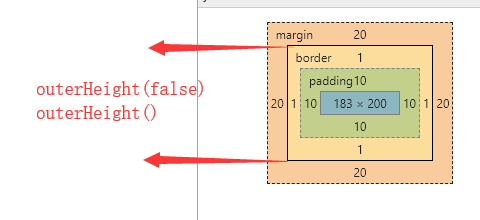
innerHeight 包括元素自身的高度+padding部分

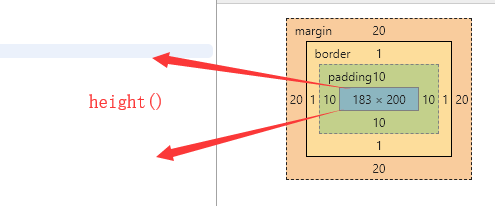
height 指的是元素本身的高度,不包括padding、border、margin
然后看看 DOM 元素的 clientHeight、offsetHeight、scrollHeight、offsetTop、scrollTop 区别
每个HTML元素都具有 clientHeight offsetHeight scrollHeight offsetTop scrollTop 这5个属性,这些是和元素高度、滚动、位置相关的属性。其中 clientHeight、offsetHeight 和元素的高度有关,scrollHeight、scrollTop 与滚动有关,offsetTop与父元素有关。
var div = $div[0];

    //220 222 734 20 0

    console.log(div.clientHeight, div.offsetHeight, div.scrollHeight, div.offsetTop, div.scrollTop);
clientHeight:包括padding但不包括border、水平滚动条、margin的元素的高度。对于inline的元素这个属性一直是0,单位px,只读元素。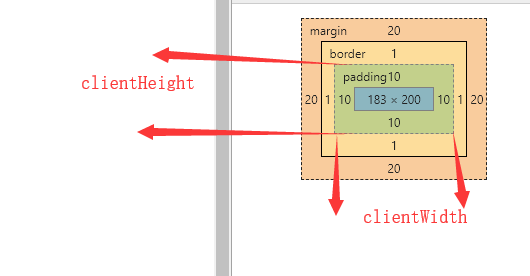
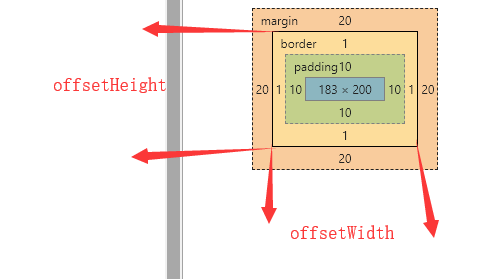
offsetHeight:包括padding、border、水平滚动条,但不包括margin的元素的高度。对于inline的元素这个属性一直是0,单位px,只读元素。
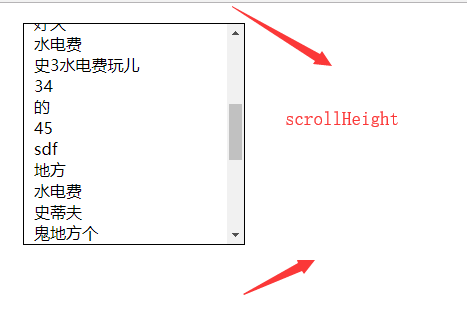
scrollHeight: 因为子元素比父元素高,父元素不想被子元素撑的一样高就显示出了滚动条,在滚动的过程中本元素有部分被隐藏了,scrollHeight代表包括当前不可见部分的元素的高度。而可见部分的高度其实就是clientHeight,也就是scrollHeight>=clientHeight恒成立。在有滚动条时讨论scrollHeight才有意义,在没有滚动条时scrollHeight==clientHeight恒成立。单位px,只读元素。
scrollTop: 代表在有滚动条时,滚动条向下滚动的距离也就是元素顶部被遮住部分的高度。在没有滚动条时scrollTop==0恒成立。单位px,可读可设置。
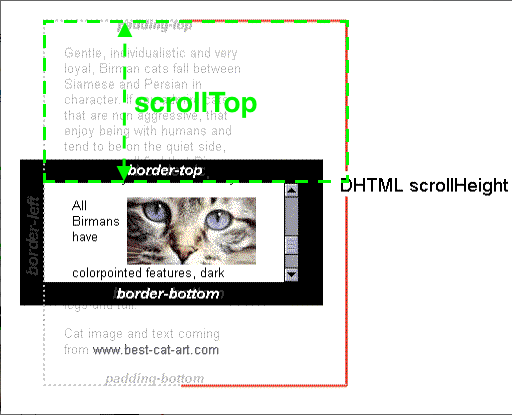
offsetTop: 当前元素顶部距离最近父元素顶部的距离,和有没有滚动条没有关系。单位px,只读元素。

参考:http://www.imooc.com/article/17571
jquery 对象的 height、innerHeight、outerHeight 的区别以及DOM 元素的 clientHeight、offsetHeight、scrollHeight、offsetTop、scrollTop的更多相关文章
- Jquery中的height(),innerHeight(),outerHeight()的区别
前言 最近练习做弹窗,遇到height(),innerHeight(),outerHeight()的区别. 根据下面的盒模型来了解三者的区别. height():element的height; inn ...
- Jquery中的 height(), innerHeight() outerHeight()区别
jQuery中的 height innerHeight outerHeight区别 标准浏览器下: height:高度 innerHeight:高度+补白 outerHeight:高度+补白+边框,参 ...
- jquery 之height(),innerHeight(),outerHeight()方法区别详解
在jQuery中,获取元素高度的函数有3个,它们分别是height(). innerHeight().outerHeight(). 与此相对应的是,获取元素宽度的函数也有3个,它们分别是width() ...
- 关于jQuery的append方法不能多次添加同一个DOM元素的解决方法
资料来自:https://segmentfault.com/q/1010000007677851?_ea=1419689 append()方法在jQuery中是使用appendChild()实现的,实 ...
- height/innerHeight/outerHeight
<script> $(document).ready(function(){ alert("height:"+$("#div").height()) ...
- JavaScript获取浏览器高度和宽度值(documentElement,clientHeight,offsetHeight,scrollHeight,scrollTop,offsetParent,offsetY,innerHeight)
IE中: document.body.clientWidth ==> BODY对象宽度 document.body.clientHeight ==> BODY对象高度 document.d ...
- offsetheight 和clientheight、scrollheight、scrollTop区别
clientHeight:元素客户区的大小,指的是元素内容及其边框所占据的空间大小(经过实践取出来的大多是视口大小) scrollHeight: 滚动大小,指的是包含滚动内容的元素大小(元素内容的总高 ...
- 【转】jQuery源码分析-03构造jQuery对象-源码结构和核心函数
作者:nuysoft/高云 QQ:47214707 EMail:nuysoft@gmail.com 毕竟是边读边写,不对的地方请告诉我,多多交流共同进步.本章还未写完,完了会提交PDF. 前记: 想系 ...
- jQuery中关于height,innerWidth与outerWidth的区别
jQuery width() 和 height() 方法 width() 方法设置或返回元素的宽度(不包括内边距.边框或外边距). height() 方法设置或返回元素的高度(不包括内边距.边框或外边 ...
随机推荐
- Cordova - XCode10编译热更新插件错误解决方法!
操作系统:OSX10.14 XCode:10.1 热更新插件:https://github.com/nordnet/cordova-hot-code-push 这个热更新插件,在安卓下编译,没有问题, ...
- 盘点Xcode中开发者最喜爱的十大开源插件
Xcode IDE拥有着诸如导航.重构.校准等众多非常高大上的工具,而予以辅助的插件更是在Xcode的基础上对相关功能进行改进与扩展.在应用开发过程中,通过开源包管理器Alcatraz对插件进行安装管 ...
- bzoj4519: [Cqoi2016]不同的最小割(最小割树)
传送门 好神仙……最小割树是个什么东西…… 其实我觉得干脆直接$O(n^2)$跑几个dinic算了…… 来说一下这个叫最小割树的神奇东西 我们先建一个$n$个点,没有边的无向图 在原图中任选两点$s, ...
- LOJ#3087. 「GXOI / GZOI2019」旅行者(最短路)
题面 传送门 题解 以所有的感兴趣的城市为起点,我们正着和反着各跑一边多源最短路.记\(c_{0/1,i}\)分别表示正图/反图中离\(i\)最近的起点,那么对于每条边\((u,v,w)\),如果\( ...
- jzoj5848
小 S 热爱大自然, 一天他种了一棵奇怪的线段树. 奇怪的线段树是一种与普通线段树类似的结构, 唯一不同的是, 它不一定以每一个区间的中点作为分治中心. 麻烦的是, 小 S 的线段树被风吹散了, 散成 ...
- You can also run `php --ini` inside terminal to see which files are used by PH P in CLI mode
在php.ini中打开extension=php_fileinfo.dll 就可以了
- JavaScript基础数组_布尔值_逻辑运算等(2)
day51 参考:https://www.cnblogs.com/liwenzhou/p/8004649.html 布尔值(Boolean) 区别于Python,true和false都是小写. var ...
- linux系统上内网ip和和外网ip的关系
1.不同服务之间的访问需要使用公网IP+端口才能访问 2.服务器上一般都是域名访问,服务器会把ip+端口映射成固定的域名,所以如果想访问服务器上其他应用,就必须的放开应用限制 问题,在服务器上放开对某 ...
- docker registry push错误“server gave HTTP response to HTTPS client”
系统环境:centos7 docker版本: 1.12.3(注意版本,可能存在不同版本设置不同的情况) docker registry版本:2.4.1 问题: 成功安装docker registry, ...
- EJB3 阶段总结+一个EJB3案例 (2)
这篇博文接着上一篇博文的EJB案例. 在上一篇博文中,将程序的架构基本给描述出来了,EJB模块分为5层. 1)DB层,即数据库层 在则一部分,我使用的数据库为mysql.在EJB程序中,访问数据库是通 ...