
PropertyGrid—为复杂属性提供下拉式编辑框和弹出式编辑框
零.引言
PropertyGrid中我们经常看到一些下拉式的编辑方式(Color属性)和弹出式编辑框(字体),这些都是为一些复杂的属性提供的编辑方式,本文主要说明如何实现这样的编辑方式。
一.为属性提供编辑类
弹出式和下拉式是如何实现的呢,这需要为属性提供一个专门的编辑类。.Net为我们提供了一个System.Drawing.Design.UITypeEditor类,它是所有编辑类的基类,从他继承出了诸如ColorEditor、FontEditor的类,因此我们可以在属性框中编辑颜色和字体。定义了这样的类,我们也可以为自己的属性实现弹出式和下拉式编辑方式。
先看一下MSDN中对UITypeEditor的介绍:提供可用于设计值编辑器的基类,这些编辑器可提供用户界面 (UI),用来表示和编辑所支持的数据类型的对象值。
UITypeEditor 类提供一种基类,可以从该基类派生和进行扩展,以便为设计时环境实现自定义类型编辑器。通常,您的自定义类型编辑器与 PropertyGrid 控件进行交互。在文本框值编辑器不足以有效地选择某些类型的值的情况下,自定义类型编辑器非常有用。
继承者说明:
若要实现自定义设计时 UI 类型编辑器,必须执行下列步骤:
- 定义一个从 UITypeEditor 派生的类。
- 重写 EditValue 方法以处理用户界面、用户输入操作以及值的分配。
- 重写 GetEditStyle 方法,以便将编辑器将使用的编辑器样式的类型通知给“属性”窗口。
通过执行下列步骤,可以为在“属性”窗口中绘制值的表示形式添加附加支持:
- 重写 GetPaintValueSupported 方法以指示编辑器支持显示值的表示形式。
- 重写 PaintValue 方法以实现该值的表示形式的显示。
- 如果编辑器应具有初始化行为,则重写 UITypeEditor 构造函数方法。
二.下拉式编辑方式
接下来我们来实现下拉式编辑方式,接下来举一个具体的例子来说明。
首先假如我们有一个控件类MyControl:
 public class MyControl : System.Windows.Forms.UserControl

 {

         private double _angle;

         [BrowsableAttribute(true)]

         public double Angle

         {

             get

             { return _angle; }

             set

             { _angle = value; }

         }

         public MyControl()

         {

             this._angle = ;

         }

         protected override void OnPaint(System.Windows.Forms.PaintEventArgs e)

         {

             e.Graphics.DrawString("The Angle is " + _angle, this.Font, Brushes.Red,,);

         }

 }
其中有个属性Angle,我们要为其提供下拉式和弹出式编辑方式,当然了,一般都是较为复杂的属性才需要,这里只是为了举例说明。
我们为其设计一个编辑类AngleEditor,在第二节中,继承说明中的第一条和第二条,EditValue和GetEditStyle两个函数,这是必须要重写的:
 [System.Security.Permissions.PermissionSet(System.Security.Permissions.SecurityAction.Demand, Name = "FullTrust")]

     public class AngleEditor : System.Drawing.Design.UITypeEditor

 {

         public AngleEditor()

         {

         }

         //下拉式还是弹出式

         public override System.Drawing.Design.UITypeEditorEditStyle GetEditStyle(System.ComponentModel.ITypeDescriptorContext context)

         {

             return UITypeEditorEditStyle.DropDown;

         }

         // 为属性显示UI编辑框

         public override object EditValue(System.ComponentModel.ITypeDescriptorContext context, System.IServiceProvider provider, object value)

         {

             //值类型不为double,直接返回value

             if (value.GetType() != typeof(double))

                 return value;

             //值为double,显示下拉式或弹出编辑框

             IWindowsFormsEditorService edSvc = (IWindowsFormsEditorService)provider.GetService(typeof(IWindowsFormsEditorService));

             if (edSvc != null)

             {

                 // 显示编辑框并初始化编辑框的值

                 AngleControl angleControl = new AngleControl((double)value);

                 edSvc.DropDownControl(angleControl);

                 // 返回编辑框中编辑的值.

                 if (value.GetType() == typeof(double))

                     return angleControl.angle;

             }

             return value;

         }

         //下面两个函数是为了在PropertyGrid中显示一个辅助的效果

         //可以不用重写

         public override void PaintValue(System.Drawing.Design.PaintValueEventArgs e)

         {

             int normalX = (e.Bounds.Width / );

             int normalY = (e.Bounds.Height / );

             e.Graphics.FillRectangle(new SolidBrush(Color.DarkBlue), e.Bounds.X, e.Bounds.Y, e.Bounds.Width, e.Bounds.Height);

             e.Graphics.FillEllipse(new SolidBrush(Color.White), e.Bounds.X + , e.Bounds.Y + , e.Bounds.Width - , e.Bounds.Height - );

             e.Graphics.FillEllipse(new SolidBrush(Color.SlateGray), normalX + e.Bounds.X - , normalY + e.Bounds.Y - , , );

             double radians = ((double)e.Value * Math.PI) / (double);

             e.Graphics.DrawLine(new Pen(new SolidBrush(Color.Red), ), normalX + e.Bounds.X, normalY + e.Bounds.Y,

                 e.Bounds.X + (normalX + (int)((double)normalX * Math.Cos(radians))),

                 e.Bounds.Y + (normalY + (int)((double)normalY * Math.Sin(radians))));

         }

         public override bool GetPaintValueSupported(System.ComponentModel.ITypeDescriptorContext context)

         {

             return true;

         }

     }

     // 这里是我们要显示出来的编辑器,把它作为一个内置类

     //从UserControl继承,要在上面EditValue函数中使用的

     internal class AngleControl : System.Windows.Forms.UserControl

     {

         public double angle; //编辑的角度

         private float x;     //鼠标位置

         private float y;

         public AngleControl(double initial_angle)

         {

             this.angle = initial_angle;

         }

         //显现时,显示属性的当前值

         protected override void OnLoad(EventArgs e)

         {

             int originX = (this.Width / );

             int originY = (this.Height / );

             this.x = (float)( * Math.Cos(this.angle * Math.PI / ) + originX);

             this.y = (float)( * Math.Sin(this.angle * Math.PI / ) + originY);

             base.OnLoad(e);

         }

         //绘制控件,用来显示编辑角度

         protected override void OnPaint(System.Windows.Forms.PaintEventArgs e)

         {

             int originX = (this.Width / );

             int originY = (this.Height / );

             e.Graphics.DrawEllipse(Pens.Black, originX - , originY - , , );

             e.Graphics.DrawLine(Pens.Black, originX, originY, x, y);

             e.Graphics.DrawString("Angle:" + this.angle, this.Font, Brushes.Red, , );

         }

         //鼠标移动时设置角度

         protected override void OnMouseMove(System.Windows.Forms.MouseEventArgs e)

         {

             if (e.Button == MouseButtons.Left)

             {

                 int originX = (this.Width / );

                 int originY = (this.Height / );

                 double len = Math.Sqrt(Math.Pow(e.X - originX, ) + Math.Pow(e.Y - originY, ));

                 double h = e.Y - originY;

                 this.angle = Math.Asin(h / len);

                 if ((e.X >= originX && e.Y >= originY))

                 {

                     this.x = (float)( * Math.Cos(this.angle) + originX);

                     this.y = (float)( * Math.Sin(this.angle) + originY);

                     this.angle = this.angle *  / Math.PI;

                 }

                 else if (e.X < originX && e.Y > originY)

                 {

                     this.x = (float)(originX -  * Math.Cos(this.angle));

                     this.y = (float)( * Math.Sin(this.angle) + originY);

                     this.angle =  - this.angle *  / Math.PI;

                 }

                 else if (e.X < originX && e.Y < originY)

                 {

                     this.x = (float)(originX -  * Math.Cos(this.angle));

                     this.y = (float)(originY +  * Math.Sin(this.angle));

                     this.angle =  - this.angle *  / Math.PI;

                 }

                 else if (e.X >= originX && e.Y <= originY)

                 {

                     this.x = (float)(originX +  * Math.Cos(this.angle));

                     this.y = (float)(originY +  * Math.Sin(this.angle));

                     this.angle =  + this.angle *  / Math.PI;

                 }

                 this.Invalidate();

             }

         }

 }
这里有两个类,一个是AngleEditor,他就是我们要用于到属性特性中的编辑类,一个是AngleControl,他是辅助AngleEditor来编辑属性的,也就是说,他就是一个form,当我们编辑属性时,他会显现出来,供我们编辑属性值,可以是textBox,图形,表格,各种方式,只需要最后他返回编辑好的属性值给AngleEditor类。在AngleEditor类中的EditValue函数中,我们会调用AngleControl类,并接受它返回的值。
设计好编辑类后,把它应用到MyControl类中的Angle属性中,在Angle属性中增加特性[EditorAttribute(typeof(AngleEditor), typeof(System.Drawing.Design.UITypeEditor))],相当于告诉PropertyGrid我们要用AngleEditor来编辑这个属性。
         [BrowsableAttribute(true)]

         [EditorAttribute(typeof(AngleEditor), typeof(System.Drawing.Design.UITypeEditor))]

         public double Angle

         {

             get

             { return _angle; }

             set

             { _angle = value; }

         }
好了,现在就可以使用下拉框来编辑我们的Angle属性了,效果如下:
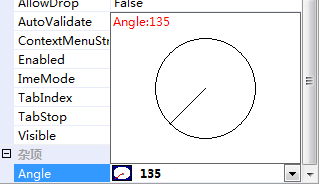
上面那个圆圈就是我们用来编辑角度的。
三.弹出式编辑方式
实现了下拉式,我们来实现弹出式,弹出式和下拉式非常的相像,现在要弹出一个编辑框,因此我们的AngleControl类不能从UserControl继承,而从From继承,让他成为一个对话框,在AngleEditor的EditValue函数中,弹出他并接受返回值,如下:
 [System.Security.Permissions.PermissionSet(System.Security.Permissions.SecurityAction.Demand, Name = "FullTrust")]

     public class AngleEditor : System.Drawing.Design.UITypeEditor

 {

         public AngleEditor()

         {

         }

         //下拉式还是弹出式

         public override System.Drawing.Design.UITypeEditorEditStyle GetEditStyle(System.ComponentModel.ITypeDescriptorContext context)

         {

             return UITypeEditorEditStyle.Modal;//弹出式

         }

         // 为属性显示UI编辑框

         public override object EditValue(System.ComponentModel.ITypeDescriptorContext context, System.IServiceProvider provider, object value)

         {

             //值类型不为double,直接返回value

             if (value.GetType() != typeof(double))

                 return value;

             //值为double,显示下拉式或弹出编辑框

             IWindowsFormsEditorService edSvc = (IWindowsFormsEditorService)provider.GetService(typeof(IWindowsFormsEditorService));

             if (edSvc != null)

             {

                 // 显示编辑框并初始化编辑框的值

                 AngleControl2 angleControl = new AngleControl2((double)value);

                 edSvc.ShowDialog(angleControl);

 // 返回编辑框中编辑的值.

                 if (value.GetType() == typeof(double))

                     return angleControl.angle;

             }

             return value;

         }

         //下面两个函数是为了在PropertyGrid中显示一个辅助的效果

         //可以不用重写

         public override void PaintValue(System.Drawing.Design.PaintValueEventArgs e)

         {

             int normalX = (e.Bounds.Width / );

             int normalY = (e.Bounds.Height / );

             e.Graphics.FillRectangle(new SolidBrush(Color.DarkBlue), e.Bounds.X, e.Bounds.Y, e.Bounds.Width, e.Bounds.Height);

             e.Graphics.FillEllipse(new SolidBrush(Color.White), e.Bounds.X + , e.Bounds.Y + , e.Bounds.Width - , e.Bounds.Height - );

             e.Graphics.FillEllipse(new SolidBrush(Color.SlateGray), normalX + e.Bounds.X - , normalY + e.Bounds.Y - , , );

             double radians = ((double)e.Value * Math.PI) / (double);

             e.Graphics.DrawLine(new Pen(new SolidBrush(Color.Red), ), normalX + e.Bounds.X, normalY + e.Bounds.Y,

                 e.Bounds.X + (normalX + (int)((double)normalX * Math.Cos(radians))),

                 e.Bounds.Y + (normalY + (int)((double)normalY * Math.Sin(radians))));

         }

         public override bool GetPaintValueSupported(System.ComponentModel.ITypeDescriptorContext context)

         {

             return true;

         }

     }

     // 这里是我们要显示出来的编辑器,把它作为一个内置类

     //从UserControl继承,要在上面EditValue函数中使用的

     internal class AngleControl2 : System.Windows.Forms.Form

     {

         public double angle; //编辑的角度

         private float x;     //鼠标位置

         private float y;

         public AngleControl(double initial_angle)

         {

             this.angle = initial_angle;

         }

         //显现时,显示属性的当前值

         protected override void OnLoad(EventArgs e)

         {

             int originX = (this.Width / );

             int originY = (this.Height / );

             this.x = (float)( * Math.Cos(this.angle * Math.PI / ) + originX);

             this.y = (float)( * Math.Sin(this.angle * Math.PI / ) + originY);

             base.OnLoad(e);

         }

         //绘制控件,用来显示编辑角度

         protected override void OnPaint(System.Windows.Forms.PaintEventArgs e)

         {

             int originX = (this.Width / );

             int originY = (this.Height / );

             e.Graphics.DrawEllipse(Pens.Black, originX - , originY - , , );

             e.Graphics.DrawLine(Pens.Black, originX, originY, x, y);

             e.Graphics.DrawString("Angle:" + this.angle, this.Font, Brushes.Red, , );

         }

         //鼠标移动时设置角度

         protected override void OnMouseMove(System.Windows.Forms.MouseEventArgs e)

         {

             if (e.Button == MouseButtons.Left)

             {

                 int originX = (this.Width / );

                 int originY = (this.Height / );

                 double len = Math.Sqrt(Math.Pow(e.X - originX, ) + Math.Pow(e.Y - originY, ));

                 double h = e.Y - originY;

                 this.angle = Math.Asin(h / len);

                 if ((e.X >= originX && e.Y >= originY))

                 {

                     this.x = (float)( * Math.Cos(this.angle) + originX);

                     this.y = (float)( * Math.Sin(this.angle) + originY);

                     this.angle = this.angle *  / Math.PI;

                 }

                 else if (e.X < originX && e.Y > originY)

                 {

                     this.x = (float)(originX -  * Math.Cos(this.angle));

                     this.y = (float)( * Math.Sin(this.angle) + originY);

                     this.angle =  - this.angle *  / Math.PI;

                 }

                 else if (e.X < originX && e.Y < originY)

                 {

                     this.x = (float)(originX -  * Math.Cos(this.angle));

                     this.y = (float)(originY +  * Math.Sin(this.angle));

                     this.angle =  - this.angle *  / Math.PI;

                 }

                 else if (e.X >= originX && e.Y <= originY)

                 {

                     this.x = (float)(originX +  * Math.Cos(this.angle));

                     this.y = (float)(originY +  * Math.Sin(this.angle));

                     this.angle =  + this.angle *  / Math.PI;

                 }

                 this.Invalidate();

             }

         }

 }
可以看到,只修改了三个地方:
- AngleEditor类中GetEditStyle函数返回Modal,表明是以弹出式编辑。
- AngleEditor类中EditValue函数中调用编辑控件的方式:
AngleControl2 angleControl = new AngleControl2((double)value);
edSvc.ShowDialog(angleControl);
3.AngleControl2从Form继承,让他显示为对话框,这里为了区别上面的AngleControl类,将其改成了AngleControl2。
现在看看效果:
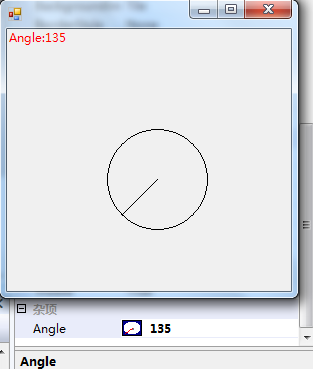
实现了弹出式的编辑方式。
四.完整代码
下面是完整的代码:
 using System;

 using System.ComponentModel;

 using System.Drawing;

 using System.Drawing.Design;

 using System.Windows.Forms;

 using System.Windows.Forms.Design;

 namespace TestUITypeEditor

 {

     //编辑器类

  [System.Security.Permissions.PermissionSet(System.Security.Permissions.SecurityAction.Demand, Name = "FullTrust")]

     public class AngleEditor : System.Drawing.Design.UITypeEditor

     {

         public AngleEditor()

         {

         }

         //下拉式还是弹出式

         public override System.Drawing.Design.UITypeEditorEditStyle GetEditStyle(System.ComponentModel.ITypeDescriptorContext context)

         {

             return UITypeEditorEditStyle.DropDown;

             //return UITypeEditorEditStyle.Modal;

         }

         //编辑属性值

         public override object EditValue(System.ComponentModel.ITypeDescriptorContext context, System.IServiceProvider provider, object value)

         {

             if (value.GetType() != typeof(double))

                 return value;

             //显示编辑框

             IWindowsFormsEditorService edSvc = (IWindowsFormsEditorService)provider.GetService(typeof(IWindowsFormsEditorService));

             if (edSvc != null)

             {

                 AngleControl angleControl = new AngleControl((double)value);

                 edSvc.DropDownControl(angleControl);

                 //AngleControl2 angleControl = new AngleControl2((double)value);

                 //edSvc.ShowDialog(angleControl);

                 // 获取返回值

                 if (value.GetType() == typeof(double))

                     return angleControl.angle;

             }

             return value;

         }

         //绘制辅助属性显示

         public override void PaintValue(System.Drawing.Design.PaintValueEventArgs e)

         {

             int normalX = (e.Bounds.Width / );

             int normalY = (e.Bounds.Height / );

             e.Graphics.FillRectangle(new SolidBrush(Color.DarkBlue), e.Bounds.X, e.Bounds.Y, e.Bounds.Width, e.Bounds.Height);

             e.Graphics.FillEllipse(new SolidBrush(Color.White), e.Bounds.X + , e.Bounds.Y + , e.Bounds.Width - , e.Bounds.Height - );

             e.Graphics.FillEllipse(new SolidBrush(Color.SlateGray), normalX + e.Bounds.X - , normalY + e.Bounds.Y - , , );

             double radians = ((double)e.Value * Math.PI) / (double);

             e.Graphics.DrawLine(new Pen(new SolidBrush(Color.Red), ), normalX + e.Bounds.X, normalY + e.Bounds.Y,

                 e.Bounds.X + (normalX + (int)((double)normalX * Math.Cos(radians))),

                 e.Bounds.Y + (normalY + (int)((double)normalY * Math.Sin(radians))));

         }

         //使用辅助属性显示

         public override bool GetPaintValueSupported(System.ComponentModel.ITypeDescriptorContext context)

         {

             return true;

         }

     }

     // 下拉式编辑方式

     internal class AngleControl : System.Windows.Forms.UserControl

     {

         public double angle;

         private float x;

         private float y;

         public AngleControl(double initial_angle)

         {

             this.angle = initial_angle;

         }

         protected override void OnLoad(EventArgs e)

         {

             int originX = (this.Width / );

             int originY = (this.Height / );

             this.x = (float)( * Math.Cos(this.angle * Math.PI / ) + originX);

             this.y = (float)( * Math.Sin(this.angle * Math.PI / ) + originY);

             base.OnLoad(e);

         }

         protected override void OnPaint(System.Windows.Forms.PaintEventArgs e)

         {

             int originX = (this.Width / );

             int originY = (this.Height / );

             e.Graphics.DrawEllipse(Pens.Black, originX - , originY - , , );

             e.Graphics.DrawLine(Pens.Black, originX, originY, x, y);

             e.Graphics.DrawString("Angle:" + this.angle, this.Font, Brushes.Red, , );

         }

         protected override void OnMouseMove(System.Windows.Forms.MouseEventArgs e)

         {

             if (e.Button == MouseButtons.Left)

             {

                 int originX = (this.Width / );

                 int originY = (this.Height / );

                 double len = Math.Sqrt(Math.Pow(e.X - originX, ) + Math.Pow(e.Y - originY, ));

                 double h = e.Y - originY;

                 this.angle = Math.Asin(h / len);

                 if ((e.X >= originX && e.Y >= originY))

                 {

                     this.x = (float)( * Math.Cos(this.angle) + originX);

                     this.y = (float)( * Math.Sin(this.angle) + originY);

                     this.angle = this.angle *  / Math.PI;

                 }

                 else if (e.X < originX && e.Y > originY)

                 {

                     this.x = (float)(originX -  * Math.Cos(this.angle));

                     this.y = (float)( * Math.Sin(this.angle) + originY);

                     this.angle =  - this.angle *  / Math.PI;

                 }

                 else if (e.X < originX && e.Y < originY)

                 {

                     this.x = (float)(originX -  * Math.Cos(this.angle));

                     this.y = (float)(originY +  * Math.Sin(this.angle));

                     this.angle =  - this.angle *  / Math.PI;

                 }

                 else if (e.X >= originX && e.Y <= originY)

                 {

                     this.x = (float)(originX +  * Math.Cos(this.angle));

                     this.y = (float)(originY +  * Math.Sin(this.angle));

                     this.angle =  + this.angle *  / Math.PI;

                 }

                 this.Invalidate();

             }

         }

     }

     //弹出式编辑框

     internal class AngleControl2 : System.Windows.Forms.Form

     {

         public double angle;

         private float x;

         private float y;

         public AngleControl2(double initial_angle)

         {

             this.angle = initial_angle;

         }

         protected override void OnLoad(EventArgs e)

         {

             int originX = (this.Width / );

             int originY = (this.Height / );

             this.x = (float)( * Math.Cos(this.angle * Math.PI / ) + originX);

             this.y = (float)( * Math.Sin(this.angle * Math.PI / ) + originY);

             base.OnLoad(e);

         }

         protected override void OnPaint(System.Windows.Forms.PaintEventArgs e)

         {

             int originX = (this.Width / );

             int originY = (this.Height / );

             e.Graphics.DrawEllipse(Pens.Black, originX - , originY - , , );

             e.Graphics.DrawLine(Pens.Black, originX, originY, x, y);

             e.Graphics.DrawString("Angle:" + this.angle, this.Font, Brushes.Red, , );

         }

         protected override void OnMouseMove(System.Windows.Forms.MouseEventArgs e)

         {

             if (e.Button == MouseButtons.Left)

             {

                 int originX = (this.Width / );

                 int originY = (this.Height / );

                 double len = Math.Sqrt(Math.Pow(e.X - originX, ) + Math.Pow(e.Y - originY, ));

                 double h = e.Y - originY;

                 this.angle = Math.Asin(h / len);

                 if ((e.X >= originX && e.Y >= originY))

                 {

                     this.x = (float)( * Math.Cos(this.angle) + originX);

                     this.y = (float)( * Math.Sin(this.angle) + originY);

                     this.angle = this.angle *  / Math.PI;

                 }

                 else if (e.X < originX && e.Y > originY)

                 {

                     this.x = (float)(originX -  * Math.Cos(this.angle));

                     this.y = (float)( * Math.Sin(this.angle) + originY);

                     this.angle =  - this.angle *  / Math.PI;

                 }

                 else if (e.X < originX && e.Y < originY)

                 {

                     this.x = (float)(originX -  * Math.Cos(this.angle));

                     this.y = (float)(originY +  * Math.Sin(this.angle));

                     this.angle =  - this.angle *  / Math.PI;

                 }

                 else if (e.X >= originX && e.Y <= originY)

                 {

                     this.x = (float)(originX +  * Math.Cos(this.angle));

                     this.y = (float)(originY +  * Math.Sin(this.angle));

                     this.angle =  + this.angle *  / Math.PI;

                 }

                 this.Invalidate();

             }

         }

     }

     //控件

     public class MyControl : System.Windows.Forms.UserControl

     {

         private double _angle;

         [BrowsableAttribute(true)]

         [EditorAttribute(typeof(AngleEditor), typeof(System.Drawing.Design.UITypeEditor))]

         public double Angle

         {

             get

             { return _angle; }

             set

             { _angle = value; }

         }

         public MyControl()

         {

             this._angle = ;

         }

         protected override void OnPaint(System.Windows.Forms.PaintEventArgs e)

         {

             e.Graphics.DrawString("The Angle is " + _angle, this.Font, Brushes.Red,,);

         }

     }

 }
新建Window工程,添加该文件,在工具箱中将MyControl控件拖入Form,在属性框中编辑Angle属性。
这里我们把AngleControl和AngleControl2都集成在里面了,当然实际只需选中一种,要实现弹出式,只需按照(三)中的方法,修改AngleEditor中两个地方即可。
PropertyGrid—为复杂属性提供下拉式编辑框和弹出式编辑框的更多相关文章
- 上拉、下拉UITableView,交互式 模态弹出(自定义弹出动画)
部分代码 InteractiveTransition 类继承NSObject: - (instancetype)initWithPresentingController:(UITableViewCon ...
- angularjs 绑定多个属性到下拉框
绑定下拉框 angularjs 代码: //活动下拉切换 $scope.activityChange = function () { var cards = new Array(); var url ...
- 让小区运营再智能一点,EasyRadius正式向WayOs用户提供到期弹出式提示充值页面
其实一直没向用户提供到期弹出式页面,主要是给VIP群的用户一点优越感,随着这次EasyRadius的更新,海哥就免费向普通easyRadius用户提供这两个模板下载. 有些人会问,什么样的模板.有什么 ...
- firefox浏览器中 bootstrap 静态弹出框中select下拉框不能弹出(解决方案)
问题出现场景1: 在firefox浏览器中在bootstrap弹出的modal静态框中再次弹出一个静态框时 select下拉框不能弹出选项 解决方案:去掉最外层静态框的 tabindex=" ...
- Jquery获取下拉选择节点名称值赋给textbox文本框 获取 父节点的栏目名称编号
<label for="parentNode" style="float:left" >父级栏目:</label> <select ...
- web开发实战--弹出式富文本编辑器的实现思路和踩过的坑
前言: 和弟弟合作, 一起整了个智慧屋的小web站点, 里面包含了很多经典的智力和推理题. 其实该站点从技术层面来分析的话, 也算一个信息发布站点. 因此在该网站的后台运营中, 富文本的编辑器显得尤为 ...
- ZH奶酪:Ionic中(弹出式窗口)的$ionicModal使用方法
Ionic中[弹出式窗口]有两种(如下图所示),$ionicModal和$ionicPopup; $ionicModal是完整的页面: $ionicPopup是(Dialog)对话框样式的,直接用Ja ...
- Operating System-Thread(5)弹出式线程&&使单线程代码多线程化会产生那些问题
本文主要内容 弹出式线程(Pop-up threads) 使单线程代码多线程化会产生那些问题 一.弹出式线程(Pop-up threads) 以在一个http到达之后一个Service的处理为例子来介 ...
- JS框架_(JQuery.js)Tooltip弹出式按钮插件
百度云盘 传送门 密码:7eh5 弹出式按钮效果 <!DOCTYPE html> <html > <head> <meta charset="UTF ...
随机推荐
- 性能优化之Hibernate缓存讲解、应用和调优
JavaMelody——一款性能监控.调优工具, 通过它让我觉得项目优化是看得见摸得着的,优化有了针对性.而无论是对于分布式,还是非分布,缓存是提示性能的有效工具. 数据层是EJB3.0实现的,而EJ ...
- winform —— 对话框和流及打印
对话框: 注意引用using System.IO; showdialog();显示对话框,返回一个dialogresult的枚举类型 colorDialog:color属性,用来获取颜色 folde ...
- 初次使用Oracle
这是我第一次写博客,主要是记录下自己这半个多月以来的学习笔记,以备以后可以随时查看. 首先就是安装Oracle的问题的,我系统是Win7 64位的,出现各种问题郁闷得不行,最终安装个Oracle102 ...
- textarea高度自适应问题
textarea中的文字如果过多,就会产生滚动条,一本分文本被遮盖住,不能看到所有的文本. 那么,如何才能让textarea的高度随输入内容多少,可以自动的改变高度呢? 解决思想: 1 利用conte ...
- [转]C# 中的.pdb/ .vshost.exe/ .vshost.exe.manifest文件讨论
原文出处:http://blog.163.com/chwei_sunshine/blog/static/19412628320125893656652/ pdb文件: 英文全称:Program Dat ...
- Android通过PHP连接MySQL(用到Json)
1下载phpnow 如果已经有mysql 则需要换一个端口 在服务器机器上的phpnow安装目录E:\PHPnow-1.5.5\htdocs下新建一个test.php文件: 其中我用的数据库是test ...
- AUL使用初记
案例:部门有一个数据库因为机器无故重启,无法启动,初步判断是系统表空间出问题了.尝试过各种不同手段,均无法修复.后来发现上面只有一个用户的数据,遂想到直接通过AUL工具从数据文件中抽取出整个库. 准备 ...
- .NET c# 串口通信
这段时间做了一个和硬件设备通信的小项目,涉及到扫描头.输送线.称重机.贴标机等硬件.和各设备之间通信使用的是串口或网络(Socket)的方式.扫描头和贴标机使用的网络通信,输送线和称重机使用的是串口通 ...
- Java web 实现 之 Filter分析ip统计网站的访问次数
统计工作需要在所有资源之前都执行,那么就可以放到Filter中了. 我们这个过滤器不打算做拦截操作!因为我们只是用来做统计的. 用什么东西来装载统计的数据.Map<String,Integer& ...
- [转]在ITunes播放中前进、后退五秒的快捷键
在ITunes播放中前进.后退五秒的快捷键 如题,快捷键为Command+Alt+方向键.听Podcast一两句没听清楚的时候很有用. reference: http://mac.pcbeta.com ...