
JQuery Easyui/TopJUI 创建多级联动下拉框(纯HTML实现!!!)
JQuery Easyui/TopJUI 创建多级联动下拉框(纯HTML实现!!!)
效果展示:
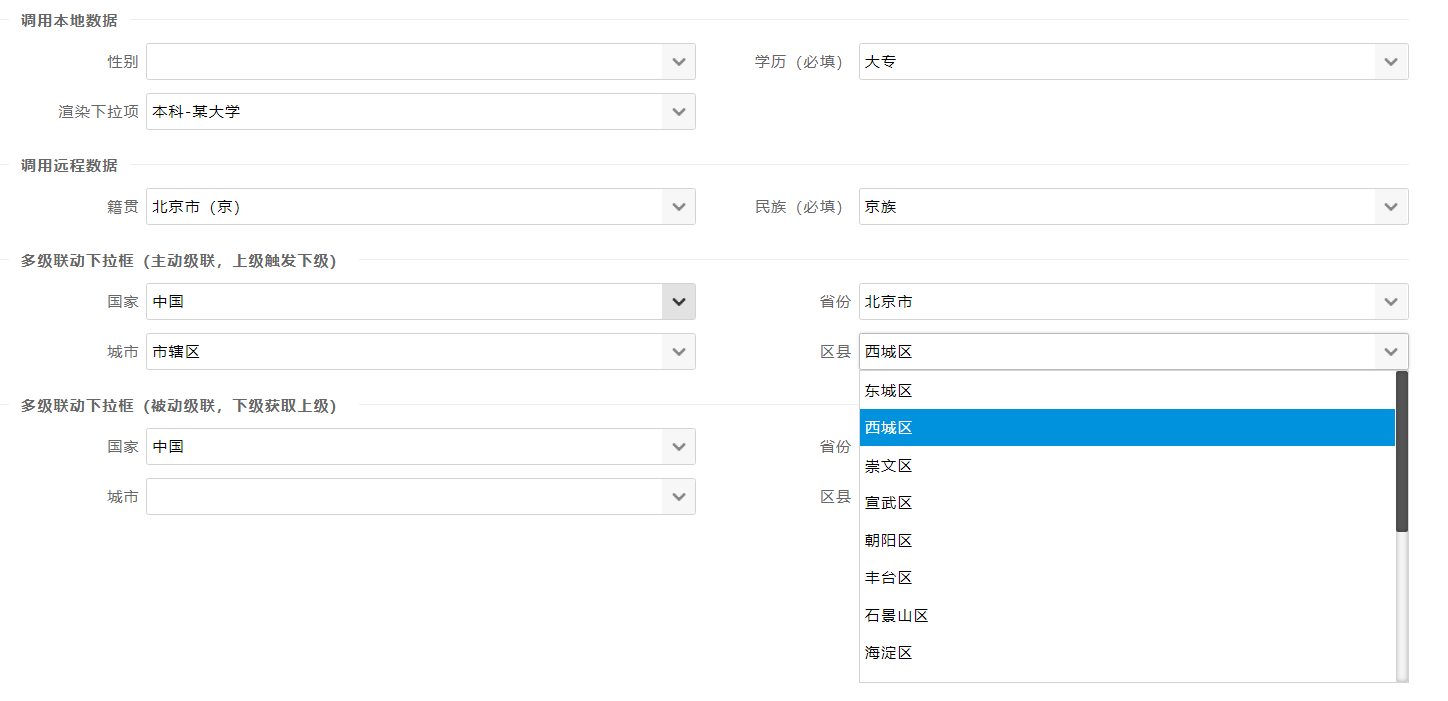
代码如下:
<form data-toggle="topjui-form">

    <div class="topjui-container">

        <fieldset>

            <legend>调用本地数据</legend>

        </fieldset>

        <div class="topjui-row">

            <div class="topjui-col-sm6">

                <label class="topjui-form-label">性别</label>

                <div class="topjui-input-block">

                    <input type="text" name="sex"

                           data-toggle="topjui-combobox"

                           data-options="data:[{value:1,text:'男'},{value:2,text:'女'}]">

                </div>

            </div>

            <div class="topjui-col-sm6">

                <label class="topjui-form-label">学历(必填)</label>

                <div class="topjui-input-block">

                    <input type="text" name="degree"

                           data-toggle="topjui-combobox"

                           data-options="required:true,

                       valueField:'id',

                       textField:'text',

                       data:[{id:1,text:'大专'},{id:2,text:'本科'},{id:3,text:'研究生'},{id:4,text:'博士生'}]">

                </div>

            </div>

        </div>

        <div class="topjui-row">

            <div class="topjui-col-sm6">

                <label class="topjui-form-label">渲染下拉项</label>

                <div class="topjui-input-block">

                    <input type="text" name="degree"

                           data-toggle="topjui-combobox"

                           data-options="required:true,

                           prompt:'使用formatter属性渲染下拉项',

                       valueField:'id',

                       textField:'text',

                       formatter:formatter,

                       data:[{id:2,text:'本科-某大学'},{id:3,text:'研究生-某大学'},{id:4,text:'博士生-某大学'}]">

                </div>

            </div>

        </div>

        <fieldset>

            <legend>调用远程数据</legend>

        </fieldset>

        <div class="topjui-row">

            <div class="topjui-col-sm6">

                <label class="topjui-form-label">籍贯</label>

                <div class="topjui-input-block">

                    <input type="text" name="nativePlace"

                           data-toggle="topjui-combobox"

                           data-options="panelHeight:250,

                       valueField:'id',

                       url:_ctx + '/json/combobox/nativePlace.json'">

                </div>

            </div>

            <div class="topjui-col-sm6">

                <label class="topjui-form-label">民族(必填)</label>

                <div class="topjui-input-block">

                    <input type="text" name="nation"

                           data-toggle="topjui-combobox"

                           data-options="required:true,

                       prompt:'必填',

                       panelHeight:250,

                       valueField:'id',

                       url:_ctx + '/json/combobox/nation.json'">

                </div>

            </div>

        </div>

        <fieldset>

            <legend>多级联动下拉框(主动级联,上级触发下级)</legend>

        </fieldset>

        <div class="topjui-row">

            <div class="topjui-col-sm6">

                <label class="topjui-form-label">国家</label>

                <div class="topjui-input-block">

                    <input type="text" name="country"

                           data-toggle="topjui-combobox"

                           data-options="panelHeight:250,

                       url:_ctx + '/json/combobox/country.json',

                       valueField: 'id',

                       childCombobox:{

                           id:'province',

                           url:remoteHost+'/system/codeItem/getListByPid?pid={parentValue}'

                       }">

                </div>

            </div>

            <div class="topjui-col-sm6">

                <label class="topjui-form-label">省份</label>

                <div class="topjui-input-block">

                    <input type="text" name="province"

                           data-toggle="topjui-combobox"

                           data-options="id:'province',

                       panelHeight:250,

                       valueField: 'id',

                       childCombobox:{

                           id:'city',

                           url:remoteHost+'/system/codeItem/getListByPid?pid={parentValue}'

                       }">

                </div>

            </div>

        </div>

        <div class="topjui-row">

            <div class="topjui-col-sm6">

                <label class="topjui-form-label">城市</label>

                <div class="topjui-input-block">

                    <input type="text" name="city"

                           data-toggle="topjui-combobox"

                           data-options="id:'city',

                       panelHeight:250,

                       valueField: 'id',

                       childCombobox:{

                           id:'district',

                           url:remoteHost+'/system/codeItem/getListByPid?pid={parentValue}'

                       }">

                </div>

            </div>

            <div class="topjui-col-sm6">

                <label class="topjui-form-label">区县</label>

                <div class="topjui-input-block">

                    <input type="text" name="district"

                           data-toggle="topjui-combobox"

                           data-options="id:'district',

                       panelHeight:250,

                       valueField: 'id'">

                </div>

            </div>

        </div>

        <fieldset>

            <legend>多级联动下拉框(被动级联,下级获取上级)</legend>

        </fieldset>

        <div class="topjui-row">

            <div class="topjui-col-sm6">

                <label class="topjui-form-label">国家</label>

                <div class="topjui-input-block">

                    <input type="text" name="country2"

                           data-toggle="topjui-combobox"

                           data-options="panelHeight:250,

                       valueField: 'id',

                       url:_ctx + '/json/combobox/country.json'">

                </div>

            </div>

            <div class="topjui-col-sm6">

                <label class="topjui-form-label">省份</label>

                <div class="topjui-input-block">

                    <input type="text" name="province2"

                           data-toggle="topjui-combobox"

                           data-options="id:'province2',

                       panelHeight:250,

                       valueField: 'id',

                       url:remoteHost+'/system/codeItem/getListByPid?pid={country2}'">

                </div>

            </div>

        </div>

        <div class="topjui-row">

            <div class="topjui-col-sm6">

                <label class="topjui-form-label">城市</label>

                <div class="topjui-input-block">

                    <input type="text"

                           name="city2"

                           data-toggle="topjui-combobox"

                           data-options="id:'city2',

                       panelHeight:250,

                       valueField: 'id',

                       url:remoteHost+'/system/codeItem/getListByPid?pid={province2}'">

                </div>

            </div>

            <div class="topjui-col-sm6">

                <label class="topjui-form-label">区县</label>

                <div class="topjui-input-block">

                    <input type="text"

                           name="district2"

                           data-toggle="topjui-combobox"

                           data-options="id:'district2',

                       panelHeight:250,

                       valueField: 'id',

                       url:remoteHost+'/system/codeItem/getListByPid?pid={city2}'">

                </div>

            </div>

        </div>

    </div>

</form>
EasyUI中文网:http://www.jeasyui.cn
TopJUI前端框架:http://www.topjui.com
TopJUI交流社区:http://ask.topjui.com
JQuery Easyui/TopJUI 创建多级联动下拉框(纯HTML实现!!!)的更多相关文章
- jQuery EasyUI/TopJUI创建树形表格下拉框
jQuery EasyUI/TopJUI创建树形表格下拉框 第一种方法(纯HTML创建) <div class="topjui-row"> <div class= ...
- 第二百二十四节,jQuery EasyUI,ComboGrid(数据表格下拉框)组件
jQuery EasyUI,ComboGrid(数据表格下拉框)组件 学习要点: 1.加载方式 2.属性列表 3.方法列表 本节课重点了解 EasyUI 中 ComboGrid(数据表格下拉框)组件的 ...
- 第二百二十七节,jQuery EasyUI,ComboTree(树型下拉框)组件
jQuery EasyUI,ComboTree(树型下拉框)组件 学习要点: 1.加载方式 2.属性列表 3.方法列表 本节课重点了解EasyUI中ComboTree(树型下拉框)组件的使用方法,这个 ...
- ajax 多级联动 下拉框 Demo
写了ajax实现级联下拉框,考虑常用,并且级联个数随不同业务个数不同,于是就整理了一下,实现了 ajax + N级联动 下拉框的效果 效果图 HTML 代码 <h2> 省级联动</h ...
- bootstrap 多级联动下拉框
<!DOCTYPE HTML> <html lang="zh-CN"> <head> <meta charset="UTF-8& ...
- jQuery cxSelect 多级联动下拉菜单
随着电商热门,这种多层次的互动更充分地体现在下拉菜单,最明显的是多级联动地址下拉选择,因此,这里是一个简单的分享 jQuery cxSelect 多级联动下拉菜单 cxSelect 它是基于 jQue ...
- jquery+html三级联动下拉框
jquery+html三级联动下拉框及详情页面加载时的select初始化问题 html写的三个下拉框,如下: <select name="ddlQYWZYJ" id=&q ...
- jquery+ligerform三级联动下拉框
如下为ligerform里的三级联动下拉框: var formData=[ {display:,width:,space:,type:"select",group:"区域 ...
- jQuery实现的3个基础案例(仿QQ列表分组,二级联动下拉框,模拟员工信息管理系统)
1.仿QQ列表分组 <!DOCTYPE HTML> <html> <head> <meta http-equiv="Content-Type&quo ...
随机推荐
- wamp server 安装后 Apache80端口占用
提示:Your port 80 is actually used by :Server: Microsoft-HTTPAPI/2.0 解决方案:计算机->右键管理->服务和应用程序-> ...
- hdu 2015校赛1002 Dual horsetail (思维题 )
Dual horsetail Time Limit: 2000/1000 MS (Java/Others) Memory Limit: 32768/32768 K (Java/Others)To ...
- SDUT 2766 小明传奇2
小明传奇2 Time Limit: 1000ms Memory limit: 65536K 有疑问?点这里^_^ 题目描述 小明不但创建了自己的商店而且选择了建立了自己的货币系统. 传统地,一个 ...
- BZOJ 1640 [Usaco2007 Nov]Best Cow Line 队列变换:贪心【字典序最小】
题目链接:http://www.lydsy.com/JudgeOnline/problem.php?id=1640 题意: 给你一个长度为n的字符串. 你可以将原串的首字母或尾字母移动到新串的末尾. ...
- PHP相关安全配置【转】
PHP是广泛使用的开源服务端脚本语言.通过HTTP或HTTPS协议,Apache Web服务允许用户访问文件或内容.服务端脚本语言的错误配置会导致各种问题.因此,PHP应该小心使用.以下是为系统管理员 ...
- LoadRunner监控图表与配置(三)对系统与网络资源进行监控
1.Windows可监控的性能计数器 2.UNIX可监控的性能计数器 3.性能计数器信息说明 Windows 性能对象 计数器 数值说明 System %Total Processor Time 系统 ...
- 在Windows7 下 mingw32 开发环境中采用 glut3.7 学习 OpenGL
2015年10月2日更新: 发现 freeglut 很好用兼容于 gut ,而且开源还在更新中.因此我觉得放弃以前的 glut 了,转而用 freeglut 了. 买了本<计算机图形学第4版&g ...
- codeforces 706A A. Beru-taxi(水题)
题目链接: A. Beru-taxi 题意: 问那个taxi到他的时间最短,水题; AC代码: #include <iostream> #include <cstdio> #i ...
- numpy中的tile函数
tile()函数可以很方便的生成多维数组.它有两个参数,第一个数是原始数组;第二个表示如何来生成,第一个数字表示生成几行,第二个表示每行有多少个原始数组(如果只写一个数字,那么就默认是一行). fro ...
- js修改页面动态添加input框显示与按钮可编辑
1. <%@ page language="java" contentType="text/html;charset=UTF-8"%> <%@ ...