
ASP.NET Core 入门笔记2,建立项目
1.建立项目

2.项目结构
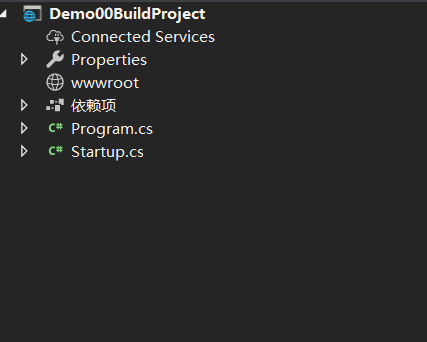
1、项目结构说明
| 根目录/文件 | 说明 |
|---|---|
| .vscode目录 | VS Code项目配置目录,相当于.vs、.idea文件夹 |
| bin目录 | 编译输出目录 |
| obj目录 | 编译配置与中间目录,用于存放编译配置与编译中间结果 |
| Properties目录 | 用于存放项目配置 |
| wwwroot目录 | 静态文件目录,css,js,图片等文件 |
| helloweb.csproj文件 | 项目描述文件 |
| Program.cs文件 | 应用程序入口类文件 |
| Startup.cs文件 | ASP.NET Core Web应用启动类文件,用于项目启动前进行相关配置 |
3.启动项目
我们直接按下F5,或者菜单:调试->启动调试启动项目,这里我们直接选择应用程序而不是IIS Express
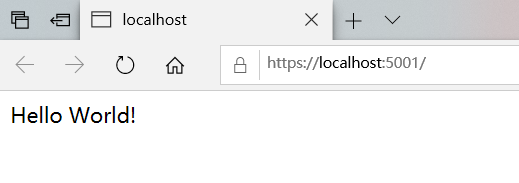
ASP.NET Core 默认绑定是5001端口,而且ASP.NET Core 2.1之后默认绑定了HTTPS,项目启动成功后,VS Code会帮我们打开默认浏览器并访问:https://localhost:5001
4.修改绑定协议HTTPS为HTTP,并且修改配置文件
接着我们可以修改配置去掉HTTPS协议绑定
打开Properties/launchSettings.json文件
{

  "iisSettings": {

    "windowsAuthentication": false,

    "anonymousAuthentication": true,

    "iisExpress": {

      "applicationUrl": "http://localhost:6323",

      "sslPort":

    }

  },

  "profiles": {

    "IIS Express": {

      "commandName": "IISExpress",

      "launchBrowser": true,

      "environmentVariables": {

        "ASPNETCORE_ENVIRONMENT": "Development"

      }

    },

    "Demo00BuildProject": {

      "commandName": "Project",

      "launchBrowser": true,

      "applicationUrl": "https://localhost:5001;http://localhost:5000",

      "environmentVariables": {

        "ASPNETCORE_ENVIRONMENT": "Development"

      }

    }

  }

}
iisSettings、profiles.helloweb配置节点都有启动绑定配置,因为VS Code启动项目默认是不通过IIS来host的,iisSettings选项我们忽略即可。将applicationUrl修改为http://localhost:5001
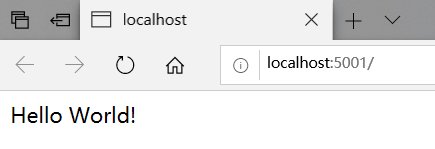
然后重启项目(Ctrl+Shift+F5)机会看到干净纯洁的Hello World!
{

  "profiles": {

    "Demo00BuildProject": {

      "commandName": "Project",

      "launchBrowser": true,

      "applicationUrl": "http://localhost:5001",

      "environmentVariables": {

        "ASPNETCORE_ENVIRONMENT": "Development"

      }

    }

  }

}
修改后运行
4.项目启动简介
应用程序入口类,在应用启动的时候,会执行CreateWebHostBuilder方法,在这个方法中通过类Startup创建了默认了HostBuilder
    public class Program

    {

        public static void Main(string[] args)

        {

            CreateWebHostBuilder(args).Build().Run();

        }

        public static IWebHostBuilder CreateWebHostBuilder(string[] args) =>

            WebHost.CreateDefaultBuilder(args)

                .UseStartup<Startup>();

    }
应用启动类,web项目模板默认在项目启动的时候调用IApplicationBuilder.run方法,在当前HTTP上下文(HttpContext)中输出了Hello World!,ConfigureService一般用于启动单例,配置,注入等过程,Configure时用户请求管道,用于解析处理用户的请求,mvc中间件,权限控制等过程在此处进行
public class Startup

    {

        // This method gets called by the runtime. Use this method to add services to the container.

        // For more information on how to configure your application, visit https://go.microsoft.com/fwlink/?LinkID=398940

        public void ConfigureServices(IServiceCollection services)

        {

        }

        // This method gets called by the runtime. Use this method to configure the HTTP request pipeline.

        public void Configure(IApplicationBuilder app, IHostingEnvironment env)

        {

            if (env.IsDevelopment())

            {

                app.UseDeveloperExceptionPage();

            }

            app.Run(async (context) =>

            {

                await context.Response.WriteAsync("Hello World!");

            });

        }

    }
| 方法 | 说明 |
|---|---|
| ConfigureServices | 用于配置应用启动时加载的Service |
| Configure | 用于配置HTTP请求管道 |
web项目模板默认在项目启动的时候调用IApplicationBuilder.run方法,在当前HTTP上下文(HttpContext)中输出了Hello World!
context.Response.WriteAsync(“Hello World!”);
ASP.NET Core 入门笔记2,建立项目的更多相关文章
- ASP.NET Core 入门笔记 1,项目概览
(1)新建项目选择ASP.NET Core Web应用程序 (2)程序会自动安装相应的包组件,此时依赖项会有感叹号,等待安装完毕感叹号消失 (3)在项目的文件夹下建立其他文件,都会在项目资源视图中显示 ...
- ASP.NET Core 入门笔记10,ASP.NET Core 中间件(Middleware)入门
一.前言 1.本教程主要内容 ASP.NET Core 中间件介绍 通过自定义 ASP.NET Core 中间件实现请求验签 2.本教程环境信息 软件/环境 说明 操作系统 Windows 10 SD ...
- ASP.NET Core 入门笔记8,ASP.NET Core MVC 分部视图入门
一.前言 1.本教程主要内容 ASP.NET Core MVC (Razor)分部视图简介 ASP.NET Core MVC (Razor)分部视图基础教程 ASP.NET Core MVC (Raz ...
- ASP.NET Core 入门笔记9,ASP.NET Core + Entity Framework Core 数据访问入门
一.前言 1.本教程主要内容 ASP.NET Core MVC 集成 EF Core 介绍&操作步骤 ASP.NET Core MVC 使用 EF Core + Linq to Entity ...
- ASP.NET Core 入门笔记7,ASP.NET Core MVC 视图布局入门
一.前言 1.本教程主要内容 ASP.NET Core MVC (Razor)视图母版页教程 ASP.NET Core MVC (Razor)带有Section的视图母版页教程 ASP.NET Cor ...
- ASP.NET Core 入门笔记6,ASP.NET Core MVC 视图传值入门
摘抄自:https://www.cnblogs.com/ken-io/p/aspnet-core-tutorial-mvc-view-renderdata.html 如有侵权请告知 一.前言 1.本教 ...
- ASP.NET Core 入门笔记5,ASP.NET Core MVC控制器入门
摘抄自https://www.cnblogs.com/ken-io/p/aspnet-core-tutorial-mvc-controller-action.html 一.前言 1.本教程主要内容 A ...
- ASP.NET Core 入门笔记4,ASP.NET Core MVC路由入门
敲了一部分,懒得全部敲完,直接复制大佬的博客了,如有侵权,请通知我尽快删除修改 摘抄自https://www.cnblogs.com/ken-io/p/aspnet-core-tutorial-mvc ...
- ASP.NET Core 入门笔记3,使用ASP.NET Core MVC框架构建Web应用
一.ASP.NET Core MVC 输出Hello World,Friend! 1.引入 ASP.NET Core MVC 修改应用启动类(Startup.cs),引入MVC模块并配置默认路由 pu ...
随机推荐
- (十)zabbix监控TCP状态
1)agent端配置 agent端脚本获取监控项 #vim /etc/zabbix/zabbix_agentd.d/tcp_status.sh #bin/bash [ $# -ne 1 ] & ...
- sysbench运行autogen.sh报错
./autogen.sh: 4: autoreconf: not found是在不同版本的 tslib 下执行 autogen.sh 产生.它们产生的原因一样,是因为没有安装automake 工具, ...
- c++使用初始化列表来初始化字段
#include<iostream> using namespace std; class Student1 { private: int _a; int _b; public: void ...
- 常用NoSql数据库比较
1. CouchDB 所用语言: Erlang 特点:DB一致性,易于使用 使用许可: Apache 协议: HTTP/REST 双向数据复制, 持续进行或临时处理, 处理时带冲突检查, 因此,采用的 ...
- The Cost of JavaScript --------引用
tl;dr: 想要保持页面的快速运行,你需要仅加载当前页面所需的 JavaScript 代码.优先考虑用户所需,之后运用代码分离懒加载其他内容. Is it happening - 在这个时期,你可以 ...
- EF 批量添加数据
原文:https://www.cnblogs.com/liuruitao/p/10049191.html 原文:https://www.cnblogs.com/yaopengfei/p/7751545 ...
- Python之asyncio模块的使用
asyncio模块作用:构建协程并发应用的工具 python并发的三大内置模块,简单认识: .multiprocessing:多进程并发处理 .threading模块:多线程并发处理 .asyncio ...
- tomcat下载与安装
https://www.cnblogs.com/limn/p/9358657.html
- less的解析笔记
Less是一种动态的样式语言.Less扩展了CSS的动态行为,比如说,设置变量(Variables).混合书写模式(mixins).操作(operations)和功能(functions)等等,最棒的 ...
- Latex里面的\newtheorem*{xx}{yy}后面的*是干什么的?
答案: 加了*表示不标号.例如: 同样使用命令: \begin{prb} xx\end{prb} 1. \newtheorem{prb}{Problem Formulation} → Problem ...