
获取impala下所有的数据库建表语句
本博文介绍三种方法,推荐使用第三种,前两种都是尝试。
方法一:
现在的导出还是有缺陷的,导出的文件中还是存在其他不必要的信息
#!/bin/bash

##获取数据库

databases=$(hive -e "show databases; exit;")

for database in $databases;

do

#获取hive建表语句

tables=$(hive -e "use $database; show tables;")

 for table in $tables;

 do

 echo "--=========== db: $database , table: $table ===========" >> $database.sql

 echo "$(hive -e "use $database;show create table $table;");" >> $database.sql

 done

done
还没有找到其他方法。有其他解决方法,可以Mark一下我
方法二:
20191108今天有想出来一个方法,有点繁杂,但也是可以的,用impala-shell
1.先准备一个文件(tables_name.txt),我们会读这个文件
[root@bigdata zw]# more tables_name.txt

show create table cdata.c01_bill_distr_stat

show create table cdata.c01_bill_distr_stat_temp1

show create table cdata.c01_bill_pro_bal

show create table cdata.c01_bill_repay_stat

show create table cdata.c01_bill_repay_stat_temp1
2.一个小脚本
#!/usr/bin/python

# -*- coding:utf-8 -*-

import time,sys

import os

reload(sys)

sys.setdefaultencoding("utf8")

file=open("tables_name.txt")

send_file = file.readlines()

for i in send_file:

   os_cmd1 = "impala-shell -q 'use cdata' "

   os_cmd2 = "impala-shell -q '"+ i.strip('\n') +"'"

   os.system(os_cmd2)

file.close()
都放在一个目录下,运行python脚本,这时候,日志会打印到屏幕上,需要获取屏幕上的日志内容即可。
我用的xshell工具
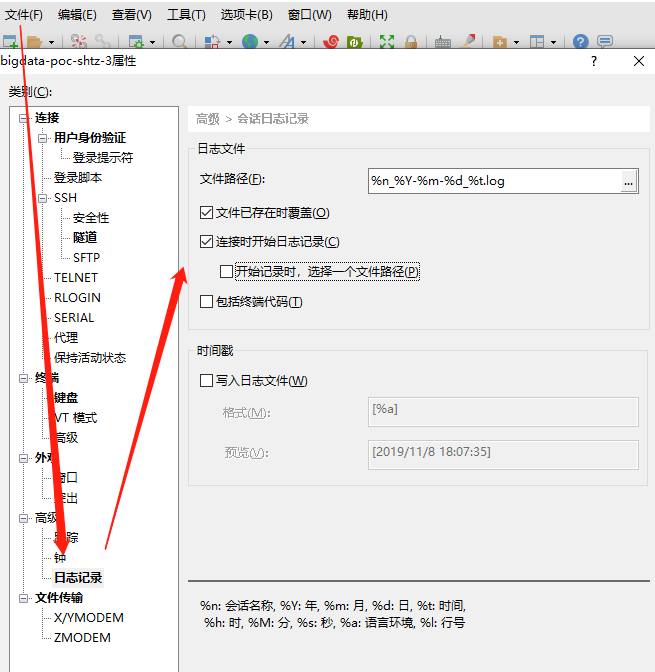
这个时候,所有的日志都会打印到文件中(bigdata_2019-11-08_17-20-11),可以找到自己想要的内容。
方法三:
#!/usr/bin/env python

#-*- coding:utf8 -*-

# 从mysql中提取hive建表语句

import os,sys

import fileinput

import datetime

import mysql.connector

reload(sys)

sys.setdefaultencoding("utf8")

def hive_create_table():

    conn = mysql.connector.connect(host="192.168.xxx.xxx",user='hive',passwd='',database='hive',charset='utf8')

    mycursor = conn.cursor()

    # 获取DB_ID

    select_DB_ID = "select DB_ID from DBS;"

    mycursor.execute(select_DB_ID)

    result_DB_ID = mycursor.fetchall()

    fo = open("create_tab.sql", "w")

    for dir_DB_ID in result_DB_ID :

        # 获取数据库名

        DB_ID = str(dir_DB_ID)[1:].split(',')[0]

          print(DB_ID)

        select_DB_NAME = "select NAME from DBS where DB_ID="+DB_ID+";"

        print(select_DB_NAME )

        mycursor.execute(select_DB_NAME)

        result_DB_NAME = mycursor.fetchone()

        fo.write("\n===========数据库:"+str(result_DB_NAME).split('\'')[1]+"===========\n")

        DBname=str(result_DB_NAME).split('\'')[1]

        print '数据库名字:' + DBname

        print(result_DB_NAME)

        # 获取表名

        select_table_name_sql = "select TBL_NAME from TBLS where DB_ID="+DB_ID+";"

        mycursor.execute(select_table_name_sql)

        result_table_names = mycursor.fetchall()

        for table_name in result_table_names :

            fo.write("\nCREATE TABLE "+DBname +'.`'+str(table_name).split('\'')[1]+"`(\n")

            # 根据表名获取SD_ID

            select_table_SD_ID = "select SD_ID from TBLS where tbl_name='"+str(table_name).split('\'')[1]+"' and DB_ID="+DB_ID+";"

            print(select_table_SD_ID)

            mycursor.execute(select_table_SD_ID)

            result_SD_ID = mycursor.fetchone()

            print(result_SD_ID )

            # 根据SD_ID获取CD_ID

            SD_ID=str(result_SD_ID)[1:].split(',')[0]

            select_table_CD_ID = "select CD_ID from SDS where SD_ID="+str(result_SD_ID)[1:].split(',')[0]+";"

            print(select_table_CD_ID)

            mycursor.execute(select_table_CD_ID)

            result_CD_ID = mycursor.fetchone()

            print(result_CD_ID)

            # 根据CD_ID获取表的列

            CD_ID=str(result_CD_ID)[1:].split(',')[0]

            select_table_COLUMN_NAME = "select COLUMN_NAME,TYPE_NAME,COMMENT from COLUMNS_V2 where CD_ID="+str(result_CD_ID)[1:].split(',')[0]+" order by INTEGER_IDX;"

            print(select_table_COLUMN_NAME)

            mycursor.execute(select_table_COLUMN_NAME)

            result_COLUMN_NAME = mycursor.fetchall()

            print(result_COLUMN_NAME)

               index=0

            for col,col_type,col_name in result_COLUMN_NAME:

                print(col)

                print(col_type)

                print(col_name)

                print(len(result_COLUMN_NAME) )

            # 写入表的列和列的类型到文件

                if col_name is None:

                   fo.write("  `"+str(col)+"`  "+str(col_type))

                else:

                   fo.write("  `"+str(col)+"`  "+str(col_type) + " COMMENT '" + str(col_name) + "'")

                if index < len(result_COLUMN_NAME)-1:

                   index = index + 1

                   fo.write(",\n")

                elif index == len(result_COLUMN_NAME)-1:

                   fo.write("\n)")

            # 根据表名获取TBL_ID

            select_table_SD_ID = "select TBL_ID from TBLS where tbl_name='"+str(table_name).split('\'')[1]+"' and DB_ID="+DB_ID+";"

            print(select_table_SD_ID)

            mycursor.execute(select_table_SD_ID)

            result_TBL_ID = mycursor.fetchone()

            print(result_TBL_ID)

            # 根据TBL_ID获取分区信息

            select_table_PKEY_NAME_TYPE = "select PKEY_NAME,PKEY_TYPE,PKEY_COMMENT from PARTITION_KEYS where TBL_ID="+str(result_TBL_ID)[1:].split(',')[0]+" order by INTEGER_IDX;"

            print(select_table_PKEY_NAME_TYPE)

            mycursor.execute(select_table_PKEY_NAME_TYPE)

            result_PKEY_NAME_TYPE = mycursor.fetchall()

            print(result_PKEY_NAME_TYPE)

            if len(result_PKEY_NAME_TYPE) > 0:

               fo.write("\nPARTITIONED BY (\n")

            else :

               fo.write("\n")

            i=0

            for pkey_name,pkey_type,PKEY_COMMENT in result_PKEY_NAME_TYPE:

                if str(PKEY_COMMENT) is None:

                   fo.write("  `"+str(pkey_name)+"`  "+str(pkey_type))

                else:

                   fo.write("  `"+str(pkey_name)+"`  "+str(pkey_type) + " COMMENT '" + str(PKEY_COMMENT) + "'\n")

                if i < len(result_PKEY_NAME_TYPE)- 1:

                   i = i + 1

                   fo.write(",")

                elif i == len(result_PKEY_NAME_TYPE) - 1:

                   fo.write(")\n")

            # 根据表TBL_ID 获得中文名称

            select_PARAM_VALUE01 = "select PARAM_VALUE from TABLE_PARAMS  WHERE TBL_ID=( select TBL_ID from TBLS where tbl_name='"+str(table_name).split('\'')[1]+"' and DB_ID="+DB_ID+") and PARAM_KEY='comment';"

            print(select_PARAM_VALUE01)

            mycursor.execute(select_PARAM_VALUE01)

            result_PARAM_VALUE01 = mycursor.fetchone()

            print result_PARAM_VALUE01

            if result_PARAM_VALUE01 is None:

               print '未设置表名'

            elif not result_PARAM_VALUE01[0]:

               print '表名为空'

            else:

               fo.write("COMMENT '" + str(result_PARAM_VALUE01[0]) +"' \n" )

            # 根据SD_ID和CD_ID获取SERDE_ID

            select_SERDE_ID = "select SERDE_ID from SDS where SD_ID="+SD_ID+" and CD_ID="+CD_ID+";"

            print(select_SERDE_ID)

            mycursor.execute(select_SERDE_ID)

            result_SERDE_ID = mycursor.fetchone()

               print(result_SERDE_ID)

            # 根据SERDE_ID获取PARAM_VALUE(列分隔符)

            select_PARAM_VALUE = "select PARAM_VALUE from SERDE_PARAMS where SERDE_ID="+str(result_SERDE_ID)[1:].split(",")[0]+" and PARAM_KEY='field.delim';"

            print(select_PARAM_VALUE)

            mycursor.execute(select_PARAM_VALUE)

            result_PARAM_VALUE = mycursor.fetchone()

            print(result_PARAM_VALUE)

            if result_PARAM_VALUE is not None:

               fo.write("ROW FORMAT DELIMITED\n")

               fo.write("FIELDS TERMINATED BY '"+str(result_PARAM_VALUE).split('\'')[1]+"'\n")

            # 根据SERDE_ID获取PARAM_VALUE(行分隔符)

            select_PARAM_HNAG = "select PARAM_VALUE from SERDE_PARAMS where SERDE_ID="+str(result_SERDE_ID)[1:].split(",")[0]+" and PARAM_KEY='line.delim';"

            print(select_PARAM_HNAG)

            mycursor.execute(select_PARAM_HNAG)

            RESULT_PARAM_HNAG = mycursor.fetchone()

            print(RESULT_PARAM_HNAG)

            if RESULT_PARAM_HNAG is not None:

               fo.write("LINES TERMINATED BY '"+str(RESULT_PARAM_HNAG).split('\'')[1]+"'\n")

            # 根据SD_ID和CD_ID获取输入输出格式

            select_table_STORE_FORMAT = "select INPUT_FORMAT from SDS where SD_ID="+SD_ID+" and CD_ID="+CD_ID+";"

            print(select_table_STORE_FORMAT)

            mycursor.execute(select_table_STORE_FORMAT)

            result_table_STORE_FORMAT= mycursor.fetchall()

            print(result_table_STORE_FORMAT)

            for store_format in result_table_STORE_FORMAT:

                if "org.apache.hadoop.hive.ql.io.orc.OrcInputFormat" in str(store_format):

                   fo.write("STORED AS ORC;\n")

                elif "org.apache.hadoop.mapred.TextInputFormat" in str(store_format):

                   fo.write("STORED AS TEXTFILE;\n")

                elif "org.apache.hadoop.hive.ql.io.parquet.MapredParquetInputFormat" in str(store_format):

                   fo.write("STORED AS PARQUET;\n")

                elif "org.apache.kudu.mapreduce.KuduTableInputFormat" in str(store_format):

                   fo.write("STORED AS KuduTable;\n")

                else :

                   fo.write("STORED AS null;\n")

    fo.close()

hive_create_table()
直接生成建表脚本的SQL文件。可以直接运行建表
获取impala下所有的数据库建表语句的更多相关文章
- PowerDesigner连接Oracle数据库建表序列号实现自动增长
原文:PowerDesigner连接Oracle数据库建表序列号实现自动增长 创建表就不说了.下面开始介绍设置自动增长列. 1 在表视图的列上创建.双击表视图,打开table properties — ...
- Java项目专栏之数据库建表
Java项目专栏之数据库建表 数据库建表前期准备 1. 安装mysql:数据库语言,语法和sql server差不太多,如果习惯于sql server可以不用mysql. 2. 安装navicat:可 ...
- 使用PowerDesigner进行数据库设计并直接把设计好的表导出相应的建表语句
Power Designer:数据库表设计工具 PowerDesigner是Sybase公司的一款软件,使用它可以方便地对系统进行分析设计,他几乎包括了数据库模型设计的全过程.利用PowerDesig ...
- 【Java框架型项目从入门到装逼】第九节 - 数据库建表和CRUD操作
1.新建学生表 这节课我们来把和数据库以及jdbc相关的内容完成,首先,进行数据库建表.数据库呢,我们采用MySQL数据库,我们可以通过navcat之类的管理工具来轻松建表. 首先,我们得建一个数据库 ...
- vue.js+koa2项目实战(六)数据库建表
数据库建表 1.打开 MySQL 终端 2.查看所有数据库 show databases 3.创建数据库 create database pet 4.进入数据库 use pet 5.创建数据表 cre ...
- 字段自动递增的数据库建表的SQL写法
数据库建表的SQL写法如下: 数据库建表的SQL写法如下: create table dataC( a int identity(1,2) primary key, b varchar(20)) ...
- 【SQL Server DBA】维护语句:删除并创建外键约束、获取建表语句
原文:[SQL Server DBA]维护语句:删除并创建外键约束.获取建表语句 1.删除外键约束,建立外键约束 先建立3个表: /* drop table tb drop table tb_b dr ...
- 数据库转换Mysql-Oracle之建表语句
Mysql建库语句(导出的): DROP TABLE IF EXISTS `tablename`; CREATE TABLE `tablename` ( `C_DI_CDE` varchar(40) ...
- 根据javabean转换为mysql建表语句与mapper内容
原文地址: https://www.cnblogs.com/Jeffscnblog/p/10072483.html 一般上,我们会使用数据库表转换为javabean.dao.或是mapper,就叫逆 ...
随机推荐
- 数学建模python matlab 编程(喷泉模拟)
在无风情况下的喷泉模拟 我的python代码 import numpy as np import random import matplotlib matplotlib.rcParams['font. ...
- Cloudera Manager 概念
cloudera公司发布的CDH集群,使用Cloudera Manager来管理整个集群,使用过程中主要涉及到几个关键概念:cluster.service.role.host.直接上图,直观理解几个概 ...
- MLN 讨论 —— 基础知识
一. MLN相关知识的介绍 1. First-order logic A first-order logic knowledge base (KB) is a set of formulas in f ...
- Semaphore 并发信号
package com.thread; import java.util.concurrent.ExecutorService; import java.util.concurrent.Executo ...
- Centos7系统下以RPM方式如何安装mysql-5.7
检查系统是否装有mariadb rpm -qa | grep mariadb 卸载mariadb 强制卸载mariadb rpm -e --nodeps mariadb-libs-5.5.35-3.e ...
- Hadoop 3.1.3伪分布式环境安装Hive 3.1.2的异常总结
背景:hadoop版本为3.1.3, 且以伪分布式形式安装,hive版本为3.1.2,hive为hadoop的一个客户端. 1. 安装简要步骤 (1) 官网下载apache-hive-3.1.2-bi ...
- Ubuntu搭建Spring源码环境常见问题
在一心想要学习Spring框架源码时,我们会遇到很多麻烦的问题.开始本文前,你只需要拥有一个装好IDEA的Ubuntu系统就可以愉快启程了.如果还没有IDEA,可以参考在Ubuntu上安装Intell ...
- JPG文件结构分析
[转自网络 作者:一 江秋水] 一.简述 JPEG是一个压缩标准,又可分为标准 JPEG.渐进式JPEG及JPEG2000三种: ①标准JPEG:以24位颜色存储单个光栅图像,是与平台无关的格式,支 ...
- 【VS开发】CString 转为 char *方法大全
[VS开发]CString 转为 char *方法大全 标签(空格分隔): [VS开发] 方法1: CString strTemp; char szTemp[128]; strTemp = _T(&q ...
- Odoo13 新功能:委外
[ADD] mrp_subcontracting In a few words, it allows to send components to a subcontractor partner and ...