
Mysql中设置指定IP的特定用户及特定权限
创建用户:
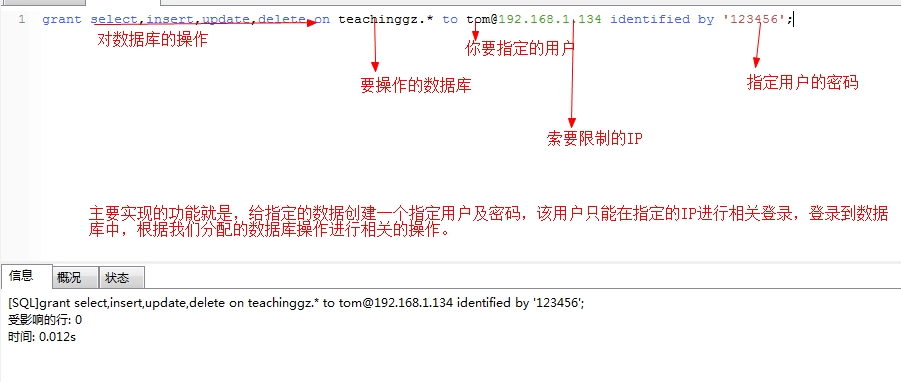
格式:grant select on 数据库.* to 用户名@登录主机 identified by '密码'
举例:
例 1:增加一个用户 test1 密码为 abc,让他可以在任何主机上登录,并对所有数据库有
查询、插入、修改、删除的权限。首先用以 root 用户连入 MySQL,然后键入以下命令:
grant select,insert,update,delete on *.* to root@localhost identified by 'mysql';
或者
grant all privileges on *.* to root@localhost identified by 'mysql';
然后刷新权限设置。
flush privileges;
例 2:如果你不想 root 有密码操作数据库“mydb”里的数据表,可以再打一个命令将密码消掉。
grant select,insert,update,delete on mydb.* to root@localhost identified by '';
#注意:此处的"localhost",是指该用户只能在本地登录,不能在另外一台机器上远程登录。
如果想远程登录的话,将"localhost"改为"%",
表示在任何一台电脑上都可以登录。也可以指定某台机器可以远程登录。
2、修改密码

 用UPDATE直接编辑user表

  mysql -u root

  mysql> use mysql;

  mysql> UPDATE user SET Password = PASSWORD('newpass') WHERE user = 'root';

  mysql> FLUSH PRIVILEGES;

在丢失root密码的时候,可以这样

  mysqld_safe --skip-grant-tables&

  mysql -u root mysql

  mysql> UPDATE user SET password=PASSWORD("new password") WHERE user='root';

  mysql> FLUSH PRIVILEGES;
3、修改登录的ip,让那个ip可以登录
数据库可以远程连接或者说用IP地址可以访问
可能是你的帐号不允许从远程登陆,只能在localhost。

这个时候只要在localhost的那台电脑,登入mysql后,

更改 "mysql" 数据库里的 "user" 表里的 "host" 项,

从"localhost"改称"%"

mysql -u root -p

mysql>use mysql;
mysql> GRANT ALL PRIVILEGES ON *.* TO 'root'@'192.168.1.100' IDENTIFIED BY 'password' WITH GRANT OPTION;
mysql> flush privileges; #刷新数据库(不要然,重启才可以看到效果)
mysql> select host, user from user; #查看
4. 删除用户
@>mysql -u root -p
@>密码
mysql>Delete FROM user Where User='test' and Host='localhost';
mysql>flush privileges;
mysql>drop database testDB; //删除用户的数据库
删除账户及权限:>drop user 用户名@'%';
>drop user 用户名@ localhost;
5. 列出所有数据库
mysql>show database;
6. 切换数据库
mysql>use '数据库名';
7. 列出所有表
mysql>show tables;
8. 显示数据表结构
mysql>describe 表名;
9. 删除数据库和数据表
mysql>drop database 数据库名;
mysql>drop table 数据表名;
10.表操作
备注:操作之前使用“use <数据库名>”应连接某个数据库。
建表
命令:create table <表名> (<字段名 1> <类型 1> [,..<字段名 n> <类型 n>]);
例子:
mysql> create table MyClass(
> id int(4) not null primary key auto_increment,
> name char(20) not null,
> sex int(4) not null default '0',
> degree double(16,2));
获取表结构
命令: desc 表名,或者show columns from 表名
例子:
mysql> describe MyClass
mysql> desc MyClass;
mysql> show columns from MyClass;
删除表
命令:drop table <表名>
例如:删除表名为 MyClass 的表
mysql> drop table MyClass;
插入数据
命令:insert into <表名> [( <字段名 1>[,..<字段名 n > ])] values ( 值 1 )[, ( 值 n )]
例子:
mysql> insert into MyClass values(1,'Tom',96.45),(2,'Joan',82.99), (2,'Wang', 96.59);
查询表中的数据
查询所有行
mysql> select * from MyClass;
查询前几行数据
例如:查看表 MyClass 中前 2 行数据
mysql> select * from MyClass order by id limit 0,2;
或者
mysql> select * from MyClass limit 0,2;
删除表中数据
命令:delete from 表名 where 表达式
例如:删除表 MyClass 中编号为 1 的记录
mysql> delete from MyClass where id=1;
修改表中数据
命令:update 表名 set 字段=新值,... where 条件
mysql> update MyClass set name='Mary' where id=1;
在表中增加字段
命令:alter table 表名 add 字段 类型 其他;
例如:在表 MyClass 中添加了一个字段 passtest,类型为 int(4),默认值为 0
mysql> alter table MyClass add passtest int(4) default '0'
更改表名
命令:rename table 原表名 to 新表名;
例如:在表 MyClass 名字更改为 YouClass
mysql> rename table MyClass to YouClass;
更新字段内容
命令:update 表名 set 字段名 = 新内容
update 表名 set 字段名 = replace(字段名, '旧内容', '新内容');
例如:文章前面加入 4 个空格
update article set content=concat(' ', content);
原文https://www.cnblogs.com/lemon-flm/p/7597879.html
Mysql中设置指定IP的特定用户及特定权限的更多相关文章
- mysql设置指定ip访问,用户权限相关操作
基础语法GRANT priv_type ON database.table TO user[IDENTIFIED BY [PASSWORD] 'password'] [,user [IDENTIFIE ...
- mysql设置指定ip远程访问连接的方法
本文实例讲述了mysql设置指定ip远程访问连接的方法,分享给大家供大家参考.具体实现方法如下: 1. 授权用户root使用密码jb51从任意主机连接到mysql服务器: 复制代码 代码如下: GRA ...
- [原创]java WEB学习笔记78:Hibernate学习之路---session概述,session缓存(hibernate 一级缓存),数据库的隔离级别,在 MySql 中设置隔离级别,在 Hibernate 中设置隔离级别
本博客的目的:①总结自己的学习过程,相当于学习笔记 ②将自己的经验分享给大家,相互学习,互相交流,不可商用 内容难免出现问题,欢迎指正,交流,探讨,可以留言,也可以通过以下方式联系. 本人互联网技术爱 ...
- Ubuntu中设置静态IP和DNS
在Ubuntu中设置静态IP共两步:1>设置IP:2>设置DNS1>设置IP 编辑 /etc/network/interface文件: sudo vi /etc/n ...
- Ubuntu中设置静态IP和DNS(转载)
原文地址:http://blog.sina.com.cn/s/blog_669421480102v3bb.html VMware 中使用网络,对虚拟机设置静态IP:在Ubuntu中设置静态IP共两步: ...
- 在linux中设置静态ip地址
在linux中设置静态ip地址1.在终端中输入:vi /etc/sysconfig/network-scripts/ifcfg-eth0 2.开始编辑,填写ip地址.子网掩码.网关.DNS等[root ...
- 在MySQL中设置事务隔离级别有2种方法:
在MySQL中设置事务隔离级别有2种方法: 1 在my.cnf中设置,在mysqld选项中如下设置 [mysqld] transaction-isolation = READ-COMMITTED 2 ...
- Mysql中设置默认时间为系统当前时间
Mysql中设置默认时间为系统当前时间 数据库设计时会遇到的一种情况:将系统当前时间设成默认值存储 数据库设计编码: CREATE TABLE `test` ( `name` varchar(50) ...
- mysql设置指定ip远程访问连接实例
1. 授权用户root使用密码jb51从任意主机连接到mysql服务器: 复制代码代码如下: GRANT ALL PRIVILEGES ON *.* TO 'root'@'%' IDENTIFIED ...
随机推荐
- MYSQL primary key use btree 是什么含义了解一下
CREATE TABLE `sth_definition` ( `id` int(11) NOT NULL AUTO_INCREMENT, `analyseId` bigint(20) DEFAULT ...
- Auto Layout: Programmatic Constraints - BNR
继续Auto Layout - BNR篇. 打开BNRDetailViewController.m文件,重载viewDidLoad方法来创建UIImageView对象.当你想要给通过加载NIB文件创建 ...
- 即将发布的 ASP.NET Core 2.2 会有哪些新玩意儿?
今年 6 月份的时候时候 .NET 团队就在 GitHub 公布了 ASP.NET Core 2.2 版本的 Roadmap(文末有链接),而前两天 ASP.NET Core 2.2 预览版 2 已经 ...
- 【Swift 4.2】uuid 取 hashCode(与 Java/Go/Kotlin 一致)
extension String { func hashCode() -> Int32 { let components = self.split(separator: "-" ...
- Vue slot插槽内容分发
slot插槽使用 使用场景,一般父组件中又一大段模板内容需要运用到子组件上.或者更加复杂的,子组件需要运用到父组件大段模板内容,而子组件却不知道挂载的内容是什么.挂载点的内容是由父组件来决定的. Sl ...
- SystemCheckError: System check identified some issues: ERRORS: users.Test.groups: (fields.E304) Reverse accessor for 'Test.groups' clashes with reverse accessor for 'User.groups'.
Error Msg: SystemCheckError: System check identified some issues: ERRORS: users.Test.groups: (fields ...
- H5 基于Web Storage 的客户端留言板
<!DOCTYPE html> <html> <head> <meta name="author" content="Yeeku ...
- [转帖]Oracle 12cR2使用经验
大规模升级来临,谈谈Oracle 12cR2使用经验 随着2019年2月13日,Oracle 19c (Oracle 12.2.0.3) for Exadata 版本发布,Oracle 12cR2体系 ...
- Mybatis映射文件的自动映射与手动映射问题
Mapper XML 文件 MyBatis 的真正强大在于它的映射语句,也是它的魔力所在.由于它的异常强大,映射器的 XML 文件就显得相对简单.如果拿它跟具有相同功能的 JDBC 代码进行对比,你会 ...
- C# Note38: Export data into Excel
Microsoft.Office.Interop.Excel You have to have Excel installed. Add a reference to your project to ...