
Unity编辑器扩展学习 转载
https://www.xuanyusong.com/archives/category/unity/unity3deditor
1
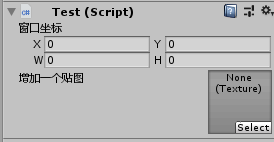
using UnityEngine;

public class Test : MonoBehaviour {
    public Rect rect;
    public Texture texture;
}

using UnityEngine;
using UnityEditor;

[CustomEditor(typeof(Test))]
public class MyEditor: Editor {
    public override void OnInspectorGUI() {
        Test test = (Test)target;
        test.rect = EditorGUILayout.RectField("窗口坐标", test.rect);
        test.texture = EditorGUILayout.ObjectField("增加一个贴图", test.texture, typeof(Texture), true) as Texture;
    }
}
2
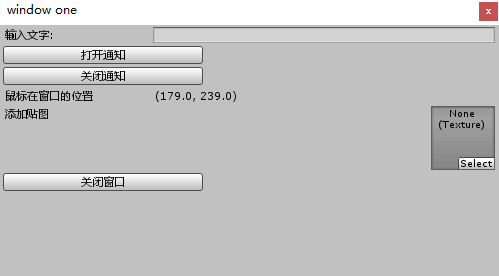
using UnityEngine;
using UnityEditor;

public class MyEditor: EditorWindow {

    private string text;
    private Texture texture;

    [MenuItem("GameObject/window")]
    public static void AddWindow() {
        Rect rect = , , , );
        MyEditor window = (MyEditor)EditorWindow.GetWindowWithRect(typeof(MyEditor), rect, true, "window one");
        window.Show();
    }

    public void OnGUI() {
        text = EditorGUILayout.TextField("输入文字:", text);

        ))) {
            ShowNotification(new GUIContent("This is a Notification"));
        }

        ))) {
            this.RemoveNotification();
        }

        EditorGUILayout.LabelField("鼠标在窗口的位置", Event.current.mousePosition.ToString());

        texture = EditorGUILayout.ObjectField("添加贴图", texture, typeof(Texture), true) as Texture;

        ))) {
            Close();
        }
    }

    public void OnFocus() {
        Debug.Log("当窗口获得焦点时调用一次");
    }

    public void OnLostFocus() {
        Debug.Log("当窗口丢失焦点时调用一次");
    }

    public void OnHierarchyChange() {
        Debug.Log("当Hierarchy视图中的任何对象发生改变时调用一次");
    }

    public void OnProjectChange() {
        Debug.Log("当Project视图中的资源发生改变时调用一次");
    }

    public void OnInspectorUpdate() {
        // Debug.Log("窗口面板的更新");
        // 这里开启窗口的重绘,不然窗口信息不会刷新
        this.Repaint();
    }

    public void OnSelectionChange() {
        foreach (Transform t in Selection.transforms) {
            Debug.Log("OnSelectionChange: " + t.name);
        }
    }

    public void OnDestroy() {
        Debug.Log("当窗口关闭时调用");
    }
}
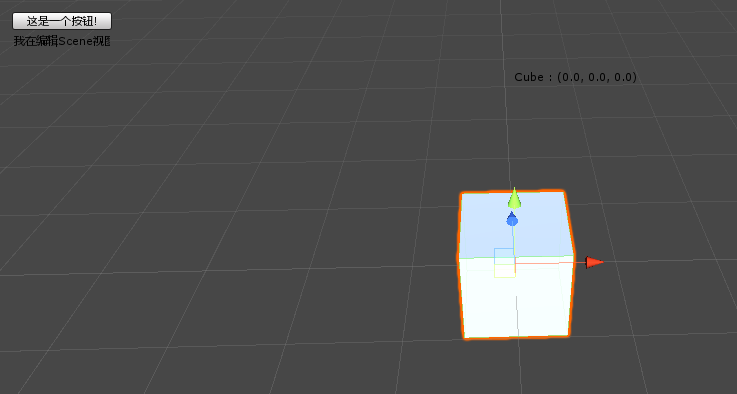
using UnityEngine;
using UnityEditor;

[CustomEditor(typeof(Test))]
public class MyEditor: Editor {

    public void OnSceneGUI() {
        Test test = (Test)target;

        Handles.Label(test.transform.position + Vector3.up * , test.transform.name + " : " + test.transform.position.ToString());
        Handles.BeginGUI();

        GUILayout.BeginArea(, , , ));

        if (GUILayout.Button("这是一个按钮!")) {
            Debug.Log("test");
        }

        GUILayout.Label("我在编辑Scene视图");

        GUILayout.EndArea();

        Handles.EndGUI();
    }
}
using UnityEngine;
using UnityEditor;

public class MyEditor: Editor {

    [DrawGizmo(GizmoType.InSelectionHierarchy | GizmoType.NotInSelectionHierarchy)]
    public static void DrawGameObjectName(Transform transform, GizmoType gizmoType) {
        Handles.Label(transform.position, transform.gameObject.name);
    }
}
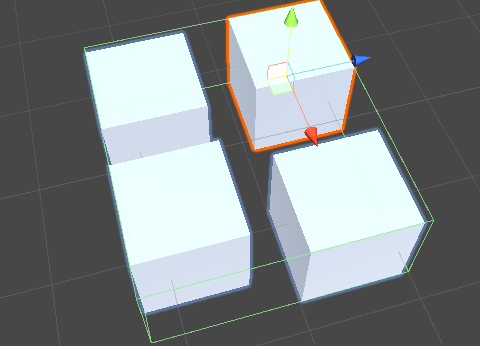
using UnityEngine;
using UnityEditor;

public class MyEditor: Editor {

    [MenuItem("MyMenu/Do Test")]
    public static void Test() {
        Transform parent = Selection.activeGameObject.transform;
        Vector3 postion = parent.position;
        Quaternion rotation = parent.rotation;
        Vector3 scale = parent.localScale;
        parent.position = Vector3.zero;
        parent.rotation = Quaternion.Euler(Vector3.zero);
        parent.localScale = Vector3.one;

        Collider[] colliders = parent.GetComponentsInChildren<Collider>();
        foreach (Collider child in colliders) {
            DestroyImmediate(child);
        }
        Vector3 center = Vector3.zero;
        Renderer[] renders = parent.GetComponentsInChildren<Renderer>();
        foreach (Renderer child in renders) {
            center += child.bounds.center;
        }
        center /= parent.transform.childCount;
        Bounds bounds = new Bounds(center, Vector3.zero);
        foreach (Renderer child in renders) {
            bounds.Encapsulate(child.bounds);
        }
        BoxCollider boxCollider = parent.gameObject.AddComponent<BoxCollider>();
        boxCollider.center = bounds.center - parent.position;
        boxCollider.size = bounds.size;

        parent.position = postion;
        parent.rotation = rotation;
        parent.localScale = scale;
    }

}
5
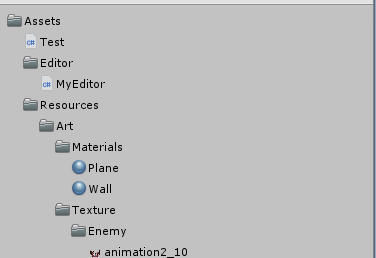
using UnityEngine;
using UnityEditor;
using System.IO;
using System.Collections.Generic;

[CustomEditor(typeof(UnityEditor.DefaultAsset))]
public class FolderInspector : Editor {

    Data data;
    Data selectData;

    void OnEnable() {
        if (Directory.Exists(AssetDatabase.GetAssetPath(target))) {
            data = new Data();
            LoadFiles(data, AssetDatabase.GetAssetPath(Selection.activeObject));
        }

    }
    public override void OnInspectorGUI() {

        if (Directory.Exists(AssetDatabase.GetAssetPath(target))) {
            GUI.enabled = true;
            EditorGUIUtility.SetIconSize(Vector2.one * );
            DrawData(data);
        }

    }

    ) {
        GUIContent content = GetGUIContent(currentPath);

        if (content != null) {
            data.indent = indent;
            data.content = content;
            data.assetPath = currentPath;

        }

        foreach (var path in Directory.GetFiles(currentPath)) {
            content = GetGUIContent(path);
            if (content != null) {
                Data child = new Data();
                child.indent = indent + ;
                child.content = content;
                child.assetPath = path;
                data.childs.Add(child);
            }
        }

        foreach (var path in Directory.GetDirectories(currentPath)) {
            Data childDir = new Data();
            data.childs.Add(childDir);
            LoadFiles(childDir, path, indent + );
        }
    }

    void DrawData(Data data) {
        if (data.content != null) {
            EditorGUI.indentLevel = data.indent;
            DrawGUIData(data);

        }
        ; i < data.childs.Count; i++) {
            Data child = data.childs[i];
            if (child.content != null) {
                EditorGUI.indentLevel = child.indent;
                )
                    DrawData(child);
                else
                    DrawGUIData(child);
            }
        }
    }

    void DrawGUIData(Data data) {
        GUIStyle style = "Label";
        Rect rt = GUILayoutUtility.GetRect(data.content, style);
        if (data.isSelected) {
            EditorGUI.DrawRect(rt, Color.gray);
        }

        rt.x += ( * EditorGUI.indentLevel);
        if (GUI.Button(rt, data.content, style)) {
            if (selectData != null) {
                selectData.isSelected = false;
            }
            data.isSelected = true;
            selectData = data;
            Debug.Log(data.assetPath);
        }
    }

    GUIContent GetGUIContent(string path) {
        Object asset = AssetDatabase.LoadAssetAtPath(path, typeof(Object));
        if (asset) {
            return new GUIContent(asset.name, AssetDatabase.GetCachedIcon(path));
        }
        return null;
    }

    class Data {
        public bool isSelected = false;
        ;
        public GUIContent content;
        public string assetPath;
        public List<Data> childs = new List<Data>();
    }
}
6
using UnityEngine;
using UnityEditor;
using System.Collections;
using System;

public class MyEditor {

    [InitializeOnLoadMethod]
    static void Start() {
        Action OnEvent = delegate {
            Event e = Event.current;

            switch (e.type) {
                //            case EventType.mouseDown:
                //                Debug.Log ("mousedown");
                //                e.Use ();
                //                break;
                //            case EventType.mouseUp:
                //                Debug.Log ("mouseup");
                //                e.Use ();
                //                break;
                //            case EventType.MouseMove:
                //                Debug.Log ("move");
                //                e.Use ();
                //                break;
                case EventType.DragPerform:
                    Debug.Log("DragPerform");
                    e.Use();
                    break;
                case EventType.DragUpdated:
                    Debug.Log("DragUpdated");
                    e.Use();
                    break;
                case EventType.DragExited:
                    Debug.Log("DragExited");
                    e.Use();
                    break;
            }
        };

        EditorApplication.hierarchyWindowItemOnGUI = delegate (int instanceID, Rect selectionRect) {

            OnEvent();

        };

        EditorApplication.projectWindowItemOnGUI = delegate (string guid, Rect selectionRect) {

            OnEvent();
        };

    }
}
7

using UnityEngine;
using UnityEditor;
using System.Collections;

public class MyHierarchyMenu {
    [MenuItem("Window/Test/yusong")]
    static void Test() {
    }

    [MenuItem("Window/Test/momo")]
    static void Test1() {
    }
    [MenuItem("Window/Test/雨松/MOMO")]
    static void Test2() {
    }

    [InitializeOnLoadMethod]
    static void StartInitializeOnLoadMethod() {
        EditorApplication.hierarchyWindowItemOnGUI += OnHierarchyGUI;
    }

    static void OnHierarchyGUI(int instanceID, Rect selectionRect) {
        if (Event.current != null && selectionRect.Contains(Event.current.mousePosition)
            && Event.current.button ==  && Event.current.type <= EventType.MouseUp) {
            GameObject selectedGameObject = EditorUtility.InstanceIDToObject(instanceID) as GameObject;
            //这里可以判断selectedGameObject的条件
            if (selectedGameObject.name == "SceneRoot") {
                Vector2 mousePosition = Event.current.mousePosition;

                EditorUtility.DisplayPopupMenu(, ), "Window/Test", null);
                Event.current.Use();
            }
        }
    }

}
using UnityEngine;
using UnityEditor;
using System.Collections;
using System.Reflection;
using UnityEngine.Profiling;

public class MyHierarchyMenu {
    [MenuItem("1/1")]
    public static void menu() {
        Texture target = Selection.activeObject as Texture;
        var type = System.Reflection.Assembly.Load("UnityEditor.dll").GetType("UnityEditor.TextureUtil");

        //var type = Types.GetType("UnityEditor.TextureUtil", "UnityEditor.dll");
        MethodInfo methodInfo = type.GetMethod("GetStorageMemorySize", BindingFlags.Static | BindingFlags.Instance | BindingFlags.Public);

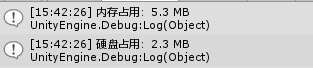
        Debug.Log("内存占用:" + EditorUtility.FormatBytes(Profiler.GetRuntimeMemorySizeLong(Selection.activeObject)));
        Debug.Log("硬盘占用:" + EditorUtility.FormatBytes((int)methodInfo.Invoke(null, new object[] { target })));
    }

}
Unity编辑器扩展学习 转载的更多相关文章
- unity编辑器扩展学习
扩展编辑器实际上就是在unity菜单栏中添加一些按钮,可以一键执行一些重复性的工作. 一.添加按钮 1.简单使用MenuItem特性 using UnityEngine; using UnityEdi ...
- Unity编辑器扩展 Chapter7--使用ScriptableObject持久化存储数据
Unity编辑器扩展 Chapter7--使用ScriptableObject持久化存储数据 unity unity Editor ScirptableObject Unity编辑器扩展 Chapt ...
- Unity编辑器扩展chapter1
Unity编辑器扩展chapter1 unity通过提供EditorScript API 的方式为我们提供了方便强大的编辑器扩展途径.学好这一部分可以使我们学会编写一些工具来提高效率,甚至可以自制一些 ...
- Unity 编辑器扩展 场景视图内控制对象
http://blog.csdn.net/akof1314/article/details/38129031 假设有一个敌人生成器类,其中有个属性range用来表示敌人生成的范围区域大小,那么可以用O ...
- unity 编辑器扩展简单入门
unity 编辑器扩展简单入门 通过使用编辑器扩展,我们可以对一些机械的操作实现自动化,而不用使用额外的环境,将工具与开发环境融为一体:并且,编辑器扩展也提供GUI库,来实现可视化操作:编辑器扩展甚至 ...
- Unity编辑器扩展Texture显示选择框
学习NGUI插件的时候,突然间有一个问题为什么它这些属性可以通过弹出窗口来选中呢? 而我自己写的组件只能使用手动拖放的方式=.=. Unity开发了组件Inspector视图扩展API,如果我们要写插 ...
- Unity 编辑器扩展
自定义检视面板的使用: 先是定义一个脚本文件,我们来修饰它的检视面板: [HelpURL("http://www.baidu.com")] public class Atr : M ...
- Unity3d编辑器扩展学习笔记
编辑器扩展 1.添加菜单栏:把特性应用于静态方法 参数1:菜单名的空格后面是定义快捷键(单符号得用"_"开头,组合键%=Ctrl,#=Shift,&=Alt) 参数2:通过 ...
- Unity编辑器扩展
在开发中有可能需要自己开发编辑器工具,在Unity中界面扩展常见两种情况,拿某插件为例: 1,自建窗口扩展 2,脚本Inspector显示扩展 不管使用那种样式,都需要经常用到两个类EditorGUI ...
随机推荐
- 第04组 Beta冲刺(5/5)
队名:new game 组长博客 作业博客 组员情况 鲍子涵(队长) 过去两天完成了哪些任务 动画优化 接下来的计划 等待答辩 还剩下哪些任务 让游戏本体运行 遇到了哪些困难 时间太少了 有哪些收获和 ...
- 使用requests模块进行封装,帮你如何处理restful类型的接口
import requests import urllib3 urllib3.disable_warnings(urllib3.exceptions.InsecureRequestWarning) c ...
- LeetCode 71.简化路径
LeetCode 71.简化路径 题目描述: 以 Unix 风格给出一个文件的绝对路径,你需要简化它.或者换句话说,将其转换为规范路径.在 Unix 风格的文件系统中,一个点(.)表示当前目录本身:此 ...
- 用Scriban进行模版解析
前言 有些时候,我们需要根据模版去展示一些内容,通常会借助模版引擎来处理. 举个简单的例子,发短信. 短信肯定是有模版的,不同的场景对应不同的模版. 注册的, [xxx]恭喜您成功注册yyy平台,您的 ...
- gRPC+gRPC Gateway+swagger小记
前言 本文记录了grpc-gateway的简单使用. 定义proto 先来看看最常规的 syntax = "proto3"; package protos; service Gre ...
- php捕获Fatal error错误与异常处理
php中的错误和异常是两个不同的概念. 错误:是因为脚本的问题,比如少写了分号,调用未定义的函数,除0,等一些编译语法错误. 异常:是因为业务逻辑和流程,不符合预期情况,比如验证请求参数,不通过就用 ...
- 写出这个数-PTA
读入一个正整数 n,计算其各位数字之和,用汉语拼音写出和的每一位数字. 输入格式: 每个测试输入包含 1 个测试用例,即给出自然数 n 的值.这里保证 n 小于 10的100次方. 输出格式: ...
- WPF 修改Webbrowser的IE版本小程序(32位)
偶尔用Winform的Webbrowser,但是ie版本太低. 手改改注册表了太慢了. 弄个了程序,修改的代码时网上的,自己就是写了个界面. 支持IE11. XAML页面代码 <Window.R ...
- 使用VS2017+WDK10开发xp驱动
VS2017+WDK10使用默认配置可以开发出运行在win7的驱动,但要开发运行在xp的驱动,还要进行如下操作: Dervier Settings -> Driver Model -> t ...
- 两种查看EFCore生成Sql语句的方法
一.利用反射生成查询语句 该方法转载自:https://jhrs.com/2019/28488.html (略有修改) using Microsoft.EntityFrameworkCore.Quer ...