
require(): open_basedir restriction in effect. File(/www/wwwroot/xcx/zerg/thinkphp/start.php) is not within the allowed path(s): (/www/wwwroot/xcx/zerg/public/:/tmp/:/proc/) in /www/wwwroot/xcx/zerg/p

解决方法:
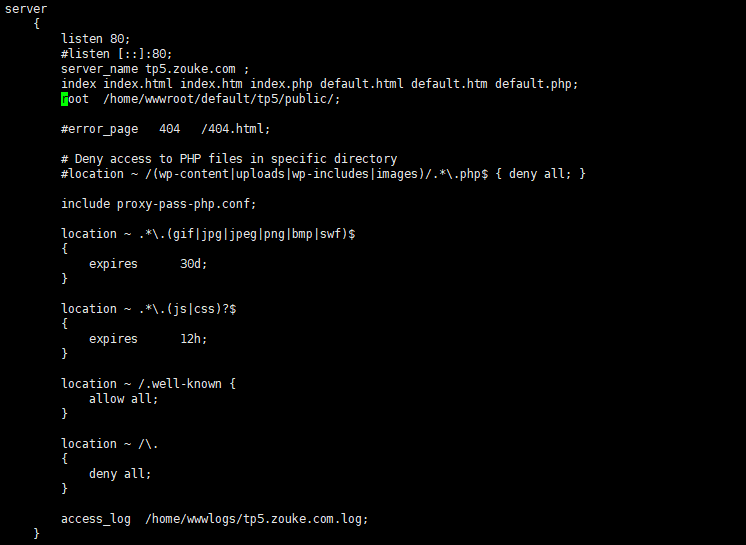
在如下文件增加一项(如图所示)
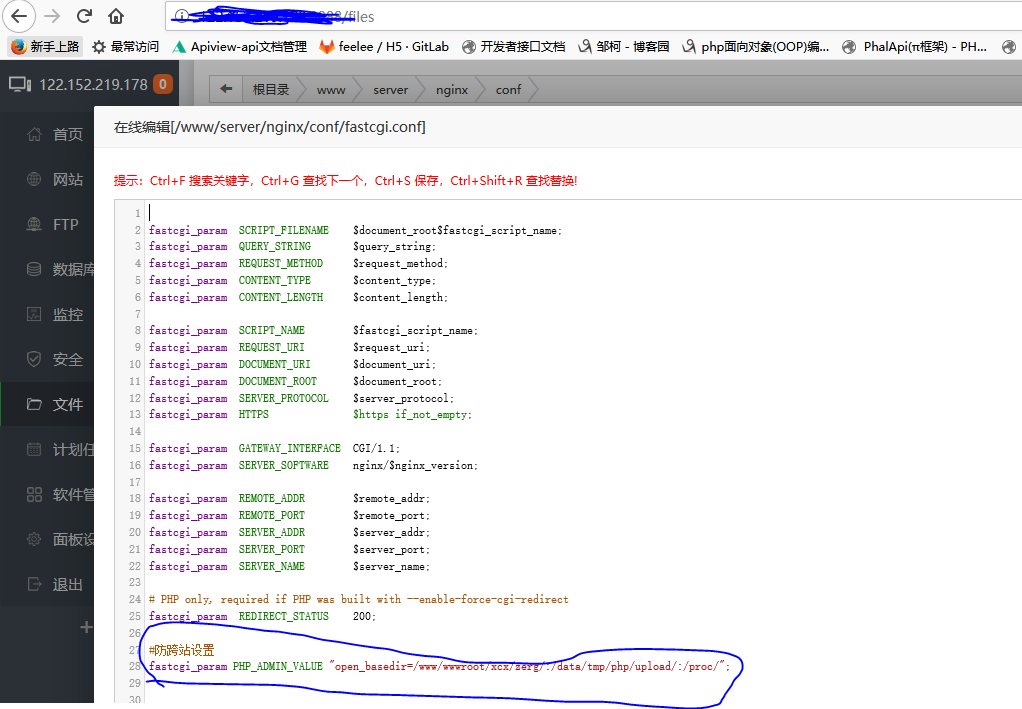
在如下文件增加一项(如图所示):
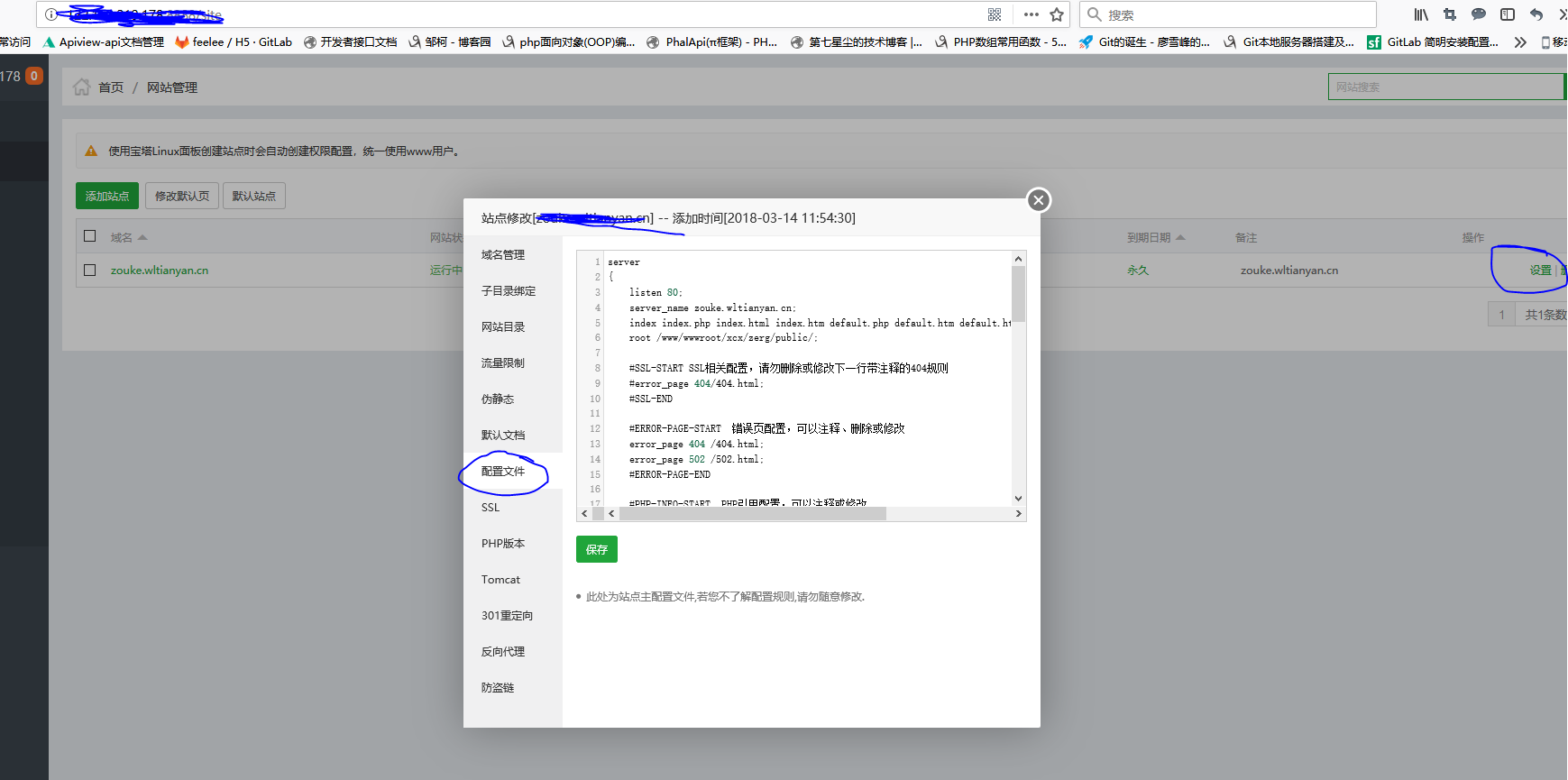
#php文件采用fastcgi解析并设置参数
    location ~ \.php {
        try_files $uri = 404;

        fastcgi_index  /index.php;
        fastcgi_pass ********;

        #加载fastcgi.conf文件中的参数
        include fastcgi.conf;

        #设置有权限目录,fastcgi.conf中默认设置就是站点目录$document_root,如果要改变就需要重新赋值
        #phalcon举例
        #fastcgi_param PHP_ADMIN_VALUE "open_basedir=/www/wwwroot/xcx/zerg/:/data/tmp/php/upload/:/proc/";
    }
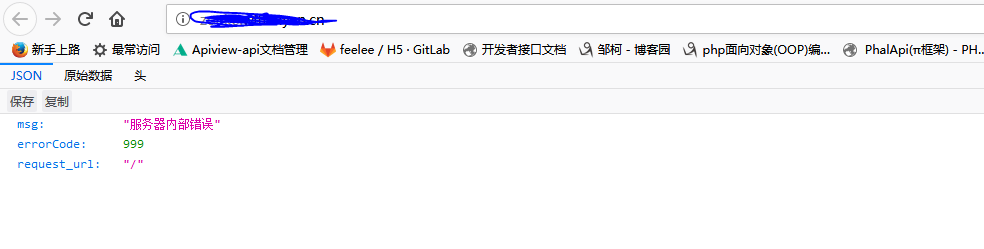
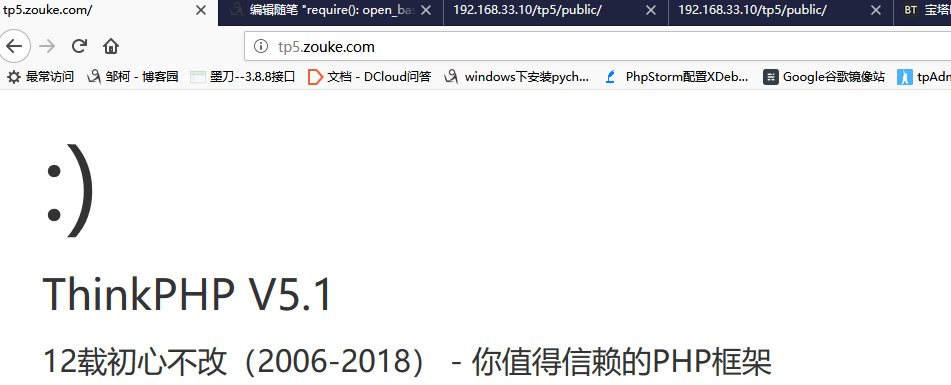
访问项目:

继续配置

location / {

          if (!-e $request_filename) {

                rewrite ^(.*)$ /index.php?s=$ last;

                break;

          }

}


圆满解决!!!!!!!!!!!!!!
参考文件:
http://blog.csdn.net/leiflyy/article/details/68063423
https://www.iamle.com/archives/1609.html
http://blog.csdn.net/slqgenius/article/details/52949191(主要解决参看的文件)
require(): open_basedir restriction in effect. File(/www/wwwroot/xcx/zerg/thinkphp/start.php) is not within the allowed path(s): (/www/wwwroot/xcx/zerg/public/:/tmp/:/proc/) in /www/wwwroot/xcx/zerg/p的更多相关文章
- thinkPHP5配置nginx环境无法打开(require(): open_basedir restriction in effect. File(/mnt/hgfs/root/tp5/thinkphp/start.php) is not within the allowed path(s)
今天想把玩一下tp5,结果怎么都无法访问,每次都是报500错误,我把错误提示都打开看到下面的错误 require(): open_basedir restriction in effect. File ...
- Warning: require(): open_basedir restriction in effect. File(/www/wwwroot/../thinkphp/start.php) is not within the allowed path(s):
Warning: require(): open_basedir restriction in effect. File(/www/wwwroot//../thinkphp/start.php) is ...
- require(): open_basedir restriction in effect. File
新安装的 lnmp 环境,将项目放上报 require(): open_basedir restriction in effect. File 的错误! 错误日志显示,访问脚本不在 open_base ...
- php Warning: require(): open_basedir restriction in effect File(/www/wwwroot/default/
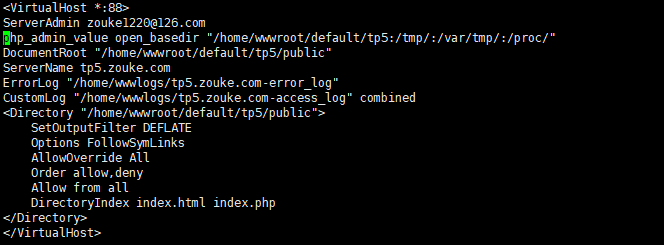
解决方案如下: 一.找到修改fastcgi的配置文件 (/usr/local/nginx/conf/fastcgi.conf) 二.vi进行编辑(保存退出) 三.对虚拟主机配置进行重写在Nginx低版 ...
- require(): open_basedir restriction in effect. 解决方法
在linux服务器部署thinkphp5的时候PHP报了这个错误, 如下: Warning: require(): open_basedir restriction in effect. File(/ ...
- LNMP - Warning: require(): open_basedir restriction in effect错误解决方法
LNMP 1.4或更高版本如果不想用防跨目录或者修改.user.ini的防跨目录的目录还需要将 /usr/local/nginx/conf/fastcgi.conf 里面的fastcgi_param ...
- open_basedir restriction in effect. File() is not within the allowed path(s)
目前发现eaccelerator安装之后如果php.ini中设置open_basedir将导致open_basedir的一些报错(open_basedir restriction in effect. ...
- php 环境require(): open_basedir restriction in effect 错误
php 环境require(): open_basedir restriction in effect 错误 错误日志显示,访问脚本不在 open_basedir的限定目录里面 解决方法打开fastc ...
- lnmp 环境require(): open_basedir restriction in effect 错误
最近配置开发用的lnmp环境,环境配置完成后,爆500错误,查看nginx错误日志 open_basedir 将 PHP 所能打开的文件限制在指定的目录树,包括文件本身 错误日志显示,访问脚本不在 o ...
随机推荐
- springboot内置的定时任务简单使用
直接上图:搞定(一定要加@EnableScheduling(开启定时任务)这个注解@Component(让spring扫描到)),下面是每五秒执行一次 结果:
- C语言笔记 14_标准库&assert&ctype&errno&float&limits
C 标准库 <assert.h> 简介 C 标准库的 assert.h头文件提供了一个名为 assert 的宏,它可用于验证程序做出的假设,并在假设为假时输出诊断消息. 已定义的宏 ass ...
- 操作Easy_UI案例以及模板
操作easy_ui案例以及模板 https://pan.baidu.com/s/1dHfclwP 密码:jygk
- VS2010如何进行程序调试
VS2010如何进行程序调试 一.前言 对于初步学习C++的朋友,程序的调试是一项必备的技能.尤其是像C++这样难学的语言,程序调试的基本方法更是至关重要.毕竟,谁也不想自己幸幸苦苦一天敲出来的代码就 ...
- redis之五大数据类型介绍
目录 redis五大数据类型 1. string(字符串) 特点: 格式: 基本操作: 2. hash(哈希) 特点: 格式: 基本操作 3. list(列表) 特点 格式 基本操作 4. set(集 ...
- PaperReading20200224
CanChen ggchen@mail.ustc.edu.cn BANANAS Motivation: This paper proposes a network performance pred ...
- 【C++】【STL】【map】基础知识干货
1.map简介 map是一种关联式容器,主要用于对数据一对一的映射. 2.map的构造 (1)头文件:#include<map> (2)定义:map<第一关键字,第二关键字> ...
- redis-Hash(哈希表)
Redis hash 是一个string类型的field和value的映射表,它的添加.删除操作都是O(1)(平均).hash特别适用于存储对象,将一个对象存储在hash类型中会占用更少的内存,并且可 ...
- jsp中获取attribute
value="<%=request.getSession().getAttribute("username")%>"
- python机器学习基本概念快速入门
//2019.08.01机器学习基础入门1-21.半监督学习的数据特征在于其数据集一部分带有一定的"标记"和或者"答案",而另一部分数据没有特定的标记,而更常见 ...