
获取取并下载tuku的漫画的爬虫
概述
一个简单的爬虫,实现是爬取tuku网站的漫画。并下载到脚本的文件夹中,下载的漫画按照章节名放在各自的文件夹中,本脚本直接命令行执行,无图形界面
详细
一、 主要思路
- 通过requests连接索引页面
- 获取索引页中给漫画的所有章节的网址,并保存到一个list中,
- 遍历章节的列表,并通过给网址传参,获取页面的状态码判断页面是否存在,如果页面不存在,就是代表该章节没有更多图片了,退出该章节。
- 如果页面存在,就获取该页面的图片元素,取得该元素的href的内容,也就是图片的源地址
- 打开源地址,将图片文件保存在本地,先建立章节名的文件夹,然后再将文件保存到该文件夹中去。
- 循环步骤3-5,直到章节列表中的项都遍历完,退出脚本。完成整个漫画的下载工作。
二、准备工作
- 需要安装的外部库,如果本机已经有安装,跳过这个步骤
pip install BeautifulSoup

pip install requests
- 导入库
from time import sleep

import os,requests,random

from bs4 import BeautifulSoup
三、实现过程的部分代码展示
- 在主执行中指定漫画的网址
if __name__ == '__main__':

    url = 'http://www.tuku.cc/comic/XXXXX/' #漫画的网址

    chapter_list = get_chapterlist(url)

    print(chapter_list)

    for chapter in chapter_list:

        # 遍历取出章节名、网址,依次打开页面,获取图片的网址,下载保留图片

        print(chapter_list[chapter])

        get_chapterdetail(chapter,chapter_list[chapter])
- 通过requests库获取索引页中的所有章节的网址,将获取的网址保存到一个list
chapterlist_data = soup.find('div', {'id': 'chapterlistload'})

    chapterlist = chapterlist_data.find_all('a', {'class': 'ib'})

    chapter_dict = {}

    for chapter in chapterlist:

        chapter_name = chapter.text

        chapter_url = chapter.get('href')

        chapter_dict[chapter_name] = chapter_url
- 遍历网址的list,只用网址的页数加一的方式,打开章节的各页,判断返回的页面元素有没有漫画的图片,直接使用requests库的getstatus,判断如果是200,就是有页面,执行下载任务;
    while True:

        if page_num > 1:

            new_url = 'http://www.tuku.cc'+chapter_url+'p'+str(page_num)+'/'

        else:

            new_url = 'http://www.tuku.cc'+chapter_url

        print(page_num, new_url)

        if requests.get(new_url).status_code == 200:

            # 状态码如果为200,就是有正常的图片。不然就是图片没有了,可以退出

            html_data = requests.get(new_url)

            soup = BeautifulSoup(html_data.text, 'lxml')

            img_url = soup.find('img', {'id': 'cp_image'}).get('src')

            img_name = img_url.split('/')[-1]

            print(img_url,img_name)

            #如果获取的地址为空,就是章节没有内容了,退出这个循环

            if not len(img_url):

                # 当len(img_url)等于0的时候,就是False,not False就是true,

                # 可以理解为:img_url没有长度是执行

                # 这个判断也可以写成len(img_url)==0

                print('章节',chapter_name,'已经内容没有了')

                break

            if not os.path.exists(chapter_name):

                os.mkdir(chapter_name)

            if requests.get(img_url).status_code == 200:

                with open(os.path.join(chapter_name, img_name), 'wb') as imgf:

                    imgf.write(requests.get(img_url).content)

            else:

                print('图片加载失败,没有下载图片',img_name)

        else:

            print(chapter_name + '已经内容没有了,退出')

            break

        sleep( random.randint(3, 6))  # 需要休眠时间,随机休眠3到5秒,这样看起来就有点类似人类的浏览

        page_num = page_num+1
- 再判断图片的地址返回的状态码是不是200,是的话,就执行下载,将图片保存到本地。
    if requests.get(img_url).status_code == 200:

                with open(os.path.join(chapter_name, img_name), 'wb') as imgf:

                    imgf.write(requests.get(img_url).content)

            else:

                print('图片加载失败,没有下载图片',img_name)
- 在各页面的切换中,加入了睡眠的随机数,用于的休眠数秒,使页面的浏览比较类似于人类正常的浏览习惯,属于建议的干扰反爬虫机制的方式
sleep( random.randint(3, 6)) # 需要休眠时间,随机休眠3到5秒,这样看起来就有点类似人类的浏览
- 以下为脚本的完整代码
from time import sleep

import os,requests,random

from bs4 import BeautifulSoup

def get_chapterlist(url):

    # 获取页面上的所有章节名和章节的网址,生产一个dict来保存。然后返回

    html_data = requests.get(url)

    soup = BeautifulSoup(html_data.text, 'lxml')

    chapterlist_data = soup.find('div', {'id': 'chapterlistload'})

    chapterlist = chapterlist_data.find_all('a', {'class': 'ib'})

    chapter_dict = {}

    for chapter in chapterlist:

        chapter_name = chapter.text

        chapter_url = chapter.get('href')

        chapter_dict[chapter_name] = chapter_url

    return chapter_dict

def get_chapterdetail(chapter_name,chapter_url):

    # 遍历取出章节名、网址,依次打开页面,获取图片的网址,下载保留图片

    # for chapter in chapter_dict:

    #     chapter_name = chapter

    #     chapter_url = chapter_url

    page_num = 1

    while True:

        if page_num > 1:

            new_url = 'http://www.tuku.cc'+chapter_url+'p'+str(page_num)+'/'

        else:

            new_url = 'http://www.tuku.cc'+chapter_url

        print(page_num, new_url)

        if requests.get(new_url).status_code == 200:

            # 状态码如果为200,就是有正常的图片。不然就是图片没有了,可以退出

            html_data = requests.get(new_url)

            soup = BeautifulSoup(html_data.text, 'lxml')

            img_url = soup.find('img', {'id': 'cp_image'}).get('src')

            img_name = img_url.split('/')[-1]

            print(img_url,img_name)

            #如果获取的地址为空,就是章节没有内容了,退出这个循环

            if not len(img_url):

                # 当len(img_url)等于0的时候,就是False,not False就是true,

                # 可以理解为:img_url没有长度是执行

                # 这个判断也可以写成len(img_url)==0

                print('章节',chapter_name,'已经内容没有了')

                break

            if not os.path.exists(chapter_name):

                os.mkdir(chapter_name)

            if requests.get(img_url).status_code == 200:

                with open(os.path.join(chapter_name, img_name), 'wb') as imgf:

                    imgf.write(requests.get(img_url).content)

            else:

                print('图片加载失败,没有下载图片',img_name)

        else:

            print(chapter_name + '已经内容没有了,退出')

            break

        sleep( random.randint(3, 6))  # 需要休眠时间,随机休眠3到5秒,这样看起来就有点类似人类的浏览

        page_num = page_num+1

if __name__ == '__main__':

    # url = 'http://www.tuku.cc/comic/28/' # 名侦探柯南

    url = 'http://www.tuku.cc/comic/17532/' # 龙珠超

    chapter_list = get_chapterlist(url)

    print(chapter_list)

    for chapter in chapter_list:

        # 遍历取出章节名、网址,依次打开页面,获取图片的网址,下载保留图片

        print(chapter_list[chapter])

        get_chapterdetail(chapter,chapter_list[chapter])
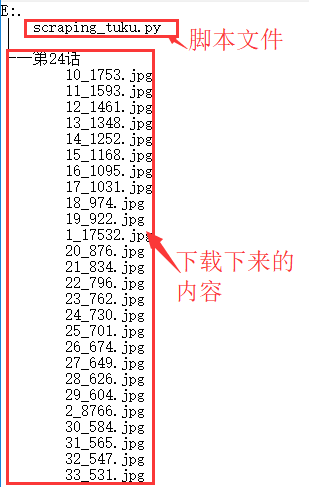
运行效果与文件截图
文件夹运行后的效果截图

运行结果后的文件结构
其他补充
本脚本为爬虫练习作,在该网站没有修改反爬虫的规则的情况下,测试了大部分的漫画,可以正常下载。本脚本仅为交流用,不对对应网站修改反爬虫策略后导致使用功能不正常做后续修改,切勿做其他用途。
获取取并下载tuku的漫画的爬虫
注:本文著作权归作者,由demo大师代发,拒绝转载,转载需要作者授权
获取取并下载tuku的漫画的爬虫的更多相关文章
- scrapy 动态网页处理——爬取鼠绘海贼王最新漫画
简介 scrapy是基于python的爬虫框架,易于学习与使用.本篇文章主要介绍如何使用scrapy爬取鼠绘漫画网海贼王最新一集的漫画. 源码参见:https://github.com/liudaol ...
- Java爬取并下载酷狗音乐
本文方法及代码仅供学习,仅供学习. 案例: 下载酷狗TOP500歌曲,代码用到的代码库包含:Jsoup.HttpClient.fastJson等. 正文: 1.分析是否可以获取到TOP500歌单 打开 ...
- scrapy爬虫学习系列五:图片的抓取和下载
系列文章列表: scrapy爬虫学习系列一:scrapy爬虫环境的准备: http://www.cnblogs.com/zhaojiedi1992/p/zhaojiedi_python_00 ...
- 用python实现的抓取腾讯视频所有电影的爬虫
1. [代码]用python实现的抓取腾讯视频所有电影的爬虫 # -*- coding: utf-8 -*-# by awakenjoys. my site: www.dianying.atim ...
- 获取youku视频下载链接(wireshark抓包分析)
随便说两句 前两天写了一个python脚本,试图以分析网页源码的方式得到优酷视频的下载地址,结果只得到视频的纯播放地址,下载纯播放地址得到的文件也无法正常播放视频. 这里共享一下播放地址得到的方法(想 ...
- Android获取百度音乐下载音乐和歌词下载链接
首先,你必须通过以下连接下载歌曲: http://box.zhangmen.baidu.com/x?op=12&count=1&title={title}$${author}$$$$ ...
- java爬取并下载酷狗TOP500歌曲
是这样的,之前买车送的垃圾记录仪不能用了,这两天狠心买了好点的记录仪,带导航.音乐.蓝牙.4G等功能,寻思,既然有这些功能就利用起来,用4G听歌有点奢侈,就准备去酷狗下点歌听,居然都是需要办会员才能下 ...
- Python实训day07pm【Selenium操作网页、爬取数据-下载歌曲】
练习1-爬取歌曲列表 任务:通过两个案例,练习使用Selenium操作网页.爬取数据.使用无头模式,爬取网易云的内容. ''' 任务:通过两个案例,练习使用Selenium操作网页.爬取数据. 使用无 ...
- Python 爬虫5——爬取并下载网页指定规格的图片
看完上篇文档之后,我们对于正则表达式已经有了基本的了解,其实学习最有效的办法就是带着问题和目的,这里我们假设有一个目标:获取某个网页上指定规格的图片的链接地址,并下载到本地. 一.实现步骤: 1.在浏 ...
随机推荐
- 前端nginx后端tomcat记录真实ip
修改nginx主配置文件:/usr/local/nginx/conf/nginx.conf proxy_set_header Host $host; proxy_set_header X-Real-I ...
- (五)cobbler自定义系统安装
注意:需要提前获取到物理机对应的网卡的MAC地址,例如我这里使用虚拟机进行演示 cobbler system add --name=linux-node2.com --mac=00:50:56:22: ...
- 微信token
<?php define("TOKEN", "lmaster"); function checkSignature() { //从GET参数中读取三个字段 ...
- Java学习之路(书籍推荐)
一.基础类 1.<Thinking in java>(阅读2遍),入门第一位是建立正确的概念 2.<Core Java>这本书更贴近实践,更多API的介绍,同样,更新也更频繁. ...
- HDU 多校1.10
- 列(Column)
同样是生肉,不同的生肉又有不同的特性,有的生肉是里脊肉,有的生肉是前臀尖,这块生肉是18公斤,而那块生肉是12公斤,这块生肉是12.2 元/公斤,而那块生肉是13.6 元/公斤.每块肉都有各自的不同 ...
- tomcat访问(access)日志配置、记录Post请求参数(转)
一.配置与说明 tomcat访问日志格式配置,在config/server.xml里Host标签下加上 <Valve className="org.apache.catalina.va ...
- C++类的复习
1.C++ 类的声明:class class_name{ private: /* *私有的数据和成员函数 *只能被本类中的成员函数引用,类外不能调用 ...
- Android证书验证存漏洞 开发者身份信息可被篡改(转)
原帖地址:http://bbs.pediy.com/showthread.php?p=1335278#post1335278 近期在国内网易,雷锋网等网站爆出谷歌市场上的索尼官方的备份与恢复应用&qu ...
- sql server博客
SQLSERVER MSDN论坛 SQLSERVER 补丁博客 SQLSERVER中国研发中心 微软亚太区数据库技术支持组官方博客 PAUL的SQLSKILL网站 sqlsaturday网站 sqls ...