
001 手把手用Git,Git从入门到上传本地项目到Github,看这篇就够了
安装git
下载Git
下载好后,一路next即可
安装好后,打开Git bash,进行配置
首先配置自己的身份
git config --global user.name "Name"

git config --global user.email "name@gmail.com"
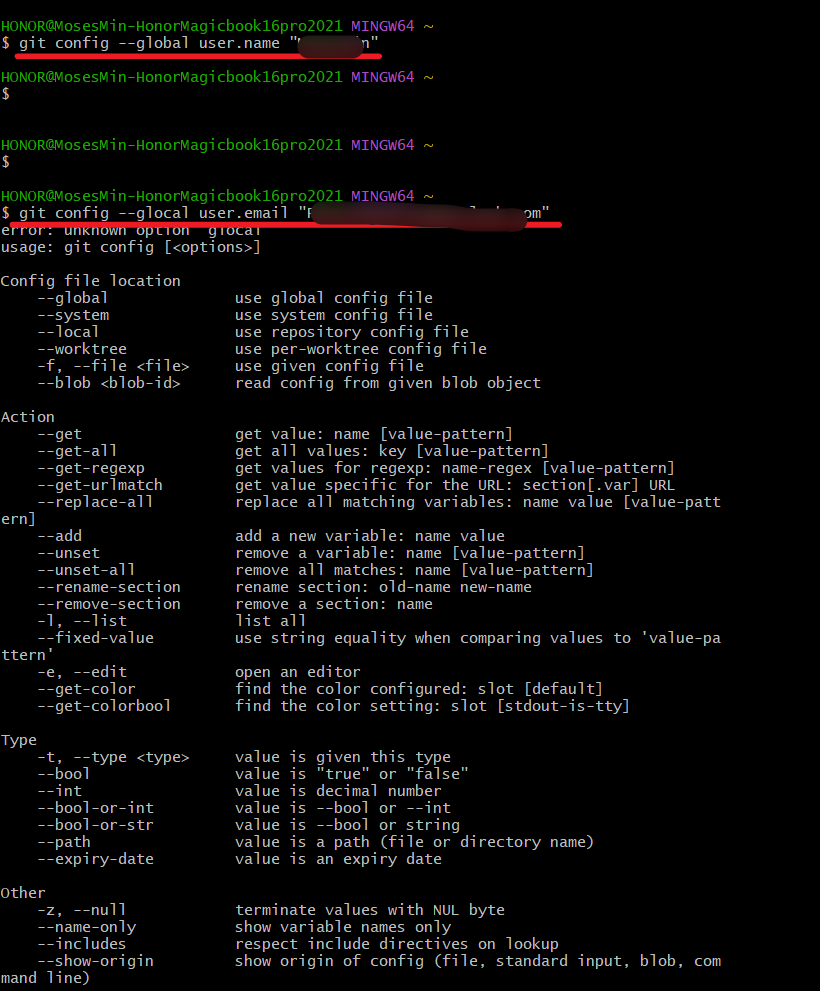
检查是否配置成功:
git config --global user.name

git config --global user.email

创建代码仓库
仓库是用于保存版本管理所需信息的地方,所有本地提交的代码都会被提交到代码仓库中,如果有需要还可以再推送到远程仓库中。
若要为某项目建立代码仓库,则在git bash中,进入该项目根目录下,然后执行git init即可:
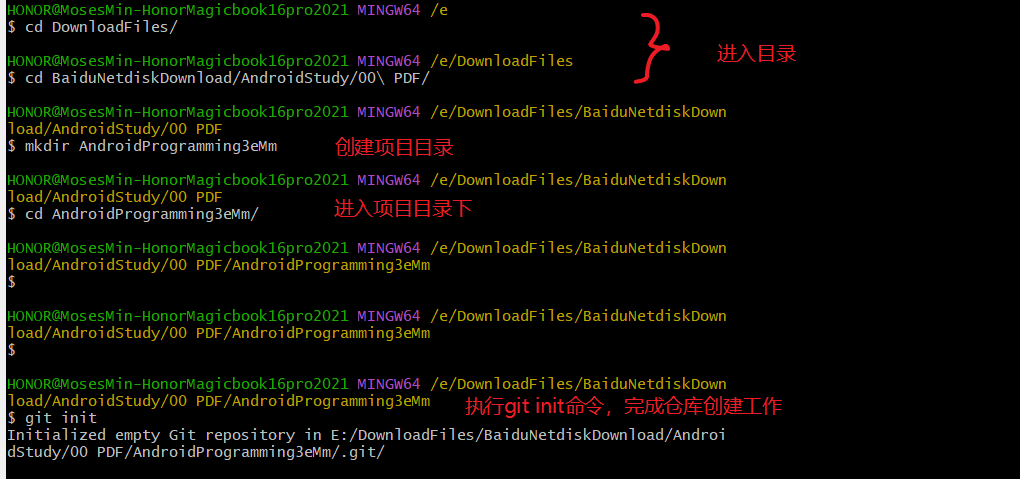
进入对应目录,看到生成了一个.git隐藏文件夹,表示仓库创建成功

如果想要删除本地仓库, 只需要删除这个.git隐藏文件即可
提交本地代码:
代码仓库创建完成之后即可提交代码,提交代码只需要使用add和commit两个命令即可
- add命令用于添加想要提交的代码
- commit则是真正去执行提交操作
例如:
git add build.gradle
// 添加app目录
git add app
// 添加所有文件
git add .
现在本地仓库内的所有文件都已经添加好了,可以进行一次提交了,执行如下命令:
git commit -m "First commit"
注意:在commit命令之后,我们一定需要通过-m参数来加上提交的描述信息,没有描述信息的提交被认为是不合法的。
执行完上条命令,所有的代码都已经成功提交了!
查看修改内容
git status
在项目根目录下执行 git status命令,就可以通过Git来查看自上次提交后哪些文件有变化
知道了哪些文件有变化,要如何知道这些文件具体变动了什么呢?
需要用到git diff命令
git diff
如果需要知道具体某个文件变动了什么,
git diff + 文件名称
例如:
git diff app/src/main/java/com/example/mosesmin/MainActivity.java
撤销未提交也未添加的修改
如上文所述:
- 所谓提交,即执行了git commit命令
- 所谓添加,即执行了git add命令
要撤销未提交也未添加的修改,用chekout命令
git checkout
例如,如果对app/src/main/java/com/example/mosesmin/MainActivity.java进行了修改,但是没有执行git add命令添加它,就可以为其执行git diff命令
git diff app/src/main/java/com/example/mosesmin/MainActivity.java
执行了上述命令后,我们对MainActivity.java 这个文件所做的修改就应该被撤销了,我们重新运行一下git status命令,检查一下,可以发现,项目中没有任何可以提交的文件,说明撤销操作确实是成功了。
撤销未提交已添加的修改
要撤销未提交却已添加的修改,先用reset命令执行一下,取消添加;再执行一遍checkout命令,执行撤销。
如果一个文件已经执行了添加操作
git reset
查看提交记录
查看提交记录,使用git log命令
git log
如果提交记录很多,可以在命令中制定id,并加上 -l参数,表示我们只想看到一条记录,如下所示:
git log 提交记录id号 -l
如果想要查看查询的这条提交记录中具体修改了什么内容,可以在命令中加入 -p参数,命令如下所示:
git log 提交记录id号 -l -p
查询的结果中,减号代表删除的部分,加号代表增加的部分
分支的用法
回顾一下上文,如果需要对某项目进行创建仓库和提交项目项目代码到仓库,则执行下述命令
git init
git add .
git commit -m "First Commit"
分支的概念:
分支是版本控制中比较高级且比较重要的一个概念,它主要的作用就是在现有代码的基础上开辟一个分叉口,使得代码可以在主干线和分支线上同时进行开发,且相互之间不受影响。
分支的工作原理示例图如下:

使用git branch命令查看分支
如果要创建分支,例如执行如下命令:
git branch version1.0
如果是在master分支下,则执行:
git branch -m version1.0
版本库的切换:

与远程版本库协作--例如与Github上的仓库协作
去Github上创建一个仓库(详细的创建过程这里不介绍了,不会可以度娘):AndroidProgramming3eMm
创建完成之后的快速指南页面:Quick setup
看到官方推荐的在本地创建新仓库并与Github上AndroidProgramming3eMm仓库关联的操作的步骤,我在每个步骤后加了注释:
echo "# AndroidProgramming3eMm" >> README.md

git init  // 创建仓库,把这个目录变成Git可以管理的仓库

git add README.md // 文件添加到仓库

git commit -m "first commit" //把文件提交到仓库

git branch -M main // 创建分支

git remote add origin https://github.com/mosesmindev/AndroidProgramming3eMm.git // 将本地仓库与远程仓库相关联

git push -u origin main /把本地库的所有内容推送到远程库上
看到其中涉及分支的命令:
git branch -M main
其实以前的命令是:
git branch -m master
之所以github官方有修改,是近年来西方左派的政治正确导致的,特别是2020年的黑命贵运动等,master主人的意思对黑人不友好,所以改为了main主要
我们这里分支沿用:git branch -m master
最后一步推送到远程库:git push -u origin master
如果本地已经有了仓库,与Github上AndroidProgramming3eMm仓库关联的操作的步骤:
git remote add origin https://github.com/mosesmindev/AndroidProgramming3eMm.git

git branch -M main

git push -u origin main
我们本地已经有了仓库,所以操作步骤如下:
git branch -m master //其实也不用这步,因为我们使用Git bash默认的仓库分支就是master

git remote add origin https://github.com/mosesmindev/AndroidProgramming3eMm.git

git push -u origin master // 暂时不确认-u参数的含义
但是我们发现执行 git push -u origin master 后上传代码并没有成功,出现了如下报错信息:
$ git push -u origin master
error: src refspec master does not match any
error: failed to push some refs to 'https://github.com/mosesmindev/AndroidProgramming3eMm.git'

因为我们没有对Github账户设置SSH key
为Github账户设置SSH key
cd ~/.ssh //查看C:\Users\用户名.ssh 是否有key
ssh-keygen -t rsa -C "PeterChenjinxu@outlook.com" // 如果没有要自己生成
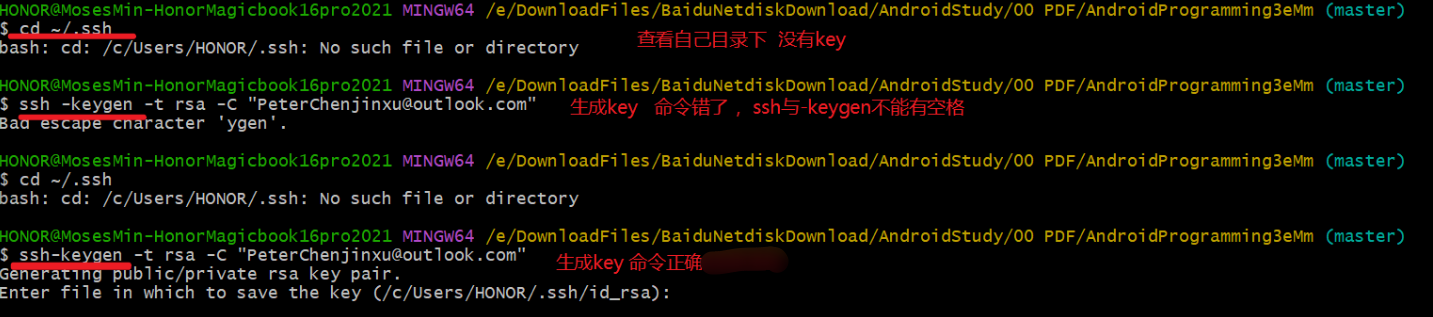

如上图,我们得到提示:
Your identification has been saved in /c/Users/HONOR/.ssh/id_rsa
Your public key has been saved in /c/Users/HONOR/.ssh/id_rsa.pub
表示我们成功生成了key,路径为:/c/Users/HONOR/.ssh/id_rsa.pub,HONOR为用户名,具体到您自己的用户名下查找;我们在该目录下用记事本或其他文本编辑器打开
id_rsa.pub,的到ssh key公钥。
如下图,我们使用SublimeText打开id_rsa.pub

之后,切换到github网站,展开个人头像的小三角,点击settings

然后打开SSH and GPG keys菜单

点击New SSH key新增密钥
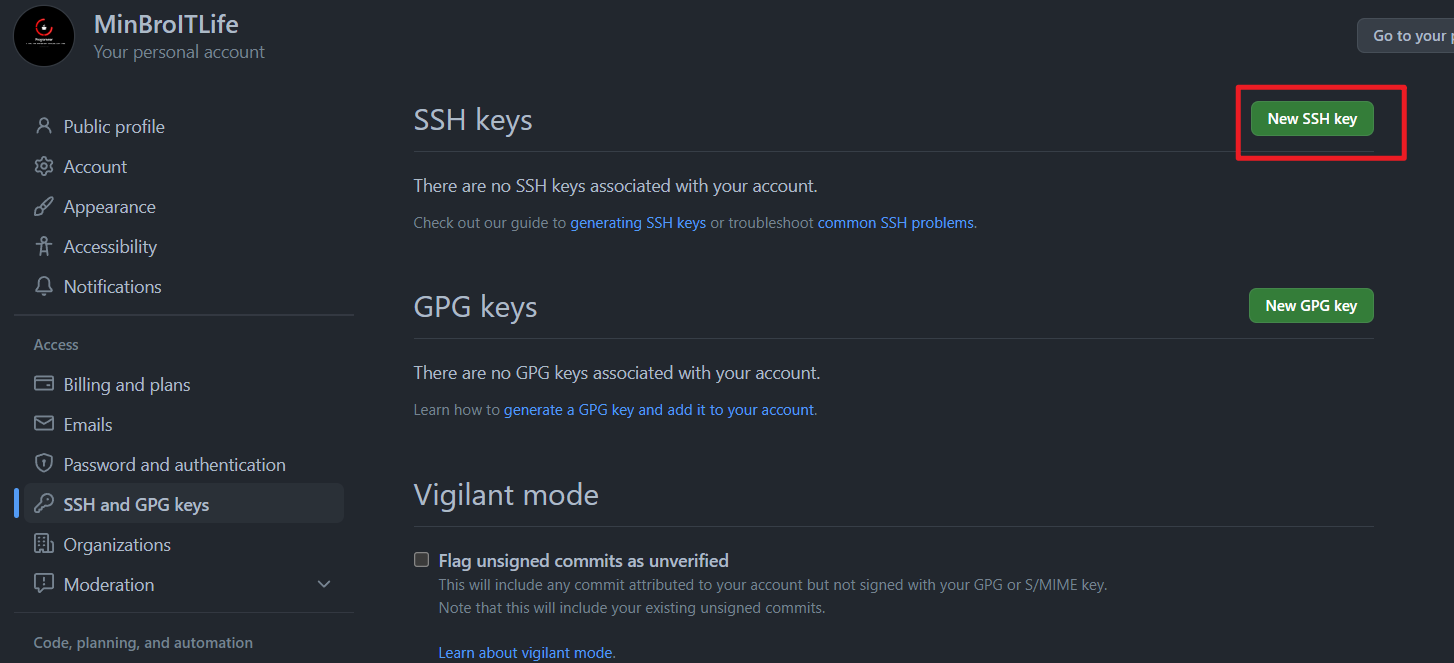
填上标题,建议跟仓库名称 AndroidProgramming3eMm 保持一致吧,方便日后区分;接着将id_rsa.pub文件中key粘贴到此,最后点击Add SSH key生成密钥吧

创建成功:
如此,github账号的SSH keys配置完成。
上传项目到Github
如果已经设置了SSH key,此时执行git push依然出现下图问题,可能是本地仓库为空(注意咯:git是不能管理空的文件夹的,文件夹里必须有文件才能add),或者本地仓库没有正确的项目导致的
我们在本地仓库AndroidProgramming3eMm下拷贝一个用Android Studio的标准Android项目GeoQuiz

GeoQuiz结构如下:

然后我们执行相关的命令:
git init // 创建仓库,初始化创建成功后你会发现项目里多了一个隐藏文件夹.git,这个目录是Git用来跟踪管理版本库的,一般不要动
git add . // 接着,将所有文件添加到仓库
怕上图中的warning坏事儿,可以再git add一次
git commit -m "001 first commit by MosesMin" //然后,把文件提交到仓库,双引号内是提交注释
git remote add origin https://github.com/mosesmindev/AndroidProgramming3eMm.git // 关联Github上创建的仓库AndroidProgramming3eMm
git push -u origin master // 上传本地代码到Github上创建的仓库AndroidProgramming3eMm
到此,本地代码已经推送到github仓库了,见证成功的时刻到了,我们现在去githubt仓库看看:
刚创建的空项目是这样的:
刷新一下页面,见证成功的时刻来临了,我们的提交注释和提交的本地仓库内容都在了
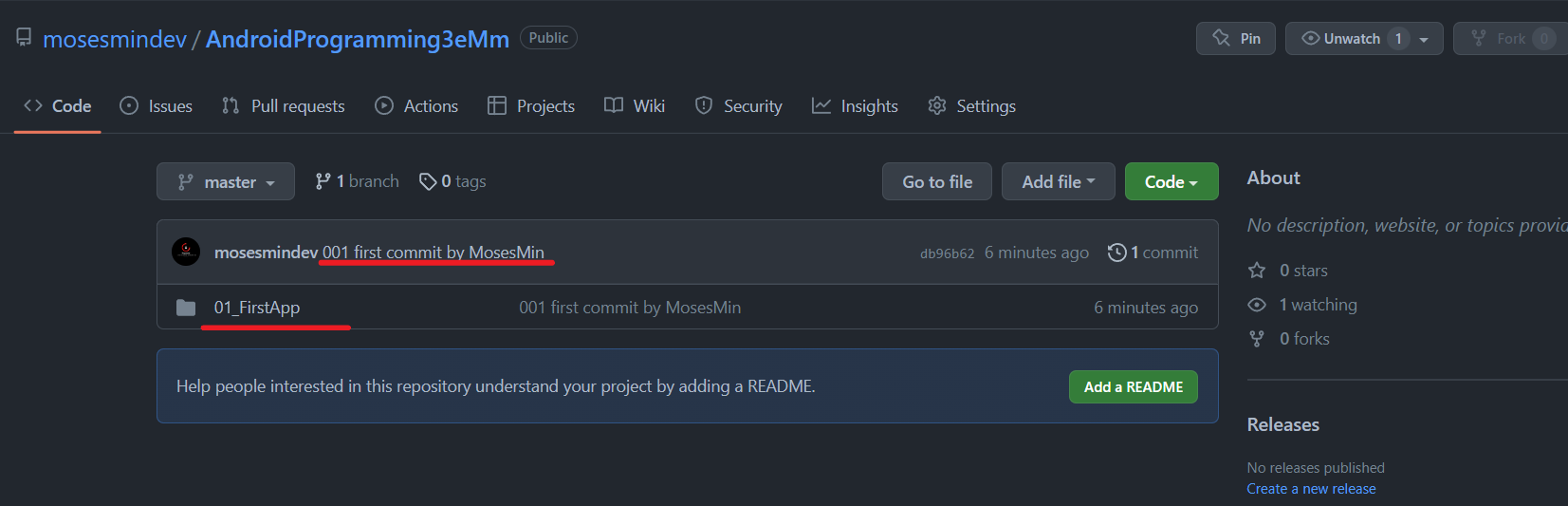
copy记录一下整个过程:
HONOR@MosesMin-HonorMagicbook16pro2021 MINGW64 /e/DownloadFiles/BaiduNetdiskDownload/AndroidStudy/00 PDF/AndroidProgramming3eMm
$ git init
Initialized empty Git repository in E:/DownloadFiles/BaiduNetdiskDownload/AndroidStudy/00 PDF/AndroidProgramming3eMm/.git/
HONOR@MosesMin-HonorMagicbook16pro2021 MINGW64 /e/DownloadFiles/BaiduNetdiskDownload/AndroidStudy/00 PDF/AndroidProgramming3eMm (master)

$ git add.

git: 'add.' is not a git command. See 'git --help'.

The most similar command is

        add

HONOR@MosesMin-HonorMagicbook16pro2021 MINGW64 /e/DownloadFiles/BaiduNetdiskDownload/AndroidStudy/00 PDF/AndroidProgramming3eMm (master)

$ git add .

warning: LF will be replaced by CRLF in 01_FirstApp/GeoQuiz/.gitignore.

The file will have its original line endings in your working directory

warning: LF will be replaced by CRLF in 01_FirstApp/GeoQuiz/.idea/compiler.xml.

The file will have its original line endings in your working directory

warning: LF will be replaced by CRLF in 01_FirstApp/GeoQuiz/.idea/copyright/profiles_settings.xml.

The file will have its original line endings in your working directory

warning: LF will be replaced by CRLF in 01_FirstApp/GeoQuiz/.idea/encodings.xml.

The file will have its original line endings in your working directory

warning: LF will be replaced by CRLF in 01_FirstApp/GeoQuiz/.idea/gradle.xml.

The file will have its original line endings in your working directory

warning: LF will be replaced by CRLF in 01_FirstApp/GeoQuiz/.idea/misc.xml.

The file will have its original line endings in your working directory

warning: LF will be replaced by CRLF in 01_FirstApp/GeoQuiz/.idea/modules.xml.

The file will have its original line endings in your working directory

warning: LF will be replaced by CRLF in 01_FirstApp/GeoQuiz/.idea/runConfigurations.xml.

The file will have its original line endings in your working directory

warning: LF will be replaced by CRLF in 01_FirstApp/GeoQuiz/app/.gitignore.

The file will have its original line endings in your working directory

warning: LF will be replaced by CRLF in 01_FirstApp/GeoQuiz/app/build.gradle.

The file will have its original line endings in your working directory

warning: LF will be replaced by CRLF in 01_FirstApp/GeoQuiz/app/proguard-rules.pro.

The file will have its original line endings in your working directory

warning: LF will be replaced by CRLF in 01_FirstApp/GeoQuiz/app/src/androidTest/java/com/bignerdranch/android/geoquiz/ExampleInstrumentedTest.java.

The file will have its original line endings in your working directory

warning: LF will be replaced by CRLF in 01_FirstApp/GeoQuiz/app/src/main/AndroidManifest.xml.

The file will have its original line endings in your working directory

warning: LF will be replaced by CRLF in 01_FirstApp/GeoQuiz/app/src/main/java/com/bignerdranch/android/geoquiz/QuizActivity.java.

The file will have its original line endings in your working directory

warning: LF will be replaced by CRLF in 01_FirstApp/GeoQuiz/app/src/main/res/layout/activity_quiz.xml.

The file will have its original line endings in your working directory

warning: LF will be replaced by CRLF in 01_FirstApp/GeoQuiz/app/src/main/res/values-w820dp/dimens.xml.

The file will have its original line endings in your working directory

warning: LF will be replaced by CRLF in 01_FirstApp/GeoQuiz/app/src/main/res/values/colors.xml.

The file will have its original line endings in your working directory

warning: LF will be replaced by CRLF in 01_FirstApp/GeoQuiz/app/src/main/res/values/dimens.xml.

The file will have its original line endings in your working directory

warning: LF will be replaced by CRLF in 01_FirstApp/GeoQuiz/app/src/main/res/values/strings.xml.

The file will have its original line endings in your working directory

warning: LF will be replaced by CRLF in 01_FirstApp/GeoQuiz/app/src/main/res/values/styles.xml.

The file will have its original line endings in your working directory

warning: LF will be replaced by CRLF in 01_FirstApp/GeoQuiz/app/src/test/java/com/bignerdranch/android/geoquiz/ExampleUnitTest.java.

The file will have its original line endings in your working directory

warning: LF will be replaced by CRLF in 01_FirstApp/GeoQuiz/build.gradle.

The file will have its original line endings in your working directory

warning: LF will be replaced by CRLF in 01_FirstApp/GeoQuiz/gradle.properties.

The file will have its original line endings in your working directory

warning: LF will be replaced by CRLF in 01_FirstApp/GeoQuiz/gradle/wrapper/gradle-wrapper.properties.

The file will have its original line endings in your working directory

warning: LF will be replaced by CRLF in 01_FirstApp/GeoQuiz/gradlew.

The file will have its original line endings in your working directory

warning: LF will be replaced by CRLF in 01_FirstApp/GeoQuiz/settings.gradle.

The file will have its original line endings in your working directory

warning: LF will be replaced by CRLF in 01_FirstApp/LICENSE.txt.

The file will have its original line endings in your working directory

HONOR@MosesMin-HonorMagicbook16pro2021 MINGW64 /e/DownloadFiles/BaiduNetdiskDownload/AndroidStudy/00 PDF/AndroidProgramming3eMm (master)

$ git add .

HONOR@MosesMin-HonorMagicbook16pro2021 MINGW64 /e/DownloadFiles/BaiduNetdiskDownload/AndroidStudy/00 PDF/AndroidProgramming3eMm (master)

$ git commit -m "001 first commit by MosesMin"

[master (root-commit) db96b62] 001 first commit by MosesMin

 35 files changed, 843 insertions(+)

 create mode 100644 01_FirstApp/.DS_Store

 create mode 100644 01_FirstApp/GeoQuiz/.gitignore

 create mode 100644 01_FirstApp/GeoQuiz/.idea/compiler.xml

 create mode 100644 01_FirstApp/GeoQuiz/.idea/copyright/profiles_settings.xml

 create mode 100644 01_FirstApp/GeoQuiz/.idea/encodings.xml

 create mode 100644 01_FirstApp/GeoQuiz/.idea/gradle.xml

 create mode 100644 01_FirstApp/GeoQuiz/.idea/misc.xml

 create mode 100644 01_FirstApp/GeoQuiz/.idea/modules.xml

 create mode 100644 01_FirstApp/GeoQuiz/.idea/runConfigurations.xml

 create mode 100644 01_FirstApp/GeoQuiz/app/.gitignore

 create mode 100644 01_FirstApp/GeoQuiz/app/build.gradle

 create mode 100644 01_FirstApp/GeoQuiz/app/proguard-rules.pro

 create mode 100644 01_FirstApp/GeoQuiz/app/src/androidTest/java/com/bignerdranch/android/geoquiz/ExampleInstrumentedTest.java

 create mode 100644 01_FirstApp/GeoQuiz/app/src/main/AndroidManifest.xml

 create mode 100644 01_FirstApp/GeoQuiz/app/src/main/java/com/bignerdranch/android/geoquiz/QuizActivity.java

 create mode 100644 01_FirstApp/GeoQuiz/app/src/main/res/layout/activity_quiz.xml

 create mode 100644 01_FirstApp/GeoQuiz/app/src/main/res/mipmap-hdpi/ic_launcher.png

 create mode 100644 01_FirstApp/GeoQuiz/app/src/main/res/mipmap-mdpi/ic_launcher.png

 create mode 100644 01_FirstApp/GeoQuiz/app/src/main/res/mipmap-xhdpi/ic_launcher.png

 create mode 100644 01_FirstApp/GeoQuiz/app/src/main/res/mipmap-xxhdpi/ic_launcher.png

 create mode 100644 01_FirstApp/GeoQuiz/app/src/main/res/mipmap-xxxhdpi/ic_launcher.png

 create mode 100644 01_FirstApp/GeoQuiz/app/src/main/res/values-w820dp/dimens.xml

 create mode 100644 01_FirstApp/GeoQuiz/app/src/main/res/values/colors.xml

 create mode 100644 01_FirstApp/GeoQuiz/app/src/main/res/values/dimens.xml

 create mode 100644 01_FirstApp/GeoQuiz/app/src/main/res/values/strings.xml

 create mode 100644 01_FirstApp/GeoQuiz/app/src/main/res/values/styles.xml

 create mode 100644 01_FirstApp/GeoQuiz/app/src/test/java/com/bignerdranch/android/geoquiz/ExampleUnitTest.java

 create mode 100644 01_FirstApp/GeoQuiz/build.gradle

 create mode 100644 01_FirstApp/GeoQuiz/gradle.properties

 create mode 100644 01_FirstApp/GeoQuiz/gradle/wrapper/gradle-wrapper.jar

 create mode 100644 01_FirstApp/GeoQuiz/gradle/wrapper/gradle-wrapper.properties

 create mode 100644 01_FirstApp/GeoQuiz/gradlew

 create mode 100644 01_FirstApp/GeoQuiz/gradlew.bat

 create mode 100644 01_FirstApp/GeoQuiz/settings.gradle

 create mode 100644 01_FirstApp/LICENSE.txt

HONOR@MosesMin-HonorMagicbook16pro2021 MINGW64 /e/DownloadFiles/BaiduNetdiskDownload/AndroidStudy/00 PDF/AndroidProgramming3eMm (master)

$ git remote add origin https://github.com/mosesmindev/AndroidProgramming3eMm.git

HONOR@MosesMin-HonorMagicbook16pro2021 MINGW64 /e/DownloadFiles/BaiduNetdiskDownload/AndroidStudy/00 PDF/AndroidProgramming3eMm (master)

$ git push -u origin master

fatal: unable to access 'https://github.com/mosesmindev/AndroidProgramming3eMm.git/': OpenSSL SSL_read: Connection was reset, errno 10054

HONOR@MosesMin-HonorMagicbook16pro2021 MINGW64 /e/DownloadFiles/BaiduNetdiskDownload/AndroidStudy/00 PDF/AndroidProgramming3eMm (master)

$ git push -u origin master

Enumerating objects: 72, done.

Counting objects: 100% (72/72), done.

Delta compression using up to 16 threads

Compressing objects: 100% (44/44), done.

Writing objects: 100% (72/72), 90.81 KiB | 12.97 MiB/s, done.

Total 72 (delta 0), reused 0 (delta 0), pack-reused 0

To https://github.com/mosesmindev/AndroidProgramming3eMm.git

 * [new branch]      master -> master

branch 'master' set up to track 'origin/master'.

HONOR@MosesMin-HonorMagicbook16pro2021 MINGW64 /e/DownloadFiles/BaiduNetdiskDownload/AndroidStudy/00 PDF/AndroidProgramming3eMm (master)

$
参考:
1、郭霖大牛的《Android第一行代码 第二版》
2、将本地项目上传到github,git操作详细指导,不看后悔深度好文!
001 手把手用Git,Git从入门到上传本地项目到Github,看这篇就够了的更多相关文章
- 【github&&git】2、github入门到上传本地项目
[在原文章的基础上,修改了描述的不够详细的地方,对内容进行了扩充,整合了网上的一些资料] [内容主要来自http://www.cnblogs.com/specter45/p/github.html#g ...
- 通过Git Gui Here上传本地项目到GitHub上
要使用此种方法上传本地项目到GitHub上,前提得是你已安装Git for window工具. Git for window下载地址:http://www.xp510.com/xiazai/Appli ...
- github入门到上传本地项目【网上资源整合】
[在原文章的基础上,修改了描述的不够详细的地方,对内容进行了扩充,整合了网上的一些资料] [内容主要来自http://www.cnblogs.com/specter45/p/github.html#g ...
- github入门到上传本地项目
GitHub是基于git实现的代码托管.git是目前最好用的版本控制系统了,非常受欢迎,比之svn更好. GitHub可以免费使用,并且快速稳定.即使是付费帐户,每个月不超过10美刀的费用也非常便宜. ...
- <转>github入门到上传本地项目
转自 http://www.cnblogs.com/specter45/p/github.html GitHub是基于git实现的代码托管.git是目前最好用的版本控制系统了,非常受欢迎,比之svn更 ...
- 用git上传本地项目到github上
首先确认自己已经安装了git,打开git bash,输入ssh-keygen -t rsa -C "自己的邮箱地址@XXX.com" ,生成自己的公钥与私钥 一路默认回车,会生 ...
- 第一次使用Git上传本地项目到github上
对于程序原来说都听说过GitHub,GitHub有许多开源的的项目和一些前沿的技术.因为自己在刚刚开始使用Git把自己写的一些小dome放到GitHub上遇到许多的坑,这么长时间过去了,想对第一次使用 ...
- git入门学习(一):github for windows上传本地项目到github
Git是目前最先进的分布式版本控制系统,作为一个程序员,我们需要掌握其用法.Github发布了Github for Windows 则大大降低了学习成本和使用难度,他甚至比SVN都简单. 一.首先在g ...
- git上传本地项目到github
git软件下载地址:https://git-scm.com/download/ 1. 在GitHub上建立项目登录GitHub后,你可以在右边靠中那里找到一个按钮“New Repository”,点击 ...
随机推荐
- Wireshark-过滤器-数据包解析
目录 过滤器 数据包解析 参考 推荐阅读: https://www.cnblogs.com/zwtblog/tag/计算机网络/ 过滤器 显示过滤器 和 捕获过滤器,俩者使用非常类似. 在Wiresh ...
- CTF大赛模拟-CFS三层内网漫游
CTF大赛模拟-CFS三层内网漫游 环境: 三台虚拟机,三个网络. target 1:192.168.161.178 ,192.168.52.132 (linux) target 2:192.168. ...
- python---十进制转换成n进制
""" 十进制转换成n进制 例子: 100转换成8进制-----144 256除8 商32 余0 32除8 商4 余0 4除8 商0 余4 每次结果的余数进栈, 最后出栈 ...
- SpringMVC获取请求参数-集合类型
1.创建User实体类 ```java public class User { private String username; private int age; public String getU ...
- Leetcode78/90/491之回溯中的子集问题
回溯之子集问题 子集问题和组合问题特别像 Leetcode78-子集 给你一个整数数组 nums ,数组中的元素 互不相同 .返回该数组所有可能的子集(幂集) 解集 不能 包含重复的子集.你可以按 任 ...
- MySQL 8 数据源配置
参考文档 官方文档 https://dev.mysql.com/doc/connector-j/8.0/en/connector-j-overview.html 官方文档(PDF版)下载地址:http ...
- zabbix server&proxy部署操作过程
zabbix server&proxy部署操作过程 系统:ubuntu20.04 zabbix版本: 5.4 安装zabbix server 安装方式: 包管理安装,docker,源码,app ...
- uniapp-app 打开小程序
plus.share.getServices( res => { let sw ...
- linux 手动挂载硬盘没有移到回收站解决方法
linux 手动挂载硬盘没有移到回收站解决方法 修改挂载硬盘的文件夹权限为当前用户即可 或者 修改读写权限 chmod 777 mount-disk-path
- 基于全志A40i开发板——Linux-RT内核应用开发教程(1)
目录 1 Linux-RT内核简介 3 2 Linux系统实时性测试 3 3 rt_gpio_ctrl案例 10 4 rt_input案例 15 本文为Linux-RT内核应用开发教程的第一章节--L ...